This thread has been locked.

If you have a related question, please click the "Ask a related question" button in the top right corner. The newly created question will be automatically linked to this question.

TMS320C6657: Cache Hit Measurement

Part Number: TMS320C6657

Hi,

The customer has two questions about cache trace on C66x. They’re now trying to measure the cache hit ratio.

They’re trying Trace feature of CCS with XDS200. It seems to be able to count the number of cache misses in a given time, but it seems not to be able to count the number of cache hit.

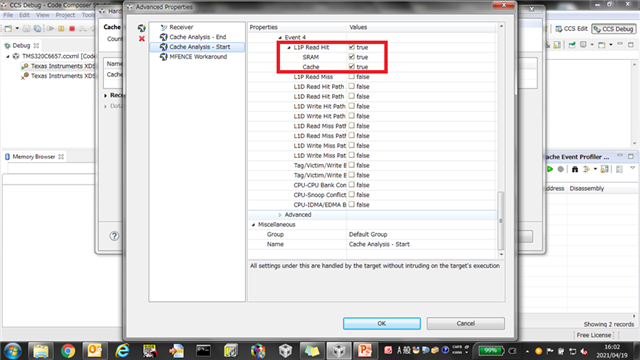
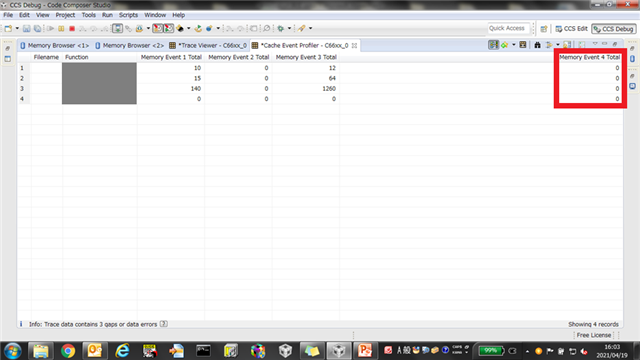
They selected Advanced Setting on the screen of Hardware Trace Analysis Configuration and added L1P Read Hit to Event 4, but Event 4 was not counted on Cache Event Profiler.
Is there any way to count the number of cache hit or the cache hit ratio ?


For the start and stop of measurement, set "Start and Stop at Address" as the Trace Range on the Hardware Trace Analysis Configuration screen.

Even if the Start Address or End Address is set, the measurement starts and ends repeatedly every time the program counter steps on that address.

It seems that the timing to really stop the measurement depends on the timing to click the stop icon. Is this correct?

Is there any measurement way which doesn’t depend on click timing such like not resume when measurement stops ?


Thanks and regards,

Hideaki


  • Hideaki-san,

    They selected Advanced Setting on the screen of Hardware Trace Analysis Configuration and added L1P Read Hit to Event 4, but Event 4 was not counted on Cache Event Profiler.

    I believe I can reproduce this behavior, or at least something similar. I believe it occurs when trying to collect L1P Read Hit for Event 4. But if L1P Read Hit is configured for another event (like Event 1), I am able to see the data. Can the customer check to see if this is the case for them also?

    For the start and stop of measurement, set "Start and Stop at Address" as the Trace Range on the Hardware Trace Analysis Configuration screen.

    Even if the Start Address or End Address is set, the measurement starts and ends repeatedly every time the program counter steps on that address.

    This is correct. The start/end address simply configure the range to collect trace data. It will do so everytime in that range.

    It seems that the timing to really stop the measurement depends on the timing to click the stop icon. Is this correct?

    This is the default behavior. Trace will stop collecting when the target is halted.

    Is there any measurement way which doesn’t depend on click timing such like not resume when measurement stops ?

    I believe this is possible. You can set trace control points to also control when to start and end trace. However, I don't see an easy way to view the data once captured. I will need to follow up with the engineers. 

    Thank you

    ki

  • I believe this is possible. You can set trace control points to also control when to start and end trace. However, I don't see an easy way to view the data once captured. I will need to follow up with the engineers. 

    I believe you can set this up in the advanced properties instead and use the action to Start Trace and specify the address to start on. Then you can add another trigger to end trace at the other desired address: