This thread has been locked.

If you have a related question, please click the "Ask a related question" button in the top right corner. The newly created question will be automatically linked to this question.

PROCESSOR-SDK-AM335X: Where is the memory size set?

Part Number: PROCESSOR-SDK-AM335X
Other Parts Discussed in Thread: AM3352, SYSBIOS, AM3358, AM3359

Hello,

I use the BBB for unit test packages.  To develop for a large device using the AM3352.

Recently, everything in one of these unit test programs broke.  Somehow, looking at the map file, I see that the size of the DDR is now listed as 1 gig.

I can't find ANYTHING that tells it what the memory size of the target should be.  I've been all over the project settings, and CFG file.

BeagleBone has 512Meg (1/2 gig) or RAM on it. Assuming I can figure out how to convince it to use the correct memory size...

But what about the larger device, which has a different memory size (and core).

Where is the setting to the project that tells it how much RAM is available to use?

  • Recently, everything in one of these unit test programs broke.  Somehow, looking at the map file, I see that the size of the DDR is now listed as 1 gig.

    Hi Christopher,

    Can you please provide more details on the PDK version you are using? Also, can you please copy and paste the Map file and also the platform and device name you are using to create the executable?

    Is this the PDK out of box example that you are trying to build is broken? Can you please provide the PDK project that you are seeing as broken?

    Thanks,

  • Clearly you did not understand my question.

    It is this:

    "Where is the setting to the project that tells it how much RAM is available to use?"

    I am not using a PDK on any of these unit test project.  Only SYSBIOS and XDC tools (which do things, I know not what, because they are also impossible to search for documentation)

    So, just for fun. lets try yet another "Out of the Box" failure courtesy of this environment.

    Rather than use a BeagleBone as my unit test device, let's pretend I have a different device using an AM3358.

    The goal is to tell the build system how much memory the device has.

    I create a project, setting it to use a AM3358  (which is a BeagleBone anyway)

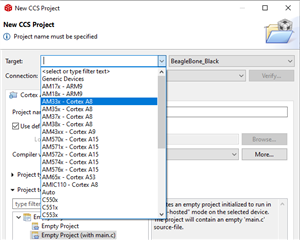
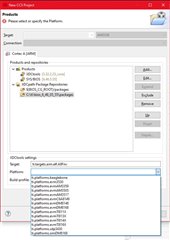
    Next, I try to set the "platform".  But naturally, it's empty, because the environment is always got defects...

    By manually setting up a "repository" (whatever that means in this context) from preinstalled platforms... there is no AM3358.  The closest is AM3359.  So I pick that.

    The wizard creates a projects...  I press build and...

    Naturally, right out of the box, it fails.

    No rule to make .configro  ?  Something I've never heard of.

    No rule to make files that are in configPkg...  a folder that doesn't exist in the project.

    So... before I can even get to the point where I want to ask the question "Where do I set...?"  I've been dragged two steps backward because of this environment that is crap.  And no idea what the heck is going on.

  • Hi Christopher,

    I see that CCS is broken in providing you some dropdown options for the project creation.

    However, you should in future provide details on the component versions and PDK version that you are using along with any out of box PDK examples (if any) that you are using. Even if you are trying to build your own projects, providing the PDK version is helpful in identifying the components. 

    Example, In this thread, it is hard for me to figure out those details. Based based on pictures that you posted, I guess the PDK version that you are using, based on the info (sys bios and xdc version) - It appears to me that you are using PDK 6.3 release.

    Now back to the question that you had on the CCS project that fails via the template:

    I see you kept the  Target as empty in the new CCS project create wizard - Can you provide inputs on why you did not pick up AM335x - Cortex A8 target with BeagleBone_Black, if you are looking for memory details for that board as below?

    I will request the CCS team to look into this issue further - someone from that team would be responding to this CCS issue.

    On the memory map details that you are looking for, I can see from sys bios for BBB, below memory details:

    PLEASE NOTE THAT IT IS NOT 1Gig DDR2,  it is 256MB DDR2 space from Sys BIOS platform. Once you pick up the right platform (ti.platforms.beaglebone) and target as (gnu.targets.arm.A8F), you would get below MEMORY:

    MEMORY
    {
    SRAM_LO (RWX) : org = 0x402f0000, len = 0x400
    SRAM_HI (RWX) : org = 0x402f0400, len = 0xfc00
    OCMC_SRAM (RWX) : org = 0x40300000, len = 0x10000
    DDR2 : org = 0x80000000, len = 0x10000000
    }
     

    You can also get the memory details from from "C:\ti\PDK-AM335x\bios_6_76_03_01\packages\ti\platforms\beaglebone\Platform.xdc file" 

    Snippet:

    metaonly module Platform inherits xdc.platform.IPlatform
    {
    readonly config xdc.platform.IPlatform.Board BOARD = {
    id: "0",
    boardName: "beaglebone",
    boardFamily: "beaglebone",
    boardRevision: null
    };

    /* GPP */
    readonly config xdc.platform.IExeContext.Cpu GPP = {
    id: "2",
    clockRate: 500.0, /* USB powered clock */
    catalogName: "ti.catalog.arm.cortexa8",
    deviceName: "AM3359",
    revision: "1.0"
    };

    instance:

    override readonly config xdc.platform.IPlatform.Memory
    externalMemoryMap[string] = [
    ["DDR2", {
    comment: "DDR2 Memory",
    name: "DDR2",
    base: 0x80000000,
    len: 0x10000000 /* 256 MB */
    }],
    ];
    };

    Hope you got the answers for how much memory for Beagle Bone Platform question.

    Thanks.

  • Hello,

    Regarding:

    Next, I try to set the "platform".  But naturally, it's empty, because the environment is always got defects...

    I filed a bug for this. Tracking link: https://sir.ext.ti.com/jira/browse/EXT_EP-10266

    Note that the external bug portal does not seem to show the images uploaded (they appear in the internal portal). 

    The wizard creates a projects...  I press build and...

    Naturally, right out of the box, it fails.

    No rule to make .configro  ?  Something I've never heard of.

    No rule to make files that are in configPkg...  a folder that doesn't exist in the project.

    So... before I can even get to the point where I want to ask the question "Where do I set...?"  I've been dragged two steps backward because of this environment that is crap.  And no idea what the heck is going on.

    I can't explain the meaning of the exact error messages, but I can explain the root cause of the issue. Basically, A8F support was dropped in BIOS 6.75 and later. I see that you are using BIOS 6.76. You will need to go with an earlier BIOS version. I tried it with 6.73 and that worked fine. See ToodMullanix's post in the below thread: https://e2e.ti.com/support/processors/f/processors-forum/887584/sysbios-am335x-xdc-tools-build-error/3283197#3283197

    Thanks

    ki

  • Ki,

    Basically, A8F support was dropped in BIOS 6.75 and later.

    Huh...?

    Half the time I try to get answers, people couch them is statements like "BIOS 6.46 is too old, you need to get on the current version."

    1.  I searched for the current version, and tried it, it was a train wreck.

    2. I was told "No, you don't get the latest version, you get the approved version for this environment"  Turns out that was 6.76

    3. One of my unit test apps is using GNU/BIOS 6.76/XDC 3.55 and works fine.

    So now you are telling me that I cannot use the "approved" version either... and yet I am.  And it's working.

    (and when you can't read this blurry thing, go tell the people who redesigned the E2E they messed this up.)

    And what is the difference between the "Target" which is A8F  (isn't that the ARM platform, in this case an ARM A8 core) and the "platform" which is still the MCU core?

    I've got two very fundamental questions I am trying to get and understanding of, and all I get are obfuscated run-arounds

    1.  How can I create a project that DOESN'T use a BBB, for when I have a Sitara MCU on a board that is designed elsewhere (I think you just described this as broken)

    2.  Where does this environment set the memory size of the code it will generate for the MCU?  I can see what it thinks it is in the map file, but there is nothing I can find that sets the memory size.

  • One of my unit test apps is using GNU/BIOS 6.76/XDC 3.55 and works fine.

    Sorry I accidentally omitted an important part of Todd's post:

    We dropped support for A8F support with TI compiler in 6.75. We still have SYS/BIOS support for A8F with the GCC compiler (i.e. gnu.targets.arm.A8F). If you need TI compiler support, use the last SYS/BIOS before 6.75.

    Basically the issue is that BIOS 6.75+ dropped TI compiler support for A8F

  • Yes, that makes sense. I was told about dropping the TI compiler on other threads.

    Except as I understand it, that is the primary compiler for Tiva.  So I can't tell what is supposed to work with what...

  • Ki,

    Wait... it's not resolved.

    PLEASE NOTE THAT IT IS NOT 1Gig DDR2,  it is 256MB DDR2 space from Sys BIOS platform. Once you pick up the right platform (ti.platforms.beaglebone) and target as (gnu.targets.arm.A8F), you would get below MEMORY:

    MEMORY
    {
    SRAM_LO (RWX) : org = 0x402f0000, len = 0x400
    SRAM_HI (RWX) : org = 0x402f0400, len = 0xfc00
    OCMC_SRAM (RWX) : org = 0x40300000, len = 0x10000
    DDR2 : org = 0x80000000, len = 0x10000000
    }

    Where (in what file) is this located?  And would I alter it for a new board we build?

    You can also get the memory details from from "C:\ti\PDK-AM335x\bios_6_76_03_01\packages\ti\platforms\beaglebone\Platform.xdc file" 

    Snippet:

    metaonly module Platform inherits xdc.platform.IPlatform
    {
    readonly config xdc.platform.IPlatform.Board BOARD = {
    id: "0",
    boardName: "beaglebone",
    boardFamily: "beaglebone",
    boardRevision: null
    };

    That tells me what is in the BBB. 

    If/When I build a new board, how is that set? Do I have to create my own file of whatever this is and put it into "C:\ti\PDK-AM335x\bios_6_76_03_01\packages\ti\platforms\"  ?  Is that described someplace (that would show up on a search)?

    How does that correlate to creating a new project, and picking a "platform"  (vs a target, which the definitions are not clear).  Are these items on this list predefined with knowing how much DDR is built onto whatever board it's installed on?

    Maybe I can explain it this way...

    There is NOT a issue in the TIVA environment, because the memory in built into the MCU.  No matter where I install it, it has the same size RAM/FLASH. So CCS knows what the limitation of the code size is.

    In this world the DDR is a function of how the user designed the board it's mounted on.  CCS has no way of knowing...  Except it does...  From where?

  • These questions are more out of my expertise. I will defer to Aravind for these.

    ki

  • Hi Ki,

    Thanks for providing answers on CCS/tools related questions.

    Hi Christopher,

    Is your intent just change only the DDR2 size for your custom board? Are there any other parameters you want to change?

  • Aravind,

    My intent is to understand it.  I do not want an answer to accomplish some specific requirement, "go into file Yada.cxz and change line 235 from Value=10 to Value=12". That isn't understanding it, it's getting someone else to solve your problem without learning anything.

    Our main project was created years ago, many of whom have left.  I am now in a position where I need to understand this environment in the event something needs to change.

    Which is why I said  "let's pretend I have a different device using an AM3358"

    Whether it is building a new custom board, or altering the existing board, I am trying to understand where this information is coming from.

    (The existing project is based on AM3352, while I use a BBB AM3358 as a development tool to unit test new functions being added.  New product lines are being planned.)

  • Hi Christopher,

    The board information is coming from sys-bios. (You can get details from the presentation below).

    You can go through the training (section 10.8 and 10.9) on creating the new RTSC custom platform for your application.

    https://training.ti.com/application-development-using-processor-sdk-rtos

    Please refer to  section 10.8 and section 10.9 in that training .

    Note that this is done a while ago, However "custom RTSC platform definition tool has not chnaged for several years now ".

    AFAIK, CCS options to get to the RTSC platform menu has changed since this training.

    Instead of TOOLS->RTSC Tools menu as mentioned in the above presentation, under CCS 10, you would see it under

    Project->RTSC Tools->...

    snippet from CCS 10.1, If you have older CCS versions, you may find this under Tools menu. Please check.

    and then follow the steps as mentioned in the above presentation.

    Let me know if you can successfully create the custom platform for your need.

    Thanks,

  • This material relies HEAVILY on using the packages, drivers, modifying files...

    I see our master project uses evmAM3359, even though its a AM3352.  And the "Platform.xdc" file contains the size of memory on the board.  That was apparently what they chose to use years ago, as I've never replaced any of those files when I joined the team and installed CCS.

    At this point, I don't know what the other files do, but this gets me pointed in the right direction.

    Thanks.