This thread has been locked.

If you have a related question, please click the "Ask a related question" button in the top right corner. The newly created question will be automatically linked to this question.

IWR6843ISK-ODS: MMWAVEICBOOST

Part Number: IWR6843ISK-ODS
Other Parts Discussed in Thread: MMWAVEICBOOST, , UNIFLASH, IWR6843

Hello.

         I have been trying to get the out_of_box demos working for IWR6843ISK-ODS with MMWAVEICBOOST. With the help of documentation and help from TI forums, I was able to make some progress, but not yet there.

Following is the story of the progress for your advise on what is it Im doing incorrect and suggestions for improvement to get it working.

I have set up boards as shown below.
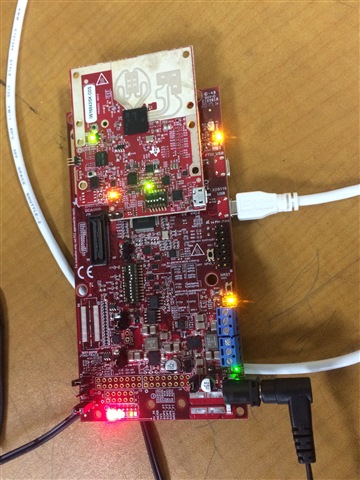
Other end of the USB cable is connected to MacBook Air (m1 processor) with MacOS (I mean not the Virtual Machines).

- Software : I have downloaded and installed latest versions of CCS, Uniflash. TI Cloud Agent, Industrial mmWave toolbox, Firefox (as TI Cloud Agent works only on Firefox or Chrome).

- The boards have been set (S1 switch, SOP jumpers on MMWAVEICBOOST and Mux on IWR6843ISK-ODS) to flash mode as per the steps indicated in the toolbox.

- TI documentation is primarily for use of their tools on Windows eco-system and support for tools on Windows OS on VM on ARM processor is still work in progress, I believe. Will be happy to be corrected on this.

- The documentation doesn't provide info on how to find COM port numbers on Mac OS.

- Uniflash was opened. When the desktop version was run. MMWAVEICBOOST was detected and serial number displayed. However, when start button is clicked, nothing happens. 

- I reinstalled XDS drivers, in case they were missing.

- As there is message which said to try through web version, if attempting for first time, I did try that as well. Following are the screenshots of result.


Its stuck here (figure above).

Even if 'MMWAVEICBOOST' is typed in the entry box, it displayed so such device. 

That's the end of it. 

Kindly advise, where am I missing here. So that I can get the demos working before jumping in for further development.

  • Can you type in IWR6843 directly into the device name shown in your second screenshot? I don't typically let Uniflash detect the device for me.

    Try to flash it after selecting this manually. Additionally. I'm closing your other post because they refer to the same issue. We will continue to correspond here.

  • Tried typing in IWR6843 as well as MMWAVEICBOOST in the search box, it couldn't find such a device is the response.

  • IWR6843 is available on Windows based Uniflash only. However, I guess what we need is MMWAVEICBOOST, please correct me if Im wrong. The device is detected in MacOS based Uniflash, but not on Windows based one. I dont see the new COM ports in Windows device manager. Im trying to install the XDS drivers on windows, just in case it helps.

  • Hi Srinivas,

    Tried typing in IWR6843 as well as MMWAVEICBOOST in the search box, it couldn't find such a device is the response.

    Can you please show a screenshot of this.

    IWR6843 is available on Windows based Uniflash only. However, I guess what we need is MMWAVEICBOOST, please correct me if Im wrong. The device is detected in MacOS based Uniflash, but not on Windows based one. I dont see the new COM ports in Windows device manager. Im trying to install the XDS drivers on windows, just in case it helps.

    You have the MMWAVEICBOOST, which is the large board that the smaller IWR6843 board is connected to. You need to connect to the IWR6843, not the MMWAVEICBOOST. The Windows system should detect the IWR6843 just the same as the Mac system. Can you please show pictures of the failure? If you don't even see the COM ports on the windows device manager then it sounds like the device isn't being connected or the computer isn't registering the connection.

    Best,

    Nate

  • Hi Nate,

    Its been quite an R & D for me. Thanks to the support TI tech. support, I could manage to swim through.

    So, the things I tried today:

    - Installed XDS drivers on Windows(on Parallels on Mac m1)

    - Windows showed two COM ports, thankfully.

    * Point to Note here for TI : Inspite of installing TI XDS drivers on Mac, Mac OS is still showing 1 COM port only. Probably a bug for TI to resolve in the next cycle. Therefore, I have continued with Windows on VM for the rest of the job.

    - As recommended by TI documentation, I have tried mmwave demo visualizer on Chrome web browser. Could easily install the extension. However, the exe in the step 2 couldnt be installed, may be an issue with exe or TI server, I dont know, but it didnt work. Then I turned to firefox, repeated the steps and it worked. Request TI to kindly examine the documentation and update. TICloudAgent__2.exe could be installed through Firefox, but not through Chrome inspite of multiple attempts.

    - Finally, after days of effort I could get demo visualizer working. One point here is, under setup details -> platform-> XWR68xx_AOP should be selected and it worked.

    So, target one accomplished. I humbly thank TI support so far and request to mark the above, so that it will be easier for people coming through in the future.

    Thank you.

  • Hi Srinivas,

    I'm glad you were able to get it up and running! I'm sorry you found it so challenging, and we appreciate all the thorough documentation you have here for customers in the future!

    Best,

    Nate

  • Now, Im trying to see the level sensing demo working.

    1. Set the boards to flash mode

    2. Using Uniflash selected the corresponding bin file.

    3. Set boards to functional mode

    4. Opened "mmwave demo visualiser" on firefox

    5. In options set the port details.

    6. The config port is connected, but the data port is not connecting. scrolling at the bottom is indicating "connecting to 2 of 2 targets,....." and remains so.

    Request suggest the way out.

  • Now, Im trying to see the level sensing demo working.

    1. Set the boards to flash mode

    2. Using Uniflash selected the corresponding bin file.

    3. Set boards to functional mode

    4. Opened "mmwave demo visualiser" on firefox

    5. In options set the port details.

    6. The config port is connected, but the data port is not connecting. scrolling at the bottom is indicating "connecting to 2 of 2 targets,....." and remains so.

    Request suggest the way out.

  • Hi Srinivas,

    Each of our demos has its own visualizer code. You should be using the Multi-peak high accuracy visualizer found here, not the mmwave demo visualizer.

    https://dev.ti.com/gallery/view/6813269/High_Accuracy_Visualizer/ver/2.0.1/

    Best,

    Nate

  • Hi Nathan,

           Tried with the link above. It worked.

    However, the measurement has an error of 100mm, with the range <1m (to the floor & with metal plate on the floor). It (Peak1) is showing 0.884 m against the actual distance of 0.784(approx). Tried default Range depth, width and later changed range depth to  2m & 5m with no change in the measurement value.

    Kindly suggest, where I might need to correct to get the best accuracy.

    Thanks.

  • Hi Srinivas,

    Please open a new thread when you have new questions. This helps us keep the forum clean and lets future customers search the forum more effectively when they have similar questions. I will be happy to assist you if you copy/paste this question in a new post. Thank you!

    Best,

    Nate