This thread has been locked.

If you have a related question, please click the "Ask a related question" button in the top right corner. The newly created question will be automatically linked to this question.

DCA1000EVM: Possible defective device

Part Number: DCA1000EVM
Other Parts Discussed in Thread: IWR6843ISK, IWR6843AOPEVM

Hi Experts,

I am troubleshooting a DCA1000EVM that a customer is using. Can you help confirm my conclusion?

Summary of the Issue.

Firs time boot of DCA1000EVM Immediately shows error. Refer to Led status below:

5V_LED - Green (OK)
FPGA_DONE_LED - OFF 

DATA_TRANS_PROG_LED1 - Green
SD_DETECT_LED5 - Green
SD_FULL_LED0 - Red
SPARE_LED8 - Green
DDR_FULL_LED7 - Red
FPGA_ERR_LED2 - Red
LVDS_PATH_ERR_LED3 - Red
HEADER_ERR_LED4 - Red
EEPROM_RD_FAIL_LED6 - Red

I love to include a screen shot but the E2E shows error when uploading.

The device manager does not show DCA1000EVM. When Ethernet is connected, the port LEDs flash briefly during power-up and then turn off, and 192.168.33.180 does not respond to ping.

I am leaning to the conclusion that the board is faulty. Is there a way to recover this? Does re-programming the FPGA work?

Regards,

Marvin

  • Hi Marvn,

    Could you please confirm which device is currently connected to the DCA1000?
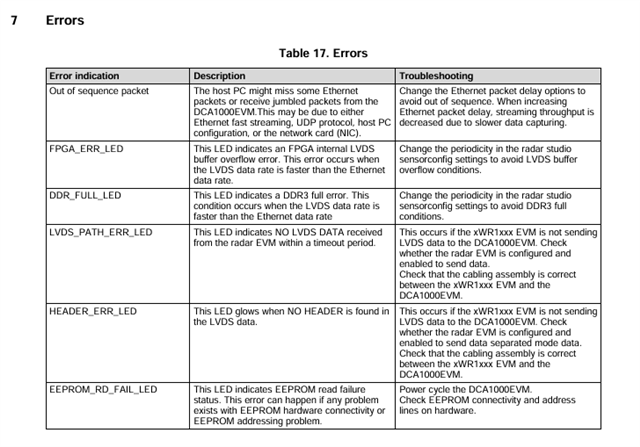
    For troubleshooting, please refer to the LED status table in the DCA1000 User Guide to interpret the meaning of the LEDs that are currently glowing.

    Also, kindly verify all the connections between the EVM and the DCA1000.

    Regards,
    Ananya K C

  • Hi Ananya,

    It was attached to an IWR6843ISK. The IWR6843ISK  appears to be working fine. The DCA board shows the same error with or without the ISK board.

    The connections are fine as well as the switches.

    I can send pictures for some reason. E2E shows error.

    Thanks!

    Marvin

  • Hi Ananya,

    The Customer is requesting a direct exchange with you. Is it okay with you to connect with the customer directly? I can provide you the details if you agree.

    Regards,

    Marvin

  • Hi Marvn,

    One possible reason for this behavior is if 12 V was applied instead of the required 5 V power supply.

    Could you please confirm the following:
    • What power supply voltage was used to power the DCA1000?
    • Whether the board was powered using the recommended 5 V supply as mentioned in the user guide.

    Additionally, it would be better to continue this discussion on E2E so that the information is documented and can also help other users facing similar issues.

    Regards,
    Ananya K C

  • Hi Ananya,

    The board was powered using a 5 V supply as specified in the user guide.
    No 12 V supply was connected to the DCA1000EVM.

    We are currently working under a tight development timeline and have already spent considerable time troubleshooting this issue, so resolving it quickly would be extremely helpful.

    If there are additional checks you would like me to run, I’m ready to perform them immediately. If helpful, I would also be available for a short call to walk through the setup and steps together, and I can summarize the outcome here on the thread for documentation.

    Thanks,
    Moshe

  • Hi Ananya,

    Just checking in to see if there are any updates on this.

    Moshe

  • The issue has been resolved by re-flashing the FPGA. 

  • Hi Ananya,

    The issue with the FPGA has been resolved but the issue with the LAN still persist. 

    Right now the setup is recognized, FPGA_DONE is on, network is configured correctly, and the customer was able to communicate with the DCA through the CLI.

    However, when the Ethernet cable is plugged they notice a brief blink, then the link drops and the LED goes off completely. The board doesn’t stay connected. The link appears to fail right after negotiation.

    How can this be resolved?

  • Hi Marvn,

    Could you please clarify what you mean by “blink”? Specifically, which LEDs are turning off or changing state?

    Also, when you mention that the board does not stay connected, do you mean that the ports are no longer visible on your system?

    It would be helpful if you could share a bit more detail on the behavior you’re observing.

    Regards,
    Ananya K C

  • Hi Ananya,

    Here's more information:

    When MMWAVE STUDIO is launched, it immediately tries to load DCA1000_FPGA_RECORD_V2.8_05JUL2019.bit, throws a file load error, and the interface remains blank, so the RadarAPI panel never becomes available.

    In parallel, the system is partially responsive. The board is detected over COM, UDP communication responds, and ARP is present, but ping is inconsistent and recording attempts are timing out.

    At this point I’m blocked both at Studio initialization and during data capture.

  • Hi Ananya,

    I’m working with Marvin on connecting the DCA1000EVM to the IWR6843AOPEVM. Ethernet now shows a connection, but initializing or reading the FPGA version in mmWave Studio still times out. I’ve reflashed the FPGA, confirmed SOP switches, and verified network settings. I also checked a similar thread reporting “Unable to read FPGA version” on rev G boards, but those solutions don’t match my setup since Ethernet shows active and partial board responses appear.

    Attached are the latest RadarAPI outputs. Could you advise if there’s any step I’m missing or provide guidance on what might be causing the issue?

    Thanks,
    Moshe


    TI_Data_Capture.zip

  • Hello Moshe,

    Could you please confirm if the device is configured in the correct SOP mode?

    We’ve observed that RS232 connection failures can occur if either the SOP mode is not set correctly or if an incorrect COM port is being used.

    Kindly verify the following on your setup:
    • The SOP mode configuration is as expected for your use case
    • The correct COM port is selected (you may want to check all available COM ports in your system)

    Regards,
    Ananya K C

  • Hey Ananya!

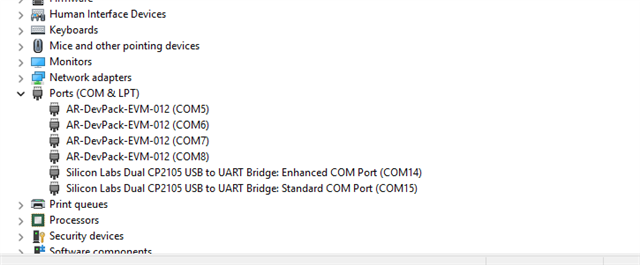
    Yep, SOP0 is on, everything else off. Using COM14 at 115200  (screenshot attached).

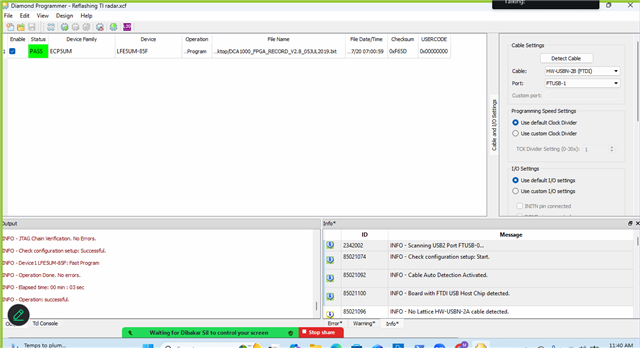
    Just to clarify on the JTAG thing, the bitstream actually flashed fine, got a clean PASS in Diamond. Power cycled after, but 192.168.33.180 still won't respond to ping. Never has, even after the successful flash.

    Any idea what could cause that?

    Thank you.


  • Hi Moshe,

    The ITS firewall can block the Ethernet connection, which might be causing the issue you’re seeing.

    Could you please check with the customers ITS team to ensure that access is granted for the following executables:
    • DCA1000EVM_CLI_Control
    • record.exe

    Once this is verified, it should help rule out any network-related restrictions.

    Regards,
    Ananya K C