This thread has been locked.

If you have a related question, please click the "Ask a related question" button in the top right corner. The newly created question will be automatically linked to this question.

DCA1000EVM: adc_data.bin is empty

Part Number: DCA1000EVM


Hi, I've received the following error while using the mmwave studio for raw data capture. My current goal is to increase the number of frames that have been received, but the transfer of data from adc_data_Raw_0.bin tends to not work when the frame rate is increased (I'm looking at values of about 100-800 frames instead of the demo 8). All other settings are at default. Here's the error i'm receiving with what I think is the key point highlighted in blue:

[15:04:32] [RadarAPI]: Error:
[15:04:32]
[15:04:32] ... MWMCR::EvaluateFunction error ...
[15:04:32] 06-Aug-2019 15:04:32: The file C:\ti\mmwave_studio_02_00_00_02\mmWaveStudio\PostProc\adc_data.bin is empty. Please capture more data.,1,
[15:04:32] Error in => process_adc_data.m at line 52.
[15:04:32]
[15:04:32] ... Matlab M-code Stack Trace ...
[15:04:32] at
[15:04:32] file C:\Users\XC199\AppData\Local\Temp\Xavier\mcrCache8.5.1\Matlab0\Logging\log_status.m, name log_status, line 32.
[15:04:32] at
[15:04:32] file C:\Users\XC199\AppData\Local\Temp\Xavier\mcrCache8.5.1\Matlab0\Processing_functions\read_adc_data.m, name read_adc_data, line 28.
[15:04:32] at
[15:04:32] file C:\Users\XC199\AppData\Local\Temp\Xavier\mcrCache8.5.1\Matlab0\MatlabPostPr\process_adc_data.m, name process_adc_data, line 52.
[15:04:32]
[15:04:32]
[15:04:32] Trace:
[15:04:32] at MathWorks.MATLAB.NET.Utility.MWMCR.EvaluateFunction(String functionName, Int32 numArgsOut, Int32 numArgsIn, MWArray[] argsIn)
[15:04:32] at MathWorks.MATLAB.NET.Utility.MWMCR.EvaluateFunction(Int32 numArgsOut, String functionName, MWArray[] argsIn)
[15:04:32] at MatlabPostProcGui.MatlabPostProcGUIClass.process_adc_data(MWArray adc_file_name, MWArray force_cont_stream_mode)
[15:04:32] at AR1xController.frmAR1Main.iStartCaptureMtlabPostProc()

These are my settings in the sensor Config tab:
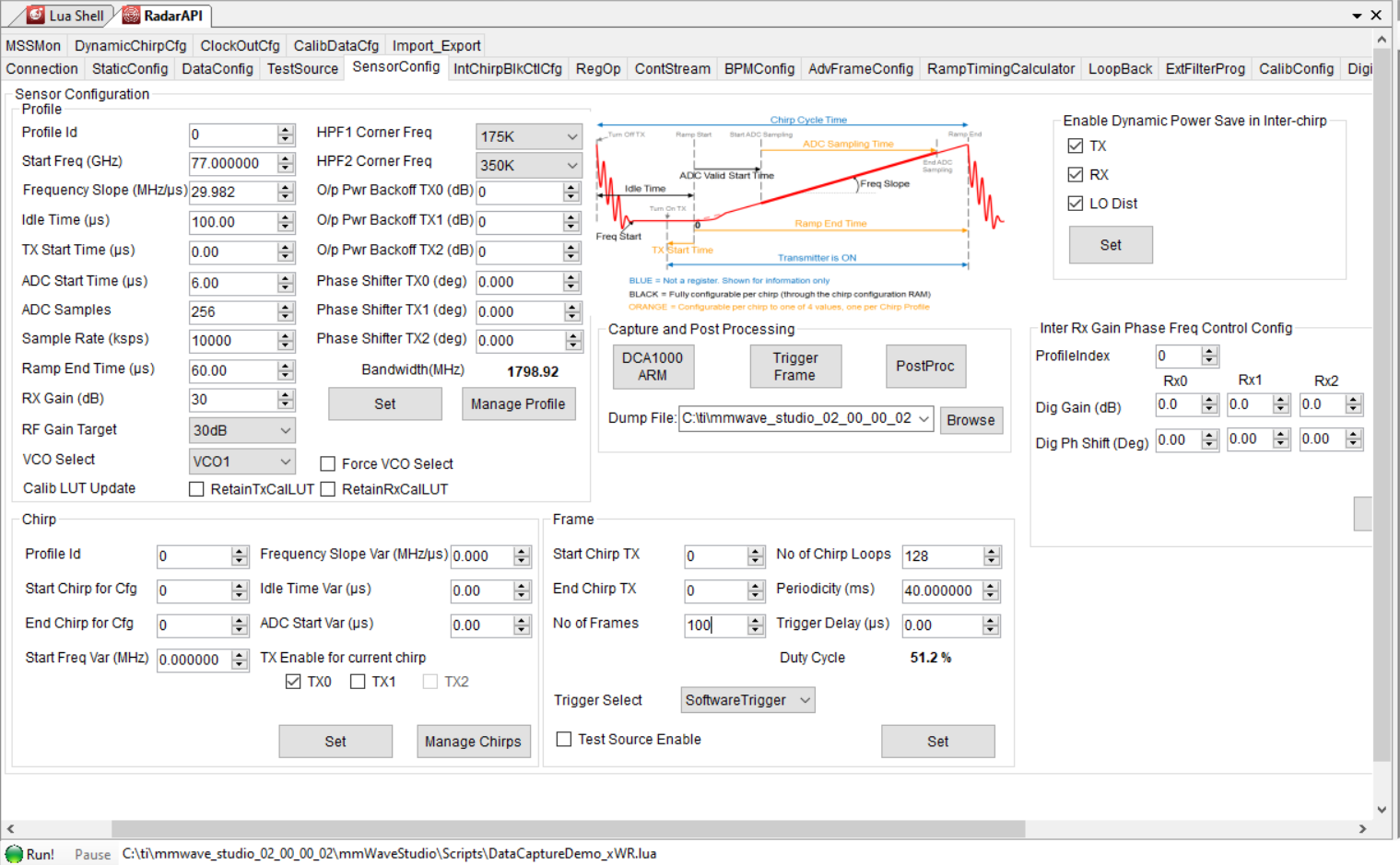
Just to reiterate, it was working perfectly fine when the number of frames was initially set to 8. However, changing it and re triggering the post-proc after data collection yields the above error. Thanks for your help!

  • Hi Xavier,

    Could you please post the complete log file from mmWave Studio here?

    Best Regards,

    Anand

  • Hi Anand,

    The system is randomly working after restarting my computer a few times, so I am currently unable to replicate the error. But my concern is that its success is sporadic

    Best,

    Xavier

  • Hi Xavier,

    Please post your log here anyway. Maybe we can identify something in the sequence that needs to be done differently.

    Best Regards,

    Anand

  • Hi Anand, thanks for your help.

    The log is as follows:

    GM: Constructor
    GM: Tue Aug 06 16:16:43 2019
    RSTD.Transmit("/Settings")
    [16:16:43]
    [16:16:43] ### Running Startup script: "C:\ti\mmwave_studio_02_00_00_02\mmWaveStudio\Scripts\Startup.lua" ###
    [16:16:43] RSTD.SetAndTransmit ("/Settings/Scripter/Display DateTime" , "1")
    [16:16:43] RSTD.SetAndTransmit ("/Settings/Scripter/DateTime Format" , "HH:mm:ss")
    [16:16:43] Scripter ignored: Attempt to UnBuild() again or before Build.
    [16:16:43] RSTD.SetVar ("/Settings/Clients/Client 0/Dll" , "C:\\ti\\mmwave_studio_02_00_00_02\\mmWaveStudio\\Clients\\\\LabClient.dll")
    [16:16:43] RSTD.SetVar ("/Settings/Clients/Client 0/Use" , "TRUE")
    [16:16:43] RSTD.SetVar ("/Settings/Clients/Client 1/Use" , "FALSE")
    [16:16:43] RSTD.SetVar ("/Settings/Clients/Client 2/Use" , "FALSE")
    [16:16:43] RSTD.SetVar ("/Settings/Clients/Client 3/Use" , "FALSE")
    [16:16:43] RSTD.SetVar ("/Settings/Clients/Client 4/Use" , "FALSE")
    [16:16:43] RSTD.SetVar ("/Settings/AL Client/AL Dll" , "C:\\ti\\mmwave_studio_02_00_00_02\\mmWaveStudio\\RunTime\\SAL.dll")
    [16:16:43] RSTD.SetVar ("/Settings/Clients/Client 0/GuiDll" , "")
    [16:16:43] RSTD.SetVar ("/Settings/AutoUpdate/Enabled" , "TRUE")
    [16:16:43] RSTD.SetVar ("/Settings/AutoUpdate/Interval" , "1")
    [16:16:43] RSTD.SetVar ("/Settings/Monitors/UpdateDisplay" , "TRUE")
    [16:16:43] RSTD.SetVar ("/Settings/Monitors/OneClickStart" , "TRUE")
    [16:16:43] RSTD.SetVar ("/Settings/Automation/Automation Mode" , "false")
    [16:16:43] RSTD.Transmit("/")
    [16:16:43] RSTD.SaveSettings(): Settings saved to "C:\Users\XC199\AppData\Roaming\RSTD\config.xml"
    [16:16:43] RSTD.Build()
    [16:16:43] RSTD.SaveSettings(): Settings saved to "C:\Users\XC199\AppData\Roaming\RSTD\config.xml"
    [16:16:43] RSTD.Transmit("/")
    [16:16:43] RSTD.AL_Build()
    [16:16:43] RSTD.AL_LoadXml()
    [16:16:43] RSTD.Transmit("/")
    [16:16:43] RSTD.AL_Init()
    [16:16:43] RSTD.Clients_Build()
    [16:16:43] GM: Init
    [16:16:43] GM: Loaded 'C:\ti\mmwave_studio_02_00_00_02\mmWaveStudio\Clients\\LabClient.dll'
    [16:16:43] GM: 1 Guest (s) init
    [16:16:43] GM: 1 Module(s) init
    [16:16:43] GM: 2 Tab (s) init
    [16:16:43] RSTD.Client_LoadXml()
    [16:16:44] [RadarAPI]: Starting Matlab Engine..
    [16:16:47] [RadarAPI]: Matlab Engine Started!
    [16:16:50] [RadarAPI]: ar1.LoadSettings('C:\Users\XC199\AppData\Roaming\RSTD\ar1gui.ini')
    [16:16:50] TESTING = false
    [16:16:50]
    [16:16:50] ***Script completed successfully.***
    [16:17:02] [RadarAPI]: Opening Gpio Control Port()
    [16:17:02] [RadarAPI]: Status: Passed
    [16:17:02] [RadarAPI]: Opening Board Control Port()
    [16:17:02] [RadarAPI]: Status: Passed
    [16:17:03] [RadarAPI]: ar1.FullReset()
    [16:17:03] [RadarAPI]: Status: Passed
    [16:17:04] [RadarAPI]: Closing Board Control Port()
    [16:17:04] [RadarAPI]: Status: Passed
    [16:17:04] [RadarAPI]: Closing Gpio Control Port()
    [16:17:04] [RadarAPI]: Status: Passed
    [16:17:04] [RadarAPI]: ar1.SOPControl(2)
    [16:17:04] [RadarAPI]: Status: Passed
    [16:17:41] [RadarAPI]: ar1.Connect(4,921600,1000)
    [16:17:44] [RadarAPI]: Warning: Connected with baudrate 115200
    [16:17:45] [RadarAPI]: Warning: Disconnected existing BaudRate
    [16:17:45] [RadarAPI]: Warning: Trying to connect with baudrate 921600
    [16:17:47] [RadarAPI]: ar1.Calling_IsConnected()
    [16:17:48] [RadarAPI]: ar1.SelectChipVersion("AR1243")
    [16:17:48] [RadarAPI]: Status: Passed
    [16:17:48] [RadarAPI]: RS232 is not connected ..!!!!
    [16:17:48] [RadarAPI]: ar1.frequencyBandSelection("77G")
    [16:17:48] [RadarAPI]: ar1.SelectChipVersion("XWR1443")
    [16:17:48] [RadarAPI]: Status: Passed
    [16:17:48] Device Status : XWR1443/QM/SOP:2/ES:3
    [16:17:49] [RadarAPI]: ar1.SelectChipVersion("AR1243")
    [16:17:49] [RadarAPI]: Status: Passed
    [16:17:49] [RadarAPI]: ar1.SelectChipVersion("XWR1443")
    [16:17:49] [RadarAPI]: Status: Passed
    [16:17:49] Device Status : XWR1443/QM/SOP:2/ES:3
    [16:17:49] [RadarAPI]: ar1.SaveSettings('C:\Users\XC199\AppData\Roaming\RSTD\ar1gui.ini')
    [16:27:05] [RadarAPI]: ar1.DownloadBSSFw("C:\\ti\\mmwave_studio_02_00_00_02\\mmWaveStudio\\Scripts\\..\\..\\rf_eval_firmware\\radarss\\xwr12xx_xwr14xx_radarss.bin")
    [16:27:06] [RadarAPI]: Downloading BSS Patch RPRC Binary..
    [16:27:08] [RadarAPI]: ar1.GetBSSFwVersion()
    [16:27:08] [RadarAPI]: BSSFwVersion:(02.00.00.01 (05/10/17))
    [16:27:08] [RadarAPI]: ar1.GetBSSPatchFwVersion()
    [16:27:08] [RadarAPI]: BSSPatchFwVersion:(01.02.00.03 (24/10/18))
    [16:27:09] [RadarAPI]: ar1.DownloadMSSFw("C:\\ti\\mmwave_studio_02_00_00_02\\mmWaveStudio\\Scripts\\..\\..\\rf_eval_firmware\\masterss\\xwr12xx_xwr14xx_masterss.bin")
    [16:27:09] [RadarAPI]: Downloading MSS RPRC Binary..
    [16:27:19] [RadarAPI]: ar1.PowerOn(0, 1000, 0, 0)
    [16:27:19] [RadarAPI]: Status: Passed
    [16:27:19] MSS power up done async event received!
    [16:27:20] [RadarAPI]: ar1.RfEnable()
    [16:27:20] BSS power up done async event received!
    [16:27:20] [RadarAPI]: Status: Passed
    [16:27:21] [RadarAPI]: ar1.GetBSSFwVersion()
    [16:27:21] [RadarAPI]: BSSFwVersion:(02.00.00.01 (05/10/17))
    [16:27:22] [RadarAPI]: ar1.GetBSSPatchFwVersion()
    [16:27:22] [RadarAPI]: BSSPatchFwVersion:(01.02.00.03 (24/10/18))
    [16:27:29] [RadarAPI]: ar1.ChanNAdcConfig(1, 1, 0, 1, 1, 1, 1, 2, 2, 0)
    [16:27:29] [RadarAPI]: Status: Passed
    [16:27:30] [RadarAPI]: ar1.LPModConfig(0, 0)
    [16:27:30] [RadarAPI]: Status: Passed
    [16:27:30] [RadarAPI]: ar1.RfInit()
    [16:27:30] RF Init async event received!
    [16:27:30] [RadarAPI]: Status: Passed
    [16:27:30] [RadarAPI]: Time stamp, Temperture: 10194,31; APLL Status, Update: 1, 0; SynthVCO1 Status, Update: 1, 1; SynthVCO2 Status, Update: 1, 1; LODist Status, Update: 1, 1; RxADCDC Status, Update: 1, 1; HPFcutoff Status, Update: 1, 1; LPFcutoff Status, Update: 1, 1; PeakDetector Status, Update: 1, 1; TxPower Status, Update: 1, 1; RxGain Status, Update: 1, 1; TxPhase Status, Update: 0, 0; RxIQMM Status, Update: 1, 1;
    [16:27:32] [RadarAPI]: ar1.DataPathConfig(513, 1216644097, 0)
    [16:27:32] [RadarAPI]: Status: Passed
    [16:27:33] [RadarAPI]: ar1.LvdsClkConfig(1, 1)
    [16:27:33] [RadarAPI]: Status: Passed
    [16:27:34] [RadarAPI]: ar1.LVDSLaneConfig(0, 1, 1, 1, 1, 1, 0, 0)
    [16:27:34] [RadarAPI]: Status: Passed
    [16:27:36] [RadarAPI]: ar1.ProfileConfig(0, 77, 100, 6, 60, 0, 0, 0, 0, 0, 0, 29.982, 0, 256, 10000, 0, 0, 30)
    [16:27:36] [RadarAPI]: Status: Passed
    [16:27:37] [RadarAPI]: ar1.ChirpConfig(0, 0, 0, 0, 0, 0, 0, 1, 0, 0)
    [16:27:38] [RadarAPI]: Status: Passed
    [16:27:38] Test Source Already Disabled...!!!
    [16:27:38] [RadarAPI]: Status: Passed
    [16:27:38] [RadarAPI]: ar1.FrameConfig(0, 0, 8, 128, 40, 0, 1)
    [16:27:38] [RadarAPI]: Status: Passed
    [16:27:41] [RadarAPI]: ar1.SelectCaptureDevice("DCA1000")
    [16:27:41] [RadarAPI]: passed
    [16:27:42] [RadarAPI]: StatusDCCard Event Registered
    [16:27:42] [RadarAPI]: Status: Passed
    [16:27:42] [RadarAPI]: ar1.CaptureCardConfig_EthInit("192.168.33.30", "192.168.33.180", "12:34:56:78:90:12", 4096, 4098)
    [16:27:42] [RadarAPI]: SYSTEM_CONNECT_CMD_CODE Async event recieved(9)
    [16:27:42] [RadarAPI]: ConnectRFDCCard Status: Passed
    [16:27:42] [RadarAPI]: ReadRFDCCarFpgaVersion Status: Passed
    [16:27:42] [RadarAPI]: READ_FPGA_VERSION_CMD_CODE event recieved(14)
    [16:27:42] [RadarAPI]: ar1.CaptureCardConfig_Mode(1, 1, 1, 2, 3, 30)
    [16:27:42] [RadarAPI]: Status: Passed
    [16:27:42] [RadarAPI]: CONFIG_FPGA_GEN_CMD_CODE Async event recieved(3)
    [16:27:42] [RadarAPI]: ar1.CaptureCardConfig_PacketDelay(25)
    [16:27:42] [RadarAPI]: Status: Passed
    [16:27:42] [RadarAPI]: CONFIG_PACKET_DATA_CMD_CODE Async event recieved(11)
    [16:27:55] [RadarAPI]: ar1.CaptureCardConfig_StartRecord("C:\\ti\\mmwave_studio_02_00_00_02\\mmWaveStudio\\PostProc\\adc_data.bin", 1)
    [16:27:55] [RadarAPI]: RECORD_START_CMD_CODE Async event recieved(5)
    [16:27:55] [RadarAPI]: Status: Passed
    [16:27:56] Test Source Already Disabled...!!!
    [16:27:56] [RadarAPI]: Status: Passed
    [16:27:56] [RadarAPI]: ar1.FrameConfig(0, 0, 100, 128, 40, 0, 1)
    [16:27:56] [RadarAPI]: Status: Passed
    [16:27:57] [RadarAPI]: ar1.StartFrame()
    [16:27:57] [RadarAPI]: Status: Passed
    [16:27:57] Frame start async event received!
    [16:27:57] [RadarAPI]: RECORD_PKT_OUT_OF_SEQ_ERROR_CODE Async event recieved(195)
    [16:28:01] [RadarAPI]: Frame Ended
    [16:28:01] Frame End async event received!
    [16:28:03] [RadarAPI]: STS_RECORD_COMPLETED Async event recieved(8)
    [16:28:03] [RadarAPI]: ar1.CaptureCardConfig_StopRecord()
    [16:28:03] [RadarAPI]: Status: Passed
    [16:28:03] [RadarAPI]: RECORD_STOP_CMD_CODE Async event recieved(6)
    [16:28:07] [RadarAPI]: Packet Reorder Utility Started...please wait...
    [16:28:07] [RadarAPI]: ar1.PacketReorderZeroFill("C:\\ti\\mmwave_studio_02_00_00_02\\mmWaveStudio\\PostProc\\adc_data_Raw_0.bin", "C:\\ti\\mmwave_studio_02_00_00_02\\mmWaveStudio\\PostProc\\adc_data.bin", "C:\\ti\\mmwave_studio_02_00_00_02\\mmWaveStudio\\PostProc\\pktlogfile.txt")
    [16:28:12] [RadarAPI]: Packet Reorder Utility process completed!
    [16:28:27] [RadarAPI]: ar1.StartMatlabPostProc("C:\\ti\\mmwave_studio_02_00_00_02\\mmWaveStudio\\PostProc\\adc_data.bin")
    [16:28:28] [RadarAPI]: Error:
    [16:28:28]
    [16:28:28] ... MWMCR::EvaluateFunction error ...
    [16:28:28] 06-Aug-2019 16:28:28: The file C:\ti\mmwave_studio_02_00_00_02\mmWaveStudio\PostProc\adc_data.bin is empty. Please capture more data.,1,
    [16:28:28] Error in => process_adc_data.m at line 52.
    [16:28:28]
    [16:28:28] ... Matlab M-code Stack Trace ...
    [16:28:28] at
    [16:28:28] file C:\Users\XC199\AppData\Local\Temp\Xavier\mcrCache8.5.1\Matlab0\Logging\log_status.m, name log_status, line 32.
    [16:28:28] at
    [16:28:28] file C:\Users\XC199\AppData\Local\Temp\Xavier\mcrCache8.5.1\Matlab0\Processing_functions\read_adc_data.m, name read_adc_data, line 28.
    [16:28:28] at
    [16:28:28] file C:\Users\XC199\AppData\Local\Temp\Xavier\mcrCache8.5.1\Matlab0\MatlabPostPr\process_adc_data.m, name process_adc_data, line 52.
    [16:28:28]
    [16:28:28]
    [16:28:28] Trace:
    [16:28:28] at MathWorks.MATLAB.NET.Utility.MWMCR.EvaluateFunction(String functionName, Int32 numArgsOut, Int32 numArgsIn, MWArray[] argsIn)
    [16:28:28] at MathWorks.MATLAB.NET.Utility.MWMCR.EvaluateFunction(Int32 numArgsOut, String functionName, MWArray[] argsIn)
    [16:28:28] at MatlabPostProcGui.MatlabPostProcGUIClass.process_adc_data(MWArray adc_file_name, MWArray force_cont_stream_mode)
    [16:28:28] at AR1xController.frmAR1Main.iStartCaptureMtlabPostProc()

    Thanks!

    Best,

    Xavier

  • Hi Xavier,

    It appears that you run two successive sequences of ar1.FrameConfig() and ar1.StartFrame() before calling the PostProcessing functions.

    The PostProcessing functions only expect the number of frames as given in the last call, and you get an error when there is a mismatch.

    If you could modify your sequence to explicitly start a new recording each time, then you should be able to post process successfully.

    (From the GUI, the sequence would be: Set Frame Config, "DCA1000 ARM", "Trigger Frame", <Wait for Frames to Stop>,"PostProc).

    Best Regards,

    Anand

  • Hi,

    Could you confirm that after this experiment adc_data.bin file is updated with the newly captured data (file size and timestamp)?

    And when you change the no. of frame, you need to click DCA1000 ARM button; wait for a second then click 'Trigger Frame'. Check the dump file path to check this file status.

    Regards,

    Jitendra