Hello,
I am working in Valeo company in software testing team. I have done a meeting with François Charlot from TI and he told me to ask my question on this forum.
I am trying to use Code Composer Studio for testing.
Can you confirm our understanding of this problem ?
And can you find a solution to solve this problem ?
I am available for any further information.
Problem:
For testing Vision SW requirements, Code Composer Studio has been installed but it failed to reach the goal.
I] CCS:
A] CCS steps:
1.1) I have built Vision software in debug mode : make AM62_run DEBUG=1 (see attachment : Compilation_in_Debug_Mode.PNG)
1.2) CCS : File-> Import -> Projects from Git -> C:\User_VCO\B\proj1999_vision_it\proj1999_xms-vision
2.1) I have connected the cables to the EVM board.
2.2) See on TeraTem EVM initialization after 5 seconds (see attachment: Wait_5_seconds_EVM_initialization.PNG)
3) I have selected AM62x_SK_EVM.ccxml as "Launch Selected Configuration"
4) I have connected to BLAZAR_Cortex_M4F_1
5) I have load program => C:\User_VCO\B\proj1999_vision_it\proj1999_xms-vision\4_Samples\build\M4_APP\sysroot\bin\demoAppVision
6) I have load symbols => C:\User_VCO\B\proj1999_vision_it\proj1999_xms-vision\4_Samples\build\M4_APP\sysroot\bin\demoAppVision
7) I have do "locate file" C:\User_VCO\B\proj1999_vision_it\proj1999_xms-vision\4_Samples
B] Obtained results:
I want to put a breakpoint in a file and go to this breakpoint: I enter in main.cpp, but when I put a breakpoint in an other file:
- the breakpoint is never reached => Failed
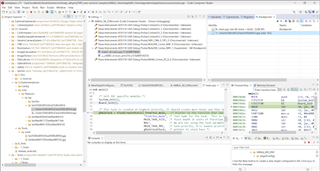
- step by step debugging failed and when I push arrows button, I doesn't follow the code but it enters in Assembly => Failed => See Screenshot_1.PNG and Screenshot_2.PNG files.
C] Analysis:
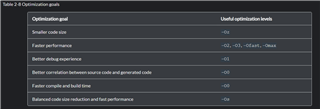
Vision compilation option is -Oz => smaller code size => debug symbols not found by CCS => Failed => See Screenshot_3.PNG and Screenshot_4.PNG files.
How to select addresses of the .map file ?
D] Others compilations:
I have compiled Vision with others compilation options => program will not fit into available memory => Failed => See Screenshot_5.PNG and Screenshot_6.PNG files.