This thread has been locked.

If you have a related question, please click the "Ask a related question" button in the top right corner. The newly created question will be automatically linked to this question.

Write output to Putty

Other Parts Discussed in Thread: MSPM0L1306

Hi,

I am looking for a way to display the output of temperature sensor readings from the BASSENSOR booster pack connected to the MSPM0L1306. I have downloaded Putty, but was hoping to get some instruction as to how to get these two platforms to interact, and what type of settings I may need to set for Putty in order to get it to work. I'm new to this application and appreciate any help I can get, thank you so much!

  • Hi Abigail,

    On the MSPM0L1306 Launchpad there are a couple of jumpers that select the UART on PA8 and PA9 to either go to the pins on the booster pack, or to the "back channel UART" feature of the on-board programmer.  Selecting the back channel UART ( J16 2-3 and J17 2-3) will route the UART TX and RX to your terminal application on the PC.  Be sure to confirm which COM-PORT # to use when setting up Putty.

    See the MSPM0L1306 user guide sections 2.3.2 - 2.3.4

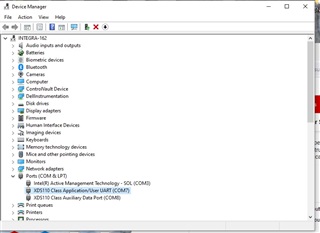
  • You also need to determine which com port to connect putty to.

    On windows, use device Manager->ports and the com you want is labeled "XDS110 Class Application/User UART"

    Fire up putty, Select "Serial" for the communication type and set your com port number and baud rate.

  • Hi Dennis and Keith,

    Thank you both for your help! I will try it out.