This thread has been locked.

If you have a related question, please click the "Ask a related question" button in the top right corner. The newly created question will be automatically linked to this question.

TMS320C54CST: CCS 1.2 to CCS 3.3 project migration and build compilation issues

Part Number: TMS320C54CST

We are planning to migrate legacy project CCS 1.2 to CCS 3.3, as we no longer have access to Windows 95 PCs for building the software. We plan to use Windows 10 or 11 with CCS 3.3 to generate the build and connect to the target using a BH USB 560 emulator.

As a first step, I attempted to convert the CCS 1.2 .mak file to a CCS 3.3 .pjt file. The compiler throws several errors. I have already fixed a few compiler and linker options, as well as link-order issues, but errors still remain.

Could you please assist us with this migration?

Target Processor: TMS320C5416
Ti XDS51x Emulator JTAG PC CONTROLLER Kit Part Number TMDS00510  ( Planning to replace this emulator with BH USB560 emulator ).

Please advise on the next steps.

TIA

  • Hello,

    As a first step, I attempted to convert the CCS 1.2 .mak file to a CCS 3.3 .pjt file.

    Have you seen the below migration guide? I covers migrating a CCS 1.3 *.mak file to a CCS 2.x pjt format that CCS 3.x also uses:

    www.ti.com/lit/an/spra745a/spra745a.pdf

    Please note that the XDS100 may be a cheaper option for C54x. It is still available for purchase unlike the obsoleted XDS560v1 and XDS510.

    https://www.blackhawk-dsp.com/store/12139b.html

    However, you may need to update to a later CCS version to use XDS100 since CCSv3.3 had limited support for it.

    Thanks

    ki

  • Thanks for sharing ccs migration document and XDS100 emulator details.

    I did follow the procedure and could able to make .pjt and few steps unable to do it per the document as CCS 3.3 doesnt have options similar to CCS 2 for example Tools–>Linker Configuration options not found in CCS 3.3.

    The .mak file contains below options and I provided below details in the project build options->Compiler and Linker in CCS 3.3. However, I dont see assembler options in the project build options.
    Linker = "-c -m <outputfile>.map -o Fast_Boot.out -x -i c:\ti\c5400\cgtools\lib -l rts_ext.lib "
    Assembler = "-gls -mf -v548 -i<build path> "
    Compiler = "-gss -als -mf -o2 -x1 -fr<buildpath>\object_and_asm -fs<buildpath>\object_and_asm -i<buildpath>\ -v548 "

    With above options getting below error in CCS 3.3. How to force CPL=0 in CCS 3.3?.

    Getting [E0003] error while building the project.

    [E0003] This address mode is invalid in CPL=1 mode

    Please advise .

    Thanks,

    Ramesh G

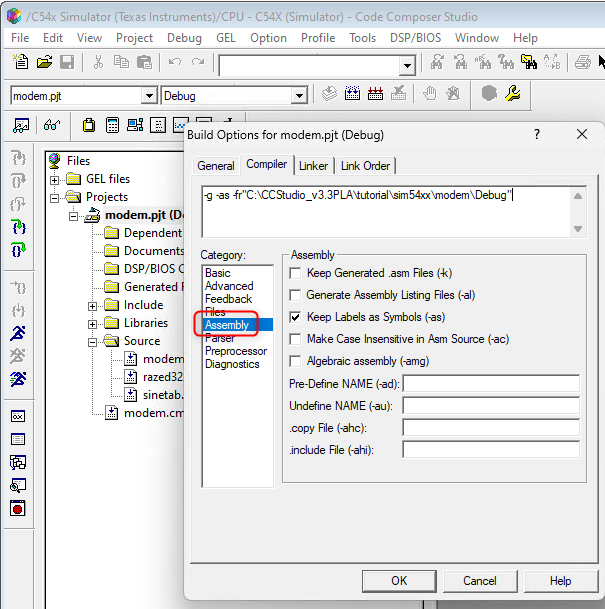
  • However, I dont see assembler options in the project build options.

    It should be here:

    How to force CPL=0 in CCS 3.3?

    I'm not sure what you are alluding to here. What is "CPL" in this context? Are you trying to set a preprocessor symbol value?

    Thanks

    ki

  • I could able to enter Compiler options "-g -ss -al -as -o2 -fr"D:\object_and_asm" -fs"D:\object_and_asm" -i"D:\" -v548 -mf -x1" and trying to generate build but build generation failed due to  "[E0003] This address mode is invalid in CPL=1 mode error".

    I’m trying to understand why the project builds successfully in CCS 1.2, but the same build throws errors in CCS 3.3. I’d appreciate help identifying the cause and resolving the issue.

    Thanks

  • "[E0003] This address mode is invalid in CPL=1 mode error".

    I assume this is output from the C54x assembler.

    I’m trying to understand why the project builds successfully in CCS 1.2, but the same build throws errors in CCS 3.3.

    Are you using the same version of the C54x build tools between the two versions?

    I will bring this thread to the attention to the compiler experts for further suggestions.

    Thanks

    ki

  • To get a general background on CPL mode, search for the term CPL in the C54x compiler manual.

    To understand ...

    [E0003] This address mode is invalid in CPL=1 mode error

    I need to know the context in which it is displayed.  Please rebuild the entire project.  I presume the build log has this error diagnostic.  Capture the entire build log into a text file, then attach that file to your next post.

    Thanks and regards,

    -George

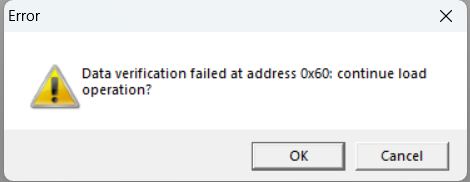
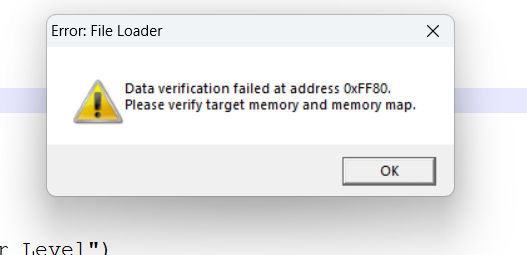
  • I compiled the software using CCS 1.2 and trying to load the .dat or .out file using CCS 3.3 getting below error in the .gel file. Also, the registers are showing 0's and not setting the values. 

    Processor: TMS320C5416
    Emulator :BH 560 USB BP

    /* set PLL to off (set address 0x58 = 0x0 */
    GEL_MemoryFill(0x58, 1, 0x01, 0x0);

    /* ST0 Reg (set address 0x6 = 0x1077)*/
    GEL_MemoryFill(0x6, 1, 0x01, 0x1077);

    /* ST1 Reg (set address 0x7 = 0x0)*/
    GEL_MemoryFill(0x7, 1, 0x01, 0x2800);

    /* BSCR Reg (set address 0x29 = 0x8000)*/
    GEL_MemoryFill(0x29, 1, 0x01, 0x8002);

    /* set times 2 wait state multiplier (set address 0x2b = 1)*/
    GEL_MemoryFill(0x2b, 1, 0x01, 0x01);

    /* PMST Reg (set address 0x29 = 0x7f88)*/
    GEL_MemoryFill(0x1D, 1, 0x01, 0x7f88);

    /* SWWSR Reg (set address 0x = 0x78F9)*/
    GEL_MemoryFill(0x28, 1, 0x01, 0x7fff);

    /* set PLL to x0 (set address 0x58 = 0x0)*/
    GEL_MemoryFill(0x58, 1, 0x01, 0x0);

    GEL_MemoryLoad(0x60, 1, 0xFEA0, "bvectors.dat");


    GEL_Load("Fast_Boot.out");  

    Please advise.

    Thanks,

    Ramesh G

  • Hello,

    Regarding the data verification error, please see:

    https://software-dl.ti.com/ccs/esd/documents/troubleshooting-data_verification_errors.html

    While you are using an older version of CCS than what is in the document, the concepts remain the same.

    Please note that your environment is very old and unsupported. Hence the amount of help that we can provide will be very limited.