This thread has been locked.

If you have a related question, please click the "Ask a related question" button in the top right corner. The newly created question will be automatically linked to this question.

Unable to start vendor: tidspssw

I am unable to start the Flexlm Service 1 service.

Reference Similar Question:

e2e.ti.com/support/development_tools/code_composer_studio/f/81/t/260338

OS: Windows Server 2003 SP 2

Instructions: Followed: processors.wiki.ti.com/index.php/License_Server_Administration_for_CCS

Error Code (Computer Management | Services Attempt): 216 0xd8

GUI/Command Line: As others have stated, the wiki article ONLY talks of the GUI setup and I do not work for nor anything with Flexera Software. Actually, I used the web browser and LmTools, so one browser and one GUI. Actually, the twitch in my spinal cord will not allow me to go without asking, please state for everyone the command line configuration. I did an extensive search on TI, Flexera, and Google and there is one setup instruction, namely the graphical setup specified in the wiki article. As this question is the first always asked, exactly where are people supposed to know or configure via the command line?

Setting Up as a Service: I set licensing up as a service. Yes, I even tried restarting the server. Before you ask if I removed the license and tried again, yes, that too.

LmTools Status Enquiry:

--------
Status
--------
Flexible License Manager status on Wed 3/16/2016 10:21

[Detecting lmgrd processes...]
License server status: 27000@jmr-stamp01
    License file(s) on jmr-stamp01: licenses\tidspssw\TMDSCCS-ALLF01-v6.lic:

jmr-stamp01: license server UP (MASTER) v11.12

Vendor daemon status (on jmr-stamp01):

Server Diags:

--------
Diagnostics
--------
FlexNet diagnostics on Wed 3/16/2016 09:35

-----------------------------------------------------
License file: C:\Program Files\FlexNet Publisher License Server Manager\TMDSCCS-ALLF01-v6.lic
-----------------------------------------------------

Browser Server Configuration Log Level Informational (after reboot):

2016-03-16 09:25:50,718 root.LicenseEngine started without redundancy.
2016-03-16 09:25:51,562 root.Vendor (tidspssw) ERROR: failed to start.
2016-03-16 09:29:43,306 root.Vendor (tidspssw) ERROR: failed to start.
2016-03-16 09:34:05,590 root Version: 11.12.1.1 build 148864 (2014.04.25-04.26.06)
2016-03-16 09:34:05,621 root.LicenseEngine started without redundancy.
2016-03-16 09:34:05,621 root.Vendor (tidspssw) ERROR: failed to start.
2016-03-16 09:42:53,122 root.LicenseEngine ERROR: Not a license administrator - operation not allowed
2016-03-16 09:42:54,871 root.LicenseEngine ERROR: Not a license administrator - operation not allowed
2016-03-16 09:43:29,045 root.Vendor (tidspssw) ERROR: failed to start.
2016-03-16 09:44:22,446 root.Vendor (tidspssw) ERROR: failed to start.
2016-03-16 09:45:39,494 root.Vendor (tidspssw) ERROR: failed to start.
2016-03-16 09:48:46,414 root.Vendor (tidspssw) ERROR: failed to start.
2016-03-16 09:49:06,536 root.Vendor (tidspssw) ERROR: failed to start.
2016-03-16 10:02:52,652 root.Vendor (tidspssw) ERROR: failed to start.

License Server Configuration:

License Server Management Port (27000 - 27009): Selected

HTTP Port: 8090

Vipre Antivirus:

No change if I stop Vipre.

Windows Firewall:

Disabled; Internet Connection Sharing (ICS) service disabled as well.

Port:

I did not follow the comment on port 52818. I tried putting 52818 in the configuration, but switched back to 27000 range after I saw the same problem. I also did not see this port referenced in the wiki.

Windows Event Viewer:

I did not see anything meaningful, or at least apparent, in the Application or System event logs. The most meaningful log was the browser log. Actually, the most meaningful information is error 216.

Summary:

Let me know if I should attach screenshots or whatnot. Hopefully, this initial post has all the relevant information.

Basically, tidspssw will not start and I tried both from the GUI and Computer Management Services. The best clue and I do not see any references is the 216 error code. What is error 216?

  • Sarah,

    Please apologize for the delay in this reply. Are you still having trouble configuring the license server?

    Sarah Weinberger said:
    As this question is the first always asked, exactly where are people supposed to know or configure via the command line?

    The source for all setup methods is inside the Flexera's License Administration Guide - the syntax of the command line utility lmgrd is shown at chapter 10 and, incidentally, in section 5.2 of the License Server Administration wiki page (which would require some adaptation to accommodate for Windows-specific commands).

    The decision to choose the published methods was simply due to popularity and ease of support on our end, not to mention to follow what is recommended by the third party software provider.

    From the description it seems you are attempting to configure the server using the lmtools utility, is that so?

    The logs shown in both the Status Enquiry and the Server Diags seem ok to me. However, the error shown in the Browser Server log after reboot is very unusual - I could find only another occurrence at this post, but the solution is not very revealing. 

    Therefore, based on the Browser message alone I suspect the service was not properly set up by lmtools, or it was setup by a user that does not have enough privileges to start a service. Unfortunately I am not very familiar with the Windows variant you are using and therefore cannot try to reproduce this scenario here.

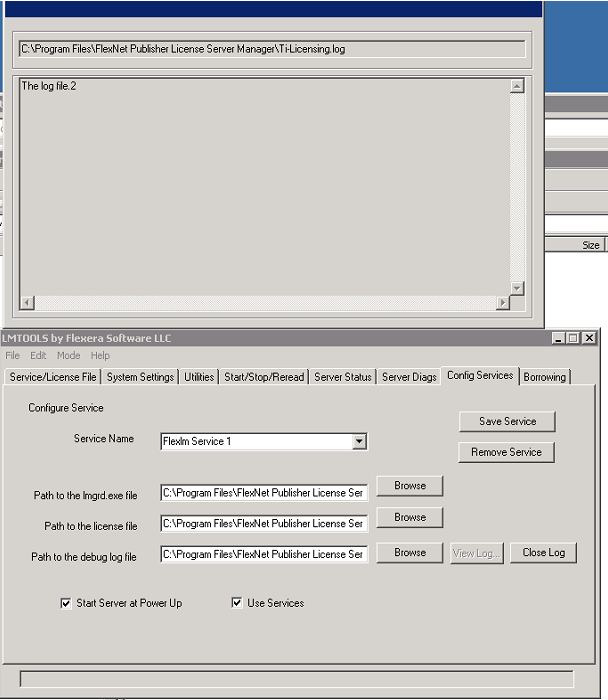
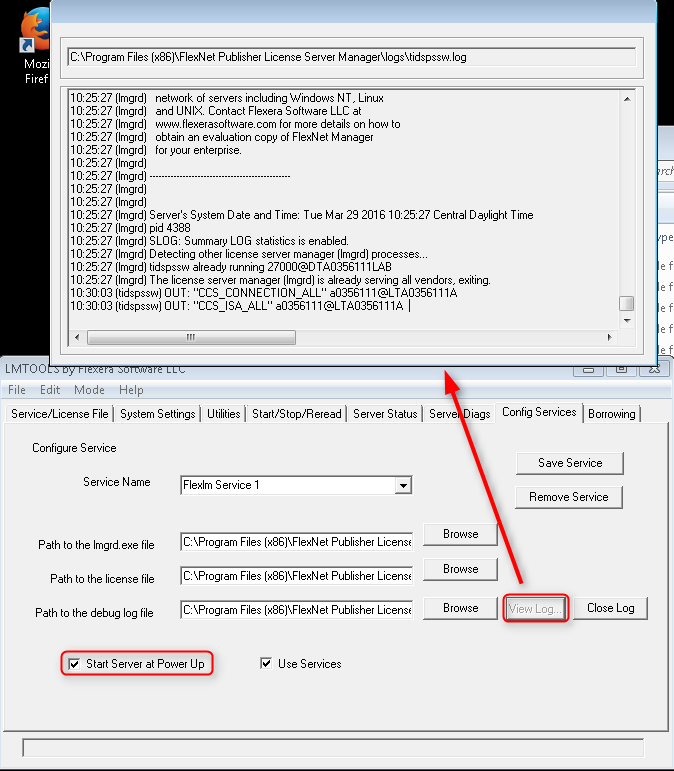
    By the way, do you see anything at the lmtools services log? The screenshot below is what I see immediately after rebooting my server.

    The other configurations look fine by me, and the issue with the port on the other thread seems to have been caused by some missing setting (unfortunately the OP did not provide additional details about his configuration to better clarify this).

    Hope this helps,

    Rafael

  • Did the problem magically solve itself?:

    No, of course not.

    Do you still have the problem?:

    Of course, see previous question/answer. I would have posted the resolution here.

    Do I still need help?:

    I am tasked with developing software for the processor, which I cannot start, because I am stuck on this licensing issue, which after having JMR pay $795, for a license I cannot use, upsets me to no end. To hear "not our problem" and "I do not have this problem". I can honestly say that I have never given these answers to anybody that I have ever supported. I try my best to do what is necessary, even connecting through TeamViewer. My motto is that if one person experiences a problem, then there are probably many more that do as well that just do not complain. Texas Instruments has failed miserably and with flying colors to live up to my standards. So to answer this question, what do you think?

    What does the config services log show?:

    Nothing. The actual file just says "The log file." I added that text, when creating the log file initially. The file does not contain the number two (2), so not sure why the screenshot shows that.

    Am I using the LmTools utility?

    The screenshot above says all. I should add. What part of "I followed directions to the letter at the URL above" is not self explanatory that you have to ask if I am using the utility or went off on my own? If I went off on my own, then I would not have followed posted instructions to the letter. Would I have? I will reiterate that I followed the posted Wiki instructions, which if I might add was not that much. I really expected the licensing task to be a few minute task, not a task that is harder than the programming task.

    Do I have sufficient rights on the server?

    Yes. I am an administrator on the Windows Server 2003. A better question is does license tools support Windows Server 2003 SP 2. ????

    Your suspicion:

    Your comment "by a user" implies that there are thousands, or at least hundreds, of individuals, much like on Madame Secretary, where the Secretary has an entire legion helpers to do her bidding, so that she can worry about whether or not her washing machine (last night's episode) works or not. I have two other helpers: myself and I. Our names are therefore: me, myself, and I.

    Service not properly setup:

    This statement should be substantiated. LmTools takes places the configuration data in only so many places: file, registry, whatever. I am not familiar with your licensed tools, so you would have to walk me through where all the configuration data reside and we can check line by line if LmTools configured things properly or if something is off. The applet looks fine, but the lack of any functionality indicate otherwise or some incompatibility. Maybe one of the tools is not Windows Server 2003 with Service Pack 2 compliant. That is a guess from the hip, as probably other users have a more recent OS.

    I believe that I addressed all points. Next?

    I will try, now that I am back on this task, to uninstall everything and going through the procedure again, although I do not expect any different results, but I cannot think of anything else at the moment.

  • **************************************************************************************************

    Update:

    Note: Since starting this update/edit, I made progress. There is a LOT of missing and miss-information in the wiki. I will put here what I have done in relatively chronological order, so as to help other people, but I still have issues, just I am further along my yellow brick road.

    Summary before starting chronological information:

    1. Before step #8, a user MUST create:

    C:\flexlm

    I tried using environment variables to point elsewhere, and C:\flexlm. It was pointless to create the LM_LICENSE_FILE and specify a path or the @host.

    2. Copy and rename in the process the *.lic file as "license.dat", so "C:\flexlm\license.dat".

    For all the talk, applets, browsers, and whatnot, the service demands C:\flexlm\license.dat.

    Once done, the "Flexera Service 1" service will start (after a reboot, as without a reboot, you will (or lat least I did) get a lmgrd already processing licenses error.

    3. The new error is that tidspssw.exe still not running

    **************************************************************************************************

    Here is my chronological update:

    1. Uninstall old version from Add and Remove control panel applet.

    - I deleted everything, when offered

    - I rebooted the system

    - I deleted the "C:\Program Files\FlexNet Publisher License Server Manager" folder.

    2. I created a download directory at "My Documents\TiLicensing", where I placed all downloaded files.

    - The server is x86 (32-bit) based, not x64, so that means that on step 2, I use the 32-bit (x86) utilities.

    3. I opened up the wiki and followed instructions to the letter.

    - I got to step 8

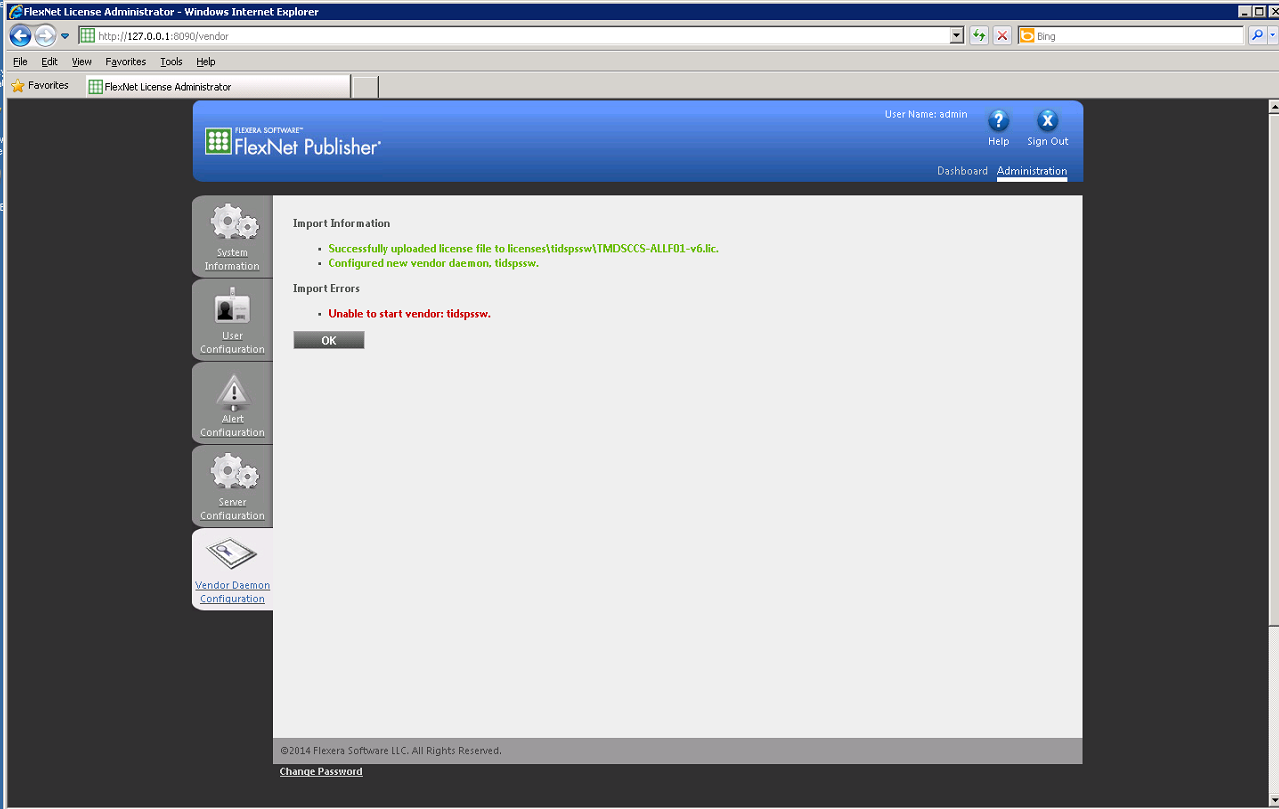
    8. In the main administration view click on Vendor Daemon Configuration and click on the Import License icon. Browse to where the .lic file is located and click on Import license. A message will be displayed saying the license was successfully imported. Click OK.

    - I browsed to my license file and clicked on the import license file button. Here is what I see.

    - As you can see, I already fail at step 8!

    Now that I am going through the procedure again, I do recall seeing this message the first time around. I should not have proceeded past step 8, but rather reached out. 

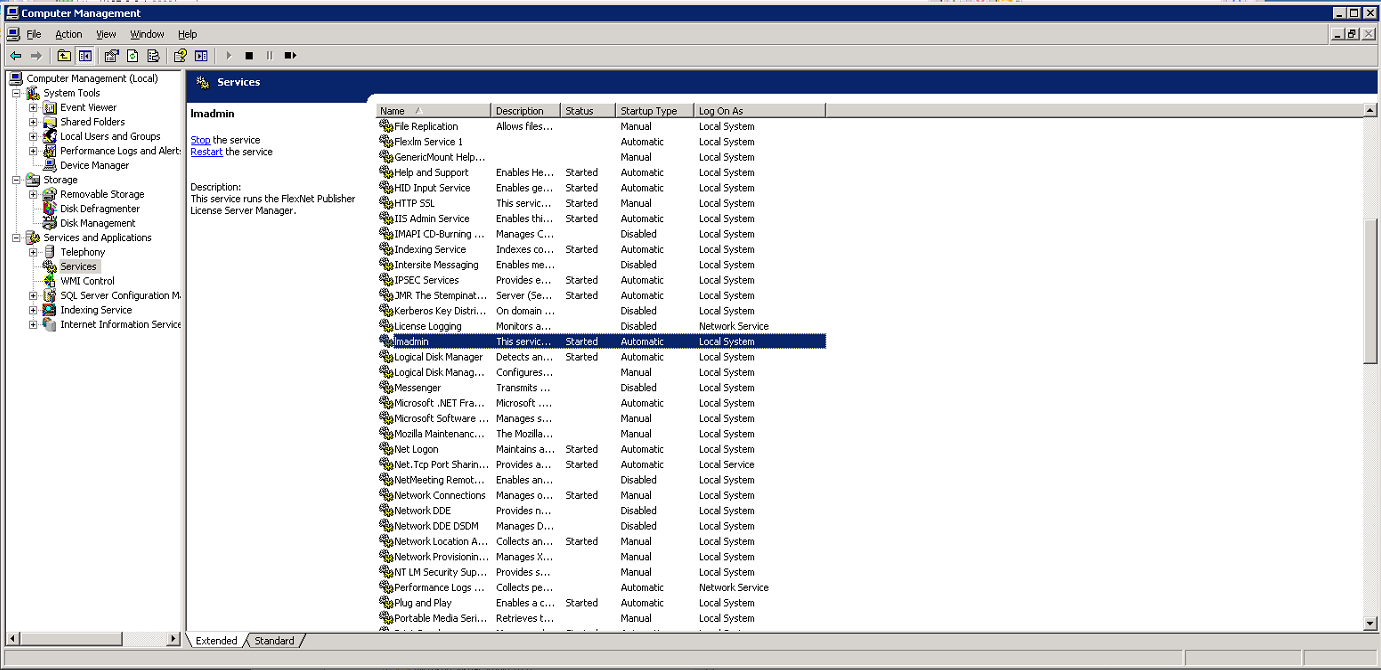
    - I verified that the lmadmin service is running. I even tried deleting the license stuff (after clicking on the ok button), making sure lmadmin was running, and importing the license file again (checking the box to overwrite). I still get the same message.

    - Here is a screenshot showing the Computer Management Services tab. Lmadmin started, but "Flexlm Service 1" did not.

    4. Log file

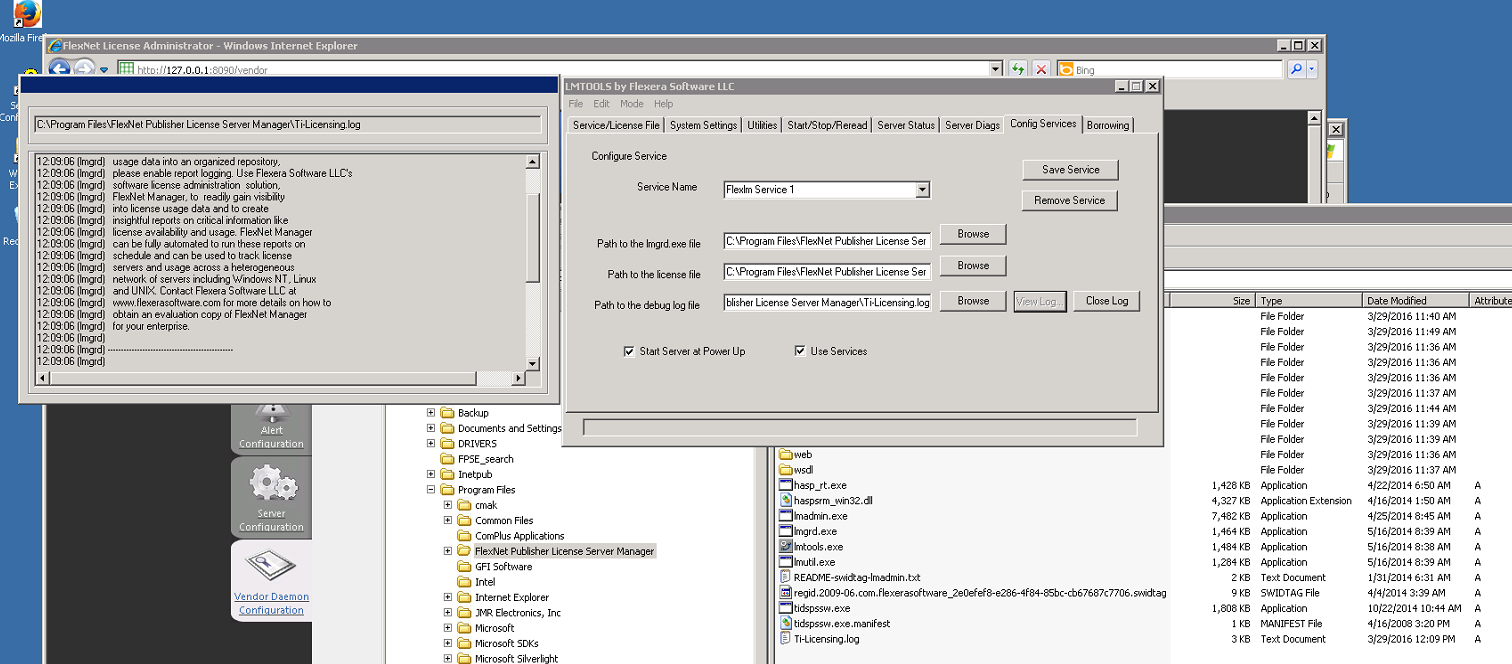
    Interesting! I tried starting "Flexlm Service 1" from the Services applet anyways. I also tried previously from the GUI, however that did not generate a log file. My attempt from the Services applet yielded a log entry!

    12:09:06 (lmgrd) -----------------------------------------------
    12:09:06 (lmgrd)   Please Note:
    12:09:06 (lmgrd) 
    12:09:06 (lmgrd)   This log is intended for debug purposes only.
    12:09:06 (lmgrd)   In order to capture accurate license
    12:09:06 (lmgrd)   usage data into an organized repository,
    12:09:06 (lmgrd)   please enable report logging. Use Flexera Software LLC's
    12:09:06 (lmgrd)   software license administration  solution,
    12:09:06 (lmgrd)   FlexNet Manager, to  readily gain visibility
    12:09:06 (lmgrd)   into license usage data and to create
    12:09:06 (lmgrd)   insightful reports on critical information like
    12:09:06 (lmgrd)   license availability and usage. FlexNet Manager
    12:09:06 (lmgrd)   can be fully automated to run these reports on
    12:09:06 (lmgrd)   schedule and can be used to track license
    12:09:06 (lmgrd)   servers and usage across a heterogeneous
    12:09:06 (lmgrd)   network of servers including Windows NT, Linux
    12:09:06 (lmgrd)   and UNIX. Contact Flexera Software LLC at
    12:09:06 (lmgrd)   www.flexerasoftware.com for more details on how to
    12:09:06 (lmgrd)   obtain an evaluation copy of FlexNet Manager
    12:09:06 (lmgrd)   for your enterprise.
    12:09:06 (lmgrd) 
    12:09:06 (lmgrd) -----------------------------------------------
    12:09:06 (lmgrd) 
    12:09:06 (lmgrd) 
    12:09:06 (lmgrd) Server's System Date and Time: Tue Mar 29 2016 12:09:06 Pacific Daylight Time
    12:09:06 (lmgrd) pid 3344
    12:09:06 (lmgrd) SLOG: Summary LOG statistics is enabled.
    12:09:06 (lmgrd) license manager: can't initialize:Cannot find license file.
    12:09:06 (lmgrd) The license files (or license server system network addresses) attempted are
    12:09:06 (lmgrd) listed below.  Use LM_LICENSE_FILE to use a different license file,
    12:09:06 (lmgrd) or contact your software provider for a license file.
    12:09:06 (lmgrd) Filename: "C:\flexlm\license.dat"
    12:09:06 (lmgrd) License Path: "C:\flexlm\license.dat"
    12:09:06 (lmgrd) FlexNet Licensing error:-1,359
    12:09:06 (lmgrd) System Error:2 No such file or directory
    12:09:06 (lmgrd) For further information, refer to the FlexNet Licensing documentation,available at "www.flexerasoftware.com".
    12:09:06 (lmgrd) Using license file "C:\flexlm\license.dat"

    Note, the screenshot of the log and the copy and pasted log contents are identical. The screenshot version was not complete, hence the copy and paste contents above.

    I made several discoveries, since the last update.

    1. I finally saw a log file. It turns out that my manually creating the file and placing the text that I did caused further log entries to not appear. When I redid the installation and did not create the log but rather manually started the service, I saw log contents. That was a huge deal.
    2. The log file showed that lmgrd wants to read "C:\flexlm\license.dat". I did read Chapter 4 of the PDF and the back-end dealing with Environment Variables, but nothing would make lmgrd happy but "C:\flexlm\license.dat". The PDF is a bit confusing, as it talks about a path, but will not read a path. I tried setting "E:\Licenses\flexlm" as the LM_LICENSE_FILE path, but the log file still showed "C:\flexlm". Furthermore, lmgrd does not recognize .lic extensions, so I renamed the file.
    3. Renaming the file and restarting the server, caused at long last "Flexera Service 1" to start, but the other service does not.
    13:02:39 (lmgrd) -----------------------------------------------
    13:02:39 (lmgrd)   Please Note:
    13:02:39 (lmgrd) 
    13:02:39 (lmgrd)   This log is intended for debug purposes only.
    13:02:39 (lmgrd)   In order to capture accurate license
    13:02:39 (lmgrd)   usage data into an organized repository,
    13:02:39 (lmgrd)   please enable report logging. Use Flexera Software LLC's
    13:02:39 (lmgrd)   software license administration  solution,
    13:02:39 (lmgrd)   FlexNet Manager, to  readily gain visibility
    13:02:39 (lmgrd)   into license usage data and to create
    13:02:39 (lmgrd)   insightful reports on critical information like
    13:02:39 (lmgrd)   license availability and usage. FlexNet Manager
    13:02:39 (lmgrd)   can be fully automated to run these reports on
    13:02:39 (lmgrd)   schedule and can be used to track license
    13:02:39 (lmgrd)   servers and usage across a heterogeneous
    13:02:39 (lmgrd)   network of servers including Windows NT, Linux
    13:02:39 (lmgrd)   and UNIX. Contact Flexera Software LLC at
    13:02:39 (lmgrd)   www.flexerasoftware.com for more details on how to
    13:02:39 (lmgrd)   obtain an evaluation copy of FlexNet Manager
    13:02:39 (lmgrd)   for your enterprise.
    13:02:39 (lmgrd) 
    13:02:39 (lmgrd) -----------------------------------------------
    13:02:39 (lmgrd) 
    13:02:39 (lmgrd) 
    13:02:39 (lmgrd) Server's System Date and Time: Tue Mar 29 2016 13:02:39 Pacific Daylight Time
    13:02:39 (lmgrd) pid 1344
    13:02:39 (lmgrd) SLOG: Summary LOG statistics is enabled.
    13:02:39 (lmgrd) Detecting other license server manager (lmgrd) processes...
    13:02:39 (lmgrd) Done rereading
    13:02:39 (lmgrd) FlexNet Licensing (v11.12.1.1 build 150159 i86_n3) started on jmr-stamp01 (IBM PC) (3/29/2016)
    13:02:39 (lmgrd) Copyright (c) 1988-2014 Flexera Software LLC. All Rights Reserved.
    13:02:39 (lmgrd) World Wide Web:  http://www.flexerasoftware.com
    13:02:39 (lmgrd) License file(s): C:\flexlm\license.dat
    13:02:39 (lmgrd) lmgrd tcp-port 27000
    13:02:39 (lmgrd) (@lmgrd-SLOG@) ===============================================
    13:02:39 (lmgrd) (@lmgrd-SLOG@) === LMGRD ===
    13:02:39 (lmgrd) (@lmgrd-SLOG@) Start-Date: Tue Mar 29 2016 13:02:39 Pacific Daylight Time
    13:02:39 (lmgrd) (@lmgrd-SLOG@) PID: 1344
    13:02:39 (lmgrd) (@lmgrd-SLOG@) LMGRD Version: v11.12.1.1 build 150159 i86_n3 ( build 150159 (ipv6))
    13:02:39 (lmgrd) (@lmgrd-SLOG@) 
    13:02:39 (lmgrd) (@lmgrd-SLOG@) === Network Info ===
    13:02:39 (lmgrd) (@lmgrd-SLOG@) Socket interface: IPV4
    13:02:39 (lmgrd) (@lmgrd-SLOG@) Listening port: 27000
    13:02:39 (lmgrd) (@lmgrd-SLOG@) 
    13:02:39 (lmgrd) (@lmgrd-SLOG@) === Startup Info ===
    13:02:39 (lmgrd) (@lmgrd-SLOG@) Is LS run as a service: Yes
    13:02:39 (lmgrd) (@lmgrd-SLOG@) Server Configuration: Single Server
    13:02:39 (lmgrd) (@lmgrd-SLOG@) Command-line options used at LS startup: -c C:\Program Files\FlexNet Publisher License Server Manager\TMDSCCS-ALLF01-v6.lic -l :\Program Files\FlexNet Publisher License Server Manager\Ti-Licensing.log -z -s 
    13:02:39 (lmgrd) (@lmgrd-SLOG@) License file(s) used:  C:\flexlm\license.dat
    13:02:39 (lmgrd) (@lmgrd-SLOG@) ===============================================
    13:02:39 (lmgrd) Starting vendor daemons ... 
    13:02:39 (lmgrd) License server manager (lmgrd) startup failed: 
    13:02:39 (lmgrd) CreateProcess error code: 0xc1   File= tidspssw.exe

    (I have seen other posts come in, which I will address.)

  • Hi,

    I apologize for the troubles you are having; I see you already have spent a disproportionate amount of time in trying to set up the license server. We could either try to get to the bottom of this or, in benefit of time and efforts, would you be ok using a single-seat node-locked license instead? If so, please accept my friend request and I can send you an activation code right away.

    Regards,
    Rafael
  • Hi Rafael,

    Disproportionate is an understatement. I already was offered a node-locked, but would prefer to debug this issue. Actually, I am close. I asked for this problem to get addressed. As far as I am concerned, resolution means that this problem get addressed, not swept underneath the rug. Positively resolved, as I being the sole judge and jury on this issue.

    I already know how you can make it up to me, but I do not want to get side-tracked. I want to stay laser focused.

    Since your last (more?) updates, I have made major progress. Please see my updated earlier response. You wrote, while I was updating a previous response.

    Texas Instrument Wiki Documentation Installation Failures:

    1. Create C:\flexlm.
    2. Users must copy and then rename the license file, TMDSCCS-ALLF01-v6.lic, in my case, to "license.dat" placing that in the C:\flexlm directory. That means that after this step "C:\flexlm\license.dat" exists.
    3. When doing the wiki steps, do NOT manually create or edit any logs, even if they do not exist. Starting the service from the Computer Management Services page will create the log. The log will not generate if a user manually creates the file or adds content not placed automatically by the service.
    4. Follow Windows Wiki steps 1 through 10.
    5. After step 8, a user might have to restart the server in order to see "Flexera Service 1" start without seeing lmgrd already running issue.

    Once done, please feel free to update the Wiki documentation.

    Even though I am not at the end of the road, Texas Instruments is purely at fault, as there are missing steps, which I am now discovering. The software is fine, but instructions are not. Yes, I realize that the instructions are obvious for 99.99% of people to follow and creating C:\flexlm and doing the rename, but to idiots, such as myself, following the Wiki instructions TO THE LETTER, the procedure is not obvious and will not work. Nowhere does the Wiki instructions say to rename files, create folders, and jump through hoops. I am discovering these steps manually.

    Anyways, pushing forward. Hopefully I am almost there.

    What do you think about the next issue and why tidspssw.exe does not start?

    13:02:39 (lmgrd) -----------------------------------------------
    13:02:39 (lmgrd)   Please Note:
    13:02:39 (lmgrd) 
    13:02:39 (lmgrd)   This log is intended for debug purposes only.
    13:02:39 (lmgrd)   In order to capture accurate license
    13:02:39 (lmgrd)   usage data into an organized repository,
    13:02:39 (lmgrd)   please enable report logging. Use Flexera Software LLC's
    13:02:39 (lmgrd)   software license administration  solution,
    13:02:39 (lmgrd)   FlexNet Manager, to  readily gain visibility
    13:02:39 (lmgrd)   into license usage data and to create
    13:02:39 (lmgrd)   insightful reports on critical information like
    13:02:39 (lmgrd)   license availability and usage. FlexNet Manager
    13:02:39 (lmgrd)   can be fully automated to run these reports on
    13:02:39 (lmgrd)   schedule and can be used to track license
    13:02:39 (lmgrd)   servers and usage across a heterogeneous
    13:02:39 (lmgrd)   network of servers including Windows NT, Linux
    13:02:39 (lmgrd)   and UNIX. Contact Flexera Software LLC at
    13:02:39 (lmgrd)   www.flexerasoftware.com for more details on how to
    13:02:39 (lmgrd)   obtain an evaluation copy of FlexNet Manager
    13:02:39 (lmgrd)   for your enterprise.
    13:02:39 (lmgrd) 
    13:02:39 (lmgrd) -----------------------------------------------
    13:02:39 (lmgrd) 
    13:02:39 (lmgrd) 
    13:02:39 (lmgrd) Server's System Date and Time: Tue Mar 29 2016 13:02:39 Pacific Daylight Time
    13:02:39 (lmgrd) pid 1344
    13:02:39 (lmgrd) SLOG: Summary LOG statistics is enabled.
    13:02:39 (lmgrd) Detecting other license server manager (lmgrd) processes...
    13:02:39 (lmgrd) Done rereading
    13:02:39 (lmgrd) FlexNet Licensing (v11.12.1.1 build 150159 i86_n3) started on jmr-stamp01 (IBM PC) (3/29/2016)
    13:02:39 (lmgrd) Copyright (c) 1988-2014 Flexera Software LLC. All Rights Reserved.
    13:02:39 (lmgrd) World Wide Web:  http://www.flexerasoftware.com
    13:02:39 (lmgrd) License file(s): C:\flexlm\license.dat
    13:02:39 (lmgrd) lmgrd tcp-port 27000
    13:02:39 (lmgrd) (@lmgrd-SLOG@) ===============================================
    13:02:39 (lmgrd) (@lmgrd-SLOG@) === LMGRD ===
    13:02:39 (lmgrd) (@lmgrd-SLOG@) Start-Date: Tue Mar 29 2016 13:02:39 Pacific Daylight Time
    13:02:39 (lmgrd) (@lmgrd-SLOG@) PID: 1344
    13:02:39 (lmgrd) (@lmgrd-SLOG@) LMGRD Version: v11.12.1.1 build 150159 i86_n3 ( build 150159 (ipv6))
    13:02:39 (lmgrd) (@lmgrd-SLOG@) 
    13:02:39 (lmgrd) (@lmgrd-SLOG@) === Network Info ===
    13:02:39 (lmgrd) (@lmgrd-SLOG@) Socket interface: IPV4
    13:02:39 (lmgrd) (@lmgrd-SLOG@) Listening port: 27000
    13:02:39 (lmgrd) (@lmgrd-SLOG@) 
    13:02:39 (lmgrd) (@lmgrd-SLOG@) === Startup Info ===
    13:02:39 (lmgrd) (@lmgrd-SLOG@) Is LS run as a service: Yes
    13:02:39 (lmgrd) (@lmgrd-SLOG@) Server Configuration: Single Server
    13:02:39 (lmgrd) (@lmgrd-SLOG@) Command-line options used at LS startup: -c C:\Program Files\FlexNet Publisher License Server Manager\TMDSCCS-ALLF01-v6.lic -l :\Program iles\FlexNet Publisher License Server Manager\Ti-Licensing.log -z -s 
    13:02:39 (lmgrd) (@lmgrd-SLOG@) License file(s) used:  C:\flexlm\license.dat
    13:02:39 (lmgrd) (@lmgrd-SLOG@) ===============================================
    13:02:39 (lmgrd) Starting vendor daemons ... 
    13:02:39 (lmgrd) License server manager (lmgrd) startup failed: 
    13:02:39 (lmgrd) CreateProcess error code: 0xc1   File= tidspssw.exe

  • By the way, Texas Instruments should thank me for debugging the Wiki documentation. I feel like nobody has used this chip or development chain before and I am alpha/engineering testing your newfangled license scheme. Beta, release candidate, and commercial grade software are further along than TI is at the moment. Documentation counts.
  • Am I missing a license.dat file?

    I do not think anymore that TMDSCCS-ALLF01-v6.lic equals license.dat, as I am reading the log file, which states the command line.

    The command line includes the TMDSCCS-ALLF01-v6.lic file. It would seem that lmgrd just does not like my manufactured license.dat file and that is why it fails.

    Okay, please email me the proper license.dat file corresponding to my TMDSCCS-ALLF01-v6.lic file.

    By the way, what is the difference between license.dat and TMDSCCS-ALLF01-v6.lic anyways?

    Sarah
  • I accepted your friend request, but that does not mean that I want or will use a node locked license. Debug your product and get my license working. I asked questions above.

    Pressing issue is sending me a license.dat file and telling me the difference between the .dat and .lic file.
  • Progress! With much thanks to my two colleagues, myself and I. Texas Instruments support personnel continue to show that they are ignorant and clueless to their own products. The Texas Instruments CEO should be embarrassed, but is probably too rich to be embarrassed. Anyways, I hope that my trials help someone. I almost done.

    NOTES:

    1. I was right in my earlier questioning of Windows Server 2003. The currently shipping version of tidspssw.zip is for Windows Server 2012 and maybe Windows Server 2008, but definitely not Windows Server 2003. There is an older version, which is compliant. There is another article, where the engineer stated the issue and gave a link to the correct download. Thankfully, I was able to find the article. I finally put in the correct search terms into Google.

    e2e.ti.com/.../424872

    2. I set the environment variable as follows, just it did not work. I am not sure how the other person in the ticket listed above got lmgrd to use the specified location. My renaming and placing in the created C:\flexlm did the trick. Those are the exact same files.

     LM_LICENSE_FILE=E:\Licensing\flexlm;

    3. I restarted the server, required, and everything started. The only issue that I see from the log is "Unable to initialize access to trusted storage," whatever that means. Can storage be the license file?


    9:26:06 (lmgrd) ----------------------------------------------- 9:26:06 (lmgrd) 9:26:06 (lmgrd) 9:26:06 (lmgrd) Server's System Date and Time: Wed Mar 30 2016 09:26:06 Pacific Daylight Time 9:26:06 (lmgrd) pid 1360 9:26:06 (lmgrd) SLOG: Summary LOG statistics is enabled. 9:26:06 (lmgrd) Detecting other license server manager (lmgrd) processes... 9:26:06 (lmgrd) Done rereading 9:26:06 (lmgrd) FlexNet Licensing (v11.12.1.1 build 150159 i86_n3) started on jmr-stamp01 (IBM PC) (3/30/2016) 9:26:06 (lmgrd) Copyright (c) 1988-2014 Flexera Software LLC. All Rights Reserved. 9:26:06 (lmgrd) World Wide Web: http://www.flexerasoftware.com 9:26:06 (lmgrd) License file(s): C:\flexlm\license.dat 9:26:06 (lmgrd) lmgrd tcp-port 27000 9:26:06 (lmgrd) (@lmgrd-SLOG@) =============================================== 9:26:06 (lmgrd) (@lmgrd-SLOG@) === LMGRD === 9:26:06 (lmgrd) (@lmgrd-SLOG@) Start-Date: Wed Mar 30 2016 09:26:06 Pacific Daylight Time 9:26:06 (lmgrd) (@lmgrd-SLOG@) PID: 1360 9:26:06 (lmgrd) (@lmgrd-SLOG@) LMGRD Version: v11.12.1.1 build 150159 i86_n3 ( build 150159 (ipv6)) 9:26:06 (lmgrd) (@lmgrd-SLOG@) 9:26:06 (lmgrd) (@lmgrd-SLOG@) === Network Info === 9:26:06 (lmgrd) (@lmgrd-SLOG@) Socket interface: IPV4 9:26:06 (lmgrd) (@lmgrd-SLOG@) Listening port: 27000 9:26:06 (lmgrd) (@lmgrd-SLOG@) 9:26:06 (lmgrd) (@lmgrd-SLOG@) === Startup Info === 9:26:06 (lmgrd) (@lmgrd-SLOG@) Is LS run as a service: Yes 9:26:06 (lmgrd) (@lmgrd-SLOG@) Server Configuration: Single Server 9:26:06 (lmgrd) (@lmgrd-SLOG@) Command-line options used at LS startup: -c C:\Program Files\FlexNet Publisher License Server Manager\TMDSCCS-ALLF01-v6.lic -l :\Program Files\FlexNet Publisher License Server Manager\Ti-Licensing.log -z -s 9:26:06 (lmgrd) (@lmgrd-SLOG@) License file(s) used: C:\flexlm\license.dat 9:26:06 (lmgrd) (@lmgrd-SLOG@) =============================================== 9:26:06 (lmgrd) Starting vendor daemons ... 9:26:06 (lmgrd) Started tidspssw (pid 1708) 9:26:08 (tidspssw) Unable to initialize access to trusted storage: 1 9:26:09 (tidspssw) FLEXnet Licensing version v11.4.100.0 build 50818 i86_n3 9:26:09 (tidspssw) lmgrd version 11.12, tidspssw version 11.4 9:26:09 (tidspssw) Server started on jmr-stamp01 for: CCS_CONNECTION_ALL 9:26:09 (tidspssw) CCS_LINKER_FULL CCS_ISA_ALL CCS_DEBUGGER 9:26:09 (tidspssw) EXTERNAL FILTERS are OFF 9:26:10 (lmgrd) tidspssw using TCP-port 1061 9:30:16 (tidspssw) TCP_NODELAY NOT enabled

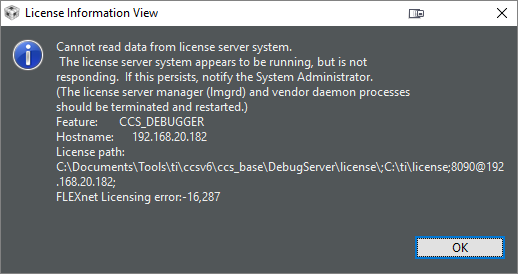
    4. With a freshly booted server, I went to CCS and saw after a time of waiting this dialog. CCS can now see the license server manager and vendor daemon processes, but cannot communicate with the license service. I would say a port issue, however CCS would not know that the services exist, if it could not communicate on port 8090. Maybe port 27000 needs opening, if I even have a firewall enabled. The error code is 16287.

    As I said, progress. Also, the Ti Documentation installation Wiki is clearly lacking. Training of Ti staff is also lacking.

  • Okay, final entry. I should be prayed to, much more so than Jobs, Gates, or anyone, as the trio of super geniuses: me, myself, and I, finally resolved the remaining issue. Since talk is cheap, here is the proof.

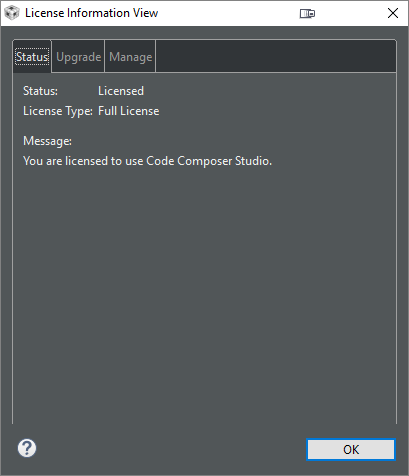
    The last problem and missing step in the instructions is the port to use in CCS (Code Composer Studio). The port is not 8090, as I had thought, but rather 27000. It might be any port in the range specified somewhere in my reading. Going to the log will state the actual port. I guess 8090 is for the admin in the browser, not licensing. Yeah, I know, obvious to 8 billion people waking up at 2:00 AM, but let us say 8 billion minus one, me. That was so not obvious and a query to Ti non-support could not mention that. Okay, 8 billion less everyone at Ti.

    The trusted server storage error is expected and not important. TI support (Billy) had at least one neuron in his head and could answer that, although I saw the same thing shortly before that in an AutoCAD article dealing with Flexlm. Here is the quote: "That trusted storage is a meaningless line entry. This is expected and has 0 impact. It just a different method of access."

    If anyone read this far, I would appreciate massive amounts of up votes on SO posts as compensation.