This thread has been locked.

If you have a related question, please click the "Ask a related question" button in the top right corner. The newly created question will be automatically linked to this question.

CCS/OMAP-L138: I Can't install Code Composer Studio on Windows 7 64 bit Professional Service Pack 1

Part Number: OMAP-L138


Tool/software: Code Composer Studio

When I try to install Code Composer Studio on Windows 7 64 bit Professional with service pack 1, the installer gives me the message: "Code Composer Studio requires Windows 7 with service pack 1 installed. Install the service pack before you run setup". Anybody knows How I can solve the problem?

Thanks in advance.

  • Could you check again that Service Pack 1 is indeed installed correctly on the machine, and then reinstall CCS?
    Take a look at this thread with a similar issue, it links to another one that shows a command you can use to check if SP1 is installed.

  • Thanks for the tips and sorry for the long silence.

    I tried to manually install service pack 1 (SP1), but only received a reply about the successful installation. After the command wmic qfe updates | find "KB2999226 I got an output: "support.microsoft.com/ user Update                        KB2999226               NT AUTHORITY\system             1/26/2016"

  • That seems to indicate the SP1 was installed successfully. Have you tried restarting the computer and then trying to install CCS again?
  • Yes I have tried to install CCS after restarting the computer.

  • Hi,

    Could you please look in %TEMP% folder for any bitrock*.log files, and send me the one corresponding to your install attempt? 

    Thanks,
    Danish

  • Log started 11/08/2017 at 16:36:41
    Preferred installation mode : unattended
    Trying to init installer in mode unattended
    Mode unattended successfully initialized
    [16:36:42] Found mode 
    Executing G:\Code Composer Studio\CCS7.3.0.00019_win32\ccs_setup_7.3.0.00019.exe --mode win32 &
    Script exit code: 0
    
    Script output:
     
    
    Script stderr:
     
    
    Cannot delete file C:/Users/Evgraphov/AppData/Local/Temp/bitrock_installer_6392.log
    Cannot delete file C:/Users/Evgraphov/AppData/Local/Temp/bitrock_installer_7780.log
    [16:36:49] Windows 7 0
    Code Composer Studio requires Windows 7 Service Pack 1 installed.
                Please install the service pack before running the installer.
            
    
    OK. I found one. Here it is.

    And other.

    Log started 11/08/2017 at 16:36:45
    Preferred installation mode : win32
    Trying to init installer in mode win32
    Mode win32 successfully initialized
    

  • For some reason, the installer is not seeing service pack 1 installed. 

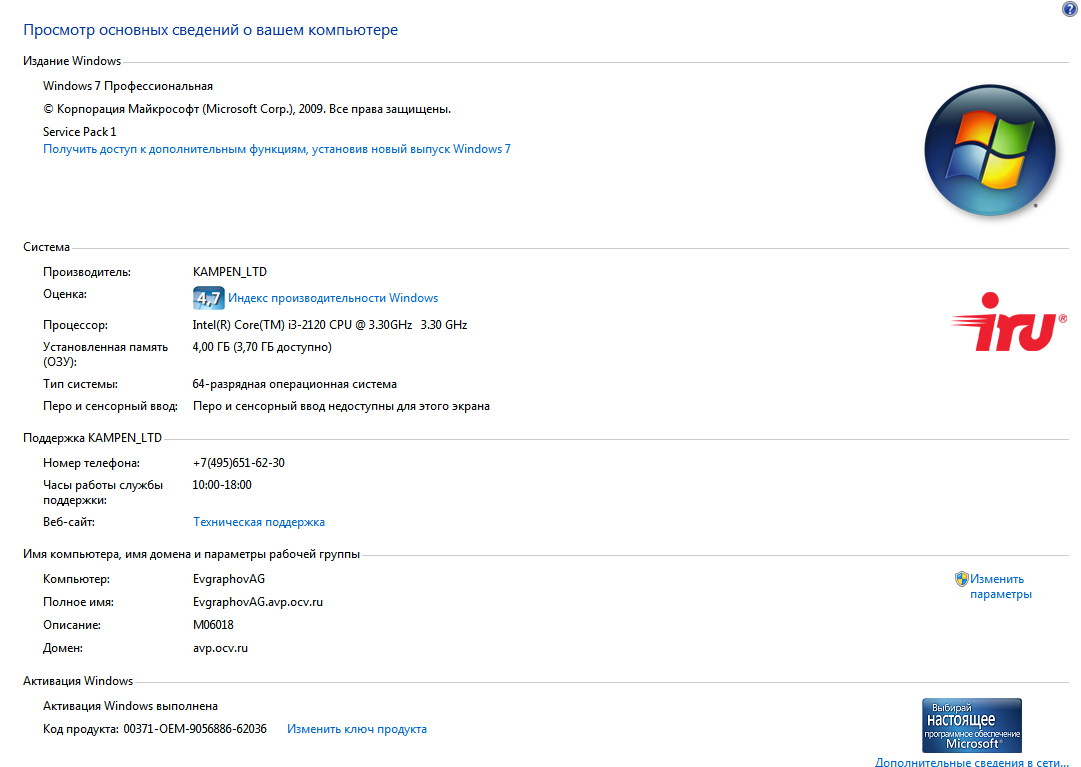
    Can you verify that Control panel -> All Control Panel Items -> System shows that the service pack installed is 1?

    Sorry for the repeated checks, but this failure has me stumped.

    Thanks,

    Danish

  • Hello Danish!

    So sad that logs couldn't help. It should be due to wrong update, but earlier I didn't face to any problems.

    Ok.

    If I understand correctly, you want to have a look at the window of the system information.

    I made 2 screenshots:

     1. Information system;

     2. Updates list.

    Screenshots attached.

    Thank you for your patience.

  • Please accept my request to connect so I can send you a debugging installer. Thanks.
  • Hello Danish!

    I have 2 news:

    1st: Debugging installer behaves the same as others, i.e. after starting I see the same message box about the error.

    2nd: I found out the reason of this problem. This is partly my fault. Usually I use by file manager like norton commander and when I've tried to launch an installer from the Windows explorer (not from Unreal commander, which I use) I got a successful result.

    I apologize for that.

    The debugging installer that is run from the Windows explorer, automatically stops shortly after starting.


    Then I did what you asked me. I ran thedebugging installer from a dos prompt with the option of tracing, but made three different attempts:

    1st is command-line unreal commander (there is an error message).

    2nd is command line text editor plugin where I ran the CMD.exe (there is an error message).

    3d is cmd.exe which was run from the Windows start menu. In this case it doesn't show any message, but silently stopped, as I mentioned earlier.

    The installer created three files: debug_UCom.txt, debug_NPP.txt and debug_CMD.txt appropriate.

    Thank you for your help!debug_CMD.txtdebug_UCom.txtdebug_NPP.txt

  • I'm glad you got that sorted out. Thank you for letting me know.
    Danish