This thread has been locked.

If you have a related question, please click the "Ask a related question" button in the top right corner. The newly created question will be automatically linked to this question.

CCS/LAUNCHXL-CC1350: Error regarding debugging CC1350

Part Number: LAUNCHXL-CC1350
Other Parts Discussed in Thread: CC1350

Tool/software: Code Composer Studio

Hello everyone,

I am working with CC1350 custom board, i got debugging error-Error -242 @ 0x0. I am using CCS7.4 version, i could not able to flash my custom board.

 I have a Retry or Cancel button on the error message dialog. Retry just redisplays the dialog. Cancel terminates the debug session and the Debug tab disappears. 

This same project will work on LaunchPad CC1350 with no problems.

Full Console output:

Cortex_M3_0: GEL Output: Memory Map Initialization Complete.
IcePick_C: Error connecting to the target: (Error -242 @ 0x0) A router subpath could not be accessed. The board configuration file is probably incorrect. (Emulation package 6.0.628.1)

For  information, custom board schematics are as per TI launchpad schematics.

Thanks & Regards 

Haricharan

  • Haricharan,

    Since this issue may be caused by the hardware, can you please check the thread below with a long discussion that may be helpful?
    e2e.ti.com/.../577606

    Hope this helps,
    Rafael
  •  hi desouza,

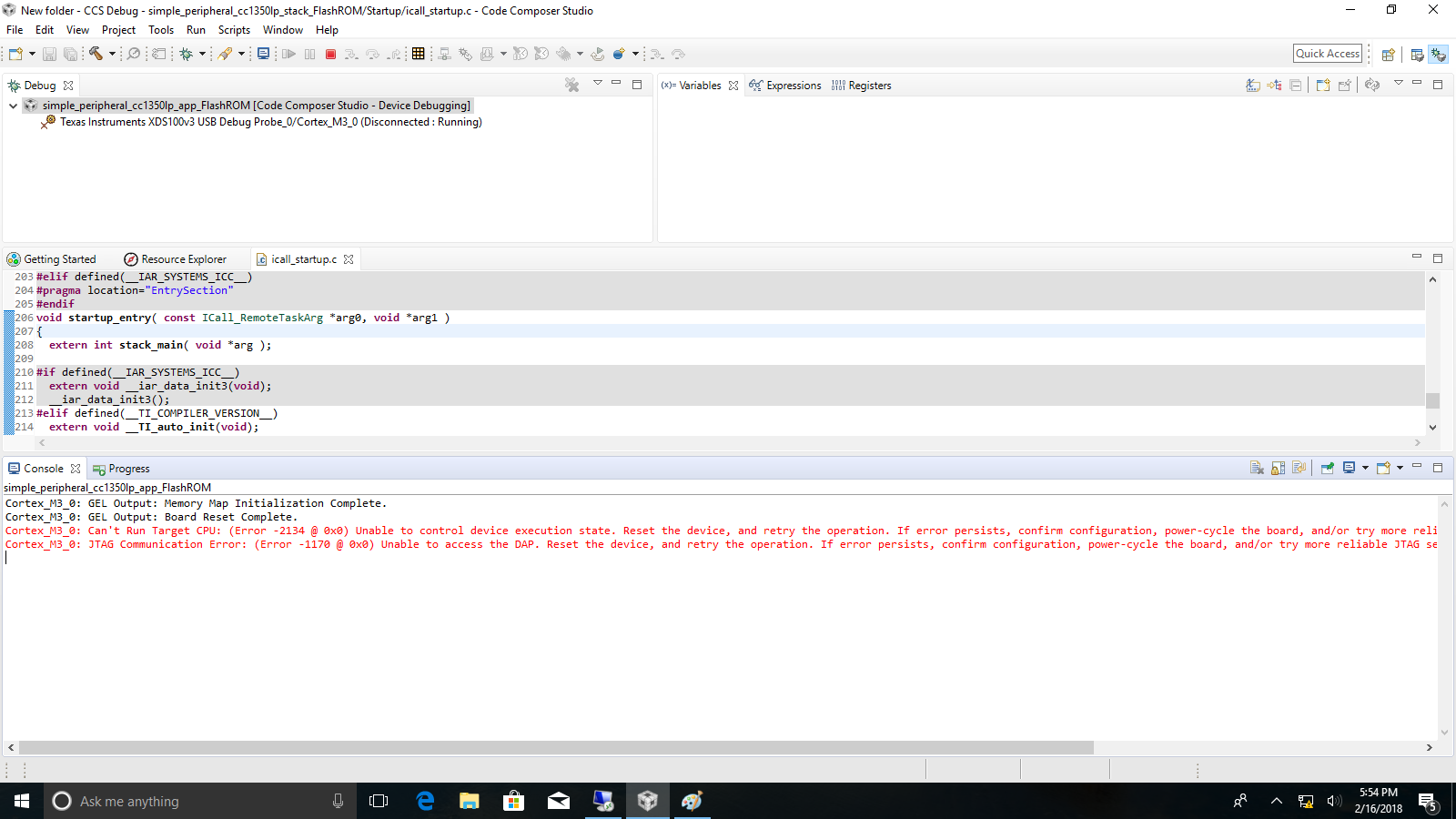
    Now i am using SmartRf06 Evaluation Board to debug simple peripheral example to my custom board(CC1350)using 10 pin arm cortex debug connector,  i am using xds100v3 usb debugging probe. I can able to flash stack but when application is going to flash, i got an error. The error is shown in the figure. Error -2134 @ 0x0 & Error - 1174@ 0x0. What are the possible ways to solve this issue.

    Thanks & regards

    haricharan

  • Haricharan,

    The error you are seeing is shown in the link below:
    software-dl.ti.com/.../ccsv7_debugging_jtag_connectivity_issues.html

    It is interesting the error happens after you are able to flash the stack - usually the application is what causes the device to lock the processor core and cause the error shown. In any case, can you issue a mass erase using either CCS or the LMFlasher utility? Perhaps it could have been a simple glitch on this load.

    Another problem is if the core stack is somehow causing the device to fail - unfortunately this is something I can't evaluate from here, but perhaps some power glitches on the board or the stack itself is misconfiguring the pins of the device? (If I recall correctly the JTAG pins are multiplexed with other functions).

    At any rate, this does not seem to be a problem of the connection itself nor the XDS100v3, as you are able to connect at least once and flash the device.

    Hope this helps,
    Rafael