This thread has been locked.

If you have a related question, please click the "Ask a related question" button in the top right corner. The newly created question will be automatically linked to this question.

CCS/CODECOMPOSER: CCS 6 , 7 and 8 Variables view reports "unknown register 'RxHL'" when debugging a TMS320F28374S

Part Number: CODECOMPOSER


Tool/software: Code Composer Studio

I still get the unknown register when debugging, Even after upgrading to latest 8.x version

This time it looks like it is the floating point registers.
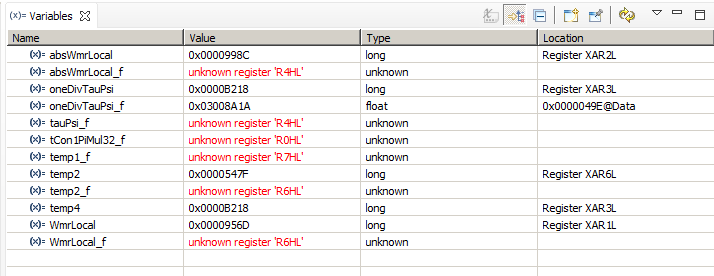
All the "unknown" variables is of the type float.

Looking in regisers window, it looks as the fpu register R6H matches what I expect in WmrLocal_f, So maybe it is just the naming from the debugger that is wrong.

  • Martin,

    This is actually due to a known compiler bug that has been fixed. Which version of compiler tools is your project using? If you update to the latest compiler version, even the latest one on the stream you are on, that should fix the issue. 

  • Nomal we are using an old compiler (6.4).

    But as this could obvous be a compiler/dubugger mismatch I already tried using the compiler that came with the CCS V8, ti-cgt-c2000_18.1.2.LTS

    Same result.

    To ensure I did not have any leftover from old compilation, i tried creating a new workspace, imported project from clean source (pulled from the version system) setting project to the new compiler, and build, then debug. Still same result.

  • Martin Hansen said:

    But as this could obvous be a compiler/dubugger mismatch I already tried using the compiler that came with the CCS V8, ti-cgt-c2000_18.1.2.LTS

    Same result.

    With CCSv8 and latest compiler, do you still see the "unknown register R4HL" message or does it say "unknown register R4H"?

    I just tried an example with CCSv8.1 and see this.

    Can you confirm that this is what you see as well?

    It does appear that either the previous bug was not entirely fixed or there is still another bug here. We will investigate and I will come back to update this thread.

    In the meantime please use the Registers or Memory view as a workaround to see the value of the variable.

  • Sorry for the delay, I was on scrum training for the last couple of days.

    Short answer Yes

    Longer answer see my screen shot

    A side note the variable 'x' at the button, keeps showing up, but is not defined in my code?

  • Thank you for the confirmation.

    It appears there is still a bug with displaying variables that are in FPU registers. I have filed a new bug to track this, the tracking # is DBGTRC-4145.
    You may track its status using the SDOWP link in my signature.

  • Hi

    Thanks for filling the bug report. But I am not able to find a bug report with that number, maybe it is not made public yet?

  • Sorry about that. It should be visible now.
