


Part Number: DRA74
Tool/software: Code Composer Studio
Hello,
the original thread on this topic is marked as closed and the solution was to use an XDC version 3.50.06 or later. Unfortunately for me this problem came back again when starting to use CCS v8.2.0.00007. When opening Runtime Object View and selecting one of the viewable modules (e.g. HeapMem in the example shown below), I'm getting an error message saying that it's an invalid address according to the application's section map.
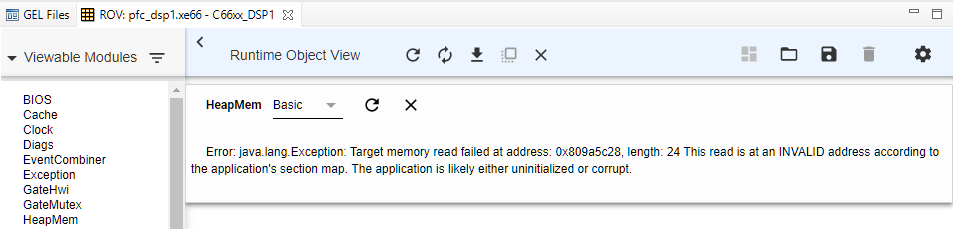
Viewing the failing address in a Memory Browser confirms that CCS does know the symbols, means that address shouldn't be invalid.

Using ROV Classic instead of Runtime Object View isn't an alternative for CCSv8.2 anymore because in that case I only get the error message:
An error has occurred. See error log for more details.
com.ti.dvt.symbolmanager.ISymbolPackage.getSectionAddress(I)J
The XDC version used for the project is xdctools_3_50_07_20_core. Using exactly the same DSP program in CCS v7.4.0.00015 doesn't show any of these ROV problems for me.
I already did a clean re-installation of CCSv8.2 to ensure this problem isn't related to any issues that may have happened during the original installation but that didn't change anything.
Any idea on how to get ROV working for CCSv8.2 would be highly appreciated.
Best regards,
Manfred


