This thread has been locked.

If you have a related question, please click the "Ask a related question" button in the top right corner. The newly created question will be automatically linked to this question.

CCS: Solve XDCTOOLS_JAVA_HOME error from config file editor

Other Parts Discussed in Thread: SYSBIOS

Tool/software: Code Composer Studio

I can't edit the configuration file because of this error message:

XDCTOOLS_JAVA_HOME is set to "C:\ti\ccs920\ccs\utils\jre32"

How can I solve?

Thaks

Lorenzo

  • I can see a number of cases similar to the mine on the forum (now 4), but no one explains exactly how to solve.

    I'm working with XDC 3.32.02.25 CORE, so I think JRE is already present in XDC (?). Just before updating to ccs 9.2 (from 9.1), there wasn't this kind of error.
    So, what I have to do?
    - How to modify XDCTOOLS_JAVA_HOME exactly.
    - How to delete and reinstall XDC.
    - Which XDC package exactly I should install? ... alternatively to 3.32.02.25_Core, or reinstall the same...
    - I need to try every available XDC distribution to find one working?

    If people ask again and again the same question, probably there is not a real response! Make one single detailed answer, and no one will ask again.

    Thank you,

    Lorenzo

  • Lorenzo Arosio said:
    I'm working with XDC 3.32.02.25 CORE, so I think JRE is already present in XDC (?).

    No, especially if installed with CCS installer and installed inside the CCS root directory, they typically do not (to save on install size).

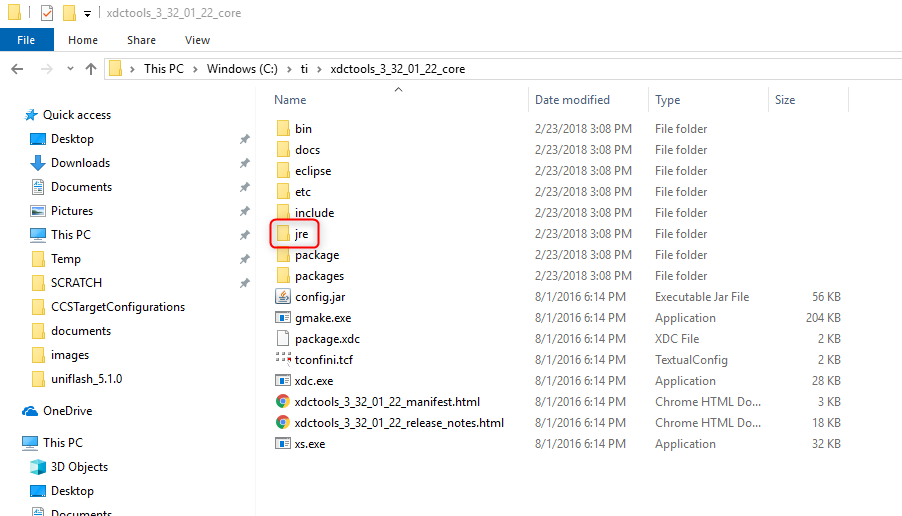
    How to check if there is a JRE? Browse to the root location of XDCtools. Do you see a 'jre' subfolder like below?

    If not, then the JRE is not present.

    Lorenzo Arosio said:
    If people ask again and again the same question, probably there is not a real response! Make one single detailed answer, and no one will ask again.

    Assuming your XDCtools does not have a JRE, the definitive answer is in:

    https://e2e.ti.com/support/tools/ccs/f/81/p/706424/2603546#2603546

    As Todd mentions in that post, option #2 is in the easiest:

    2. Delete that XDCtools you have and install the XDCtools with the JRE from here: software-dl.ti.com/.../


    Hence delete the existing XDCtools version (you can just delete the whole folder) and download/install the desired XDCtools version in: 

    http://software-dl.ti.com/dsps/dsps_public_sw/sdo_sb/targetcontent/rtsc/

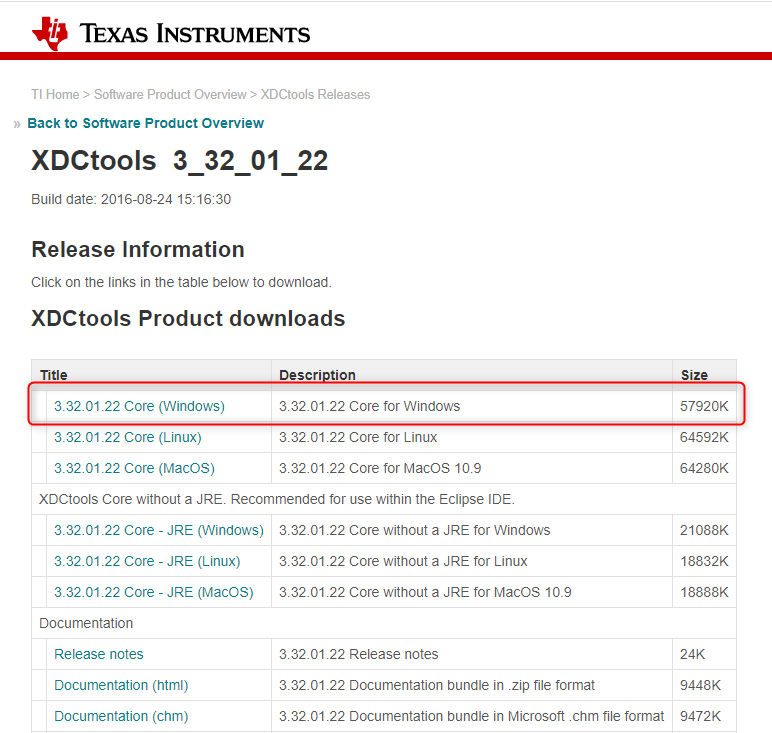
    Pick the option with the JRE:

    Once installed, restart CCS. It should get discovered and be available for use.

    Thanks

    ki

  • Hello Ki,

    this is the third time i try to delete and reinstall XDC and it worked: now cfg editor works.

    But, I can't compile the project due to errors that weren't there before:

    Description Resource Path Location Type
    gmake: *** [../src/sysbios/sysbios.aem4f] Error 2 FM794 C/C++ Problem
    gmake: Target 'all' not remade because of errors. FM794 C/C++ Problem
    gmake[1]: *** [m3_Hwi_asm_switch.obj] Error 2 FM794 C/C++ Problem
    gmake[1]: *** [m3_Hwi_asm.obj] Error 2 FM794 C/C++ Problem
    gmake[1]: *** [m3_IntrinsicsSupport_asm.obj] Error 2 FM794 C/C++ Problem
    gmake[1]: *** [m3_TaskSupport_asm.obj] Error 2 FM794 C/C++ Problem
    gmake[1]: *** No rule to make target 'xdc/runtime/Assert.c', needed by 'BIOS.obj'. FM794 C/C++ Problem
    gmake[1]: *** No rule to make target 'xdc/runtime/Core-label.c', needed by 'BIOS.obj'. FM794 C/C++ Problem
    gmake[1]: *** No rule to make target 'xdc/runtime/Core-mem.c', needed by 'BIOS.obj'. FM794 C/C++ Problem
    gmake[1]: *** No rule to make target 'xdc/runtime/Core-params.c', needed by 'BIOS.obj'. FM794 C/C++ Problem
    gmake[1]: *** No rule to make target 'xdc/runtime/Core-smem.c', needed by 'BIOS.obj'. FM794 C/C++ Problem
    gmake[1]: *** No rule to make target 'xdc/runtime/Diags.c', needed by 'BIOS.obj'. FM794 C/C++ Problem
    gmake[1]: *** No rule to make target 'xdc/runtime/Error.c', needed by 'BIOS.obj'. FM794 C/C++ Problem
    gmake[1]: *** No rule to make target 'xdc/runtime/Gate.c', needed by 'BIOS.obj'. FM794 C/C++ Problem
    gmake[1]: *** No rule to make target 'xdc/runtime/Log.c', needed by 'BIOS.obj'. FM794 C/C++ Problem
    gmake[1]: *** No rule to make target 'xdc/runtime/Memory.c', needed by 'BIOS.obj'. FM794 C/C++ Problem
    gmake[1]: *** No rule to make target 'xdc/runtime/Registry.c', needed by 'BIOS.obj'. FM794 C/C++ Problem
    gmake[1]: *** No rule to make target 'xdc/runtime/Startup.c', needed by 'BIOS.obj'. FM794 C/C++ Problem
    gmake[1]: *** No rule to make target 'xdc/runtime/SysMin.c', needed by 'BIOS.obj'. FM794 C/C++ Problem
    gmake[1]: *** No rule to make target 'xdc/runtime/System.c', needed by 'BIOS.obj'. FM794 C/C++ Problem
    gmake[1]: *** No rule to make target 'xdc/runtime/Text.c', needed by 'BIOS.obj'. FM794 C/C++ Problem
    gmake[1]: *** No rule to make target 'xdc/runtime/Timestamp.c', needed by 'BIOS.obj'. FM794 C/C++ Problem
    gmake[1]: *** No rule to make target 'xdc/runtime/xdc_noinit.c', needed by 'BIOS.obj'. FM794 C/C++ Problem
    gmake[1]: Target 'all' not remade because of errors. FM794 C/C++ Problem

    This is the real problem, because when I modify the xdc this type of error happends. Why? 

    Is it compiler compatibility problem?   (TI v18.12.13.LTS)

    Or, some configuration to be correted?

    Thank,

    Lorenzo

  • OK,

    Better with XDC 3.32.0.06 core, is the one working.

    Done.

    Thank you,

    Lorenzo

  • Thank you for the update and happy to hear that it is working now.

    ki