This thread has been locked.

If you have a related question, please click the "Ask a related question" button in the top right corner. The newly created question will be automatically linked to this question.

CCS/TM4C129XNCZAD: USB PORT IS NOT DETECTING

Part Number: TM4C129XNCZAD
Other Parts Discussed in Thread: UNIFLASH

Tool/software: Code Composer Studio

Hi,

We are trying to flash the program into the TM4C129XNCZAD controller but the port is not detecting it is showing as Stellar-is firmware upgrade .When  i tried to flash the  program it is showing as unable to communicate with device is getting so we have installed and updated the drivers from stellaris icdi drivers but still we are not able to flash the program .I have attached the file below please check and give me solution
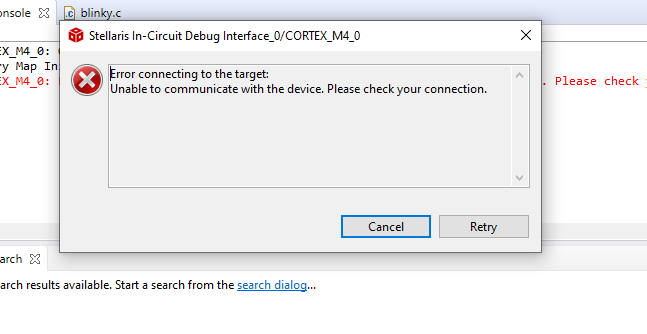
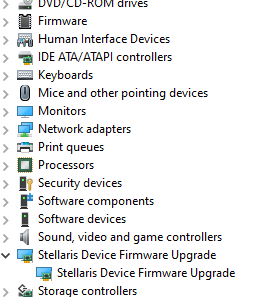
  • Hi,

    Could you please confirm whether you are using this board? EK-TM4C1294XL

    It sounds like the board is coming up in DFU mode.  Would you be able to try updating the LaunchPad firmware using "ICDI Firmware Update" button of the LMFLASH utility?

    LMFLASH

  • Thanks for the reply.

    we are not using EK tm4c1294xl  launchpad  but we are using customized tm4c129xnczad controller and we have inbuilt debugger ic tm4c123g6mpi.We have developed the customized  board as same as DK TM4C129XNCZAD .We are using Usb cable to flash the program so now the problem is that port is not detecting.

     Would you be able to try updating the LaunchPad firmware using "ICDI Firmware Update" button of the LMFLASH utility? - can you tell me how to update this.

    Please help me to resolve this issue.

  • It sounds like you are using a custom version of this board: DK-TM4C129X  

    Nevertheless, as long as you have exactly copied the debugger circuitry the same firmware should still work. It does look like the debugger is coming up in DFU mode, so please try updating the firmware using either LMFLASH or UNIFLASH

    I do not currently have access to either board to try it myself, but it should just be a matter of installing the UNIFLASH or LMFLASH software, manually selecting the correct board, and clicking the firmware upgrade button.

    You said in the first post that you had already updated the Stellaris ICDI drivers. Please also confirm you have the latest drivers installed (http://software-dl.ti.com/tiva-c/SW-TM4C/latest/exports/SW-TM4C-2.1.4.178.PATCH-1.0.zip),