This thread has been locked.

If you have a related question, please click the "Ask a related question" button in the top right corner. The newly created question will be automatically linked to this question.

Compiler/TM4C129ENCPDT: Bare-metal Programming for TM4C129ENCPDT MCU

Part Number: TM4C129ENCPDT
Other Parts Discussed in Thread: EK-TM4C129EXL, TM4C1294NCPDT

Tool/software: TI C/C++ Compiler

Hello All,

I am trying to work on bare-metal programnming with TM4C129ENCPDT MCU.

Kindly guide on how to get started on this - maybe a blinker to get started.

I'm using EK-TM4C129EXL LaunchPad.

Thanks in advance. :)

Regards,
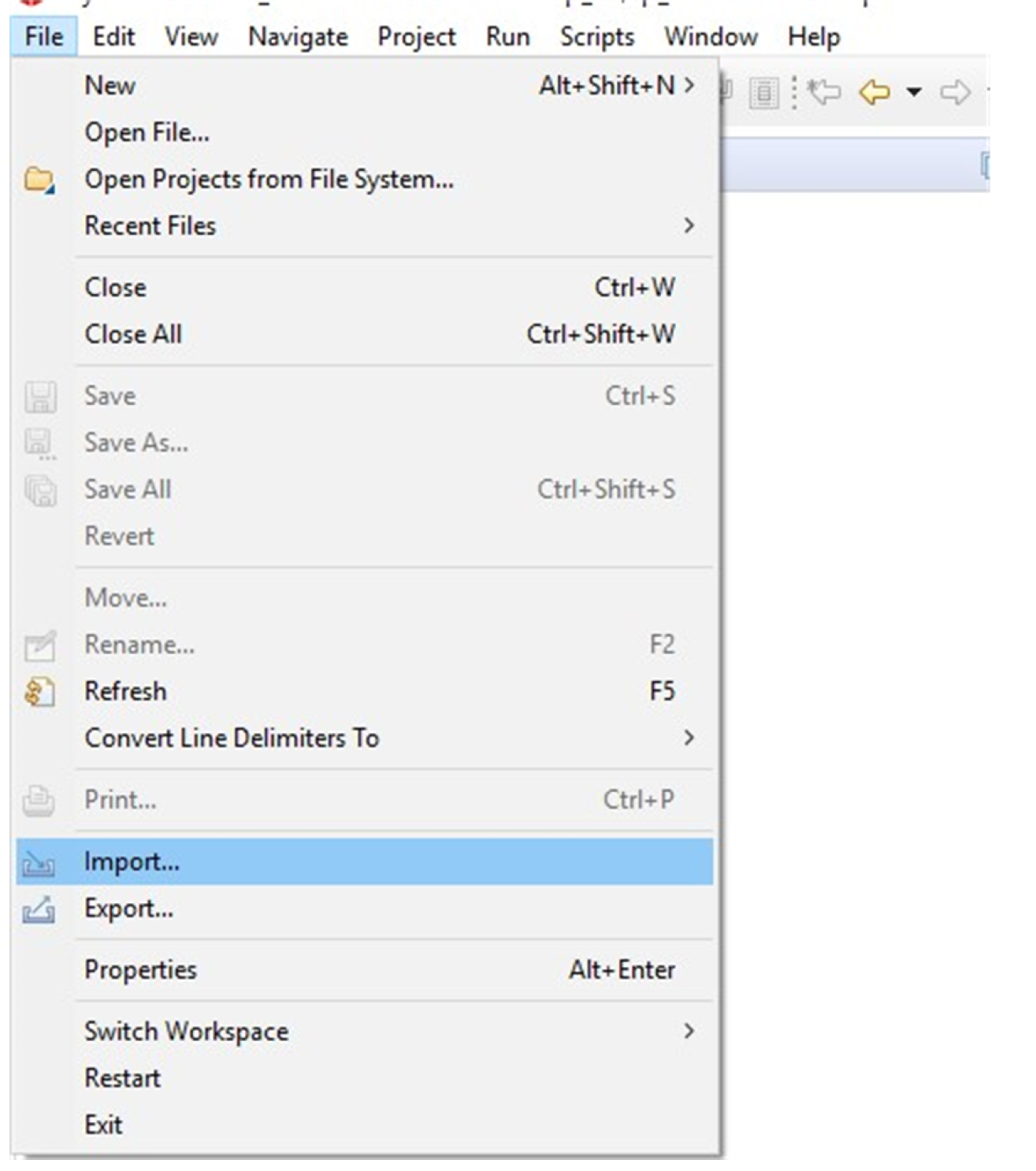
  • Download Code Composer Studio if you have not already, or use the on-line version. Then download the TivaWare library. Once you have installed both, you can open Code Composer and do File -> Import ->

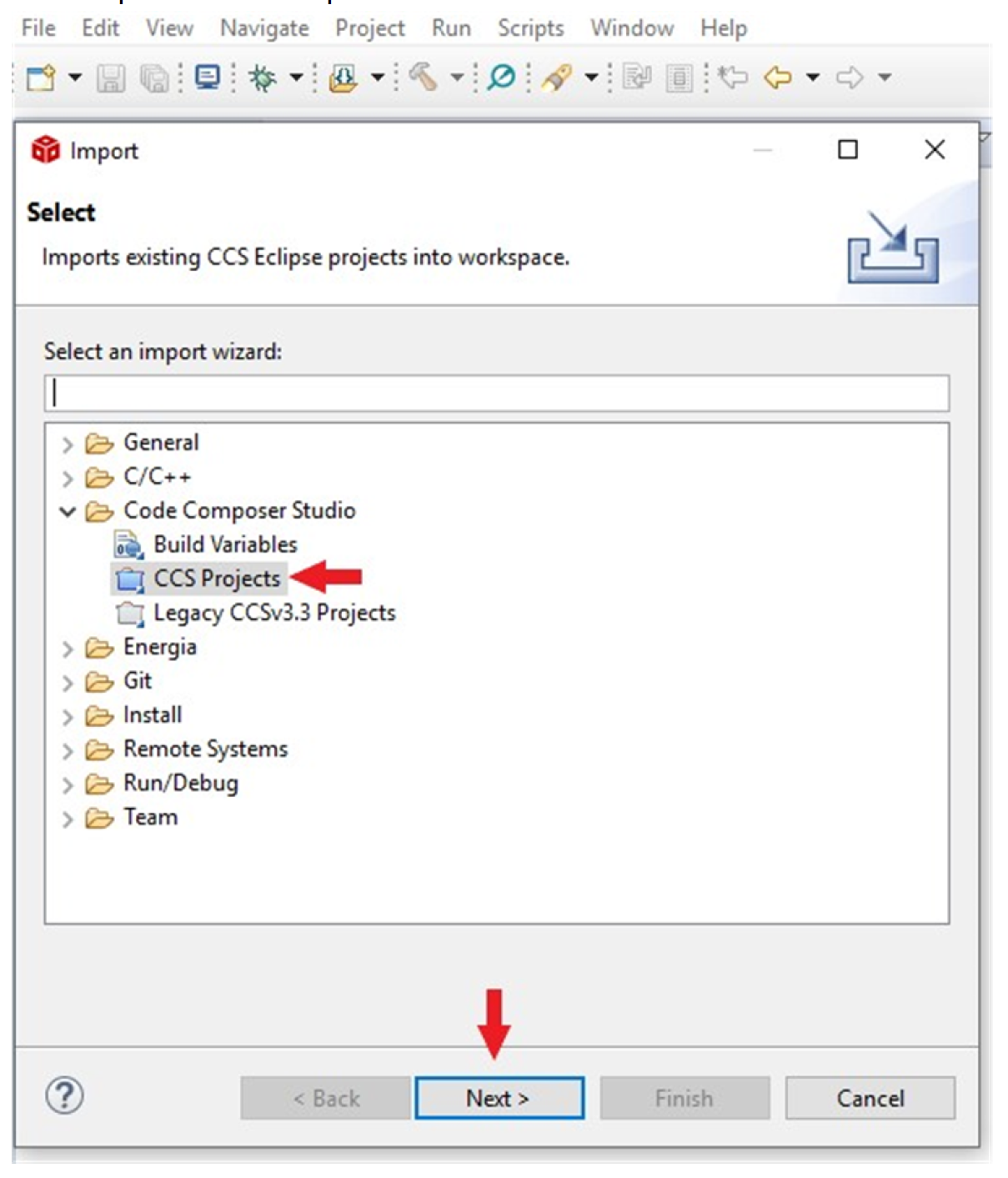
    Select "CCS Projects" to import the example and then click "Next".

    Browse to the "blinky" example in TivaWare. By default it will be in "C:\ti\TivaWare_C_Series-2.2.0.295\examples\boards\ek-tm4c129exl\blinky"

    Click the "Copy projects into workspace".

  • Hello ,

    My bad,

    I wasn't clear with my question.

    Actually I meant register level programming for TM4C129ENCPDT MCU without using the available API from TI.

    Regards,

  • We strongly discourage doing direct register writes as it increases the difficulty of programming and increase the number of errors. I have copied item #4 from the post "[FAQ] ***Read Before Posting!*** TM4C Forum General Guidelines". 

    4) Avoid use of Direct Register Modification (DRM) only programming, and instead use TivaWare.

    One of the primary purposes of TivaWare has been to remove the need for individual users to learn the ins and outs of DRM programming. For this reason, we will not be able to offer support for any questions that only pertain to DRM programming.

    For those who truly want to understand how to program the device with DRM for greater understanding, then the recommendation from TI is to first code the project with TivaWare, and then replace the TivaWare APIs section by section with the DRM code that they execute. As TivaWare API's are open source, this option is open for all users.

     *** This does not apply to questions regarding situations where a handful of DRM calls may be needed to supplement TivaWare or address errata items ***


  • Hello Bob,

    I would like to know more maybe some tutorials or sample codes about DRM programming for educational purpose.

    Yes, as you mentioned, best option is to use TivaWare, but its not the case here.

    Many thanks for the response. :)

    Regards,

    Arunava.

  • Since we do not recommend direct register modification, we do not have tutorials or examples. I can show you a simple program to blink an LED using DRM, but that is about all the support I can give you. I suspect your professor is having you write to the registers directly so that you will read the data sheet in detail and get a better understanding of the peripherals in the device.

    #include <stdint.h>
    #include "inc/tm4c1294ncpdt.h"
    
    //*****************************************************************************
    //
    //! \addtogroup example_list
    //! <h1>Blinky (blinky)</h1>
    //!
    //! A very simple example that blinks the on-board LED using direct register
    //! access.
    //
    //*****************************************************************************
    
    //*****************************************************************************
    //
    // Blink the on-board LED.
    //
    //*****************************************************************************
    int
    main(void)
    {
        volatile uint32_t ui32Loop;
    
        //
        // Enable the GPIO port that is used for the on-board LED.
        //
        SYSCTL_RCGCGPIO_R = SYSCTL_RCGCGPIO_R12;
    
        //
        // Do a dummy read to insert a few cycles after enabling the peripheral.
        //
        ui32Loop = SYSCTL_RCGCGPIO_R;
    
        //
        // Enable the GPIO pin for the LED (PN0).  Set the direction as output, and
        // enable the GPIO pin for digital function.
        //
        GPIO_PORTN_DIR_R = 0x01;
        GPIO_PORTN_DEN_R = 0x01;
    
        //
        // Loop forever.
        //
        while(1)
        {
            //
            // Turn on the LED.
            //
            GPIO_PORTN_DATA_R |= 0x01;
    
            //
            // Delay for a bit.
            //
            for(ui32Loop = 0; ui32Loop < 200000; ui32Loop++)
            {
            }
    
            //
            // Turn off the LED.
            //
            GPIO_PORTN_DATA_R &= ~(0x01);
    
            //
            // Delay for a bit.
            //
            for(ui32Loop = 0; ui32Loop < 200000; ui32Loop++)
            {
            }
        }
    }
    

    The definitions of all of the registers are provided by the file "tm4c1294ncpdt.h" which can be found in the TivaWare directory "C:\ti\TivaWare_C_Series-2.2.0.295\inc"

  • Hi ,

    Many thanks for the help.

    BTW, I'm a working professional. I'm into desktop applications currently and willing to move out to embedded systems. Any guidance in this regard will be very helpful.

    Regards,

    Arunava.

  • I suggest you not spend time trying to write code using direct register modification. Rather, start with examples that use the TivaWare library. As you debug your code use the disassembly window and assembly stepping when you think the C code is not doing what you want. (My code has a mean habit of doing what I told it to do instead of what I wanted it to do.) If a peripheral is not doing what you expected, use the register window to see how each register was programmed by your code and use the detailed register description in the datasheet to check if that is correct. This is how you will gain knowledge of the device at the register level. Have fun! Embedded code writing can be frustrating and rewarding.

  • HI ,

    Many thanks for the suggestions. They are really helpfull.

    After a bit of research, even I have have come to the conclusion that using the API from TI would be the best option.

    Yeah, at time it gets frustrating but it always proves to be rewarding.

    Regards,

    Arunava.