This thread has been locked.

If you have a related question, please click the "Ask a related question" button in the top right corner. The newly created question will be automatically linked to this question.

CCS/PROCESSOR-SDK-AM335X: Yet ANOTHER out of the box FAILURE

Part Number: PROCESSOR-SDK-AM335X
Other Parts Discussed in Thread: SYSBIOS

Tool/software: Code Composer Studio

Hello,

1.  Launch CCS 10

2. Create a new project (name test or whatever) using  GNU 7.2.1 Linaro and template:  SYS/BIOS | GNU Target Examples | Typical

3. Select SYSBIOS 6.83.0.18 and XDC 3.61.2.27

4. MANUALLY ENTER "ti.platforms.beaglebone" in the platform because the drop down is empty (something else that is broken)

5. Press finish.  A project temple is generated.

6.  Select build.  Get an error:  

C:/ti/bios_6_83_00_18/packages/ti/sysbios/rts/gnu/ReentSupport.c:84: 
undefined reference to `ti_sysbios_rts_gnu_ReentSupport_checkIfCorrectLibrary'

7.  Search and find this solution (which isn't - because this is NOT an imported project)

8. Follow the link to the FAQ, and read it, realizing it is useless to this issue:

Why do I get a “undefined reference to `ti_sysbios_rts_gnu_ReentSupport_checkIfCorrectLibrary’” error when compiling my application?

Well...

You may have encountered this error when building an application for ARM using makefile and not using CCS

Wrong.  This is 100% CCS.  Or 

You will need to link in the proper C runtime library from SYS/BIOS. 

And where are they??  Or

Double check the makefile(s) and make sure that you are using libc, libgcc, libm, etc. 
from the SYS/BIOS package and not from your toolchain (GCC Linaro).

Which I did NOT set up, the "wizard" did.

But examining the linker setting, the ONLY search path is 

${COM_TI_BIOS_LIBRARY_PATH}

Which is yet another one of those "under the cover", "magical", "you're not allowed to see where it came from", "not defined anywhere in the workspace" environment macros.

Any wonder why my disdain for this environment grows daily?

  • Hi Chris,

    I see this in the PRSDK docs: http://processors.wiki.ti.com/index.php/SYS/BIOS_with_GCC_(CortexA)#What_do_I_need_to_do_to_make_the_C_runtime_library_re-entrant_when_building_SYS.2FBIOS_applications_for_Cortex-A_GNU_targets.C2.A0.3F

    I also see this E2E thread: https://e2e.ti.com/support/processors/f/791/t/640006?RTOS-SYSBIOS-GNU-linker-error-with-SYSBIOS-v06-52-00-12

    I notice SYSBIOS 6.83.00.18 has a dependency on XDCTools 3.61.03. However, I can't find a public location for this XDCTools version: http://software-dl.ti.com/dsps/dsps_public_sw/sdo_sb/targetcontent/rtsc/index.html

    The SYSBIOS release just prior to 6.83.00.18 is 6.82.01.19. This version is available for download at the above link, and the associated XDCTools version 3.61.0.16 is located in the CCS 10 installation.

    I tried creating the SYSBIOS "Typical" example using SYSBIOS 6.82.01.19 & XDCTools 3.61.0.16. However, I see the same build problem:

    C:/ti/bios_6_82_01_19/packages/ti/sysbios/rts/gnu/ReentSupport.c:84: undefined reference to `ti_sysbios_rts_gnu_ReentSupport_checkIfCorrectLibrary'

    I followed the instructions in the above docs / e2e threads, but I still see the same build error. Checking the SYSBIOS installation, I notice there isn't a folder <BIOS>\packages\gnu\targets\arm\libs\install-native\arm-none-eabi\lib\hard. To me this suggests the required library isn't included in the installation package.

    I was able to get the SYSBIOS "Typical" example building in CCS 10 using the SYSBIOS & XDCTools versions packaged with PRSDK 6.3. I recommend you use those versions since they've been tested as part of the PRSDK release.

    Regards,
    Frank

  • Okay, I installed the packages as described, since the page was not discovered on any search engines, only pages that show the latest versions of these packages.

    The "Out of Box" failures continue:

    Well, I don't have a newer version of Java.  Was that a prerequisite?  Should it have been explained somewhere?  Should the package installer have detected it and aborted or prompted the user?

    Oddly enough, it will actually build a project.  But the XGCONG window won't open.

    No matter what "console" I open, there is no "XDCTOOLS_JAVA_HOME" defined anywhere I can find.  So this is an environmental variable that I do not have any control over.  I can find no setting anywhere in the IDE that controls what version of Java it uses.

    (CCS7 now only "kind-of" works.  It kept giving me blank screens...  I was about to complain about CCS 10 damaging some of those projects, until I made the miraculous discovery that it will show the screen if you re-size the window (force a repaint) )

    Am I supposed to go directly to Oracle and install their Java, complete with all the spyware, adverts, and browser add-ons?   Or should this use the existing version  (jre6) ?  Or does TI have a recommended/customized version?

  • Hi Chris,

    I don't think it should be necessary to install Java.

    I was able to create a new SYS/BIOS "Typical" example following the steps below. I was able to build the project and open the .cfg file in XGCONF.

    Start by installing PRSDK 6.3 into C:\ti_am335x_06_03_00_106. Next in CCS:

    • Select Window -> Preferences -> Code Composer Studio -> Products.
      • Click "Add" button, add C:\ti_am335x_06_03_00_106 to product discovery path
      • Click "Refresh" button. 
      • Install all RTSC components in C:\ti_am335x_06_03_00_106
      • Restart CCS when prompted
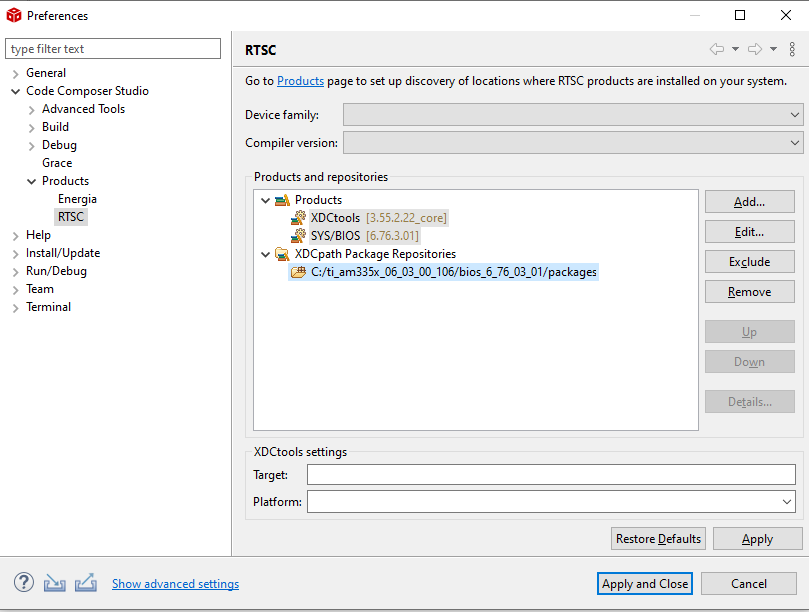
    • Select Window -> Preferences -> Code Composer Studio -> Products -> RTSC.
      • Click "Add" button
      • Click "Select a product" button
      • Select SYS/BIOS & 6.76.3.01, click OK
      • Click "Add" button
      • Click "Select a product" button
      • Select XDCtools & 3.55.2.22_core, click OK. See screen cap 01_add_rtsc_components.PNG.
    • Select Window -> Preferences -> Code Composer Studio -> Build -> Compilers
      • Click "Add" button, add C:\ti_am335x_06_03_00_106 to tool discovery path
      • Click "Refresh" button. 
      • Click "Apply and Closes" button.
      • Restart CCS manually
    • File -> New -> CCS Project
      • Select Target: BeagleBone_Black
      • Select Comiler version: GNU v7.2.1 (Linaro)
      • Under "Project templates and examples", select SYS/BIOS -> GNU Target Examples -> Typical
      • Type in a project name, e.g. "test", click Next
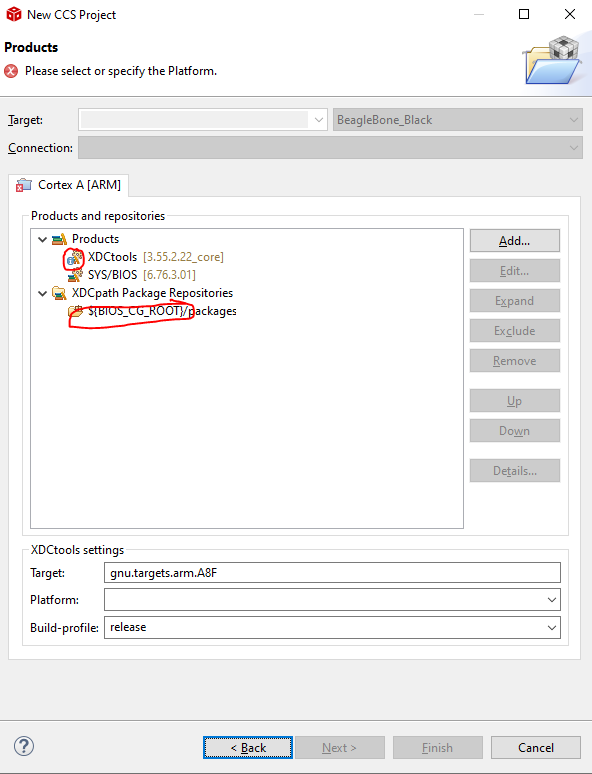
      • XDCpath Package Repositories will have "${BIOS_CG_ROOT}/packages", but it seems this doesn't work properly.
        • Double-click on this package repository, click browse, and browse to "C:\ti_am335x_06_03_00_106\bios_6_76_03_01\packages, and click "Select folder".
        • See screen cap 02_ccs_project_xdctools.PNG. The red circles show CCS confused about XDCTools since (1) it "auto-selects" 3.55.2.22_core even though this is the only installed version and (2) it doesn't understand ${BIOS_CG_ROOT} even though it shows up in the environment variables (see below).
      • From Platforms dropdown list select ti.platforms.beaglebone, click Finish.

    To see value of "${BIOS_CG_ROOT}" environment variable:

    • Select Window -> Preferences
    • Select Code Composer Studio -> Build -> Variables
    • Click "Show System variables"
    • Double-click on "BIOS_CG_ROOT"

    To open .cfg file in XGCONF: right-click on app.cfg in Project Explorer, Open With -> XGCONF

    Please let me know if this resolves the issue.

    Regards,
    Frank

    Add RTSC components: 01_add_rtsc_components.PNG

    CCS Project and XDCTools: 02_ccs_project_xdctools.PNG

  • Frank,

    Happy Monday... turn it on and it works.  The XCONF graphic screen now works, and I did NOT install any new JAVA, or so anything else.  It just  started working on it's own.

    Very annoying...

    Also, I am way past the installing the packages step.

    What I cannot understand is:

    How does it add the "C:\ti\bios_6_46_05_55" path when the project has NO SYSBIOS product selected??

    Well, your explanation of 

    • Select Window -> Preferences
    • Select Code Composer Studio -> Build -> Variables
    • Click "Show System variables"
    • Double-click on "BIOS_CG_ROOT"

    And although the list in the dialog box says "ECLPISE_DYNAMIC_VARIABLE" when I double click it, it shows me the actual path.

    Seems to indicate that CCS is using this as a default search path all the time, regardless (unless you take the step of adding SYSBIOS from a different package which overrides it).

    Now... yet another annoyance!!!!  Why is this compiling *.S files when I tell it to "build selected file" on a "c" file?   

    And why does it do that even if I select the "S" file and mark it as "exclude from build" ??

  • Chris,

    Christopher Weber said:

    Now... yet another annoyance!!!!  Why is this compiling *.S files when I tell it to "build selected file" on a "c" file?   

    And why does it do that even if I select the "S" file and mark it as "exclude from build" ??

    I'm not sure. Can you please open a new thread for this topic?

    Thanks and regards,
    Frank

  • Frank,

    I did.  Here:

    e2e.ti.com/.../956849

    Which has a link to a screen capture showing that I can tell it to ignore the first S file and it does.

    But if I tell it to ignore the SECOND S file, it doesn't.

    AND... (someone put an # include in there - wasn't me) the assembler was trying to compile XDC "C" code and generated 1000's of lines or errors... that is expected.   

    BUT that all scrolled off the window.  So I spend days just trying to figure out WHERE THESE ERRORS WERE COMING FROM.  Because the errors are all attributed to XDC source files.

    If the window held enough, or just logged it to a file I could open after the fact, I could have seen the original command line and not spend days trying to figure out which source file was the cause.

  • Hi Chris,

    Christopher Weber said:
    If the window held enough, or just logged it to a file I could open after the fact, I could have seen the original command line and not spend days trying to figure out which source file was the cause.

    I don't think there's a way to redirect the build output to a file. I only see a "copy" and "scroll lock" feature. This is discussed in this e2e thread: https://e2e.ti.com/support/tools/ccs/f/81/t/87023

    One possible workaround is build your CCS project from the command-line, and redirect the build output to a file. Please check this: http://software-dl.ti.com/ccs/esd/documents/ccs_projects-command-line.html

    Regards,
    Frank

  • Frank,

    Another one...  (Do I open question?)

    As I dig, and look at the GNU compiler, I guess TI has abandoned the "SYS_BIOS_PATH" in this thing, and now there is a ${COM_TI_BIOS_INCLUDE_PATH}.

    Guess what...? It's empty. not just "not populated yet" It's actually EMPTY. And not defined anywhere in the preference you described.

    Given this set of includes:

    ${COM_TI_BIOS_INCLUDE_PATH}
    ${PROJECT_ROOT}
    ${CG_TOOL_INCLUDE_PATH}
    ${PROJECT_ROOT}/ti

    (yes, I have a "TI" folder in the project) My build command is this:

    C:/ti/gcc-arm-none-eabi-7-2018-q2-update/bin/arm-none-eabi-gcc-7.3.1.exe" 
    -c 
    -mcpu=cortex-a8 
    -march=armv7-a 
    -mtune=cortex-a8 
    -marm 
    -mfloat-abi=hard 
    -I"C:/Source/projects/DnsTest" 
    -I"C:/ti/gcc-arm-none-eabi-7-2018-q2-update/arm-none-eabi/include" 
    -I"C:/Source/projects/DnsTest/ti" 

    This is truncated from the full command line, but notice there are 4 directories listed, but the command line has three. And the first one: ${COM_TI_BIOS_INCLUDE_PATH} is not even listed.

    Next I created a quick test project, and the includes are this:

    ${COM_TI_BIOS_INCLUDE_PATH}
    ${PROJECT_ROOT}
    ${xdc_find:gnu/targets/arm/libs/install-native/arm-none-eabi/include/newlib-nano:${ProjName}}
    ${xdc_find:ti/posix/gcc:${ProjName}}
    ${CG_TOOL_INCLUDE_PATH}

    What the heck is that {xdc_find... ??

    Obviously it's some search that is invoked, but what? Is it documented someplace? And why does it have the project name appended to it?

    Any idea what it is?

  • Christopher Weber said:
    If the window held enough, or just logged it to a file I could open after the fact, I could have seen the original command line and not spend days trying to figure out which source file was the cause.

    The complete build log already gets written to the workspace, in the file .metadata/.plugins/org.eclipse.cdt.ui/<project-name>.build.log

    With CCS10 I looked at that directory and saw some examples of complete build logs of 2270 lines (when I had a lot of warnings).

    Not sure why Eclipse doesn't make this obvious where the complete build output is written.

  • Chester...  WOW.

    That'll be useful.    You're right, another non-obvious, hidden behavior.

    I've got a "global-build.log" of 38,000 line!  I wonder when it is purged?

  • Hi Chris,

    Christopher Weber said:
    Another one...  (Do I open question?)

    Yes, I would open a separate thread for these questions. This is so:

    1. the Q&A can be more easily located in the future by other people with a similar problem
    2. the right "expert" is assigned to the thread.

    I'll close this thread for now.

    Regards,
    Frank

  • Chester,

    Thanks much, very useful info.

    Regards,
    Frank