This thread has been locked.

If you have a related question, please click the "Ask a related question" button in the top right corner. The newly created question will be automatically linked to this question.

CCS/CC2650: Compiling on Win10 computer, a workspace from backups that was developed on XP computer

Part Number: CC2650

Tool/software: Code Composer Studio

I developed a fairly complex CC2650 BLE project back in 2017 on my XP computer which has gone the way of the dodo (the computer, not the project ;) ).

I have been working for 2 days now trying to get my current Win10 Pro computer (with the same version of CCS7 Version: 7.0.0.00042 installed) to compile the code that has been running on 1000's of CC2650 installations for 3 years.

I have backups that were created in many ways when the XP was running, including a full copy of the workspace directory structure from the hard drive.

I don't know where to begin telling you everything that I have tried, but I guess an explanation of my current errors when compiling might help.

I have been much closer to success than this before but I have lost those instants in time that were close.

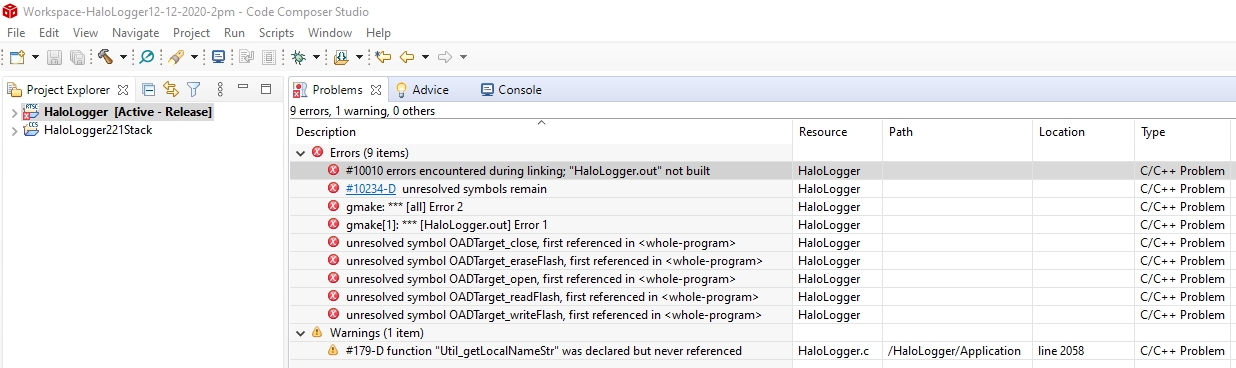
Here is my current 'problems tab' when I try to build (I hesitate switching compilers and I do not know why it says no make file):

All/any help would be appreciated.

Thanks,

Dale

  • Hi Dale,

    The error regarding "make" is interesting. CCS projects should be build by using "gmake" instead of "make". Please check the project properties and make sure that the "Use default build command" option is enabled. Note that you'll need to expose the advanced build settings by clicking on the option in the lower left corner.

    As for the compiler, please see section 4.4 of the User's Guide to see how to obtain the version of the ARM compiler needed:

    https://software-dl.ti.com/ccs/esd/documents/users_guide/ccs_updates.html#installing-new-software

    Thanks

    ki

  • Hi Ki,

    Use default build command was unchecked so I checked it and that error was gone but then the same make error appeared for the HaloLogger221Stack. So, I tried to check 'Use default build command' in its properties but the box will not take a check.  

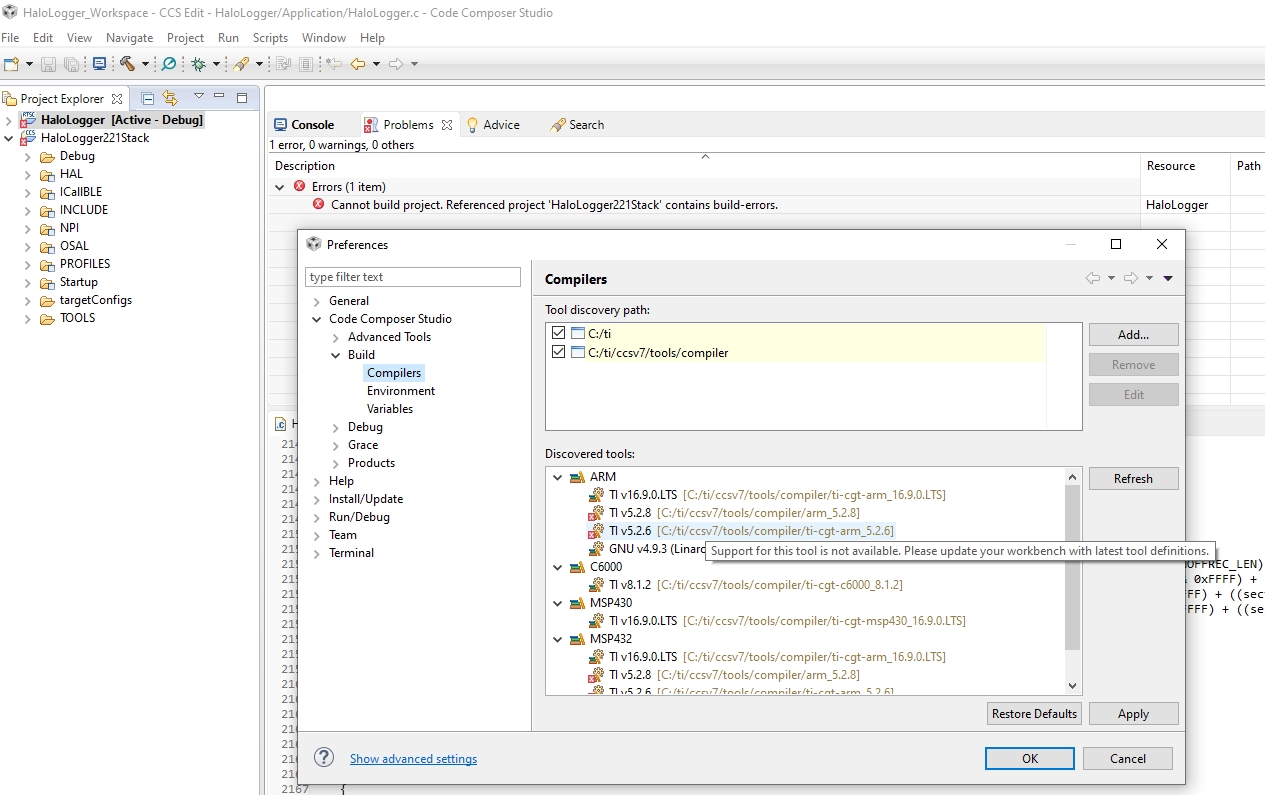
    As far as compiler, I had already installed ARM 5.2.6 but I could not get past this error that says i should update my tool definitions, whatever that is (Google did not help):

    Perhaps we should start over and try to get one up the backup methods to work from scratch...

    Which backup method from my XP computer is most likely the easiest one to get running on my Win10 computer and how would I import/open the backup?

  • I re-read your initial post and have a question - are you trying to use the actual workspace folder from your XP machine? Or just importing projects from it to you new workspace on your new PC? I don't recommend the former - workspaces are not very portable and aren't meant to be shared (moved around).

  • I have tried all ways I could think of, including the workspace folder as a last resort.

    I think the version I am now using is that on XP machine I did a File>Export>General>Archive file.  Then on Win10, I used Project>Import CCS projects>Select archive file>Browse to my archived file that had both HaloLogger and HaloLogger221Stack in it.

    Should I start from scratch to import into a new workspace on my Win10 computer again?

  • Dale Kramer said:
    Should I start from scratch to import into a new workspace on my Win10 computer again?

    I think that is the best way also use the latest SDK and latest CCS version.

    -kel

  • Do you mean the latest CCS7 or the latest CCS period?

    Also, what SDK, I have not been loading any specific SDK?

    Thanks

  • Dale Kramer said:
    Do you mean the latest CCS7 or the latest CCS period?

    Very latest CCS version.

    Dale Kramer said:
    Also, what SDK, I have not been loading any specific SDK?

    Sorry, for CC2650 it is referred to as BLE Stack. BLE Stack v2.2.5 which you can download from the link below. What you can do is port your work to an example program of the latest BLE Stack for CC2650.

    -kel

  • Dale Kramer said:
    I think the version I am now using is that on XP machine I did a File>Export>General>Archive file.  Then on Win10, I used Project>Import CCS projects>Select archive file>Browse to my archived file that had both HaloLogger and HaloLogger221Stack in it.

    When did the project export, did you also try to archive any linked files? If not, then the export/import of the archive should be fine.

    I'm not sure why you would not be able to change the builder settings for the stack project. And those older versions of the compiler should work fine with v7. I just updated my v7 install to grab compiler version 5.2.6. It installed fine and is properly detected by CCS

    I am, however, using CCSv7.4 while you are using 7.0. If you must stick to CCS 7.0, I can try installing that version to see if I have any issue.

  • Ki said:
    I am, however, using CCSv7.4 while you are using 7.0. If you must stick to CCS 7.0, I can try installing that version to see if I have any issue.

    No issues with CCS 7.0.0.00042 either. Perhaps you have a bad installation?

    Can you provide your project to me? I don't need all the source files, I just need the three .*project files in the project folder. If you do not wish to share publcly, please start a private E2E conversation with me.

    Thanks

    ki

  • Only problem is that I know I had to make a change or two to the BLE stack (that is the HaloLogger221Stack in my workspace) and since they have been working in so many installations for three years I think I will continue with my version of the BLE stack.

    Thanks, I will try with a completely 'modern' install of CCS...

    The hard disk was failing on my XP when the various methods of backups were made and I hope one of them will get me going again (unfortunately it may be the workspace directory structure backup that is the one I have to use :( ).

  • Ki said:
    Can you provide your project to me? I don't need all the source files, I just need the three .*project files in the project folder. If you do not wish to share publcly, please start a private E2E conversation with me.

    Files .*project have been sent in E2E message.  They started life in a zip file that was made about 3 years ago when the project last compiled and I just got them from the workspace directory structure where the projects were imported to just now.  I know have in the past tried archiving the linked files but I am not sure if that was done with the files I sent you.  I was able to backup the whole hard drive that was failing and could perhaps have another look in XP computer now (which still boots and runs XP from the copy of the failed hard drive) but the project was not compiling in XP the other day either (not sure if that was because of corrupt files there from hard disk failure).

    Ki said:
    No issues with CCS 7.0.0.00042 either. Perhaps you have a bad installation?

    After I uninstalled CCS 7.0.0.00042 with Windows uninstall, I actually deleted my whole c:/ti directory and the installed CCS 7.0.0.00042 again.

    I had the same issue with 'make' vs 'gmake' and with ARM 5.2.6 not recognized.

    I am currently in the middle of doing another uninstall, delete c:/ti and new installation of the latest CCS.

  • I am now closer than ever to solving my issue.

    I am told I have to install XDCtools 3.32.0.06_core.

    I got it from here http://downloads.ti.com/dsps/dsps_public_sw/sdo_sb/targetcontent/rtsc/3_32_00_06/index_FDS.html

    It installs and shows up in the c:/ti directory but CCS does not see it yet.

    How do I force CCS to see/load it when I open CCS up?

  • Dale Kramer said:

    It installs and shows up in the c:/ti directory but CCS does not see it yet.

    How do I force CCS to see/load it when I open CCS up?

    Try pressing the "Rediscover" button in the "Products" settings 

    Thanks

    ki

  • Ki said:
    Try pressing the "Rediscover" button in the "Products" settings 

    I forgot the screenshot. Here it is:

  • Ki said:
    Try pressing the "Rediscover" button in the "Products" settings

    Nice to know that is there but CCS just decided to start seeing it after a while and now all I am left with is this error:

    I am unable to find osal_snv.c anywhere, even on the internet (the one git copy of it does not work for me, can't remember what error it gives but I got this far a couple days ago, then I screwed things up and ended up here)

    At that time I even tried setting OSAL_SNV to a value of 1 but that did not work either.

    Any ideas on this one?  Maybe that file was corrupted before the backup was made :(

  • Dale Kramer said:
    I am unable to find osal_snv.c anywhere,

    I see in my BLE SDK installation:

    C:\ti\simplelink\ble_sdk_2_02_02_25\src\components\osal\src\mcu\cc26xx\osal_snv.c

    /cfs-file/__key/communityserver-discussions-components-files/81/osal_5F00_snv.c

  • Wow, not sure how my searching missed that the other day but I was quite in a state back then.

    So yes an osal_snv.c file is there in my dir too "C:\ti\simplelink\ble_sdk_2_02_01_18\src\components\osal\src\mcu\cc26xx"

    I copied it to my HaloLogger221Stack location and building now finds it but these errors are now left:

    It appears that both the osal_snv.h and osal_snv.c are defining these symbols.

    So maybe this is not the same osal_snv.c that was in the original project.

    I am getting a little out of my league on what to try next...

  • It's getting out of my league too (my expertise is mostly with the tools itself). I'll need to bring this thread to the attention of the device experts. They are most familiar with the SDK.

  • OK, and thanks very much for the help you provided, it was invaluable :)

  • Dale Kramer said:
    It appears that both the osal_snv.h and osal_snv.c are defining these symbols.

    It is actually osal_snv.c and osal_svn_wrapper.c which define those functions.

    Looking at osal_svn_wrapper.c from ble_sdk_2_02_02_25, that file uses conditional compilation to either:

    1. Define the functions.
    2. #include "osal_snv.c"

    What I think is happening is that the project compiles both osal_snv.c and osal_svn_wrapper.c, leading to the duplicate symbols.

    In the Project Explorer for HaloLogger221Stack right click on OSAL/osal_snv.c and select Exclude from Build. That will stop CCS from trying to automatically compiling osal_snv.c, unless osal_snv.c gets #included by osal_svn_wrapper.c.

  • WOW, that was it (sorry I misspoke on where they were double defined.

    Thanks for following this thread and jumping in Chester.

    But now that the stack is taken care of, something is still awry in HaloLogger project...

    These problems definitely out of my league:

  • Dale Kramer said:
    But now that the stack is taken care of, something is still awry in HaloLogger project...

    The undefined symbols are from the compiler run-time library.

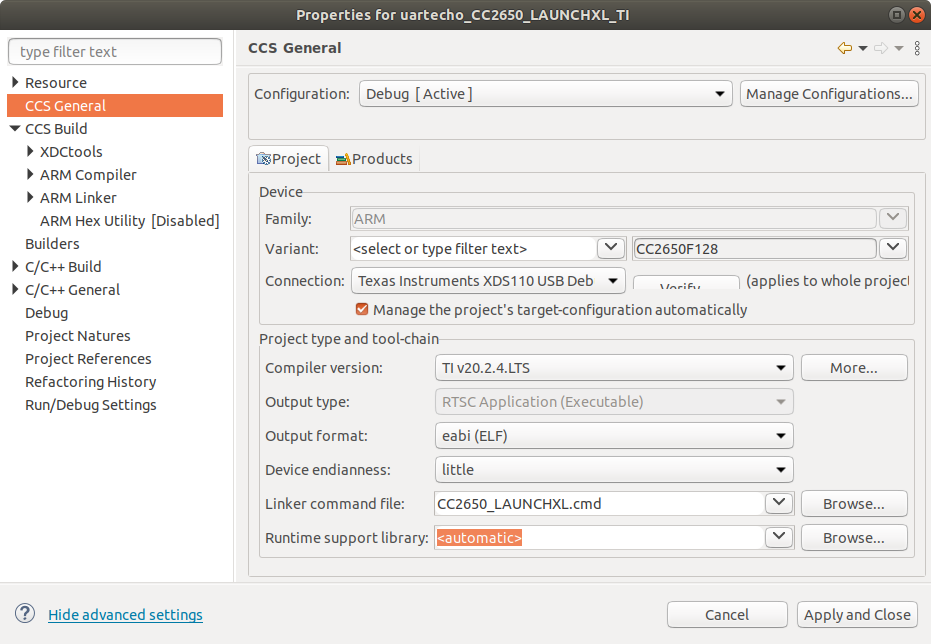
    I can repeat them when took the uartecho_CC2650_LAUNCHXL_TI example, and in the CCS General Project properties changed the "Runtime support library:" from <automatic> to <none>.

    What runtime support library is set for the  HaloLogger project?

    Normally <automatic> is used to let the linker select the library according to the other options in the project.

    Here is the settings for a working example:

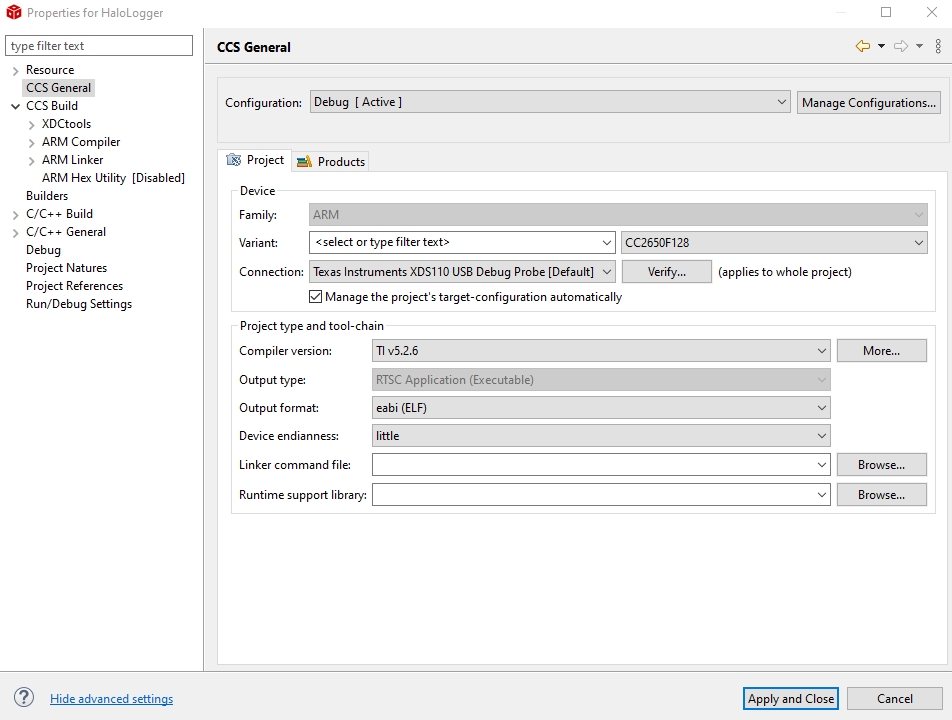
  • Manage was NOT checked, but same errors with it checked as un-checked:

    Chester Gillon said:
    What runtime support library is set for the  HaloLogger project?

    Sorry but I am so out of touch now that I do not know how to answer that, where do I look? (3 years ago is when I was pulling my hair out writing this, and I am older and more forgetful now ;) )

  • Ooops, foot in mouth...

    Setting 'Runtime support library' to automatic got rid of all errors :)

  • Dale Kramer said:
    Manage was NOT checked, but same errors with it checked as un-checked:

    I wasn't clear, the manage option only affects the target configuration file when debugging, not how the project is built.

    Dale Kramer said:
    Sorry but I am so out of touch now that I do not know how to answer that, where do I look?

    The "Runtime support library:" box at the bottom of your screenshot is blank, which means <none>. Try changing it to <automatic>.

    Edit: You have just reported that fixed the errors.

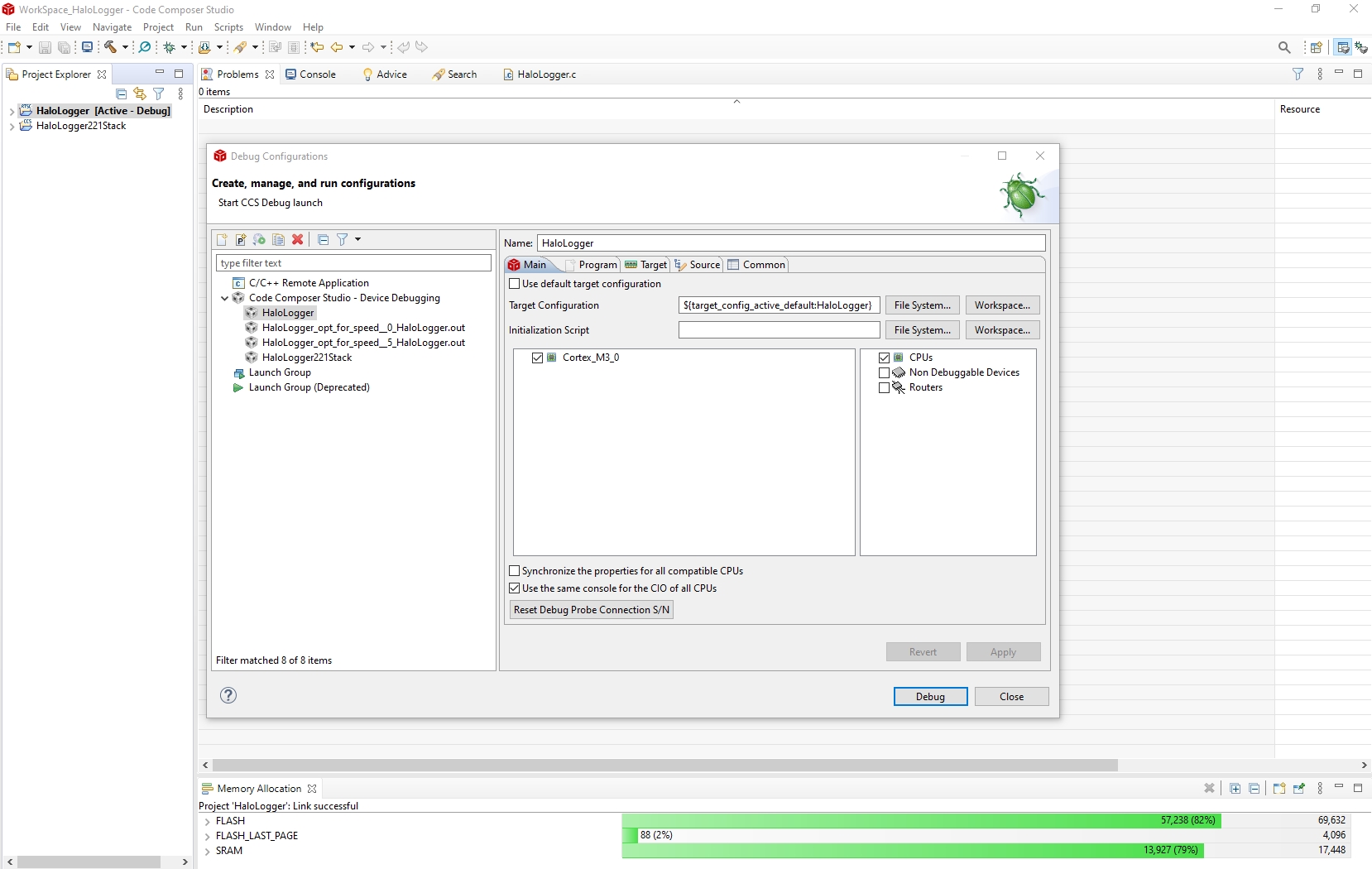
    Based upon the different errors you have been getting, looks like the project properties have been preserved when the project was restored from the backup. CCS can have different project settings for each of the Build Configurations, so was wondering if the project has any other build configurations that "Debug" and it they built without error.

  • Here are the Debug Configs that are setup (I can't remember how I used them but I did ;) ).  They all seem to build now...

    My problem now is that I can't seem to debug my board with the XDS110 on my CC2650 Launchpad.  Firmware was able to update itself but I get errors trying a debug session.  I will start a new topic on that so it does not get buried here...

  • What forum would you think best for the XDS110 debug issue.. or leave it here...

    Here is the error (as I said the firmware updated fine, also I can load my hex files this way with SmartRF Flash Programmer 2 software)

    Seems like it has to do with setup in CCS and maybe the project settings..

  • Dale Kramer said:
    Seems like it has to do with setup in CCS and maybe the project settings..

    Maybe the target configuration settings for the debugger got changed when the "Manage the project's target-configuration automatically" was checked when trying to fix the build errors (https://e2e.ti.com/support/tools/ccs/f/81/p/965702/3568311#3568311).

    I am not sure what could cause the SC_ERR_ROUTER_SECURE_SUBPATH error when starting a debug session, but allow SmartRF Flash Programmer 2 software to work.

    Perhaps try:

    1. Ensure the "Manage the project's target-configuration automatically" option is NOT checked.
    2. Restore the original .ccxml target configuration from the backup.

    If that doesn't work, suggest create a new thread on the Bluetooth® forum where the device experts should have more knowledge.

  • 1. Same SC_ERR_ROUTER_SECURE_SUBPATH error when "Manage the project's target-configuration automatically" option is NOT checked.

    2. Same SC_ERR_ROUTER_SECURE_SUBPATH error after restoring  the original .ccxml target configuration from the backup.

    Time to start that new topic in the Bluetooth Forum.

    So many thanks to  and  for help resolving the actual issue of this topic.

    I will come back here and make a summary post (one of my New Years resolutions after I get some actual work done on this project ;) ) which I will mark as the 'Resolving post' so that others may benefit more easily from all the wisdom provided by these great people, rather than them having to wade through this whole long topic.

    As always, my experience with these forums has been awesome even when I have to re-learn things I knew in the past!

    Dale

  • For continuity, if anyone gets this far in the thread, here is the new topic: https://e2e.ti.com/support/wireless-connectivity/bluetooth/f/538/t/965777 

  • Chester Gillon said:
    In the Project Explorer for HaloLogger221Stack right click on OSAL/osal_snv.c and select Exclude from Build. That will stop CCS from trying to automatically compiling osal_snv.c, unless osal_snv.c gets #included by osal_svn_wrapper.c.

    One more issue just discovered, when I build for Release, I get the same 'already defined' errors even with osal_svn.c excluded from build, any ideas?

  • Dale Kramer said:
    One more issue just discovered, when I build for Release, I get the same 'already defined' errors even with osal_svn.c excluded from build, any ideas?

    The state of which source files are excluded, and other project properties, are stored per build configuration.

    Your screen shot of the Project Explorer shows osal_snv.c is excluded when the Debug build configuration is active.

    If you right-click on the HaloLogger221Stack in the project explorer and use Build Configurations -> Set Active -> Release is osal_svn.c still shown as excluded?

    If not, also exclude the osal_snv.c from the Release build configuration. You might also have to fix the Runtime support library selection for the Release build configuration.

  • Yet again, you have seen the issue (I should have too if I truly looked at my screenshot ;) ).  Not sure why when I clicked 'Release' build from the Build Icon dropdown that Release was not set as active...)

    Still have more release build errors but I am hacking a way at them...

  • So, I still can't get release to build without errors.

    In debug 'FEATURE_OAD' is defined and there are no build errors.

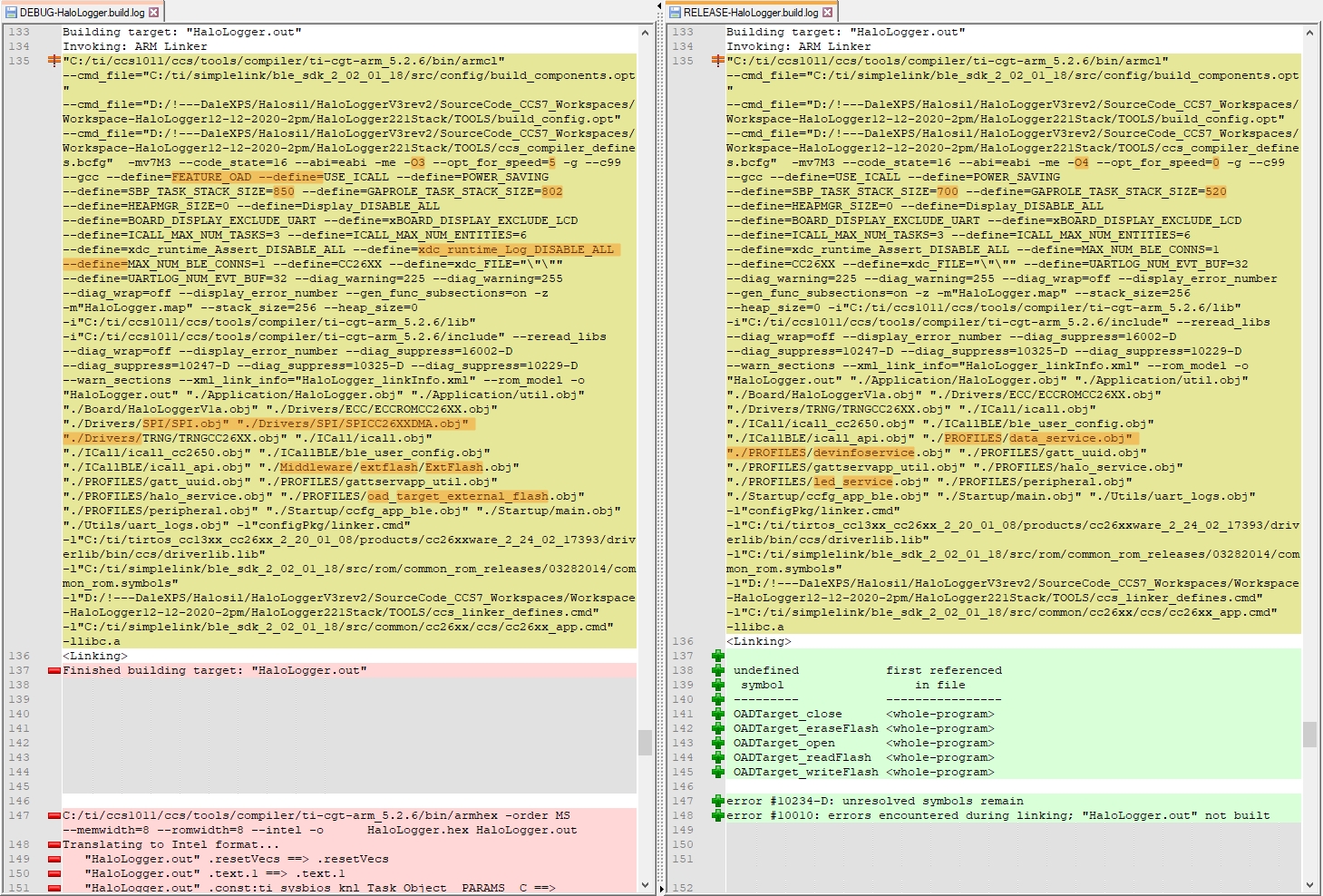
    In release whether 'FEATURE_OAD' is defined or not still gives these OAD related errors:

    I am starting to remember that I had OAD issues when I wrote the program but I must have solved them and built the code for release (or is it possible that I just used hex files from a debug build?)...

  • Dale Kramer said:
    I am starting to remember that I had OAD issues when I wrote the program but I must have solved them and built the code for release (or is it possible that I just used hex files from a debug build?)...

    I am not sure of where those symbols are supposed to be defined.

    Possible steps to investigate:

    1. Perform a rebuild of the Debug and Release configuration, and compare the build output for both configurations to look for any differences in which files are complied / which macros are defined. In case the CCS Console only shows part of the build process, see CCS Build Console Buffer Size for where to find the complete log
    2. Look in the linker .map file for the Debug build configuration to identify which object files the symbols are being linked from, by searching for the function names.

  • Chester Gillon said:
    Perform a rebuild of the Debug and Release configuration, and compare the build output for both configurations to look for any differences in which files are complied / which macros are defined. In case the CCS Console only shows part of the build process, see CCS Build Console Buffer Size for where to find the complete log

    Well I do see OAD differences in the two build logs, but where in CCS do I go to fix these differences and why are there differences?

  • Hi Dale,

    Based on the screenshots, I believe you are receiving the undefined symbols due to FEATURE_OAD not being defined which causes oad_target_external_flash.c to be stubbed out. I saw you said you receive the same undefined symbols even when defining FEATURE_OAD as a compiler symbol. Can you please redefine FEATURE_OAD for the release build and take a screenshot of the build log to see if there are any additional differences? Thanks!

    Best Regards,

    Jenny

  • Jenny,

    It looks the the resolution of my XDS110 debugging path issues has made things work here with the Release build.

    Here is where that was resolved: https://e2e.ti.com/support/wireless-connectivity/bluetooth/f/538/t/965777

    Basically if my workspaces are in a directory path that does NOT include an exclamation mark, then things started behaving well and predictably.

    I can now build the Release configuration without errors if FEATURE_OAD is defined in my main project (it does not seem to matter if it is defined or not in the dependent Stack project).

    So, all seems good right now, I can Debug through my XDS110 on my CC2650 Launchpad and get an error free Release build... :)

    Thanks everyone!!! 

  • Hi Dale,

    Glad to hear your issues were resolved! I'll go ahead and mark your latest post as TI Thinks Resolved.

    Happy holidays!

    Best Regards,

    Jenny

  • Dale Kramer said:
    Basically if my workspaces are in a directory path that does NOT include an exclamation mark, then things started behaving well and predictably.

    Thanks for the update. I did notice the use of the exclamation mark on the workspace path, but forgot it is one of the problematic characters listed in [FAQ] CCS: Why do I need to avoid non-alphanumeric (unicode) characters in my paths?