This thread has been locked.

If you have a related question, please click the "Ask a related question" button in the top right corner. The newly created question will be automatically linked to this question.

Analog Engineer's Calculator, disabled list of instrumentation amplifiers in "vcm vs vout" calculator

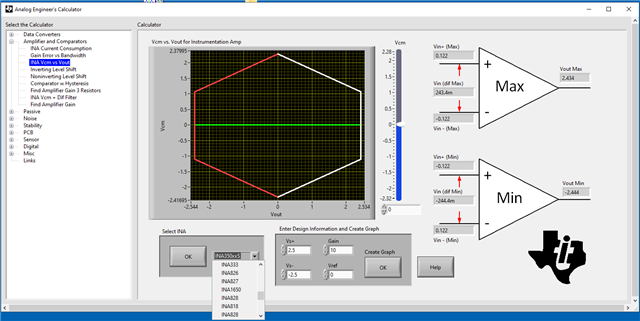
Fresh installation in Windows 10, when selecting the "vcm vs vout" calculator a message window with a "Supply or Ref voltage out of Range" warning appears, and the "Select INA" list is empty (cannot select amplifier).

This Windows 10 install is a virtual guest on a Linux server, but I don't think that matters.

There ia a previous thread about this same problem, without solution, I think.

Any ideas?

Thanks in advance, Mario Valdez.

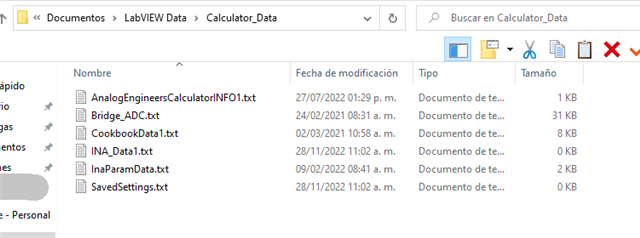
  • Checking the Documents / LabVIEW Data / Calculator_Data folder, there is a file name "INA_Data1.txt" empty (0 bytes). I read on the other thread that the calculator may try to download some data on startup. Maybe this is the cause.

    Regards, Mario Valdez.

  • I found the problem. In our network Internet access has to pass thru a proxy server. It seems the Calculator software, on startup, tries to connect to a server named "software-dl.ti.com", but ignores the Windows proxy configuration.

    I had to ask for temporary permissions for this Windows machine to be able to connect bypassing the proxy server.

    Now, the "INA_Data1.txt" file size is around 14 kbytes and it contains parameters for the available amplifiers, and the calculator seems to work correctly.

    After the access is again allowed only thru the proxy server, it seems the calculator tries to access the remote server unsuccessfully but at least preserves the already populated "INA_Data1.txt" file.

    I understand the calculator was developed using LabView. I don't know how hard would be to updated it to read and use the network proxy settings on Windows, but that would be nice. (Or maybe LabView components have a global way to set the proxy settings outside the application).

    Regards, Mario Valdez.

  • To all,

    Can you check what version of the calculator you are using?  I am currently working on a new release of the calculator, and want to fix any issues.  I do not think this should be an issue in the latest version, but I know the latest version has a minor bug.  If you are using the latest version (1.7.0), I may have additional questions.

    Art

  • Hi. The version is 1.7.0. Let me know what other information I may provide.

    Regards, Mario Valdez.

  • Thanks Mario,

    This is the latest version.  I need some time to look into this.  I hope to have a new version in the next few weeks, and plan on addressing this issue.

    Art