This thread has been locked.

If you have a related question, please click the "Ask a related question" button in the top right corner. The newly created question will be automatically linked to this question.

TIDA-080004: DLPC120-Q1: DLPC120 Control Program Connect ERROR

Part Number: TIDA-080004

Dear Team,

Whenever I operate the DLPC120, it keeps popping up error messages. How can I check and fix this?
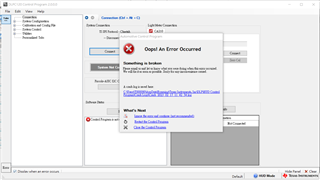
=====================.log===========================

Crash File for Automotive Control Program 2.0.0.0
Current Time: 2/17/2023 11:42:54 AM


Message:

Outer Exception :
=========================
- Message :
=========================
沒有可以顯示列的空間。   (There is no room to display columns.)


- StackTrace :
==================
於 System.Windows.Forms.DataGridView.set_FirstDisplayedScrollingRowIndex(Int32 value)
於 Automotive_Control_Program.ErrorControl.DisplayError(String Msg)
於 Automotive_Control_Program.MainForm.DisplayError(String Msg)
於 Automotive_Control_Program.ConnectionWrapper.Connect(ConnectionAdapter Adapter)
於 Automotive_Control_Program.SystemConnection.ConnectToSystem(ConnectionAdapter Adapter, ICommnProtocol Protocol)
於 Automotive_Control_Program.Connection.btnConnect_Click(Object sender, EventArgs e)
於 System.Windows.Forms.Control.OnClick(EventArgs e)
於 System.Windows.Forms.Button.OnClick(EventArgs e)
於 System.Windows.Forms.Button.OnMouseUp(MouseEventArgs mevent)
於 System.Windows.Forms.Control.WmMouseUp(Message& m, MouseButtons button, Int32 clicks)
於 System.Windows.Forms.Control.WndProc(Message& m)
於 System.Windows.Forms.ButtonBase.WndProc(Message& m)
於 System.Windows.Forms.Button.WndProc(Message& m)
於 System.Windows.Forms.Control.ControlNativeWindow.OnMessage(Message& m)
於 System.Windows.Forms.Control.ControlNativeWindow.WndProc(Message& m)
於 System.Windows.Forms.NativeWindow.Callback(IntPtr hWnd, Int32 msg, IntPtr wparam, IntPtr lparam)

The similar situation occurs even when using the newer version 2.1.2.0.

Thank you for your assistance.

  • Hi,

    Please expand the bottom error window before performing any operations. You should be able to see messages appear in the gray section.

    Thanks,

    Alex Chan

  • Hi Alex 

    Thanks for your reply.

    Displayed as follows, do you have any clue? 

    無法將類型 'CommonUtilities.GenericKeyClass`2[System.String,SDK.SPI_Flash_Program.SPIFlash+FlashDevice]' 的物件轉換為類型 'Common.GenericKeyClass`2[System.String,SDK.SPI_Flash_Program.SPIFlash+FlashDevice]'。

    Command : Software Status (Read: 103, 0, 0, 0, 0, 0, 0, 0, 0, 0, 0, 0, 0, 0, 0, 0, 0, 0, 0, 0, 0, 0, 0, 0, 0, 0, 0, 0, 0, 0, 0, 0, 0, 0, 0, 0, 0, 0, 0, 0, 0, 0, 0, 0, 0, 0, 0, 0, 0, 0, 0, 0, 0, 0, 0, 0, 0, 0, 0, 0, 0, 0, 0, 0, 0, 0, 0, 0, 0, 0, 0, 0, 0, 0, 0, 0, 0, 0, 0, 0, 0, 0, 0, 0, 0, 0, 0, 0, 0, 0, 0, 0, 0, 0, 0, 0, 0, 0, 0, 0, 0, 0, 0, 0, 0, 0, 0, 0, 0, 0, 0, 0, 0, 0, 0, 0, 0, 0, 0, 0, 0, 0, 0, 0, 0, 0, 0, 0, 0, 0, 0, 0, 0, 0, 0, 0, 0, 0, 0, 0, 0, 0, 0, 0, 0, 0, 0, 0, 0, 0, 0, 0, 0, 0, 0, 0, 0, 0, 0, 0, 0, 0, 0, 0, 0, 0, 0, 0, 0, 0, 0, 0, 0, 0, 0, 0, 0, 0, 0, 0, 0, 0, 0, 0, 0, 0, 0, 0, 0, 0, 0, 0, 0, 0, 0, 0, 0, 0, 0, 0, 0, 0, 0, 0, 0, 0, 0, 0, 0, 0, 0, 0, 0, 0, 0, 0, 0, 0, 0, 0, 0, 0, 0, 0, 0, 0, 0, 0, 0, 0, 0, 0, 0, 0, 0, 0, 0, 0, 0, 0, 0, 0, 0, 0, 0, 0, 0, 0, 0, 0, 0, 0, 0, 0, 0, 0, 0, 0, 0, 0)
    ERROR: Timed out waiting for response

    沒有可以顯示列的空間。

  • Hello User,

    Thank you for this information.

    Please allow us time to look over your email. It may be a week or two before we can address your issue.

    Regards,

    Austin

  • Hello Johns,

    Can you please check if you have installed Total Phase Cheetah drivers in the properly location? 

    1. You can download and install USB drivers for the Cheetah from https://www.totalphase.com/products/usb-drivers/

    2. Download Flash Center software from https://www.totalphase.com/products/flash-center/

    3. From the downloaded folder, copy cheetah.dll and paste it into DLPC120 Automotive Control Program installation directory. 

    4. Close and re-open the DLPC120 Automotive Control Program

    Please let us know if this will resolve your issue. 

    Regards,

    Lori 

  • Hi Lori

    Copying cheetah.dll resolved my issue.

    Thank you for your assistance.

    Regards,

    Johns