Part Number: PSPICE-FOR-TI
Tool/software:
Hello,
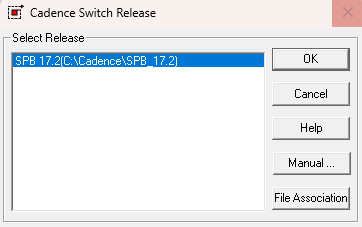
I am currently facing an issue where the uninstalled PSpice for TI is still set as the default. Whenever I try to open .dsn or .opj files, they automatically open with the program shown below, and I can't change the default program for these file types.

I have already uninstalled PSpice for TI via the Control Panel, and the directory shown in the above image no longer exists.
I also followed the instructions from "How to manually uninstall PSpice for TI (no uninstaller in Windows)" to check the registry for any specific folders related to PSpice for TI.
Our IT department is also unsure how to resolve this, as they believe it’s a conflict between PSpice for TI and OrCAD (we use OrCAD at our company).
Any help would be greatly appreciated. Thanks in advance!