This thread has been locked.

If you have a related question, please click the "Ask a related question" button in the top right corner. The newly created question will be automatically linked to this question.

CC2652R7: Gatt read Authentication is insufficient (iOS device)

Part Number: CC2652R7
Other Parts Discussed in Thread: BLE-STACK, SYSCONFIG

Hi,

My project is based on simple_peripheral example and sdk I'm using is simplelink_cc13xx_cc26xx_sdk_5_40_00_40.

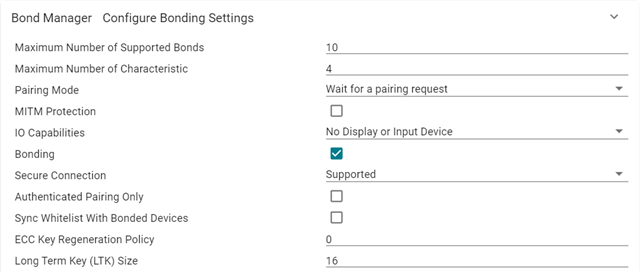
Some of my characteristics have GATT_PERMIT_ENCRYPT_READ permission. And my bond_mgr parameters are as below. So based on the below parameters I'm using justworks pairing method.

pair_param_cmd.pair_mode = GAPBOND_PAIRING_MODE_WAIT_FOR_REQ;
pair_param_cmd.mitm = false;
pair_param_cmd.io_cap = GAPBOND_IO_CAP_NO_INPUT_NO_OUTPUT;
pair_param_cmd.bond_mode = BLE_BONDING_ENABLED;
pair_param_cmd.secure_connection = GAPBOND_SECURE_CONNECTION_ONLY;

I'm able to read the characteristic with GATT_PERMIT_ENCRYPT_READ  permission after pairing from the android app successfully.

The issue is while trying with the iOS app. The iOS app automatically initiates pairing after getting insufficient authentication for the read request. Got a pairing popup on iphone and its successful. Even after that when I try to read the characteristic I'm getting Error Domain=CBATTErrorDomain Code=5 "Authentication is insufficient." on the iphone. Help me on this.

Also I saw a similar issue fix in below release note. Does it have something to do with this ?

software-dl.ti.com/.../release_notes_ble3stack_3_02_00_49.html

BLESTACK-2535 GATT procedures that require encryption may incorrectly return Insufficient Authentication after LE Secure Connection Authentication Stage 2 completes

Regards,

Madhusudhan

  • Hi Madhusudhan,

    Thank you for your inquiry, I have notified the BLE Team and they should follow up with you soon.

    Regards,
    Ryan

  • Hey Madhusudhan,

    I believe what you are seeing is expected behavior. See https://e2e.ti.com/support/wireless-connectivity/bluetooth-group/bluetooth/f/bluetooth-forum/764131/cc2640-successful-pairing-using-le-secure-connections-just-works-but-cannot-read-data for some details.

    Also I saw a similar issue fix in below release note. Does it have something to do with this ?

    This bug was reported on a different device using a different BLE-stack (not BLE5-stack). It is not related.

  • Hi Ammar,

    My scenario is different, In the provided reference they are using GATT_PERMIT_AUTHEN_READ and its not working which is an expected behavior. But in my case I'm using GATT_PERMIT_ENCRYPT_READ permission for which just works pairing should work. The strange thing is that its working fine with android and I'm facing issue only with iOS.

    Regards,

    Madhusudhan

  • Hi,

    I tested again and gatt read is failing with android also. I have captured and attached the snoop log.

    Regards,

    Madhusudhan

    6355.btsnoop_hci.zip

  • Hey Madhusudhan,

    I am unable to open your sniffer capture at this time and have requested the software needed to open the capture. I apologize for this.

    I'm not sure it is correct that an encrypted read is expected to work during an unencrypted connection based on Just Works pairing. Let me investigate this. After a quick test, I was able to read our default characteristic 5 based off of simple_peripheral after modifying the security settings as you've highlighted. The LightBlue application I use requested a pairing session, the bond was saved successfully, but upon reading the characteristic, I only see "No value". If this should work, my expectation is that we see the proper value when we attempt the read.

  • Hi Ammar,

    Justworks encrypts the connection, so GATT_PERMIT_ENCRYPT_READ should work. I tested the simple_peripheral example characteristic 5 with nrf connect app and it works. I don't know why its not working for my custom project based on simple_peripheral example. I have captured snoop logs in both these cases and attached. I see no differences but yet its not working in my case. Please go through the logs and help me on this.

    Wireshark_Logs.zip

    Below is the screenshot of my custom project snoop log frames which show the issue.

    Below is the screenshot of simple_peripheral example project snoop log frames which is working fine.

    Regards,

    Madhusudhan

  • Hey Madhusudhan,

    To be clear, the default simple_peripheral project (unmodified), sets up an encrypted connection using passcode pairing. This means it will work out of the box. When I modify the settings to match what you've provided, I too get an Insufficient Authentication error from nRF connect.

    I will take a look at the logs you provided and reply by Thursday.

  • Hi Ammar,

    Sorry that I haven't mentioned it, but I modified simple_peripheral example project to use justworks pairing and it worked with nrf connect app. But its not working with my custom project.

    Regards,

    Madhusudhan

  • Hey Madhusudhan,

    Unfortunately I am not able to get simple_peripheral to read characteristic 5 from simple peripheral with the above changes to Sysconfig (no code changes were made). I've reproduced the Insufficient Authentication error on 3 phones (Iphone 13, Pixel 6 Pro, and Samsung S7).

    Do you have an Ellisys or Frontline sniffer log to share? After parsing the snoop logs, I see that pairing runs to completion in both cases.

    I do believe this is expected behavior.. Can you check to see if you've made any other changes to simple_peripheral (in addition, please verify the simple_gatt_profile.c files are unmodified)?

    Please make sure to erase the bonding info on your cell phone during each test as this could impact the behavior if stale bonding information is used when reading the characteristic.

    If possible, can you share the hex file for the modified simple_peripheral project so I can try on my end?

  • H Ammar,

    I don't have Ellisys or Frontline sniffer with me. If you have gone through both the snoop logs you can see that in both logs, reading characteristic fails at first and after pairing the read request is success in simple_peripheral example log and fails in my custom project. I'm sure its not expected behavior as from the snoop logs its clear that it working in example project and not working in my custom project. Also we have the same application running on different chip from a different vendor and its working perfectly.

    I have made only 3 changes to the simple_peripheral example. Max number of connections to 1, Disabled MITM and changed IO capabilities to No display or input device. I verified that there are no other changes made to the example project.

    I'm using simple_peripheral tirtos ticlang example project. I have attached the hex file below.

    simple_peripheral_LP_CC2652R7_tirtos_ticlang.zip

    Regards,

    Madhusudhan

  • Hey Madhusudhan,

    Can you summarize what SDK version, IDE (and version), SysConfig, XDCTools, etc you are using? There seems to be a gap in our environment where I am unable to build a similar binary with only the changes you mentioned above.

    Can you also enable ECC debug keys in SysConfig and resend the hex file? This way I can look at the encrypted traffic using a sniffer.

    I appreciate your patience.

    I'm still unable to reproduce the behavior on my end. However, with your hex file, I am able to write to the characteristic successfully. I have since taken Ellisys logs of the behavior of your hex file and the one I generated out of the box (with your changes of course). At first glance, I too see the encryption request and response exchanged. After which I am unable to read the characteristic. I have also reached out to our developers for additional guidance.

  • Hi Ammar,

    I'm using Code Composer Studio Version: 11.1.0.00011, you can find the remaining version info below.

    I have enabled ECC Debug keys and attached hex file below.

    simple_peripheral_LP_CC2652R7_tirtos_ticlang_ECC_Debug.zip

    I'm using nrf connect app to read the char 5, which automatically initiating pairing after the first read request returns insufficient authentication and after pairing the read request is successful. You can see all this in the snoop log I shared.

    Regards,

    Madhusudhan

  • Hi Ammar,

    Finally I found the issue and was able to read the encrypted characteristic. I changed the value of GAPBOND_SECURE_CONNECTION from GAPBOND_SECURE_CONNECTION_ONLY to GAPBOND_SECURE_CONNECTION_ALLOW in my custom project. I don't know how its affecting the encrypted characteristic read request. Can you explain me ? When the GAPBOND_SECURE_CONNECTION is set to GAPBOND_SECURE_CONNECTION_ONLY, the pairing is successful as its a secure connection but the read request is failing. I think this is an issue from the stack. Please explain to me why the stack is behaving differently for read request based on GAPBOND_SECURE_CONNECTION value.

    Regards,

    Madhusudhan

  • Hey Madhusudhan,

    Glad you were able to resolve the difference between the example and the custom project.

    Here is the impact on GATT reads when setting GAPBOND_SECURE_CONNECTION.

    With GAPBOND_SECURE_CONNECTION set to GAPBOND_SECURE_CONNECTION_ONLY, only SC pairing is used with a 128-bit key. When the link is authenticated, the host will return insufficient authentication if:

    • There isn't an LTK or STK available for the connection (if this is the case, the host reports the connection was not encrypted)
    • If unauthenticated pairing occurred but authenticated pairing was required (with SC's enabled, this only means that the stack's state flag must have been false; NOT that the MITM flag is incorrectly set)
    • If the above are not the cause, that is, if LE legacy pairing has occurred. However, if the above is set to SC's enabled, I don't see this being a valid case to enter.

    I have reached out to our designers to look into this query to clear up and verify our observations. I will follow up as soon as I get a response from the team.

  • Hi Ammar,

    Thanks for explaining the impact on GATT reads when setting GAPBOND_SECURE_CONNECTION. But the above mentioned cases does not apply for my issue as in my case:

    1. LTK or STK is available

    2. it is an unauthenticated pairing and authentication is not required

    3. LE legacy pairing has not occurred. It is a LE secure connections pairing.

    So I think its an issue from the stack. Also once its resolved I want to switch back to GAPBOND_SECURE_CONNECTION_ONLY as I don't want to allow legacy pairing in my custom project.

    Regards,

    Madhusudhan

  • Hi Ammar,

    Any update from your side ?

    Regards,

    Madhusudhan

  • Hey Madhusudhan,

    I will create a ticket for our team to look into this issue, but unfortunately cannot comment on their timeline. For now, please continue with your workaround.

    A key factor here is that I am unable to reproduce this behavior with the example projects. Can you instead send me a zip of your project workspace so that I can see what I am missing? This will enable me to investigate this further on my end and will help speed things up.

  • Hi Ammar,

    As requested I have attached the working and non-working example project zip's. The only difference between both the projects is that non-working has GAPBOND_SECURE_CONNECTION set to GAPBOND_SECURE_CONNECTION_ONLY.

    2308.Simple_Peripheral_Working.zip

    7384.Simple_Peripheral_Failing.zip

    Regards,

    Madhusudhan

  • Thanks Madhusudhan, I will take a look.

  • Hi Ammar,

    Madhusudhan is my colleague and we're working on this project together. I have been testing using the workaround he described and discovered an additional issue. While the stack indicates that pairing has completed and we no longer receive the "5" error, but when attempting to read certain characteristics set to "GATT_PERMIT_ENCRYPT_READ", we receive an "error 137" from the Android device. Changing the characteristic to "GATT_PERMIT_READ" allows the read to succeed. I suspect this issue has the same root cause, but wanted to provide the information in case it helps narrow things down.

    -Steve

  • Hey Steve/Madhu,

    I attempted to reproduce the issue by compiling the provided projects and was unable to read the characteristic. I will try more tests while I wait for follow up from our dev team to verify the expected behavior.

    Taking a step back, what is the encrypted characteristic being used for? I am curious as it is uncommon to use GATT_PERMIT_ENCRYPT_READ in a scenario where Just Works pairing is used.

  • I wasn't involved in the design of this product, so I'm not sure why certain choices were made for the implementation. We are replacing a different BLE solution in a current design with the TI part due to availability concerns, so we have been configuring everything exactly as it is currently to minimize the impact on our existing mobile apps, test tools, etc.

    I do know that things work well on Android when not setting the characteristics to encrypted, but when we do this iOS no longer pairs as there is no "insufficient authentication" message to trigger the pairing. This presents an issue because the state machine in our device terminates the connection if an unpaired device repeatedly tries to communicate after sufficient time to complete pairing has elapsed. Is there an alternate way for us to force pairing on iOS without setting the characteristics to encrypted? The acceptability of this long term needs to be examined, but it would at least allow us to progress a bit in our development.

  • Hey Steve,

    Thanks for the insight. I assure you I am looking into this as my top priority and have looped in all the right people. I have pinged them for a reply once more.

    Is there an alternate way for us to force pairing on iOS without setting the characteristics to encrypted?

    This can actually be done in SysConfig by setting the "Pairing Mode" to "Initiate a pairing request".

    Let's sync offline on this issue and I will update the thread with further insights as we discover them.

  • Hi Ammar,

    I found out that the additional issue which my colleague Steve reported is also due to secure connections set to GAPBOND_SECURE_CONNECTION_ONLY in different part of code. So basically we have only one issue which is, if we set the value of GAPBOND_SECURE_CONNECTION to GAPBOND_SECURE_CONNECTION_ONLY then read/write of encrypted characteristics is not working.

    Regards,

    Madhusudhan

  • Hey Madhusudhan,

    Thanks for the additional detail. I found the issue on my end and was able to reproduce the behavior you see.

    In short, the stack reports this error because it considers the Just Works pairing session as unauthenticated. The stack requires an authenticated session when Secure Connections is enabled. This behavior is explained well by a colleague in this related e2e reply.

    We can certainly discuss this further offline. For now I will mark this thread as TI Thinks Resolved. If there is a bug report as a result of our offline discussions, I will update this thread.

  • To follow up on this thread:

    I have filed a bug ticket to resolve this issue as the spec does not explicitly require an authenticated session when Secure Connections is enabled. This issue will be addressed in a future SDK release.