This thread has been locked.

If you have a related question, please click the "Ask a related question" button in the top right corner. The newly created question will be automatically linked to this question.

CC2564C: SDK version compatability, reliable pairing, I2s, HFP profile and ptt.

Part Number: CC2564C
Other Parts Discussed in Thread: CC2564MODN, , TLV320AIC3101, CC2564

Hi Rogelio,

If you didn't read the other post in the other thread already, happy new year!

I'm using the CC2564MODN with the 5.1.1.1 sdk, I didn't find the older sdk on this page: https://www.ti.com/tool/CC2564CSTBTBLESW. I don't know if I can use this newer sdk on the older chipset without qonsequences?

We already ordered the BDE-BD2564CN with the newer CC2564C chipset. It will arrive soon. In the meantime I try to get everything working with the headset. However there are a couple of challenges.

When I pair and try to open an audio connection with the headset, like explained in your document: "CC256x TI’s Bluetooth Stack Basic HFGAGDemo APP", it always works till the "OpenAudioGatewayClient" command. When this command works the output is this:

HFP AG>openaudiogatewayclient 2 3
                                             
Bluetooth Device Address: 0x886B0FC8C0CC
                                      
Open Remote HandsFree Port = 0003
                                             
HFRE_Open_Remote_HandsFree_Port: Function Successful ID = 0002.
               
OpenRemoteHandsFreePort: HFRE_Update_Current_Control_Indicator_Status Function S
tatus 0.
                                                              
HFP AG>
                                                                       
HFP AG>
                                                                       
atLinkKeyRequest: 0x886B0FC8C0CC
                                              
GAP_Authentication_Response() Success.
                                
HFP AG>
                                                                       
HFRE Open Port Confirmation, ID: 0x0002, Status: 0x0000.
               
HFP AG>
                                                                       
HFRE Open Service Level Connection Indication, ID: 0x0002
                     
                     RemoteSupportedFeaturesValid: TRUE
                       
                          RemoteSupportedFeatures: 0x0000009E
                 
                  RemoteCallHoldMultipartySupport: 0x00000000
                 
HFRE_Enable Call Line Identification
                                   
HFP AG>HFRE Network Operator Selection Format Indication, ID: 0x0002 Format: 3.

HFP AG>HFRE Network Operator Selection Indication, ID: 0x0002.
           
HFP AG>
                                                                       
HFRE Audio Connection Indication, ID: 0x0002, Status: 0x0000.
             
HFP AG>HFRE Call Line Identification Notification Activation Indication, ID: 0x0
002, Enabled: TRUE.
                                                           
 HFP AG>HFRE Speaker Gain Indication, ID: 0x0002, Speaker Gain 0x000A.

When it not works the output is this:

openaudiogatewayclient 3 3
                                             
Bluetooth Device Address: 0x886B0FC8C0CC
                                      
Open Remote HandsFree Port = 0003
                                             
HFRE_Open_Remote_HandsFree_Port: Function Successful ID = 0001.
               
OpenRemoteHandsFreePort: HFRE_Update_Current_Control_Indicator_Status Function S
tatus 0.
                                                                          
HFP AG>
                                                                       
HFP AG>
                                                                       
atPINCodeRequest: 0x886B0FC8C0CC
                                                                      
Respond with the command: PINCodeResponse
                                                                       
HFP AG>pincoderesponse 0000
                                                   
PINCodeResponse.
                                                              
GAP_Authentication_Response(), Pin Code Response Success.
                                                                            
HFP AG>
                                                                       
atLinkKeyCreation: 0x886B0FC8C0CC
                                             
Link Key: 0x8FED9B58A34A43B9CEDA797BBC2A3C45
                                  
Link Key Stored locally.
                                                                           
HFP AG>
                                                                       
HFP AG>
                                                                       
HFRE Open Port Confirmation, ID: 0x0001, Status: 0x0000.
                                                                         
HFP AG>
                                                                       
HFRE Open Service Level Connection Indication, ID: 0x0001
                     
                     RemoteSupportedFeaturesValid: TRUE
                       
                          RemoteSupportedFeatures: 0x0000009E
                 
                  RemoteCallHoldMultipartySupport: 0x00000000
                 
HFRE_Enable Call Line Identification
                                                                            
HFP AG>HFRE Network Operator Selection Format Indication, ID: 0x0001 Format: 3.
                                                                           
HFP AG>HFRE Network Operator Selection Indication, ID: 0x0001.
                                                                         
HFP AG>
                                                                       
HFRE Close Port Indication, ID: 0x0001, Status: 0x0000.
                                                                   
HFP AG>openaudiogatewayclient 3 3
                                             
Bluetooth Device Address: 0x886B0FC8C0CC
                                      
Open Remote HandsFree Port = 0003
                                             
HFRE_Open_Remote_HandsFree_Port: Function Successful ID = 0002.
               
OpenRemoteHandsFreePort: HFRE_Update_Current_Control_Indicator_Status Function S
tatus 0.

                                                               
HFP AG>
                                                                       
HFP AG>
                                                                       
HFRE Open Port Confirmation, ID: 0x0002, Status: 0x0001.

When it not works, I also don't get it to work. I tried the manageaudio command, but that fails. Why the result is often so different? Also I'm wondering how to get a connection with a device where I previously paired with? When this headset is not in pairing mode, it's not showing up in the inquiry list. However it should be possible to connect with it when it was once paired. Do you know how to do this?

When the "openaudiogatewayclient" command works, the audio is opened. I added a call to the function "vs_pcm_codec_config_slave_i2s" and changed some parameters in the function to get the right settings for the audio bus. I coupled a tlv320aic3101 on the same bus. Now I have some audio from the headset but it's very crackling sound. So I think there's something wrong with the audio bus settings. Is this the right way to set up the pcm-bus on the bluetooth module side? Is it even possible to configure the audio bus the same on these two devices? As far as I know they both support I2s with 16bit per channel.

Furthermore this headset is provided with a ptt-button. The previously used bluetooth module was receiving commands when buttons where pushed on the headset. Do you know what I have to do to receive these commands?

Last one, I don't quite understand the meaning of the "service pack" you mentioned earlier. Could  you explain if I need it and if I need it with the newer module that will arrive soon?

Looking forward to hear from you.

Best regards,

Robin

  • Hi Robin,

    I'll check this and come back to you later this week.

    Br,

    Kobi

  • It seems like the peer decided to close the connection although the connection setup seems ok.

    It may be related to the authentication method used as they are different between the 2 cases.

    in order to call OpenAudioGatewayClient for the 2nd time you'll need to call CloseAudioGatewayClient before.

  • Hi Kobi,

    Ok, what types of authentication methods are there? With our previous modules I didn't need to have a pincode while pairing, this module asked for it while pairing. So I don't know it here's another method of pairing without that.

    How about the questions on how to connect once paired? And the other questions about the codec and buttons? Do you know how to do that?

    Looking forward to hear from you.

    Best regards,

    Robin
  • There are legacy pairing (pairing mode 1 that use the pin code) and secure simple pairing (mode 2, doesn't use pin code) that you can set SetPairabilityMode.

    After pairing is completed you should store the link key and bd addr in non volatile memory and use them when the link key request received (the sample just stores them locally in ram so they get lost when the device is reset).

    Regarding the codec issue we will need more time to check internally.

  • Ok, thank you.

    If I would like to initiate the connection from the audiogateway, so not from the headset. What do I have to do with the saved link key and bd addr?

  • Ok, thank you.

    If I would like to initiate the connection from the audiogateway, so not from the headset. What do I have to do with the saved link key and bd addr?

  • same thing, see the use of LinkKeyInfo in the HFPDemo_ag (it should be stored when receiving the atLinkKeyCreation event and retrieved upon atLinkKeyRequest).

  • Dear Kobi,

    The simple pairing mode works, so that's nice. Also connecting while the remote bluetooth device is not in pairing mode works.

    However, I still have the problem that when I try to connect to the remote device it often disconnects in a few seconds. When it gets connected correctly it prints:

    HFP AG>HFRE Open Service Level Connection Indication, ID: 0x0001
                             RemoteSupportedFeaturesValid: TRUE
                             RemoteSupportedFeatures: 0x0000009E
                     RemoteCallHoldMultipartySupport: 0x00000000
    HFRE_Enable Call Line Identification                                                                      
    HFP AG>HFRE Network Operator Selection Format Indication, ID: 0x0001 Format: 3.                                                                        
    HFP AG>HFRE Network Operator Selection Indication, ID: 0x0001.
    HFP AG>HFRE Audio Connection Indication, ID: 0x0001, Status: 0x0000.
    HFP AG>HFRE Call Line Identification Notification Activation Indication, ID: 0x0001, Enabled: TRUE.
    HFP AG>HFRE Speaker Gain Indication, ID: 0x0001, Speaker Gain 0x000A.

    When it connects wrong and gets a close port indication in  a couple of seconds(no audio) it prints:

    HFP AG>HFRE Open Service Level Connection Indication, ID: 0x0006
                             RemoteSupportedFeaturesValid: TRUE
                             RemoteSupportedFeatures: 0x0000009E
                          RemoteCallHoldMultipartySupport: 0x00000000
    HFRE_Enable Call Line Identification
    HFP AG>HFRE Network Operator Selection Format Indication, ID: 0x0006 Format: 3.
    HFP AG>HFRE Network Operator Selection Indication, ID: 0x0006.
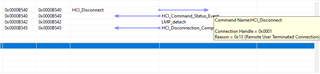
    HFP AG>HFRE Close Port Indication, ID: 0x0006, Status: 0x0000.

    I don't know what I have to do to get this reliable?

    Furthermore what steps does it involve to receive button events from the remote device?

    Looking forward to hear from you.

  • Hi Robin,

    Would you be able to provide either HCITester or BT Firmware logs? Please see the attached PDF's on instructions to gather these logs. This will help us to further diagnose what might be causing the issue.

    CC256x Logger User Guide.pdfHCITester User's Guide.pdf

  • Hi Daniel,

    I gathered two logs. First one is from start-up, then initing by hand through realterm and then try to openaudiogateway for the device. With als a result that the port is directly closing again.

    Second log is the same as the first, however then two more time calling openaudiogateway, last one with succes.1512.logs.zip

  • Hi Robin, thank you for your work here. Please allow me some time to dive through the logs. 

    On the topic of receiving button events, when the headset sends a bluetooth profile compliant command the appropriate Event_Callback function will be thrown on the CC256x side, from there you can read the event data and write the code to handle it appropriately.

  • Hi Daniel,

    About the receiving of button events I don't see any clarifying explanations or examples. I found:

    -CC2564: HSP AudioGateway Role "etHDSET_Button_Pressed_Indication" Issue

    -RE: CC2564: HSP AG Mode : How can I use my own functions based on the call status of the incoming pressButton indication?

    Which threads do you mean?

    Furthermore I found the event "etHDSET_Button_Pressed_Indication" in the file HDSETAPI.h in the folder ...\Bluetopia\profiles\HDSET\include, however I use the HFREAPI.h from the folder ...\Bluetopia\profiles\HFRE_16\include. In the file I use, the enum "HDSET_Event_Type_t" is much longer, however lacks on the buttonpress event.

    Do I need to enable an extra profile and set somthing in the classofdevice? Connect in another way? Where can I find which steps are involved to receive these events?

    Looking forward to hear from you.

  • Hi Daniel,

    See my previous question.

    Also would like to know which demo I can use the best. HFPDemo_AG, HFPDemo_HF or HSPDemo. Because in HFPDemo_HF.c I can find "atKeypressNotification". Also in HSPDemo.c I can find "atKeypressNotification".

    Goal is to develop a device that can pair with a headset. The commercial headset has ptt-button that we should receive at the other end.

    Also would like to receive the HSPDemo App texas wiki documentation.

    Best regards

  • Hi Robin, most likely you will need a combination of profiles at this point. That being said, without knowing which bluetooth profile command the PTT button sends I cannot tell you which one you need for that function. 

    For documentation on combining profiles please see this pdf. HFP HID SPP Integration.pdf

    Additionally, here is the HSP Demo documentation as requested.HSP Demo TI Wiki.pdf

  • Hi Daniel,

    Have you had time to look at the logs, from 7 Feb?

    Looking forward to hear from you.

    Best regards

  • Hi Robin, apologies, I have been preoccupied and will get back to you by end of tomorrow on what I find from the logs.

  • Hi Robin,

    According to the logs you sent it appears the remote device you are trying to connect to is terminating the connection from its end.

    This could be for a variety of reasons but debugging should most likely start with figuring out why that device is terminating the connection.