This thread has been locked.

If you have a related question, please click the "Ask a related question" button in the top right corner. The newly created question will be automatically linked to this question.

LP-CC2652RB: How to log without using UART?

Part Number: LP-CC2652RB
Other Parts Discussed in Thread: CC2652RB, CC2340R5, SYSCONFIG

I need to use both the UART ports on CC2652RB for my peripherals so I'd like to avoid using one for logging, which ProjectZero sample project currently does. I tried to search for instructions for this but they all seemed to be obsolete as the ProjectZero sample project doesn't have the .cfg file. Any suggestions?

Thank you!

  • Hello Qinchen, 

    What SDK version and CCS version are you using? There is a logging feature available for use. I will provide a link to a E2E post with information about implementation here. The implementation guide is for the new CC2340R5 device, but the implementation is the same, besides for the addition of the file search path. Additionally, I will link the API's here.

    Thanks, 

    Isaac

  • Hi Isaac,

    Thanks for the prompt reply! The SDK version is 6.40.0.13 and CCS version is 12.3.0.00005. It looks like the logging module mentioned in the post uses Log_printf() instead of the current Log_debug, Log_info or Log_error. Does it mean I need to replace all of them manually?

    Thanks,

    Qinchen

  • Hello Qinchen, 

    Log_DEBUG, Log_INFO, Log_ERROR, Log_WARNING, and Log_VERBOSE, are log levels. These can be customized via SysConfig to customize the outputs based on use case. Log_printf is the API that outputs messages or information to the log. For example, you can have a Log_printf that is set to Log_DEBUG. When this message is outputted to the Runtime Object Viewer (ROV), the message will show that it is a part of the debug log level. 

    Were you able to set up the log driver for you application? If not let me know what problems, you are running into! 

    Thanks, 

    Isaac

  • Hi Isaac,

    After updating the Simplelink CC13xx CC26xx SDK to 7.10.0.98 and SysConfig to 1.16.1, I was able to setup the log module and observed logs in the ROV. However, I can only log in the Log_DEBUG level, but I can't see any logs if I change to any other level, such as Log_VERBOSE or Log_INFO. Is this expected?

    Regarding the question above, I think there was a misunderstanding. The ProjectZero sample app uses UART logging and hence used Log_error0, Log_info1 and other similar functions. I meant to ask is there an easy way to migrate to using the ROV logging module without having to manually replace every such log function with Log_printf?

    Thanks!

    Qinchen

  • Hello Qinchen, 

    To see any other log level, there needs to be Log_printf's under that log level. The log levels need to be enabled within the SysConfig, under the log modules, to see these logs on the ROV.

    Regarding the other question, the only way you would be able to change these is to manually change them to Log_printf. You can you the search function (ctrl+f) to change all of the similar UART log functions to ROV. This is more efficient, but you will be changing all the logs to output the same thing, so you would still need to go through and manually change the message/information being outputted. I hope this helps. 

    Thanks, 

    Isaac

  • Hi Isaac,

    I did enable those log levels in SysConfig and logged at those level. But nothing showed up in ROV. Not sure if the combination of SDK and SysConfig versions matter.

    Thanks,

    Qinchen

  • Hello Qinchen, 

    Can you send me some screenshots of your log modules within SysConfig, and where you implemented the Log_printf? There shouldn't be any issues with your current SDK and SysConfig versions. 

    Thanks, 

    Isaac 

  • Hello Qinchen,

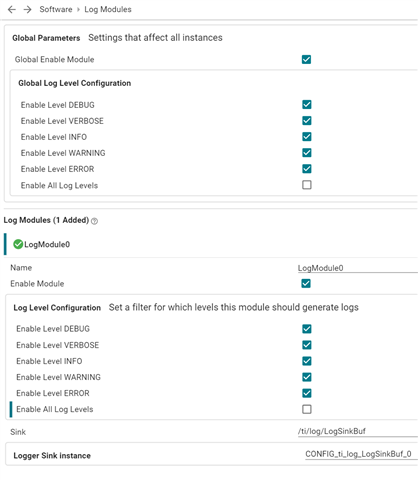
    Another thing to check is that you have configured the 'Global Parameters' for the Log modules.  These are 'a little hidden' at the top of the sysconfig page and also need to be configured :-

    [Note : in sdk 7.10, it's best to enable levels individually, rather than using the 'Enable All Log Levels' (as shown above) ]

    Hope that helps,

    ~roger

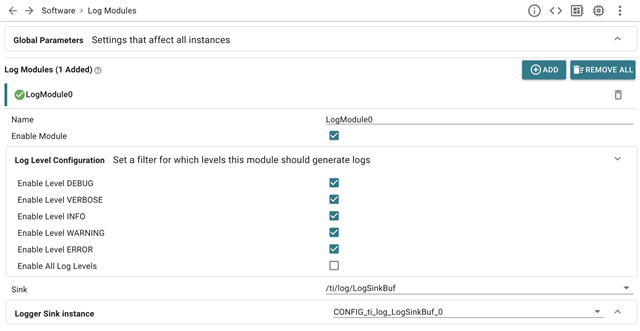
  • Sure, please find below the screenshot for log module in SysConfig.

    I called the Log_printf function like this and did observe the log in ROV.

    Log_printf(LogModule0, Log_DEBUG, "Hello World!");

    However if I change log level to anything other than Log_DEBUG, the log won't show up in ROV.

  • Another issue I found is that Log_printf doesn't seem to support %x format string. Is this something that will be supported in the future?

  • Hi Qinchen,

    Did you check the 'Globals' as well? - They are hidden (collapsed) by default at the top of the page.  Could you send screenshot of those as well?

    ~roger

  • Ah that's what I was missing! After enabling all the log levels in the globals, I can finally log at other levels. Thank you!