This thread has been locked.

If you have a related question, please click the "Ask a related question" button in the top right corner. The newly created question will be automatically linked to this question.

CC2340R5: cc2340r5

Part Number: CC2340R5
Other Parts Discussed in Thread: UNIFLASH, LP-XDS110ET,

I am working on cc2340r5 launchpad
and when i try to debug it it throws an error
Error connecting to the target:
(Error -615 @ 0x0)
The target failed to see a correctly formatted SWD header. The
connection to the target may be unreliable. Try lowering the
TCLK setting before trying again.
in Uniflash its easy to change the tclk setting but i am not able to change it here in Code Composer studio
Waiting for the reply 

  • Hi Robin,

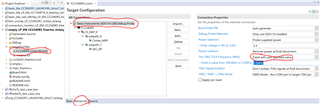
    Open targetConfigs/CC2340R5.ccxml with the Target Configuration Editor and navigate to the Advanced tab -> Texas Instruments XDS110 USB Debug Probe -> The JTAG TCLK Frequency (MHz) -> Fixed with user specified value and determine a new frequency inside of the added drop-down box.


    Are you using the LP-XDS110ET?  Make sure that you are using a short and reliable USB C 3.X cable.

    Regards,
    Ryan

  • Hi Ryan,

    I have already change this configuration but still it is not able to flash & debug.

    Yes we are using LP-XDS110ET.

    Regards,

    Robin

  • Ryan this is the continuation of the above thread

    Below are the logs of test connection

    [Start: Texas Instruments XDS110 USB Debug Probe]

    Execute the command:

    %ccs_base%/common/uscif/dbgjtag -f %boarddatafile% -rv -o -S integrity

    [Result]


    -----[Print the board config pathname(s)]------------------------------------

    C:\Users\DHRUVA~1\AppData\Local\TEXASI~1\
    CCS\ccs1250\0\0\BrdDat\testBoard.dat

    -----[Print the reset-command software log-file]-----------------------------

    This utility has selected a 100/110/510 class product.
    This utility will load the adapter 'jioxds110.dll'.
    The library build date was 'Dec 6 2023'.
    The library build time was '17:33:10'.
    The library package version is '12.6.0.00029'.
    The library component version is '35.35.0.0'.
    The controller does not use a programmable FPGA.
    The controller has a version number of '5' (0x00000005).
    The controller has an insertion length of '0' (0x00000000).
    This utility will attempt to reset the controller to enter SWD mode.

    -----[Print the reset-command hardware log-file]-----------------------------

    This emulator does not create a reset log-file.

    -----[Perform the SWD Mode Integrity test]-----------------------------------

    This test will read the IDCODE register 1 time.


    -----[An error has occurred and this utility has aborted]--------------------

    This error is generated by TI's USCIF driver or utilities.

    The value is '-615' (0xfffffd99).
    The title is 'SC_ERR_SWD_PROTOCOL'.

    The explanation is:
    The target failed to see a correctly formatted SWD header. The
    connection to the target may be unreliable. Try lowering the
    TCLK setting before trying again.

    [End: Texas Instruments XDS110 USB Debug Probe]

  • Hello Shivam,

    Thanks for the additional information.  Have you ever successfully used the LP-XDS110ET with a LP-EM-CC2340R5?  Do you have multiple of each you can test with?  Are these brand new hardware boards?   Have you tried using a different computer to compare the results?  Are you able to interface with Uniflash or Smart RF Studio 8? Confirm you are using PG2.0 devices and consider the recovery process mentioned in these relevant E2E threads.

    Regards,
    Ryan