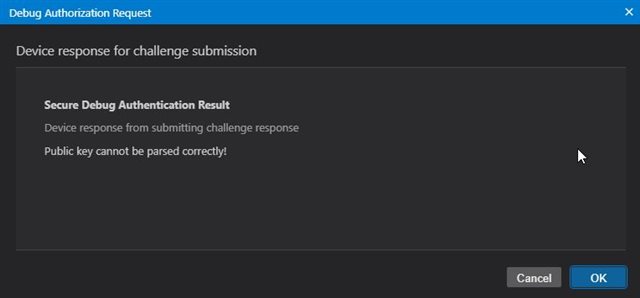
CC2745R10-Q1: Debug authentication

Part Number: CC2745R10-Q1
Other Parts Discussed in Thread: UNIFLASH, , SYSCONFIG

Hi,
I'm working on CC2745R10-Q via SWD with my Host device
we want to implement debug authentication. As per TRM, the below commands are used for debug authentication.
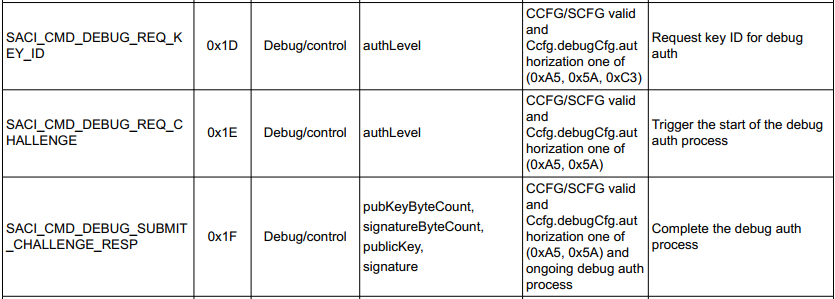
image.png
and in CCS(V20.3.1.5__1.9.1 ), the debug configuration is done,and generated the SCFG.bin file as shown below
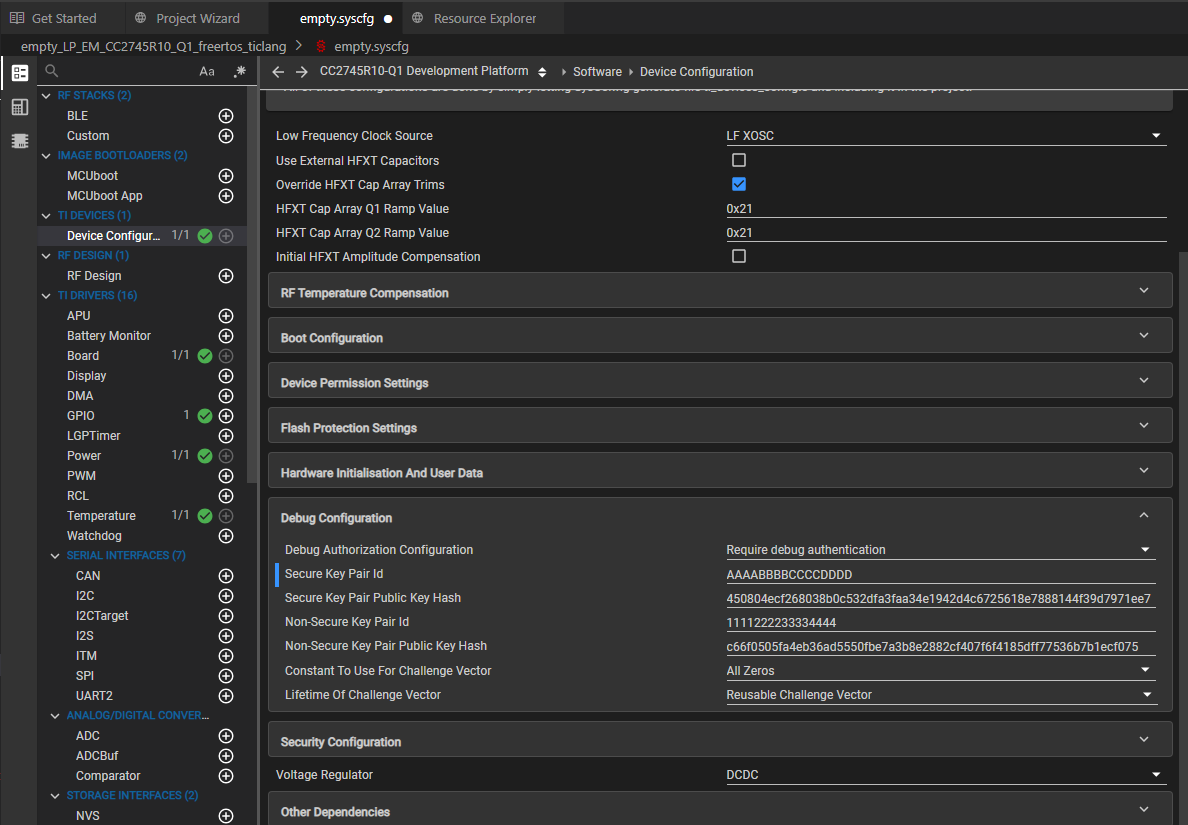
image.png
image.pngimage.png
But in the UniFlash(V9.3.0.5401), debug authentication feature seems like
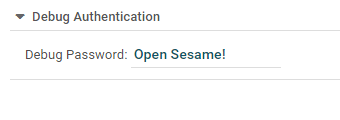
image.png
 Here are my inquiries:
1. It appears that UniFlash has not updated the debug authentication capability for the CC2745R10-Q. When will this feature be available?
2. If a device needs debug authentication, please provide a clear explanation of how to authenticate using Uniflash/CCS or any other tool. 
Thanks.
warm regards,
surender.


  • Hello Surender,

    Yes you are correct, UniFlash does not have debug authentication capability for the CC2745R10-Q1, and is there to support our legacy products. We do not plan on adding that feature, so we recommend using CCS directly to authenticate debugging. I have outlined the steps below:


    1. In your installed CCS directory, navigate to the /ccs/ccs_base/DebugServer/bin/sdm/ path. Make sure there is a SecureDebugManagerCC27.dll file.

    2. As you did above, go to the Debug Configuration section of sysconfig and set the parameters you want

    3. rebuild and flash the project onto the device, either using CCS or UniFlash

    4. reopen CCS and start a debug session, and a popup should appear requiring you to select authorization level

    5. save the challenge vector as challenge.bin somewhere on your device, make sure the file is saved as a .bin

    6. enter the filepath for the public key you generated and stored, should be in a .der file

    7. sign the challenge vector that you received from the device using OpenSSL: openssl dgst -sha256 -sign private_key.der -keyform DER -out sig.bin challenge.bin

    8. enter the file path to the sig.bin file that was generated

    9. if successful, debug will open after this step

    Thanks,

    Eshaan

  • Hi Eshaan,
    Thanks for the response, i have followed the same procedure to debug authenticate, but unable to unlock the debug authentication.
    Case 1: Configuring Debug configuration and loading via CCS
    1.SecureDebugManagerCC27.dll is available in the /ccs/ccs_base/DebugServer/bin/sdm/ path
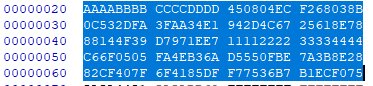
    2.Configured the Debug configuration as shown below, the provided the public key hash (32 bytes) of non-secure/secure is generated from the public_key.der(certutil -hashfile public_key.der SHA256)

    3.Rebiuld and when flashing the project, a pop of displayed to select the authorization level,
              chosen secure and got the challenge.bin
             
    signed the challenge vector using OpenSSLopenssl dgst -sha256 -sign private_key.der -keyform DER -out sig.bin challenge.bin
              

    4.
    Entered the public_key.der and sig.bin but [Restrictions are not met to proceed unlocking the device], please check the log details below.


    Even if tried by selecting authorization level to non-secure and provided the non-secure public key hash in the scfg debug configuration as shown below, but [Restrictions are not met to proceed unlocking the device],


    case 2: Configuring the Debug configuration via CCS and loading via UniFlash
    i have performed chip erase with my host device and loaded default CCFG, SCFG values
    After step 3(Rebuild) in CCS, generated the CCFG, SCFG bins files with debug authentication enabled and tried to load from Uniflash, it hangs as shown below the log details.

    My observation is as follows: When attempting to flash from CCS, it successfully loads all configurations and enters debug mode for authentication.
    Here are my questions:
    I have the following questions:
    1. Is the public key hash of 32 bytes, which is generated from the public_key.der using the command (certutil -hashfile public_key.der SHA256), correct?


    2. After executing the aforementioned procedure in CCS, what restrictions remain unfulfilled that prevent the unlocking of the device? 
    3. if debug authorization selection is chosen "Non-secure authorization" or "Non-invasive authorization", what is the difference, can you explain?
    Please advise me on any errors I may have made in the process of unlocking the device.
    Thanks,
    surender.


  • Surender,

    Can you please provide me with your sysconfig version, sdk, and which project example you are using? I am trying to reproduce the issue on my end so that I can see what you are seeing. Thanks

    Eshaan

  • Hello Eshaan,
                          im using CCS Version: 20.3.1.5__1.9.1, sysconfig Version: 1.23.2, SDK Version:9.14.0.35
                         
                          Example project: empty (empty_LP_EM_CC2745R10_Q1_freertos_ticlang)
    UniFlash Version: 9.3.0.5401

    Kindly verify and inform me of the proper method to unlock and also respond to all my previous questions.
    Thanks,
    Surender.

  • Hello Surender,

    Thank you for sharing this information, I was able to reproduce your environment and successfully test debugging authentication on my end. Here are the exact steps I followed. I did however use a slightly newer SDK, the 9.14.00.39 since that is the most recent public SDK we have. However, the CCS and Sysconfig version are the exact same so it should work the same:

    1.  Generate public/private keys in DER format using openSSL. You can call these commands from which ever directory you want to save your keys.

    2. Once you generate the hash, you will copy/paste that directly into the Debug Configuration section of sysconfg. I have provided a picture of my sysconfg with the key I generated from openSSL


    3. Rebuild and flash the project (I used Uniflash instead of CCS to flash). You might see an error or some message about debugging permissions, but it should show load successful at the bottom so you can ignore the error messages since it will still work. We are still in the process of updating both CCS and Sysconfg to handle debug authentication so that is why they might appear.

    4. Start a debug session in CCS, and the pop-up asking for authorization should appear (I selected secure for testing purposes)

    5. Save the challenge vector to your computer

    6. Provide the path to the public_key.der you generated in step 1

    7. Before you can continue from this page, you need sign the challenge vector using: openssl dgst -sha256 -sign private_key.der -keyform DER -out sig.bin challenge.bin, Once generated, you can insert the path to the newly generated sig.bin and continue

    8. You should see this message below if everything works as expected


    Thanks,

    Eshaan

  • Hi Eshaan,
                    Thanks for the quick and clear response, but i have issue while flashing into device.
    Case: 1: Used CCS to flash
    1. Followed the step 1
    2.Followed the step 2
    3. Rebuild and try to flash (i used CCS) while flashing pop-up asking for authorization appeared (I selected secure for testing purposes)
    4.Saved the challenge vector to my computer as challenge.bin(40 bytes)
    5.provided the public_key.der
    6. Generated the sig.bin for the challenge.bin and provided
    7.I can see the below pop-up of [Restrictions are not met to proceed unlocking the device] and the configurations and log as shown below


    Case 2: Used UniFlash(version:9.3.0.5401) for flash
    Note: Before flashing via UniFlash, performed chip erase by using my host device

    1. Followed step 1
    2. Followed step 2
    3. Rebuild and try to flash using the UniFlash, it hangs as shown below along with its log, but i can't see load successful at the bottom. 
    observed that the LED sample code is executing after reset
     
    4. Started debug session in CCS pop-up asking for authorization appeared (I selected secure for testing purposes)
    5.Saved the challenge vector to my computer
    6.Provided the path to the public_key.der which i generated in step 1
    7.Generated sig.bin, inserted the path to the newly generated sig.bin by using (openssl dgst -sha256 -sign private_key.der -keyform DER -out sig.bin challenge.bin)
    8. The below message appread pop-up of [Restrictions are not met to proceed unlocking the device] and the configurations and log as shown below


    I've used UniFlash version 9.3.0.5401. Could you tell me which version of UniFlash you used for testing? I'd want to do exactly the same.
    regards,
    Surender.