This thread has been locked.

If you have a related question, please click the "Ask a related question" button in the top right corner. The newly created question will be automatically linked to this question.

CC2340R5: Can't set low power modes

Part Number: CC2340R5

I am developing an app and have to work a lot with power modes. I have traced a problem all the way back to the basic_ble exmple. When I check the project property "Allow power transitions while running if supported (low power running)", I can no longer load the project onto the eval board. The loading dialogs spin forever. Turn the property off and everything loads but I never see the chip go into standby mode when it should. I have never seen the example consume less than 1.2 ma.  I need to consume much less power in standby for my product. The following is a picture of the dialog I see when I set the property on.
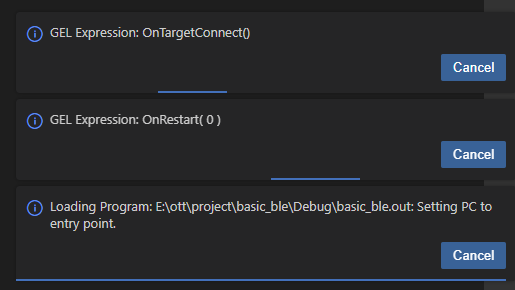
image.png


  • Hi !

    Before trying to make Energy Trace with no debugger work in CCS 20, I think we should first make sure that the issue actually comes from the debugger attached and not something else.

    Please try the 2-wire solution proposed in the initial thread and see if Energy Trace returns expected results.

    Kind regards,
    Lea

  • I think you are missing the point. I download the basic_ble code. I compile and run. I set the check box to allow low power states. I never can never load and run again. 

  • Hi,

    The ticket that you shared in the original thread (https://sir.ext.ti.com/jira/browse/EXT_EP-12168) mentions that standalone energy trace is not supported in CCS Theia. The workaround for this is to use CCS Eclipse/CCS 12 to run energy trace measurements.

    I cannot know for sure, but the reason why Energy Trace is currently not working is probably the same reason why the checkbox to allow low power states is not working either, since Energy Trace needs to allow low power states to function.

    Kind regards,
    Lea

  • My impression is that the check box is necessary to enable low power states, so ET would never work without it enabled. It is not that the checkbox is not working, is that when I enable it, the firmware does not run at all. This has nothing to do with Energy Trace. If you cannot know for sure, where would I turn to find out for sure? Thank you for your support. 

  • When the checkbox is enabled, the JTAG connection to the board is not disconnected during a power transition.

    From https://software-dl.ti.com/ccs/esd/documents/users_guide/ccs_debug-main.html :
    Allow power transitions while running if supported (low power running): Maintains the JTAG Debug Probe connection when the target device goes through a power transition or reset. This is heavily dependent on the device and board capabilities.

    It's not necessary to use this checkbox for energy trace and you shouldn't enable it.