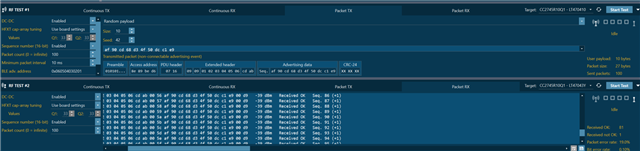
CC2755P10: Step by Step how to measure RSSI in Smart RF Studio 8

Part Number: CC2755P10

Hello

Can you please provide a step by step guide on how to measure RSSI in Smart RF Studio 8? This tool lacks a guide overall and there are no testing guides available. My customer is looking to measure the RSSI in radiated method and are asking which client is used.

For example, can this be done using x1 LP or are x1 needed? What is reccomended to achieve the best performance, x1 or x2 launch pads?

I previously directed my customer to measeure RSSI by enabling the following

1. Continuous RX

2. Packet TX to Packet RX (RX side will show packet info and also the detected RSSI)

However that was not sufficient to conduct this measurement.

Thank you.

  • Hi Bailey,

    If the customer wants to capture the average RSSI over a specific channel then they would use the Continuous RX mode (1 LP).  If the customer desires to capture RSSI from a specific Packet TX device then they would use Packet RX mode (2 LP).  In either mode, results can be saved to a CSV or text file for further processing.  There is documentation inside of the Smart RF Studio 8 Help tab -> User's Guide.  If the customer is still not satisfied then please have them provide specific details as to what they desire to achieve.

    Regards,
    Ryan

  • Hi Ryan, 

    I have tried this test myself and I am seeing very bad RSSI values. 

    For option 1:

    My steps after selecting the LP I was using were the following -> continuous RX (no modifications, should I enable modifications?, what do the Q1 and Q2 values mean?) then selected "start test" and see RSSI consistently below 0 avg around -80ish. 

    For option 2:

    My steps after selecting the LP I was using were the following -> 

    Test #1, packet TX, no modifications (should I make modifications?) -> start test

    Test #2, packet RX, no modifications, (should I make modifications?) -> start test

    I assume the dBm value displayed (-39 dBm) is RSSI?? can you confirm?

    I have the following questions:

    - For the x2 LP test, how do I know which test is running on which LP? I cannot find an option to select a COM port or anything of that sort to indicate which board is on which side...

    - Do I need to connect an antenna to the LP?

    - Do you have any recommendation on how to improve the RSSI value?

    - What modifications should I make to the test setup for either test 1 or test 2?

  • Responded and handling offline.

    Regards,
    Ryan

  • RSSI Measurement Guide.docx

    Inserting this for anyone who finds this thread and needs the guide.