


Tool/software:
Hello,
I'm trying to flash and debug the example CC35xx_ble_wifi_provisioning in CCS 20.1.1
I copied the cc35x1_device_support files from the sdk 9.10.0.01 to the ccs_base directory and run the python script.
Building the project works fine.
I followed the steps in C:\ti\simplelink_wifi_sdk_9_10_00_01_52MHz_ea/docs/html/cc35xx/software/software-overview.html and finished it successfully.
In step 12 in the document, I replaced the toolbox path with C:\\ti\\simplelink_wifi_toolbox_2_2_4.
But Debug Project and Flash Project both fail with:
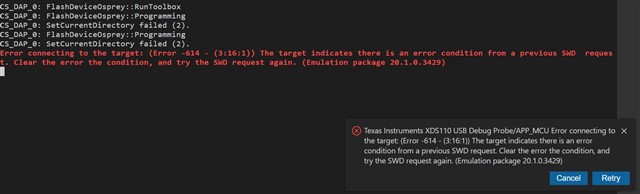
Does somebody know, what I'm doing wrong? Did I miss something in the configuration?
Regards
Thomas
