This thread has been locked.

If you have a related question, please click the "Ask a related question" button in the top right corner. The newly created question will be automatically linked to this question.

CC2530: CC2530 Stack Data is outside of Stack range

Part Number: CC2530
Other Parts Discussed in Thread: Z-STACK,

 Hi Guys,

I´m using TI Z-Stack Home 1.2.2a.44539 version and IAR IDE version 10 to building my device (on/off actuator) based on Sample Light project. I have using two different vendors gateways to test my on/off device!

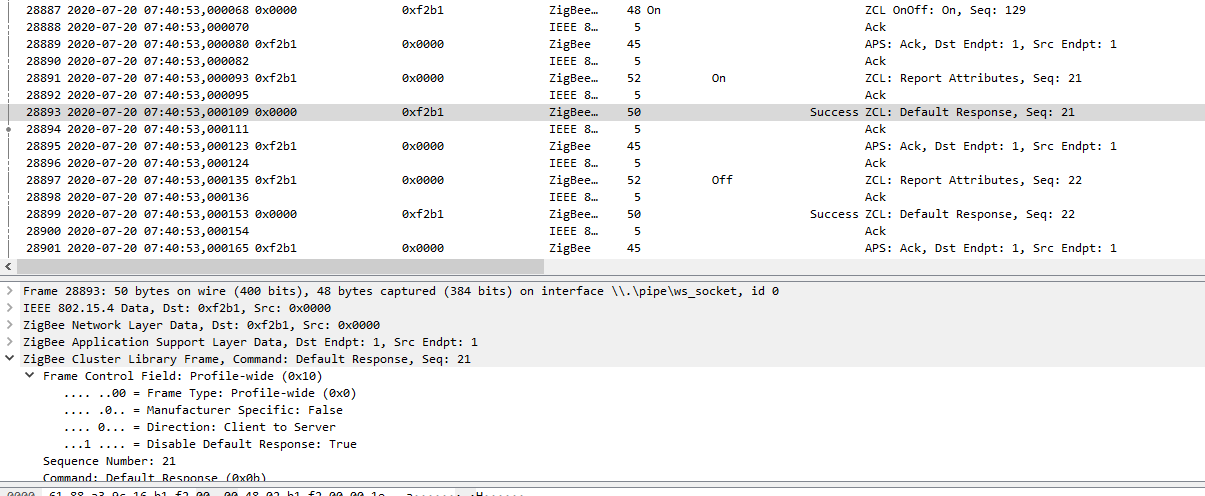
Since I first the first on/off device version I have observed a abnormal behavior after the gateway sending ZCL On/off message to on/off device, only in the ON command, the device interpret ON CMD change his status to ON and after it change to OFF him self. It´s happening aleatory! As you can see in the trace log, that after the on/Off device received ZCL On/off with cmd ON sequentially the device sends the ZCL Reporting Message as OFF. In the two gateways I have observed the same error, even have the ZCL on/off message have a little difference in FCF field in the Disable default response parameter (1s TRUE and 2st False). 

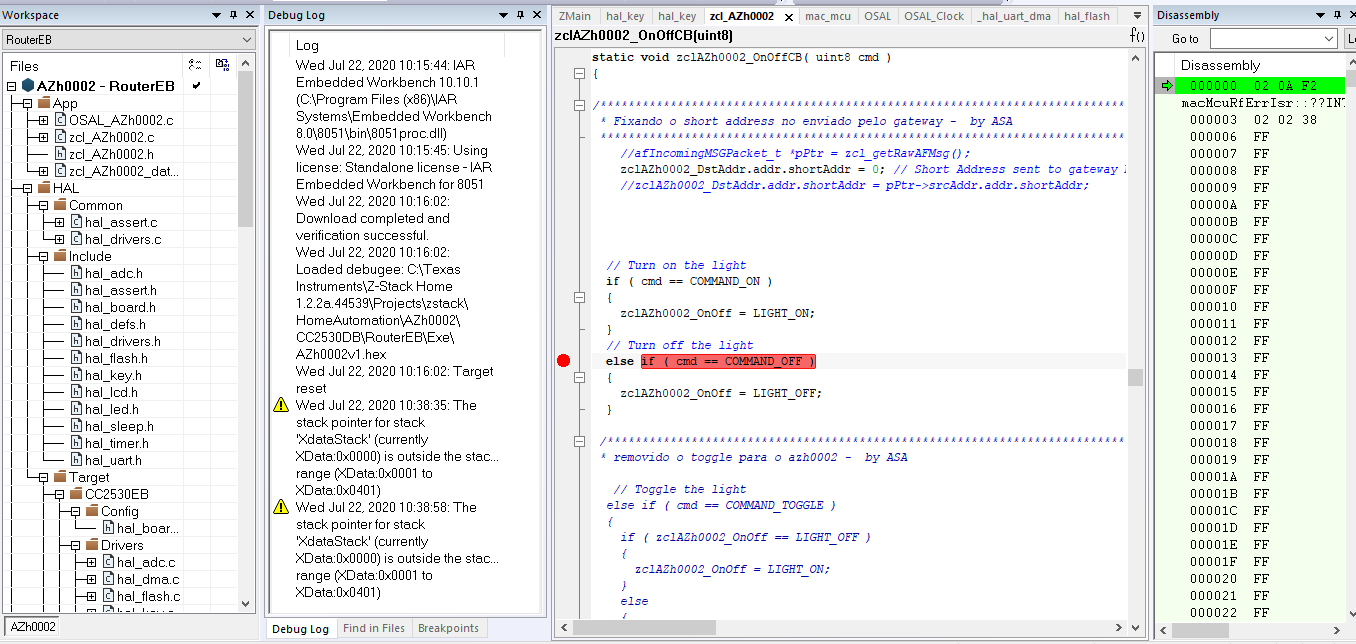
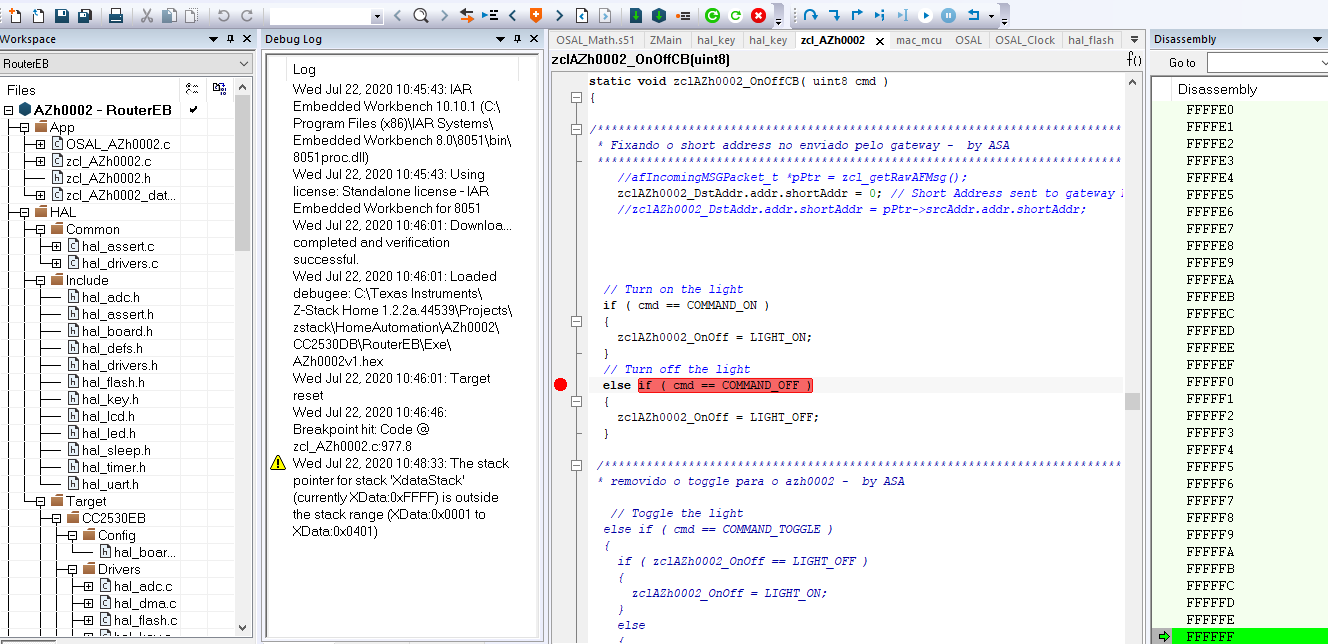
I have tried to follow in the IAR debugging mode, the main root cause, in the different code stages (ZCL.C or my APP files) but I cant do it. I have observed errors like The Stack Data is outside of stack range (0x0000 or 0xFFFF) and the IAR stop debug after it,  as you can observing in the PICs attached. 

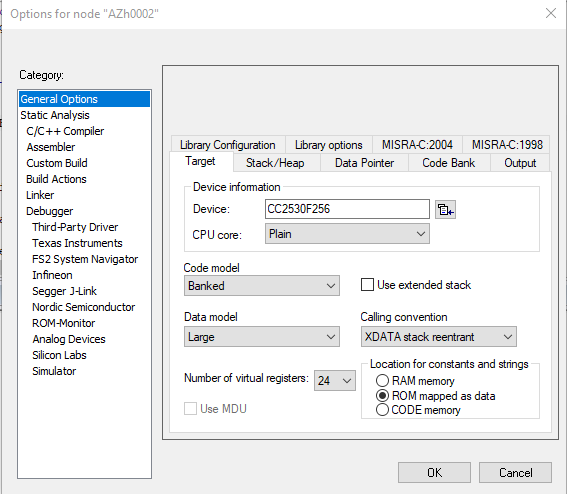
I don´t know if Stack out-off range is the main problem or consequence, but the intermittency occur since when I burn the code definitely in the CC2530F256 using CC Debugger. Including I have change the Virtual Register to 24 to check if it will fix the problem, but I do not have success!
Someone please can help me and direction to fix it?

 Stack out-of range 0x0000 
 Stack out-of range 0xFFFF

 ZCL On/oFF as ON and Reporting Attributs controversial as OFF


  • Hi,

    alexander argollo said:
    I´m using TI Z-Stack Home 1.2.2a.44539 version and IAR IDE version 10

    I would suggest using the recommended IAR version as specified in the release notes (<zstack>/Z-Stack Home Release Notes.txt). This may address the debug issues.
    With IAR 10, you may want to consider using Z-Stack 3.0.2 (which recommends IAR 10.20.1 for CC2530).

    What happens if you send "on" command a second time? Do you see the Report Attributes indicate that the light is "on"?
    Can you attach the sniffer log with multiple instances of sending "on" command (and Report Attributes)?

    Regards,
    Toby

  • Hi Toby, thanks a lot for your assistance!!!

    I´m using IAR EWB 10.10.1, as you suggest me, I´ll try to port my on/off device to Zstack- 3.0. 

    In response to your question, considering that I have run my device with code inside, without debug mode, after the first "on" command that is no work, some times the second "on" command work or some times not work, it´s totally aleatory. But in the most part of time, the on-off device works after 3 command on consecutive. 

    The light is On and OFF in sequence, demonstrating what happens in the messages flow, proving that the device has changed state from "ON" to "OFF".

    You can see more detail in trace log attached and bellow:

    #28887 - The Command  ZCL on/off w/ CMD ON, seq Numb. 129 , sent by GW

    #28891 - Report Attributes On/off CTRL as "ON"  Seq Numb. 21, sent by Device 

    # 28893 - Default Response, seq  Numb. 21 sent by GW

    # 28897 - Report Attributes On/off CTRL as "ON"  Seq Numb. 22, sent by Device him self, without any ZCL on/off CMD OFF.

    Note: You can see in the attached trace, at different moments or times, two gateways and my device on/off flows with distinct network short IDs. 

    Device On-off in diff moments_w error.zip

  • Hi Toby, 

    As I told you, I cant follow the problem via debugger if I starting with any parameter triggered to do it the IAR IDE, when the stack error occurring the IAR IDE stopping to work. because it I did some experience in the code using comment out.

    My Device have a mechanical switch, I using an opto cuppler to trigger P0_4 port and P1_4, via opto cuppler also, to trigger a 5V relay. My first investigation was to check if the electrical conditions to trigger P0_4 port, because the Key Switch (HAL_ISR_FUNCTION( halKeyPort0Isr, P0INT_VECTOR ) and zclAZh0002_OnOffCB has convergent work points. 

    I have observed that:

    When I comment out the HAL_ISR_FUNCTION( halKeyPort0Isr, P0INT_VECTOR, the error persist (On and Off sequentially).

    when I comment out the zclAZh0002_OnOff = zclAZh0002_OnOff ? LIGHT_OFF : LIGHT_ON the error fades away, or working well, when on-off CMD is coming from Over the air! 

    Do you can see any idea to fix it?

    You can see bellow, the electrical investigation via oscilloscope.

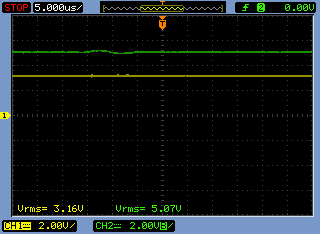
    My Mechanical Key is off

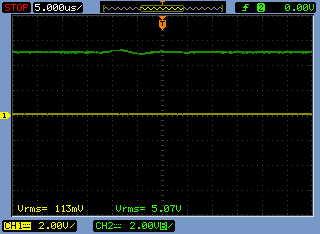
    The Yellow oscilloscope port is connected to opto cuppler connect in P0_4 (switch)

    The Green oscilloscope port is connected to opto cuppler connect in P1_4 (relay)

    My Mechanical Key is ON, please disregards the green line. was too faster to capture it.

    Would you see my codes parts bellow:

    ZCL_App.c file


    if ( keys & HAL_KEY_SW_6 )
      {
        // toggle local light immediately
        zclAZh0002_OnOff = zclAZh0002_OnOff ? LIGHT_OFF : LIGHT_ON;
      }
    
      // update the display, including the light
      zclAZh0002_DeviceStatusUpdate();

    /*********************************************************************
     * @fn      zclAZh0002_LcdDisplayUpdate
     *
     * @brief   Called to update the LCD display.
     *
     * @param   none
     *
     * @return  none
     */
    void zclAZh0002_DeviceStatusUpdate( void )
    {
    #ifdef LCD_SUPPORTED
      if ( giLightScreenMode == LIGHT_HELPMODE )
      {
        zclAZh0002_LcdDisplayHelpMode();
      }
      else
      {
        zclAZh0002_LcdDisplayMainMode();
      }
    #endif
    
      zclAZh0002_DisplayLight();
    }
    
    #if (defined HAL_BOARD_ZLIGHT) || (defined HAL_PWM)

    static void zclAZh0002_DisplayLight( void )
    {
    	
     /**********************************************************************************************************
     * ZCL Addressing Mode definition  -  by ASA
     **********************************************************************************************************/  
     	zclAZh0002_DstAddr.addrMode = (afAddrMode_t)Addr16Bit;
    	zclAZh0002_DstAddr.addr.shortAddr = 0; // Short Address sent to gateway
    	zclAZh0002_DstAddr.endPoint=1; // DST Endpoint sent to Gateway
     
    
    // set the Green LED based on light (on or off)
      if ( zclAZh0002_OnOff == LIGHT_ON )
      {
    	//HalLedSet ( HAL_LED_1, HAL_LED_MODE_ON );
        P1_4 = 1; // AZH0002 OC2 turn on Relay
        P0_0 = 0; // LED GREEN is active in low


         osal_start_timerEx( zclAZh0002_TaskID, AZh0002_LEVEL_CTRL_EVT, 400 );
    
    
    	zclReportCmd_t *pReportCmd;
    	pReportCmd = osal_mem_alloc( sizeof(zclReportCmd_t) + sizeof(zclReport_t) );
    		if ( pReportCmd != NULL ){  
    									pReportCmd->numAttr = 1;
    									pReportCmd->attrList[0].attrID = ATTRID_ON_OFF;
    									pReportCmd->attrList[0].dataType = ZCL_DATATYPE_BOOLEAN;
    									pReportCmd->attrList[0].attrData = (uint8*)&zclAZh0002_OnOff;
    									zcl_SendReportCmd(AZh0002_ENDPOINT,&zclAZh0002_DstAddr,ZCL_CLUSTER_ID_GEN_ON_OFF,
                                         pReportCmd, ZCL_FRAME_SERVER_CLIENT_DIR, FALSE, SeqNum++ );
    		}
    	osal_mem_free( pReportCmd );
      }
      else if ( zclAZh0002_OnOff == LIGHT_OFF)
      {
    	//HalLedSet ( HAL_LED_1, HAL_LED_MODE_OFF );
    	P1_4 = 0; // AZH0002 OC2 turn off Relay
    	P0_0 = 1; // LED GREEN is active in low
    
    
    osal_start_timerEx( zclAZh0002_TaskID, AZh0002_LEVEL_CTRL_EVT, 400 );
    
    
    	zclReportCmd_t *pReportCmd;
    	pReportCmd = osal_mem_alloc( sizeof(zclReportCmd_t) + sizeof(zclReport_t) );
    		if ( pReportCmd != NULL ){ 
    									pReportCmd->numAttr = 1;
    									pReportCmd->attrList[0].attrID = ATTRID_ON_OFF;
    									pReportCmd->attrList[0].dataType = ZCL_DATATYPE_BOOLEAN;
    									pReportCmd->attrList[0].attrData = (uint8*)&zclAZh0002_OnOff;
    									zcl_SendReportCmd(AZh0002_ENDPOINT,&zclAZh0002_DstAddr,ZCL_CLUSTER_ID_GEN_ON_OFF,
                                        pReportCmd, ZCL_FRAME_SERVER_CLIENT_DIR, FALSE, SeqNum++ );
    		}
    
       osal_mem_free( pReportCmd );  
      }
    
    #ifdef LCD_SUPPORTED
      if (giLightScreenMode == LIGHT_MAINMODE)
      {
    #ifdef ZCL_LEVEL_CTRL
        // display current light level
        if ( ( zclAZh0002_LevelCurrentLevel == ATTR_LEVEL_MIN_LEVEL ) &&
             ( zclAZh0002_OnOff == LIGHT_OFF ) )
        {
          HalLcdWriteString( (char *)sLightOff, HAL_LCD_LINE_2 );
        }
        else if ( ( zclAZh0002_LevelCurrentLevel >= ATTR_LEVEL_MAX_LEVEL ) ||
                  ( zclAZh0002_LevelCurrentLevel == zclAZh0002_LevelOnLevel ) ||
                   ( ( zclAZh0002_LevelOnLevel == ATTR_LEVEL_ON_LEVEL_NO_EFFECT ) &&
                     ( zclAZh0002_LevelCurrentLevel == zclAZh0002_LevelLastLevel ) ) )
        {
          HalLcdWriteString( (char *)sLightOn, HAL_LCD_LINE_2 );
        }
        else    // "    LEVEL ###"
        {
          zclHA_uint8toa( zclAZh0002_LevelCurrentLevel, &sLightLevel[10] );
          HalLcdWriteString( (char *)sLightLevel, HAL_LCD_LINE_2 );
        }
    #else
        if ( zclAZh0002_OnOff )
        {
          HalLcdWriteString( (char *)sLightOn, HAL_LCD_LINE_2 );
        }
        else
        {
          HalLcdWriteString( (char *)sLightOff, HAL_LCD_LINE_2 );
        }
    #endif // ZCL_LEVEL_CTRL
      }
    #endif // LCD_SUPPORTED
    }


    hal_key.c file

     **************************************************************************************************/
    #define HAL_KEY_RISING_EDGE   0
    #define HAL_KEY_FALLING_EDGE  1
    
    #define HAL_KEY_DEBOUNCE_VALUE  25
    
    /* CPU port interrupt */
    #define HAL_KEY_CPU_PORT_0_IF P0IF
    #define HAL_KEY_CPU_PORT_2_IF P2IF
    
    /* SW_6 is at P0.4 */
    #define HAL_KEY_SW_6_PORT   P0
    #define HAL_KEY_SW_6_BIT    BV(4)
    #define HAL_KEY_SW_6_SEL    P0SEL
    #define HAL_KEY_SW_6_DIR    P0DIR
    
    /* edge interrupt */
    #define HAL_KEY_SW_6_EDGEBIT  BV(0)
    #define HAL_KEY_SW_6_EDGE     HAL_KEY_FALLING_EDGE
    
    
    /* SW_6 interrupts */
    #define HAL_KEY_SW_6_IEN      IEN1  /* CPU interrupt mask register */
    #define HAL_KEY_SW_6_IENBIT   BV(5) /* Mask bit for all of Port_0 */
    #define HAL_KEY_SW_6_ICTL     P0IEN /* Port Interrupt Control register */ 
    #define HAL_KEY_SW_6_ICTLBIT  BV(4) /* P0.4 enable/disable bit */
    #define HAL_KEY_SW_6_PXIFG    P0IFG /* Interrupt flag at source */

    void HalKeyInit( void )
    { /* Initialize previous key to 0 */ halKeySavedKeys = 0; HAL_KEY_SW_6_SEL &= ~(HAL_KEY_SW_6_BIT); /* Set pin function to GPIO */ HAL_KEY_SW_6_DIR &= ~(HAL_KEY_SW_6_BIT); /* Set pin direction to Input */ /* Initialize callback function */ pHalKeyProcessFunction = NULL; /* Start with key is not configured */ HalKeyConfigured = FALSE; }

    HAL_ISR_FUNCTION( halKeyPort0Isr, P0INT_VECTOR )
    { HAL_ENTER_ISR(); if (HAL_KEY_SW_6_PXIFG & HAL_KEY_SW_6_BIT) { halProcessKeyInterrupt(); } /* Clear the CPU interrupt flag for Port_0 PxIFG has to be cleared before PxIF */ HAL_KEY_SW_6_PXIFG = 0; HAL_KEY_CPU_PORT_0_IF = 0; CLEAR_SLEEP_MODE(); HAL_EXIT_ISR(); }


  • Thanks for sharing details.

    Are you using CC2530 on custom board? Or is it EVM?

    From my understanding, you have two ways to control the light:
        1. by Zigbee command (via gateway)
        2. by switch on light device (GPIO) 
    Is this correct?

    alexander argollo said:
    When I comment out the HAL_ISR_FUNCTION( halKeyPort0Isr, P0INT_VECTOR, the error persist 

    Do you have ISR_KEYINTERRUPT defined? If not, then polling (every 100 ms, see Hal_ProcessEvent -->HAL_KEY_EVENT) is used rather than interrupt (in that case, HAL_ISR_FUNCTION is not called); see InitBoard(). 

    alexander argollo said:
    when I comment out the zclAZh0002_OnOff = zclAZh0002_OnOff ? LIGHT_OFF : LIGHT_ON the error fades away

    The issue you're describing sounds like further debouncing is needed. You can check if this is the case by sending NO on/off commands from gateway (keep rest of test setup same). Then in the sniffer log, if you still see the Report Attributes showing on/off randomly, this likely means some activity on the external input to P0_4 is causing this issue.

    Perhaps you could define ISR_KEYINTERRUPT (default is 25 ms debounce HAL_KEY_DEBOUNCE_VALUE).
    Or, you can try modifying the interval of polling (see in hal_drivers.c: osal_start_timerEx( Hal_TaskID, HAL_KEY_EVENT, 100)).

  • Hi Toby, firstly I would like to say thanks a lot for your assistance!!!!

    In response to your first question, Yes, I have to way to control the light, over the air via ZCL CMD On/off and via GPIO (P0_4) using the mechanical gang.

    I´m very happy to share you that I have solve the problem after you help me, thanks a lot!!!

    I will share below all the details in case our colleagues need to use in the future!


    Actions to fix the problem:

    1. As you have advise me, I change debounce time (HAL_KEY_DEBOUNCE_VALUE) from 25 to 50ms.

    2. I have observed that my OptoCoulpler (OC) was not working well, I made a mistake in the calculation to polarize it, and the OC was working on polarize slightly saturated when mechanical gang (S1) was in the off state, I have observed 0.13V, between Pins 3 and 4. to fix it I had to change the Emitter Resistor (R4) value to polarize OC in the Cut-Off region, you can see bellow my final on/off circuit:

    BR,

    Alex