This thread has been locked.

If you have a related question, please click the "Ask a related question" button in the top right corner. The newly created question will be automatically linked to this question.

[CC2650] Running SimpleBLEPeripheral Sample Code on CC2650EM-7ID v1.2

Other Parts Discussed in Thread: CC2640, CC2650

Hi,

I have SmartRF06 Evaluation Board and CC2650EM-7ID Module.

I have setup the CCS IDE and I am able to "Import" and "Build" the SimpleBLEPeripheral Project.

The BLE Stack Version is ble_cc26xx_2_00_00_42893 from where I have Imported the SimpleBLEPeripheral Project.

I am also able to flash the output hex file on the board but then the LCD is not showing anything and I am also not able to see any advertisement packets.

I am able to see the Red LED for Advanced Mode ON.

When I saw the Build Option in the CCS IDE, the variant is for CC2640, but I have the CC2650EM-7ID Module on the SmartRF06 Evaluation Board.
So this does not have any issues right (Please see the below snap) ?
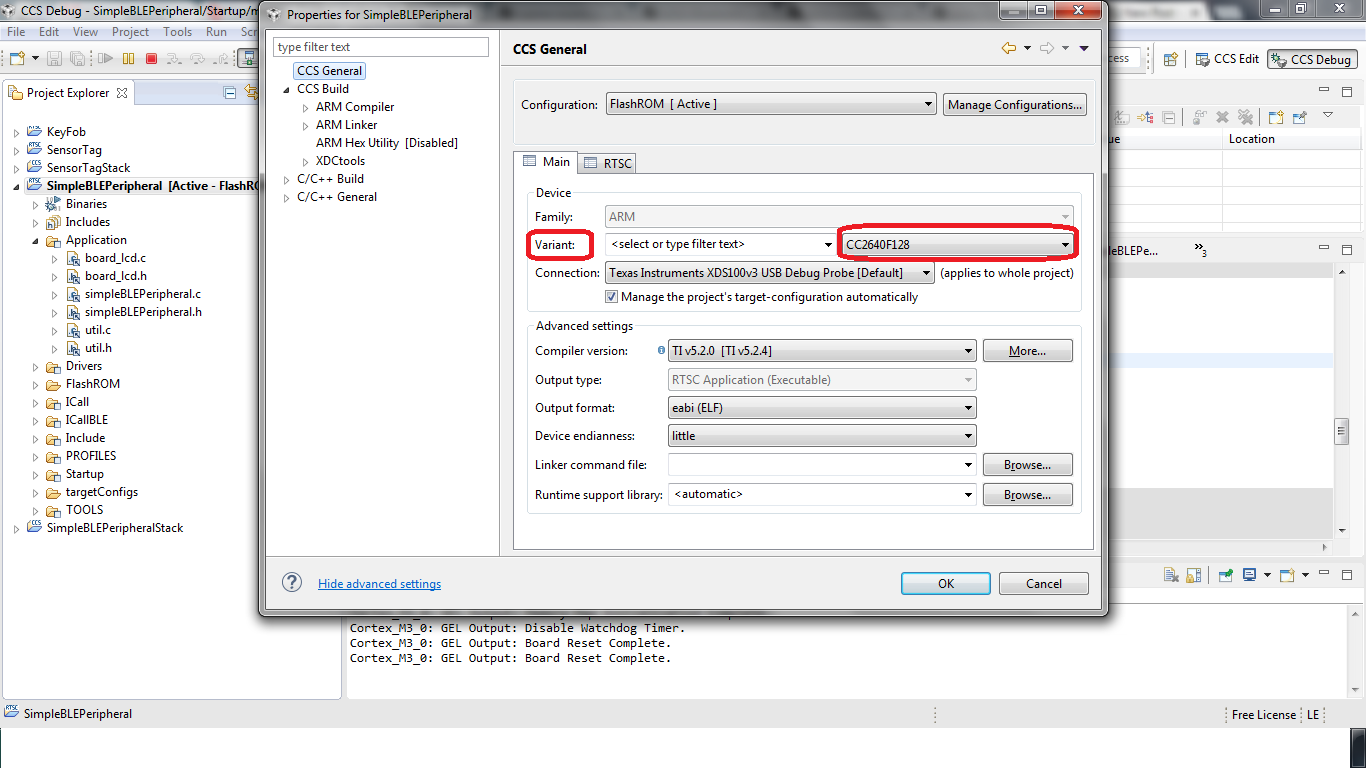
I see that the Debugger stops at main(). I am also able to step-in to the functions and step-over the functions.

I am able to go till SimpleBLEPeripheral_createTask(), but then I do not see the SimpleBLEPeripheral_taskFxn() getting called and also the SimpleBLEPeripheral_init().

Please do let me know if I am missing anything.

Thanks,
Sunny

  • Hello Sunny,

    Please see the sticky CC2640 FAQ thread. It is not recommended to change the CPU variant in the project, please use the defaults. If you have changed it, you'll need to re-import your project to the workspace.

    Best wishes
  • Hi JXS,

    I tried to search "sticky CC2640 FAQ" but I am not able to find.
    Also the link leads to the CC2640 Product page.

    Moreover, the actual question that I am asking is that the module that I have has CC2650EM while the CCS project "Build Options" has CC2640 mentioned in it. So will it make any problem ?

    Also I am able to step through the main() function via the XDS Debugger present on the SmartRF06 Evaluation Board.

    So can you please let me know if I need to do any other settings regarding the same ?

    Thanks,
    Sunny

  • I'm having the same (probably the same) issue. Single stepping through the code works
    Void main()
    {
    PIN_init(BoardGpioInitTable); // all of the code in main is inlined, not subroutined
    etc
    // until it hits
    BIOS_start();
    which inassembly is : 0x67ba 0xe8bd 0x4031 POP.W {R0, R4, R5, LR}
    }
    single stepping it ends up at 1001c054 (is this part of TI bios)
    asks for a file in c:\hudson\workspace\FWGroup-DriverLib...\osc.c
    jumps to 1001c680, goes for a while,
    and then hangs, either single stepping or after 'run' and break it is in an infinite loop at

    0x1001bbd6 0x2a00 CMP R2, #0 // R2 is 0 and is never reloaded, so hangs here, ?perhaps waiting for interrupt to change R2
    0x1001bdd8 0xd0fd BEQ.N 0x1001bdd6


    The red 'advanced mode' led is lit, as is green 'power' led.
    using
    IAR Workbench 7.40.2.8570
    IAR common components 7.2.1.3693

    Chip is a CC2650 F128 TI 531 AJLL G4
    Board is CC2650EM-7ID Rev 1.2
    Using SMARTRF06 pcb v 1.2
    Both arrived new from TI yesterday

    Prior to reprogramming the lcd and test programs worked.
    Have tried both SimpleBLEPeripheral and ProximityTag, both do the same thing.
    Tried setting chip in IAR to 2650 and to 2640 without affecting the result.
  • The stack being used was not the stack being compiled.   There are instructions to this effect.

    In IAR, Select the stack project, and download using 'download and debug'.  It will not run, but it flashes the cc2640 properly.

    Even though the cc2640App shows the stack project, it does not download it.

  • I am not sure whether this is still an issue with you, but I have been having the same issue and was pulling my hair out to find an answer. 

    My setup:

    1. SmartRF06EB with CC2650EM-7ID1.2

    2. CCS 6.1.1 on windows 10.

    What worked for me:

    1. As JXS suggested, import the SimpleBLEPeripheral project and DO NOT change anything. I have found importing projects using the "resource explorer" from the view menu very straight forward.

    2. As John C has indicated, import the SimpleBLEPeripheralStack and don't change anything. This is a step that has not been explicitly mentioned.

    3. Build, upload (i.e. attempt to debug) the SimpleBLEPeripheralStack, however this will not run (as John C has mentioned) but this will atleast upload the stack to the device.

    4. Build and debug the SimpleBLEPeripheral project, and now it should be working.

    I hope that works and helps :)

    Cheers,

    Aaron

  • hi
    am working on same file for OAD is it will help?? what are the procedures to do that
  • Hello Stebin,

    Is this related to your other inquiry: e2e.ti.com/.../627435 ?

    I recommend you open a new post if it's a different topic as this thread is 2+ years old.

    Best wishes