• Join
  • Sign In with my.TI Login
Texas Instruments
  • Products
  • Applications
  • Tools & Software
  • Support & Community
  • Sample & Buy
  • About TI
Sample & Purchase Cart Sample & Purchase Cart
  • Search
  • Advanced
TI E2E™ Community
  • Support Forums
  • Blogs
  • Groups
  • Videos
  • 简体中文
  • More ...
TI Home » TI E2E Community » Support Forums » Low Power RF & Wireless Connectivity » Low Power RF Hardware & Tools Forum » CC-6LOWPAN-DK-868
Share
Low Power RF & Wireless Connectivity
  • Forums
  • Announcements
  • Files
  • E2E Wiki
Options
  • Subscribe via RSS

CC-6LOWPAN-DK-868

CC-6LOWPAN-DK-868

This question is not answered
stefano Zermian
Posted by stefano Zermian
on Mar 23 2012 07:53 AM
Prodigy20 points

2022.MAC - Ti 6lowPan DK-868 -no nodes found issue.zip


I am Stefano Zermian sistem fae for arrow italy.

My customer bought recently the evaluation board of 6 lowpan

CC-6LOWPAN-DK-868

They have the problem with this evaluation board , the nodes do not connect with the router

In attached the documentation that the customer sended me.


Thanks for your feedback


Report Abuse
  • Reply
You have posted to a forum that requires a moderator to approve posts before they are publicly available.
All Replies
  • Firefighter
    Posted by Firefighter
    on Mar 26 2012 02:32 AM
    Expert5460 points

    Hi Stefano,

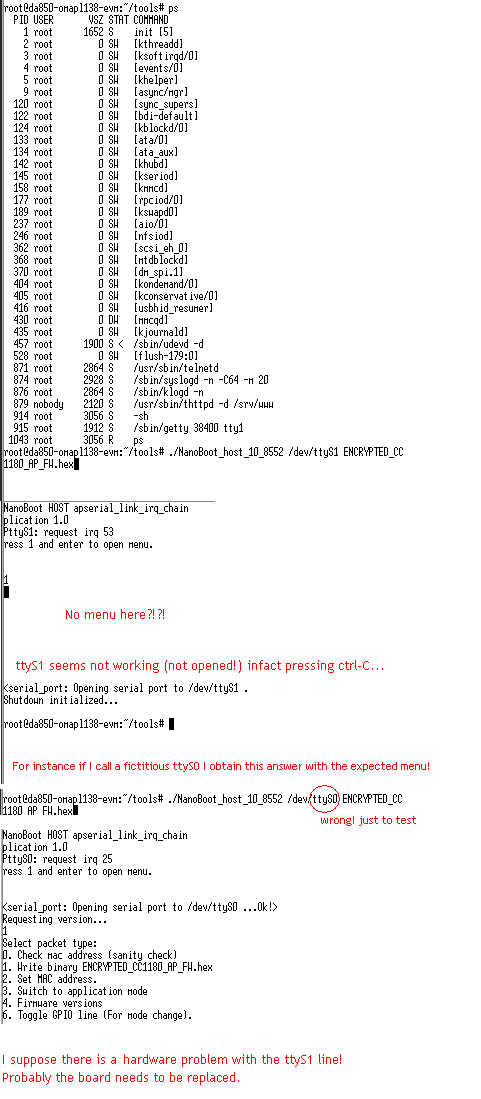
    The gateway seems to be in boot mode, which is indicated by the two LEDs are on. Use the NanoBoot_host tool to get it into application mode:

    1)Use RS-232 cable to debug console port (RS-232 port on OMAP, use e.g. Tera Term in windows)

    2)Power up OMAP board, wait for it to boot.

    3)Log in to Linux: “root” (no password)

    4)Issue the command ps, you will see a list of active applications

    5)Use kill -2 [process ID for nanorouter], e.g. kill -2 845

    6)Repeat step 4 +5 for the NAPSocketServer process ID. (Not certain that you have one)

    7)Issue command cd /tools

    8)Issue command ./Nanoboot_host_10_8552 /dev/ttyS1 ENCRYPTED_CC1180_AP_FW.hex

    9)You will now get a small GUI in front of you.

    10)Press 1 [Enter]

    11)Press 6 [Enter]

    12)Press Ctrl-C to exit the nanoboot application

    13)Cycle power on the OMAP board and let it boot, it will start nanorouter automatically. 

    Nodes should now connect when powered on. 

    Let me know if you have any more issues.

    Regards,

    Jonas

    Report Abuse
    • Reply
    You have posted to a forum that requires a moderator to approve posts before they are publicly available.
  • stefano Zermian
    Posted by stefano Zermian
    on Mar 27 2012 06:51 AM
    Prodigy20 points

    Sorry , the customer yersterday have tryed to download the firmware but without success.

    i attach the sreenshot.


    many thanks for your feedback


    Report Abuse
    • Reply
    You have posted to a forum that requires a moderator to approve posts before they are publicly available.
  • Fazilah Hassan
    Posted by Fazilah Hassan
    on Mar 27 2012 22:06 PM
    Prodigy60 points

    Hi, I also have the same problem. we purchased 6lowpandk868 last week and have problem connecting the nodes in windows platform. Do i need any software or else to make the node connecting to the router. The red LED seems to blink all the time. And green LED not ON no matter how long I connect the router to the PC.

    The first time I try connecting the device, the router can be connected and view through node wiew but not the nodes. (using 2001::11 ip add)

    It seems that the nodes not connected with the router.

    The next day I try, i cant connected the router at all.

    Do i need any software to connect the router or nodes?

    CC430 868 MHz 6LoWPAN
    Report Abuse
    • Reply
    You have posted to a forum that requires a moderator to approve posts before they are publicly available.
  • Firefighter
    Posted by Firefighter
    on Mar 29 2012 02:41 AM
    Expert5460 points

    To make life easier I reply in this thread only: http://e2e.ti.com/support/low_power_rf/f/156/t/151236.aspx#644471

    Cheers,

    Jonas

    Report Abuse
    • Reply
    You have posted to a forum that requires a moderator to approve posts before they are publicly available.
  • Yujin Cheng
    Posted by Yujin Cheng
    on Oct 03 2012 08:32 AM
    Prodigy60 points

    Hello,

    Thank you in advance for accepting my problem!

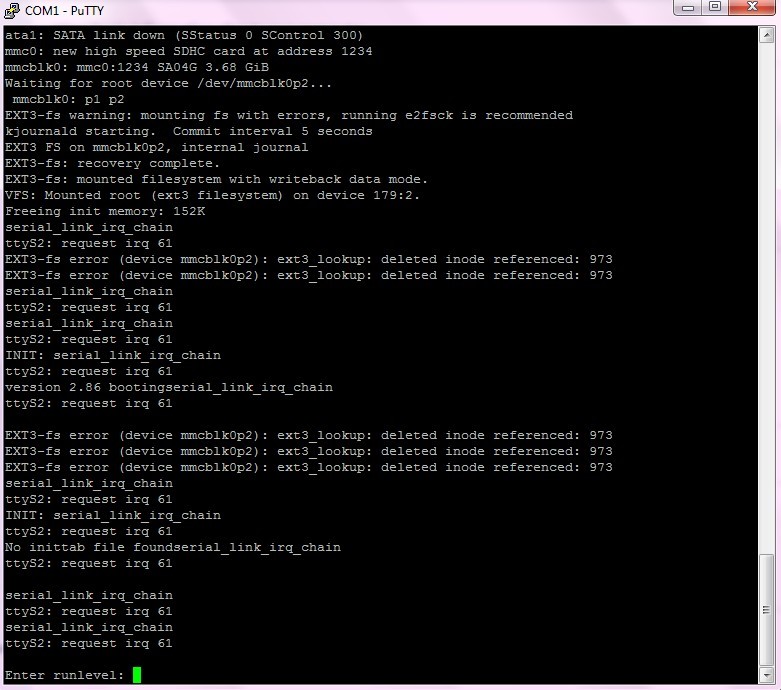
    I am a new users of cc-6lowpan-dk-868 development kit, and I power on the router this morning and it goes into different than as usually to---the two leds(red and green) on the adapter board keeping on.I think something wrong with my edge router.

    I power on the edge router which has already attached the adapter card and the cc1180EM on. Then I connect the router to my computer using RS232 cable,and the situation in the serial monitor shows blow:

    And I would like to know the problem is that the system been broken in the SD card? I am very anxious to solve this problem!

    Thank you again!

    Regards,

    Yujin Cheng

    Report Abuse
    • Reply
    You have posted to a forum that requires a moderator to approve posts before they are publicly available.
  • Firefighter
    Posted by Firefighter
    on Oct 05 2012 02:09 AM
    Expert5460 points

    See post http://e2e.ti.com/support/low_power_rf/f/156/t/151236.aspx

    -Jonas

    CC1180
    Report Abuse
    • Reply
    You have posted to a forum that requires a moderator to approve posts before they are publicly available.
TI E2E™ Community
  • Support Forums
  • Blogs
  • Videos
  • Groups
  • Site Support & Feedback
  • Settings
TI E2E™ Community Groups
  • TI University Program
  • Make the Switch
  • Microcontroller Projects
  • Motor Drive & Control
Other Communities
  • Deyisupport
  • Designsomething.org
  • beagleboard.org
  • TI on Element 14
  • TI on TechXchangeSM
Other Technical & Support Resources
  • WEBENCH® Design Center
  • Product Information Centers
  • Technical Documents
  • TI Design Network
  • TI Technical Articles
  • TI Training

All content and materials on this site are provided "as is". TI and its respective suppliers and providers of content make no representations about the suitability of these materials for any purpose and disclaim all warranties and conditions with regard to these materials, including but not limited to all implied warranties and conditions of merchantability, fitness for a particular purpose, title and non-infringement of any third party intellectual property right. TI and its respective suppliers and providers of content make no representations about the suitability of these materials for any purpose and disclaim all warranties and conditions with respect to these materials. No license, either express or implied, by estoppel or otherwise, is granted by TI. Use of the information on this site may require a license from a third party, or a license from TI.

Content on this site may contain or be subject to specific guidelines or limitations on use. All postings and use of the content on this site are subject to the Terms of Use of the site; third parties using this content agree to abide by any limitations or guidelines and to comply with the Terms of Use of this site. TI, its suppliers and providers of content reserve the right to make corrections, deletions, modifications, enhancements, improvements and other changes to the content and materials, its products, programs and services at any time or to move or discontinue any content, products, programs, or services without notice.

Follow Us Texas Instruments on Facebook Texas Instruments on Twitter Texas Instruments on LinkedIn Texas Instruments on Google+
TI Worldwide | Contact Us | my.TI Login | Site Map | Corporate Citizenship | mobile m.ti.com (Mobile Version)

TI is a global semiconductor design and manufacturing company. Innovate with 100,000+ analog ICs and
embedded processors, along with software, tools and the industry’s largest sales/support staff.

© Copyright 1995-2013 Texas Instruments Incorporated. All rights reserved.
Trademarks | Privacy Policy | Terms of Use