This thread has been locked.

If you have a related question, please click the "Ask a related question" button in the top right corner. The newly created question will be automatically linked to this question.

MSP430 and HD44780

Other Parts Discussed in Thread: MSP430G2452, MSP430G2231, MSP430G2553, MSP430F5437A, CONTROLSUITE

Hi, I did not like any library for handling the LCD so I write her but I do not know what to do next .... where's my mistake? Thank you very much.


#include <msp430g2452.h>

#define LCD_DIR P1DIR
#define LCD_OUT P1OUT

#define LCD_PIN_RS BIT0
#define LCD_PIN_EN BIT1
#define LCD_PIN_D4 BIT2
#define LCD_PIN_D5 BIT3
#define LCD_PIN_D6 BIT4
#define LCD_PIN_D7 BIT5

void PulseLCD(void)
{
LCD_OUT |= LCD_PIN_EN;
__delay_cycles(2000);

LCD_OUT &= (~LCD_PIN_EN);
__delay_cycles(2000);

}

void SendBite(char data)
{
if(data & 0x01)
LCD_OUT |= LCD_PIN_D4;
else
LCD_OUT &= ~LCD_PIN_D4;

__delay_cycles(2000);

if(data & 0x02)
LCD_OUT |= LCD_PIN_D5;
else
LCD_OUT &= ~LCD_PIN_D5;

__delay_cycles(2000);

if(data & 0x04)
LCD_OUT |= LCD_PIN_D6;
else
LCD_OUT &= ~LCD_PIN_D6;

__delay_cycles(2000);

if(data & 0x08)
LCD_OUT |= LCD_PIN_D7;
else
LCD_OUT &= ~LCD_PIN_D7;

__delay_cycles(2000);

PulseLCD();

}

void SendInstruction(char data)
{
LCD_OUT &= ~LCD_PIN_RS;

SendBite((data>>4) & 0x0F);
SendBite((data) & 0x0F);

}

void SendByte(char data)
{
LCD_OUT |= LCD_PIN_RS;

SendBite((data>>4) & 0x0F);
SendBite((data) & 0x0F);

}

void InitLCD(void)
{
LCD_OUT &= (~LCD_PIN_EN);
LCD_OUT |= LCD_PIN_RS;

__delay_cycles(100000);

SendInstruction(0x02);
SendInstruction(0x0C);
SendInstruction(0x01);
SendInstruction(0x06);
}

void LCDSetPosition(char Row, char Col)
{
char address;

if (Row == 0)
{
address = 0;
}
else
{
address = 0x40;
}

address |= Col;

SendInstruction(0x80 | address);
}

void LCDClear(void)
{
SendInstruction(0x01);
}

void LCDGoToHome(void)
{
SendInstruction(0x02);
}

void LCDShiftLeft(void)
{
SendInstruction(0x18);
}

void LCDShiftRight(void)
{
SendInstruction(0x1C);
}

void LCDBlinkCursor(void)
{
SendInstruction(0x0F);
}

void LCDPrintString(const char * Text)

{

while (*Text)

SendByte(*Text++);

}


  • Marek Prochazka said:
    where's my mistake?

    What is your problem?
    It really helps to know what to look for.


    However, two things I noticed:

    Marek Prochazka said:
    void LCDPrintChar(char *x, char data)
    {
        SendByte(*x);
    }

    This doesn't make sense. YOu pass a pointer to a char as well as a char, and then forward teh value the pointer points to, but don't use the passed char at all
    Either you pass a char* and then forward it as a string byte by byte to SendByte (in a loop) or you don't need a pointer at all and just get a char and pass it to sendByte.
    Or the code checkes whether teh pointer is a null pointer and passes the char or ignores the char and processes the string the pointer points to.
    But in its current form it makes no sense.

    The other thing is

    Marek Prochazka said:
    SendBite((data) & 0xf0);
    SendBite((data>>4) & 0x0F);


    (several appearances of the same mistake)

    Here you pass the upper 4 bit of data (by masking out the lower 4 bit) and then you shift the upper 4 bit to the lower 4 bit, clear the upper 4 bit and pass the former upper 4 bit divided by 16 to SendByte.

    so if data ix 0xa5, you're sending 0xa0 and 0x0a instead of 0x0a and 0x05, as surely intended.

    I guess you meant

    SendBite((data>>4)&0x0f);
    SendBite(data&0x0f);

  • Thank you very much. Taydy are my adjustments. Still does not work.


    #include  <msp430g2452.h>


    #define     LCD_DIR               P1DIR

    #define     LCD_OUT               P1OUT


    #define     LCD_PIN_RS            BIT0

    #define     LCD_PIN_EN            BIT1

    #define     LCD_PIN_D4            BIT2

    #define    LCD_PIN_D5          BIT3

    #define    LCD_PIN_D6        BIT4

    #define    LCD_PIN_D7            BIT5


    #define DATA_MASK ((LCD_PIN_D7 | LCD_PIN_D6 |LCD_PIN_D5 | LCD_PIN_D4));


    void PulseLCD(void)

    {

        LCD_OUT |= LCD_PIN_EN;

        __delay_cycles(200);


        LCD_OUT &= (~LCD_PIN_EN);

        __delay_cycles(200);

    }


    void SendBite(char data)

    {

      PulseLCD();


      if(data & 0x01)

        LCD_OUT |= LCD_PIN_D4;

      else

        LCD_OUT &= ~LCD_PIN_D4;


      if(data & 0x02)

        LCD_OUT |= LCD_PIN_D5;

      else

        LCD_OUT &= ~LCD_PIN_D5;


      if(data & 0x04)

        LCD_OUT |= LCD_PIN_D6;

      else

        LCD_OUT &= ~LCD_PIN_D6;


      if(data & 0x08)

        LCD_OUT |= LCD_PIN_D7;

      else

        LCD_OUT &= ~LCD_PIN_D7;


    }


    void SendInstruction(char data)

    {

    LCD_OUT &= ~LCD_PIN_RS;

    PulseLCD();


        SendBite((data>>4) & 0x0F);

    SendBite((data) & 0x0F);


    }


    void SendByte(char data)

    {

        LCD_OUT |= LCD_PIN_RS;


        SendBite((data>>4) & 0x0F);

    SendBite((data) & 0x0F);


    }


    void InitLCD(void)

    {

        LCD_OUT &= (~LCD_PIN_EN);

    LCD_OUT |= LCD_PIN_RS;


        __delay_cycles(100000);


        SendInstruction(0x02);

        SendInstruction(0x0C);

        SendInstruction(0x01);

        SendInstruction(0x06);

    }


    void LCDSetPosition(char Row, char Col)

    {

        char address;


        if (Row == 0)

        {

            address = 0;

        }

        else

        {

            address = 0x40;

        }


        address |= Col;


        SendInstruction(0x80 | address);

    }


    void LCDClear(void)

    {

        SendInstruction(0x01);

    }


    void LCDGoToHome(void)

    {

        SendInstruction(0x02);

    }


    void LCDShiftLeft(void)

    {

        SendInstruction(0x18);

    }


    void LCDShiftRight(void)

    {

        SendInstruction(0x1C);

    }


    void LCDBlinkCursor(void)

    {

        SendInstruction(0x0F);

    }


    void LCDPrintString(char *Text)

    {

        char *c;

        c = Text;


        while ((c != 0) && (*c != 0))

        {

            SendByte(*c);

            c++;

        }

    }


  • I think it would be better to call PulseLCD() after you set the output pins for the current nibble.

    Also, are 200 MCLK cycles enough when pulsing? double-check the datasheet. Not oly for the length of the pulse but for any additional delay required between two writes or between command and data etc.

    Are you sure about the polarity? Most often, signals are low-active. But your pulse pulls the line high and then releases it. Maybe the logic is inverted here.

    Then some LCDs require their reset line to be handled properly. Minimum duration of the reset pulse, reset may only be released when VCC has settled or is stable for a minimum amount of time, other requirements.

    I really don't know why simple LCDs are so pickery about everything. :(

  • And you think the "SendBite" is good?

  • I use this library. But there does not change the pin D4-D7


    https://sites.google.com/site/cacheattack/msp-projects/msp430-launchpad-with-lcd-module


    So she try a remake

  • Marek Prochazka said:
    And you think the "SendBite" is good?

    No idea. I don't know the LCD protocol and how it expects the data to be sent.

    My comments were pointing to rather generic quirks.

  • And it is wrong that my function SendBite is working? It is a bit on the distribution of the pins.

  • Marek Prochazka said:
    And it is wrong that my function SendBite is working? It is a bit on the distribution of the pins.


    Sorry, I don't understand what you mean.

    It surely isn't wrong if something is working, but I doubt this is what you wanted to ask :)

  • Please excuse my English "by Google" :-). Of course I wanted to ask if you feel that function is right.

  • Marek Prochazka said:

    void SendBite(char data)

      PulseLCD();  // <--- Here is wrong you have to set output pin then pulse strobe Remove and move to end of procedure

      if(data & 0x01)

    .....

        LCD_OUT &= ~LCD_PIN_D7;

     xxxxxxxxx <---- Pulse LCD HERE ---|

    }


     Hi Marek, try use your own translator and avoid googling, expecially if you need learn from mistakes.

     About your code, I don't understand why not wire up to a more simple configuration like first or last 4 bit data, so you cannot pulse strobe sending some thrash data then set lines with what it need. Move strobe at end of procedure.


    Marek Prochazka said:

    void SendInstruction(char data)

    {

    LCD_OUT &= ~LCD_PIN_RS;

    PulseLCD();  // <--- Don't strobe before to set data again another error

    SendBite((data>>4) & 0x0F);

    SendBite((data) & 0x0F);


     Again you are pulsing Strobe before to set data, strobe pulse also is embedded in SendBite.

     Pulse LCD was needed twice per Byte, in this manner you are sending a third time in front of transaction, this result in sending trash to LCD and voiding transactions.

     Remove this extra Pulse LCD and try again. Remember fixing this code is a time consuming task.

     Have a nice time

     Roberto

  •  Hi Again Marek, when you post code please use a programmer editor, I got troubled quoting and editing code text, first time i wasted up reply And I was near trashing again all this stuff ... After some trimming result still is horrible, take hint for next.

     Regards

     Roberto


  • I removed the "PulseLCD()" from function "SendInstruction()" and it is the same.

  • Marek Prochazka said:

    I removed the "PulseLCD()" from function "SendInstruction()" and it is the same.

     That's OK but also moved pulselcd from begin to end of sendbite?

    You need set data lines then pulse strobe line not before. I hope it must work if LCD is not broken.

     What appear on LCD?

    LCD is 3V or 5V powered?  Contrast Vo is at correct voltage? Wiring is correct? Delay from reset need wait 10-100mS is this dne? if still troubled try clean code and repost again, a picture of setup also can help.

    Reagards

    Roberto


  •  I checked again, no setup delay exist from reset to first command, first instruction require long time

      __delay_cycles(100000);


    repeat twice set to 4 bit

        SendInstruction(0x02);

    /// Extra delay here 20 mSec

        SendInstruction(0x02);

    /// Extra delay here 20 mSec


        SendInstruction(0x0C); // also try 0x0e to see if blinking cursor appear

    /// Extra delay here 8 mSec

    ....continue init

  • Marek said:

    void LCDPrintString(char *Text)

    {

        char *c;

        c = Text;


        while ((c != 0) && (*c != 0))

        {

            SendByte(*c);

            c++;

        }

    }

    simplify this manner:

    void LCDPrintString(const char * Text)

    {

        while (*Text)

            SendByte(*Text++);

    }


  • Here is my current code. The circuit is not a problem because other library is functions.


     #include <msp430g2452.h>

    #define LCD_DIR P1DIR
    #define LCD_OUT P1OUT

    #define LCD_PIN_RS BIT0
    #define LCD_PIN_EN BIT1
    #define LCD_PIN_D4 BIT2
    #define LCD_PIN_D5 BIT3
    #define LCD_PIN_D6 BIT4
    #define LCD_PIN_D7 BIT5

    void PulseLCD(void)
    {
    LCD_OUT |= LCD_PIN_EN;
    __delay_cycles(2000);

    LCD_OUT &= (~LCD_PIN_EN);
    __delay_cycles(2000);

    }

    void SendBite(char data)
    {
    if(data & 0x01)
    LCD_OUT |= LCD_PIN_D4;
    else
    LCD_OUT &= ~LCD_PIN_D4;

    __delay_cycles(2000);

    if(data & 0x02)
    LCD_OUT |= LCD_PIN_D5;
    else
    LCD_OUT &= ~LCD_PIN_D5;

    __delay_cycles(2000);

    if(data & 0x04)
    LCD_OUT |= LCD_PIN_D6;
    else
    LCD_OUT &= ~LCD_PIN_D6;

    __delay_cycles(2000);

    if(data & 0x08)
    LCD_OUT |= LCD_PIN_D7;
    else
    LCD_OUT &= ~LCD_PIN_D7;

    __delay_cycles(2000);

    PulseLCD();

    }

    void SendInstruction(char data)
    {
    LCD_OUT &= ~LCD_PIN_RS;

    SendBite((data>>4) & 0x0F);
    SendBite((data) & 0x0F);

    }

    void SendByte(char data)
    {
    LCD_OUT |= LCD_PIN_RS;

    SendBite((data>>4) & 0x0F);
    SendBite((data) & 0x0F);

    }

    void InitLCD(void)
    {
    LCD_OUT &= (~LCD_PIN_EN);
    LCD_OUT |= LCD_PIN_RS;

    __delay_cycles(100000);

    SendInstruction(0x02);
    SendInstruction(0x0C);
    SendInstruction(0x01);
    SendInstruction(0x06);
    }

    void LCDSetPosition(char Row, char Col)
    {
    char address;

    if (Row == 0)
    {
    address = 0;
    }
    else
    {
    address = 0x40;
    }

    address |= Col;

    SendInstruction(0x80 | address);
    }

    void LCDClear(void)
    {
    SendInstruction(0x01);
    }

    void LCDGoToHome(void)
    {
    SendInstruction(0x02);
    }

    void LCDShiftLeft(void)
    {
    SendInstruction(0x18);
    }

    void LCDShiftRight(void)
    {
    SendInstruction(0x1C);
    }

    void LCDBlinkCursor(void)
    {
    SendInstruction(0x0F);
    }

    void LCDPrintString(const char * Text)

    {

    while (*Text)

    SendByte(*Text++);

    }

  • Marek Prochazka said:
    void InitLCD(void)
    {
    LCD_OUT &= (~LCD_PIN_EN);
    //LCD_OUT |= LCD_PIN_RS;   // useless

    __delay_cycles(100000);

    SendInstruction(0x02);   <------ Init missing

    __delay_cycles(8000);  <------- Init Setup
    SendInstruction(0x0C); // Make cursor invisible
    SendInstruction(0x01); // Clear Screen
    SendInstruction(0x06); // Increment Address Counter mode
    }

     Hi Marek, refer this table for commands:

    http://www.geocities.com/dinceraydin/lcd/commands.htm

     I suppose your display is a single line from mistake so a 0x20 not 0x02 is required otherwise a 0x28 for 2 line display. Code 02 is executed by 01 too.

     What happen on display when you launch this code?

     Regards

     Roberto

  • Here is my function. The display does nothing. My display is 2x16 char.


    void InitLCD(void)
    {
    LCD_OUT &= (~LCD_PIN_EN);
    //LCD_OUT |= LCD_PIN_RS;

    __delay_cycles(100000);

    SendInstruction(0x28);

    __delay_cycles(8000);
    SendInstruction(0x0C);
    SendInstruction(0x01);
    SendInstruction(0x06);
    }

  • Marek Prochazka said:
    oid InitLCD(void)
    {
    LCD_OUT &= (~LCD_PIN_EN);
    //LCD_OUT |= LCD_PIN_RS;

    __delay_cycles(100000);

    SendInstruction(0x28);

    __delay_cycles(8000);
    SendInstruction(0x0C);
    SendInstruction(0x01);
    SendInstruction(0x06);
    }

     Hi Marek, you are missing a lot of things, timing and initiation, I setup a test and LCD started but a lot of cleaning has to be done...

    http://meteosat.pessac.free.fr/Cd_elect/Doc-CI/LCD/lcd-htm/LCD%20Hitachi.htm

     No DIR setting exist, on 4 bit some initiation needed so i loaded your code and debugged... It work after adding 8 bit set trick and setting port direction out:

     If still doesn't work I am sorry but i lost too much time in this lib and hardware debug may be necessary.

     Please start thinking in a good programmer way and comment code.

     Regards

     Roberto

    //   ############################################### changed part to match hardware

    #include "io430.h"
    //<msp430g2452.h>
     
    #define LCD_DIR P1DIR
    #define LCD_OUT P1OUT
     
    #define LCD_PIN_RS BIT4
    #define LCD_PIN_EN BIT5
    #define LCD_PIN_D4 BIT0
    #define LCD_PIN_D5 BIT1
    #define LCD_PIN_D6 BIT2
    #define LCD_PIN_D7 BIT3

    //  ############################################################

    void PulseLCD(void)
    { // Set Enable active
    LCD_OUT |= LCD_PIN_EN;
    __delay_cycles(20);
    // Release Strobe
    LCD_OUT &= (~LCD_PIN_EN);
    }
     
    void SendBite(char data)
    {
    if(data & 0x01)
    LCD_OUT |= LCD_PIN_D4;
    else
    LCD_OUT &= ~LCD_PIN_D4;
     
    if(data & 0x02)
    LCD_OUT |= LCD_PIN_D5;
    else
    LCD_OUT &= ~LCD_PIN_D5;
     
    if(data & 0x04)
    LCD_OUT |= LCD_PIN_D6;
    else
    LCD_OUT &= ~LCD_PIN_D6;
     
    if(data & 0x08)
    LCD_OUT |= LCD_PIN_D7;
    else
    LCD_OUT &= ~LCD_PIN_D7;
     
    PulseLCD();
    __delay_cycles(50000);
    }
     
    void SendInstruction(char data)
    {
    LCD_OUT &= ~LCD_PIN_RS;
     
    SendBite((data>>4) & 0x0F);
    SendBite((data) & 0x0F);
    }
     
    void SendByte(char data)
    {
    LCD_OUT |= LCD_PIN_RS;
     
    SendBite((data>>4) & 0x0F);
    SendBite((data) & 0x0F);
    }
     
    void InitLCD(void)
    {
    LCD_OUT &= ~(LCD_PIN_EN|LCD_PIN_RS);
    //LCD_OUT &= ~LCD_PIN_RS;
    LCD_DIR |=(LCD_PIN_EN|LCD_PIN_RS|LCD_PIN_D4|LCD_PIN_D5|LCD_PIN_D6|LCD_PIN_D7);
     
    __delay_cycles(100000);
     
    SendBite(3);
    __delay_cycles(80000);
    SendBite(3);
    __delay_cycles(80000);
    SendBite(3);
    __delay_cycles(80000);

    SendBite(2);
    __delay_cycles(80000);

    S
    endInstruction(0x28);
    __delay_cycles(80000);
    SendInstruction(0x0C);
    SendInstruction(0x01);
    __delay_cycles(160000);
    SendInstruction(0x06);
    __delay_cycles(80000);

    SendInstruction(0x80);
    __delay_cycles(80000);

    }
     
    void LCDSetPosition(char Row, char Col)
    {
      if(Row)
        Col+=0x40;   //0x28;
      SendInstruction(0x80 | Col);
    }
     
    void LCDClear(void)
    {
    SendInstruction(0x01);
    }
     
    void LCDGoToHome(void)
    {
    SendInstruction(0x02);
    }
     
    void LCDShiftLeft(void)
    {
    SendInstruction(0x18);
    }
     
    void LCDShiftRight(void)
    {
    SendInstruction(0x1C);
    }
     
    void LCDBlinkCursor(void)
    {
    SendInstruction(0x0F);
    }
     
    void LCDPrintString(const char * Text)
    {
      while (*Text)
        SendByte(*Text++);
    }
     
    void main (void)
    {
      char c;
      int i;
      // Stop watchdog timer to prevent time out reset
      WDTCTL = WDTPW + WDTHOLD;
     
      InitLCD();
      LCDPrintString("Hello world");
      c='0';
      while(1)
      {
        LCDSetPosition(1,10);
        for(i=0;i<1000;i++)
          __delay_cycles(1000);
        SendByte(c);
        c++;
        if(c>'9') c='0';
      }
    }

  •  

     Hi Marek, I completely debugged your code, so set your pinout I changed to use on my hardware and tell me if it work also on your setup.

     I hope can be of some help so I wish post on 43oh site, can I do that?

     Here is final version of code, I hope you can learn from and get good programmer style.

     Every time I hit reset or power up restart in the correct way.

     Regards

     Roberto


    /* This program is an example of HD44780 driver no busy check
     Original from Marek Prochazka, adapted and debugged then released to public domain in TI e2e.
     This program use a bit free assignment to lcd pinout so 6 free pin can be connected to LCD any way.
     uP selected from Project setting. Tested on an LCD 16x2 and MSP430G2231
    */

    #include "io430.h"
    //<msp430g2452.h>

    // LCD Port assignement
    #define LCD_DIR P1DIR
    #define LCD_OUT P1OUT

    // Lcd Pin assignement
    #define LCD_PIN_RS BIT4
    //#define LCD_PIN_RW BIT7
    #define LCD_PIN_EN BIT5
    #define LCD_PIN_D4 BIT0
    #define LCD_PIN_D5 BIT1
    #define LCD_PIN_D6 BIT2
    #define LCD_PIN_D7 BIT3

    // Procedure to strobe data to LCD register
    void LCDPulseEN(void)
    { // Set Enable active
      __delay_cycles(20);
      LCD_OUT |= LCD_PIN_EN;
      __delay_cycles(20);
      // Release Strobe
      LCD_OUT &= (~LCD_PIN_EN);
    }

    // this send 4 bit of data
    void SendNibble(char data)
    {
      // Clear all data bit
      LCD_OUT &= ~(LCD_PIN_D4|LCD_PIN_D5|LCD_PIN_D6|LCD_PIN_D7);
      // Set data bit on port bit
      if(data & 0x01)
        LCD_OUT |= LCD_PIN_D4;
      if(data & 0x02)
        LCD_OUT |= LCD_PIN_D5;
      if(data & 0x04)
        LCD_OUT |= LCD_PIN_D6;
      if(data & 0x08)
        LCD_OUT |= LCD_PIN_D7;
      // Nibble set complete, send to LCD
      LCDPulseEN();
      __delay_cycles(500);
    }

    // Send a byte of data to LCD register
    void SendByte(unsigned char data)
    {
      SendNibble((data>>4) & 0x0F);
      SendNibble((data) & 0x0F);
      __delay_cycles(500);
    }

    // send a byte to command register
    void SendInstruction(unsigned char data)
    {
      // Set Register to command
      LCD_OUT &= ~LCD_PIN_RS;
      SendByte(data);
      __delay_cycles(80000);
    }

    // Send a byte of data to LCD register
    void LCDputch(unsigned char data)
    {
      // Set Register to data
      LCD_OUT |= LCD_PIN_RS;
      SendByte(data);
      __delay_cycles(500);
    }


    void InitLCD(void)
    {
      // clear all bit of LCD control & data Lines
      LCD_OUT &= ~(LCD_PIN_EN|LCD_PIN_RS); //|LCD_PIN_RW);
      // Set LCD pins to output
      LCD_DIR |=(LCD_PIN_EN|LCD_PIN_RS|LCD_PIN_D4|LCD_PIN_D5|LCD_PIN_D6|LCD_PIN_D7); // |LCD_PIN_RW
      // wait Powerup
      __delay_cycles(100000);
      // LCD can be in an unknown state so set to a known state sending 3 times LCD set to 8 bit mode
      SendNibble(3);
      __delay_cycles(16000);  // Wait for init
      SendNibble(3);
      __delay_cycles(400);
      SendNibble(3);
      __delay_cycles(400);
      // now is 8 bit, sending 2 set mode to 4 bit (0x2n)
      SendNibble(2);
      __delay_cycles(800);
      // Now set to mode 4 bit 2 line 5x7 char
      SendInstruction(0x28);
      __delay_cycles(8000);
      // Make cursor visible one line set to 0x0c to invisible cursor
      SendInstruction(0x0e);//c
      __delay_cycles(800);
      // Clear screen
      SendInstruction(0x01);
      __delay_cycles(8000);
      // Increment address mode
      SendInstruction(0x06);
      __delay_cycles(8000);
      // Set write data address to 0
      SendInstruction(0x80);
    }

    // Set write cursor to Row and Col
    void LCDSetPosition(char Row, char Col)
    {
      // if row is not 0 add 0x40 (4 line models require adding 0 20 60 40)
      if(Row)
        Col+=0x40;
      SendInstruction(0x80 | Col);
      __delay_cycles(800);
    }

    // Clear LCD
    void LCDClear(void)
    {
    SendInstruction(0x01);
      __delay_cycles(100000);
    }

    // Lcd cursor to first row first column
    void LCDGoToHome(void)
    {
    SendInstruction(0x02);
      __delay_cycles(100000);
    }

    // Shift left mode
    void LCDShiftLeft(void)
    {
    SendInstruction(0x18);
    }

    // Shift right mode
    void LCDShiftRight(void)
    {
    SendInstruction(0x1C);
    }

    // Cursor blinking mode
    void LCDBlinkCursor(void)
    {
    SendInstruction(0x0F);
    }

    // Print a text line to LCD screen
    void LCDPrintString(const char * Text)
    {
      while (*Text)
        LCDputch(*Text++);
    }

    void main (void)
    {
      char c;
      int i;
      // Stop watchdog timer to prevent time out reset
      WDTCTL = WDTPW + WDTHOLD;

      InitLCD();
      LCDPrintString("Hello world");
      c='0';
      while(1)
      {
        LCDSetPosition(1,10);
        for(i=0;i<100;i++)
          __delay_cycles(1000);
        LCDputch(c);
        c++;
        if(c>'9') c='0';
      }
    }

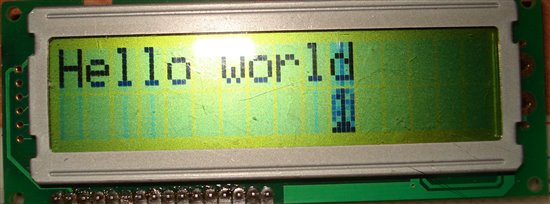
  • It works! Thank you very much.

    c='0';
    while(1)
    {
    LCDSetPosition(1,10);
    for(i=0;i<100;i++)
    __delay_cycles(1000);
    LCDputch(c);
    c++;
    if(c>'9') c='0';
    }
    }


    It also works without it. With this last position on the redrawing at random character.


  • Marek Prochazka said:

    LCDputch(c);
    c++;
    if(c>'9') c='0';
    }
    }


    It also works without it. With this last position on the redrawing at random character.

     I don't understand about random character..

     It must appear like this with number 0..9 sequence only changing faster but not random

     Last question was not answered, i wish publish this code on 430OH blog, can i leave your name and pubblish as is?

     Original question .. #I hope can be of some help so I wish post on 43oh site, can I do that?#

     I am happy to learn that finally it work, to finalize thread please click on Verify(ied) answer.

     Regards

     Roberto

  • Yes of course-this is your code. Thank you very much.

  • Hi Roberto,

                       I was connecting the the circuit wrongly. Sorry to disturb you, actually I was keeping 2 different grounds for the circuit. One for the MSP and another for the LCD. So when I connected the ground line of the LCD with MSP some arbitiary characters started appearing. That's how I came to know that I was making a silly mistake. The code works fine without any correction. But i'll check your modifications and verify to you.

  • lovelesh said:

    Hi Roberto,

                       I was connecting the the circuit wrongly. Sorry to disturb you, actually I was keeping 2 different grounds for the circuit. One for the MSP and another for the LCD. So when I connected the ground line of the LCD with MSP some arbitiary characters started appearing. That's how I came to know that I was making a silly mistake. The code works fine without any correction. But i'll check your modifications and verify to you.

     Hi Lovelesh, I am not sure to fully understand your writing, your code or Marek code?

     If you need help just ask, if I have some spare time I answer suddenly otherwise just wait or ask again on private conv.n

     Regards

     Roberto

  • Hi Roberto,

                       My problem is solved. Thanks. Now i am planning to put three hardware interrupts to my msp so that when any of the interrupts are on only messages related to that interrupt will be displayed. i am using msp430g2553 and planning to use push buttons as interrupts.

    Plz suggest me some posts or discussions that will guide me.

  • Good morning Roberto Romano. I am a italian student and i'm working with a diplay in my project. I try your program and it works. I have to translate this program in assembly language, you can help me? I am desperate because i try to do this program from 3 weeks and  I did not succeed. Thank you very much.

  • ps: I use a MSP430F5437A. 

  •  Hi Francesca, when I meet MSP430 on early 2K year I translated assembly to C, also during the hugest project, (interrupt real time filtering of audio signalling twin 10 frequency bank) I looked to assembly generated by C and just one or two useless instruction, analysis reported me code was no more than I can optimize on asm side so  I decided to just use C.

    Tell me why ASM needed and I can help you cure your trouble. I am not so much online this period, but try and I answer ASAP I have good ADSL carrier.

  • Hi Roberto, thank you for your interest. I have to pragram in assembly for academic reasons : can use assembly language is important because it can useful in many applications so prof. says us to use assembly. I would be grateful if you could help me.

  • Roberto Romano said:
    I looked to assembly generated by C and just one or two useless instruction, analysis reported me code was no more than I can optimize on asm side so  I decided to just use C.

    In most cases, indeed you cannot optimize better than the compile ralready does.

    However, the compiler does not know about timing and outside-world effects. So sometimes you can get better results in assembly just because you knwo things about conditions outside the scope of the plain program that the compiler simply cannot know.

    Like how many CPU cycles it takes to send an SPI byte, so you can interleave TX and RX operation for maximum throughput. The compiler would see a different order of instructions 'faster', not knowing tha tbecause of timing requirements it would miss an event when being too fast and then waste time on waiting for it etc.

    Also, if you have to deal with things outside the C language scope, you'll nee dassembly too. bis_SR_register() is basically an assembly instruction disguised as a pseudo-C instruction. Whenever you need to deal with stack, prozessor registers or such, you'll have to use assembly. Only that the most common things (like the bic_SR/bis_SR) are provided as intrinsics for convenience.

  •  Hi Francesca, yes I can help you, but start from a different view, load C example on IAR compiler then show the assembly pane and step there this code, see how instruction and register work then load your code and try what happen, if again you remain in trouble try post your code.

     Where are you attending this course?

  • Hi Roberto. Thank you very much for your help,but i don't understand what i have to do to translate the program in assembly in IAR. Sorry! Can you help me suggesting steps to be? Thanks.

    I'm attending this course to the university.

    Regards 

  •  Setup the project, then compile code and load to processor or simulator too, on left side of IDE you can see the "Disassembly" pane, enlarge to read full text, also open register window by menu "view"->register then select  Disassembly pane and do single step there, c code is executed in asm and you can follow how compiler translated code and IMHO also learn how assembly and register work.

    Where is located your course?

  • Thank you Roberto, but I solved the problem in another way. I translated the program manually and it work luckily. I looked the disassembly code but it was not clear. I'm attending the University of Palermo(Sicily). Thank you again. 

    Regards 

    Francesca

  •  Hi, happy to hear you solved, I am far away from your location, I am proud also there is teaching MSP, at Turin was introduced a long time ago.

     Just ask again but don't expect timed answer before end of september when I restart teaching work.

  • I'm trying to translate this for a C2000 uC, but I have some problems understanding the msp430 intructions. I can see that it looks similar to the arduino, but considering where it comes from and reading the datesheet I can assume it should be much better. Unfortunately, I have managed to get accustomed to the c2000 family and I like its flexibility+I can't afford to buy a msp430 development board just to test some thing when I have a bunch of c2000 lying around. 

    could you tell me if my assumptions are correct:

    P1 is a "port" with 8 pins (pin 0 to 7).

    in the sintax:  P1OUT=BIT1; you basically tell the uC to put pin 1 low and the rest of the pins high. and if the next instruction will be P1out=bit2 it will pun pin 2 low and the rest high, and in order to have more than a pin low you need to do a logical or? 

    or is that a illegal operation and you have to always work with logical OR : P1OUT |= BIT1. 


    P.S. which would be cheaper and easier to implement (msp430 or piccolo) for a simple processors if the application would require an LCD, SPI (SD card), UART or RS232 and some 10-20GPIOs. For the piccolo I have managed to find an SD library, SPI is piece of cake, the LCD I'm trying to translate now. I'm also considering an ethernet interface for an ftp client application and in the field update. The DSP part isn't really needed and it is here just because I got used to it. 

    I have also tried the concerto, but ARM only for communication is a bit of overkill, considering that the c2000 is prety powerful, it wouldn't make sense for this. 

    Thank you and I hope I didn't disturb too much. I have tried to install the msp430 documentation, but I couldn't find the code well explained and there's no solution like ControlSuite where one could see a lot of documentation. 

  • Emanuel Eni said:
    P1 is a "port" with 8 pins (pin 0 to 7).

    Yes

    Emanuel Eni said:
     P1OUT=BIT1;

    Means P1OUT = 0x02;

    Emanuel Eni said:
    P1OUT |= BIT1. 

    Means P1OUT |= 0x02;

    It's good idea to download some msp430 development package to see definitions in header files instead of asking for them in forum :)

    Emanuel Eni said:
    P.S. which would be cheaper and easier to implement (msp430 or piccolo) for a simple processors if the application would require an LCD, SPI (SD card), UART or RS232 and some 10-20GPIOs.

    If code, ram memory and performance of msp430 is enough, then cheaper and easier is msp430.

  • Emanuel Eni said:
    P1 is a "port" with 8 pins (pin 0 to 7).

    Yes. Each bit in the port registers controls one digital I/O pin.

    The pins are independent and so are the bits in teh por tregisters. You manipulate them by bit operations and the digital port pins follow the change of the bits in the registers. (note, thsi applies also for intermediate values in these registers, so be careful what operations you do on them)

    Emanuel Eni said:
    or is that a illegal operation and you have to always work with logical OR : P1OUT |= BIT1. 

    You can write to these registers as if they were normal variables. However, any change of the bit sin these registers has an immediate effect.

    You can assign a new bit combination or or or and individual bits.

    However...

    P1OUT &=~BIT1; P1OUT |= BIT2;
    is different from
    P1OUT = (P1OUT & BIT1)|BIT2;

    In teh first case, P1.1 would go low and then P1.2 would go high, In the second case, P1.1 would go low at the same time P1.2 goes high.
    While the resulting content of P1OUT is the same in both cases, the effect on the outside world is quite different.
    For this reason, all hardware registers are declared volatile, so that the compiler will not optimize any access to them but perform read and write operation exactly as they are coded.
    For the same reason, the (deprecated) use of bitfields for these registers is highly inefficient.

    Emanuel Eni said:
    which would be cheaper and easier to implement (msp430 or piccolo) for a simple processors if the application would require an LCD, SPI (SD card), UART or RS232 and some 10-20GPIOs.

    I can't say for the price, and the peripherals, well, SPI is a piece of cake too on the MSP (unless you want to be an SPI slave - but in this case, the timing and you coding skills are the problem, not the processor type). UART is simple too, as well the GPIOs. Accessing SD cards is a topic of several threads here. It isn't that difficult, even though there is no library code available and the appnote for MMC cards (which can be used on SD cards <2GB) isn't the best and most stable implementation. There are so many differnet ways to do it (depending on your requirements: transfer speed or smooth operation wihtout disturning other oepration, with or with out file syste, etc.) that a ready-made library would probably not the best impelmentation for any application :)

    And the LCD, well, depends on the LCD :) SPI , I2C or parallel port? Alphanumeric or matrix? However, if you have the high-level funcitons, you'll usually be able to use them 1:;1 and onyl the low-level funcitons (the hardware protocoll to send the commands to the LCD) need to be ported.

  • Thank you very much guys, and especially Jens. 

    I looked around in the documentation for the msp430 but I couldn't understand too much. 

    Jens, your explanation was exactly what I needed. 

    for the moment, the fact that I have direct access to the registers and king of got used to it (although sometimes I look for a stupid line for ages) the c2000 is more suited for me. 

    The LCD I was referring to was any classic HD44780 parallel display, since you can find them for nothing also when shopping for a low quantity. 

    Now that I'm sure how exactly everything goes I will try to port the library to the f28x since it doesn't see like a complicated thing. 

    as for the libraries, for you it might not be necessary, but for persons like me, whom want to do control and mostly know control, it's hard to do everything from scratch. a solution like arduino won't work since I want to control more than a fan and to have real PWM and DSP, but sometime, the little things (like a parallel display) take more than we want too, and when you try to start something from scratch, you can't really hire a programmer. 

    By the way, is there any straight solution for in field update of the code on the MSP430 like USB, MMC or any memory like option? I tried to look at the F28069 solution, and while it exists  and I'm sure TI did a wonderful job explaining it, my brain hurts and I'm overwhelmed with everything.

  • Emanuel Eni said:
    as for the libraries, for you it might not be necessary, but for persons like me, whom want to do control and mostly know control, it's hard to do everything from scratch.

    I completely understand. However,the problem with automatisms is that tehy sometimes go automatically wrong - and there's nothing you can do. Same for libraries. For certain tasks, there is more than one way to do things and what's the best for one application is the worst for another. Fast, small, low ram footprint, compatible with background tasks, low CPU usage, low power, all these are requirements that are partly mutually exclusive. Depending on proiority, different approaches are required.  A library will usually only offer one. Most likely not the best one for your needs, possibly the worst. This is why on a system with limited resources liek the MSP, the support with libraries is small: Chances are that they won't fir the requirements of msot other anyway, so the effort to make it fit for release and properly document it is too much.
    (not to mention that in some cases, like mine, the code is property of the employer and must not be released to the public)

    Emanuel Eni said:
    is there any straight solution for in field update of the code on the MSP430 like USB, MMC or any memory like option?

    Teh MSPs with internal USB controlelr do have a bootstrap loader that can be invoked by e.g. pushing a button when plugging the MSP into the host. All others (except a few G series MSPs) have a serial bootloader that requires RTS/DTR/RX/TX connection.
    On the PC side, you only need a (precompiled) program that uploads the new firmware from a file.
    Also, Olimex offers a flash programmer that can carry a new firmware image and can push it onto the MSP without PC, using JTAG.

  • Roberto Romano said:
     Hi Marek, I completely debugged your code, so set your pinout I changed to use on my hardware and tell me if it work also on your setup.

    Hello Roberto, I have been trying to connect LCD to MSP430G2553 since last week , I made my code but it didnt work.

    So I tried many sample codes but none of them works.

    So I tried your code, (the code discussed in this conversation) , but it still is not working.


    Only back light glows.

    I double checked my hardware connections from microcontroller pin to LCD pins.


    I removed TXD , RXD connection in J3 , and P1.0, P1.6 connection in J5 .

    Please help me with this .

**Attention** This is a public forum