This thread has been locked.

If you have a related question, please click the "Ask a related question" button in the top right corner. The newly created question will be automatically linked to this question.

OPA347: SPICE model noise incorrect?

Part Number: OPA347
Other Parts Discussed in Thread: OPA140, TINA-TI

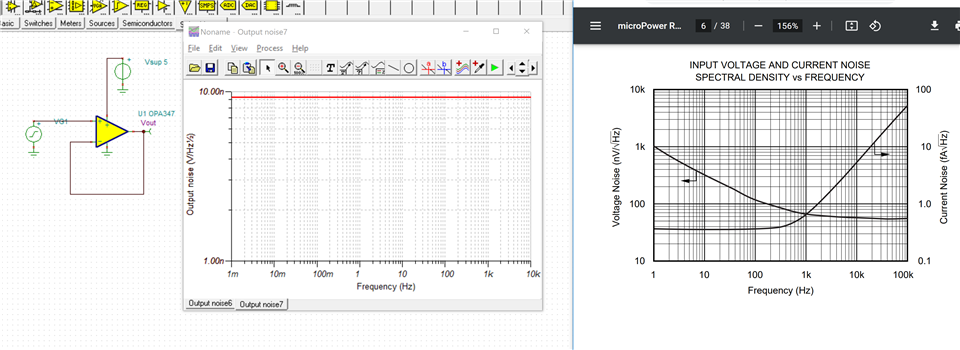
I believe I am seeing incorrect noise behavior from the OPA347 model in TINA.

I started by using the SPICE model for this (OPA347.lib) and importing into LTSpice, which I am more familiar with than TINA. This gave me incorrect results (flat noise at the wrong broadband level, with no 1/f rollup). I then tried this with the OPA140 model (OPAx140.lib) and got similarly strange results, so I figured I would give TINA a try.

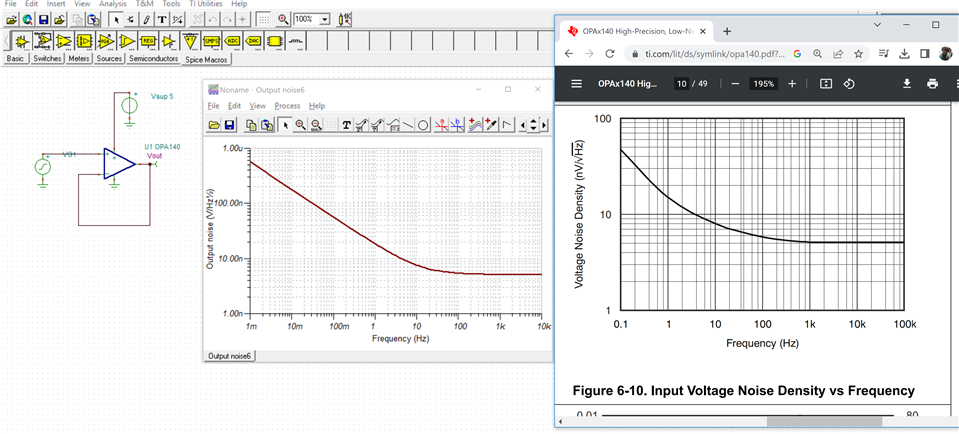
Once I set things up in TINA, I modeled each of these parts in unity gain buffer configuration with 0-ohm source resistance. The OPA140 gave me the expected result as compared to the datasheet. The OPA347 gave me the same apparently wrong result I got in LTSpice. See screenshots of both alongside datasheet vnoise spectra in each case attached.

I therefore have two questions:
1) Is the OPA347 model wrong? If not, why is it producing results inconsistent with the datasheet?
2) In general, can I not expect to use the .lib SPICE models you provide with the LTSpice tool? If I should be able to, do you know why I might be getting incorrect results when I try that, even with the OPAx140 model that seems to be correct?

Thanks,

Zach
  • Hey Zach,

    These two devices have different model architectures, with very different levels of complexity. The OPA140 has our newest model architecture that models many parameters in detail. The OPA347 model is a simple macromodel, and noise is not one of the modeled parameters.

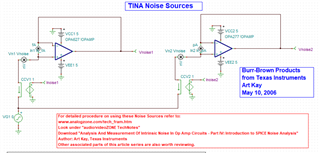
    You can manually add the noise sources and configure them on your inputs if you would like. In your TINA-TI install, under C:\Program Files (x86)\DesignSoft\Tina 9 - TI\EXAMPLES\Noise Sources. They can be implemented like the example project in this folder.

    Best,
    Jerry

  • Hi Jerry,

    Thanks for the quick reply. OK, so I should not assume that a given part's model includes noise parameters unless I peek under the hood and see that they are there. Is that the take-away message? Is there an easy way to tell this for the TINA built-in models, or do I have to download the corresponding .lib SPICE models from the website and look in there?

    Zach

  • Hey Zach,

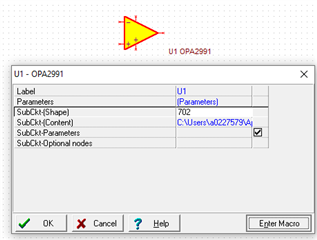
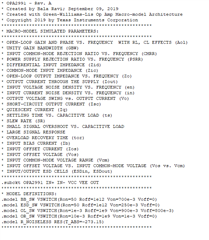
    The good news is that it's even easier in TINA-TI than it is in other simulators. You don't have to open file explorer to open the .lib. Double-click your device and click the button "Enter Macro". This will pull up the .lib file tied to the symbol in your schematic. In our newer models, the header contains all the parameters that are accurately modeled. Side note, these are going to represent the typical specifications at room temp. 

    Best,
    Jerry

  • Hi Jerry,

    Great, thanks for the information!

    Zach