This thread has been locked.

If you have a related question, please click the "Ask a related question" button in the top right corner. The newly created question will be automatically linked to this question.

LM2903B: Pspice model error

Part Number: LM2903B
Other Parts Discussed in Thread: PSPICE-FOR-TI, TINA-TI

Hello,

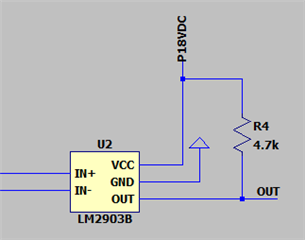
I used LM2903B PSpice Model (Rev. E) in LTSPICE and i have this error : 
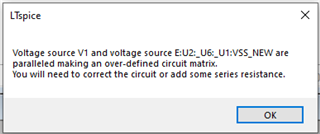
Does anyone have any idea how to fix this ?

Thank you.

  • Hi Rami,

    It looks like the V1 Voltage source and some internal voltage source in the LM2903B model are trying to drive the same node. Could you try making the nodes different by adding a 1 Ohm resistor between V1 and U2?

  • Hi,

    I tried that, but it doesn't work.

    Thank you.

  • Hi Rami,

    Could you send me a full picture of your schematic on LTSpice as well as the error that you are get while using the 1 Ohm resistor?

  • Hello HO SIU,

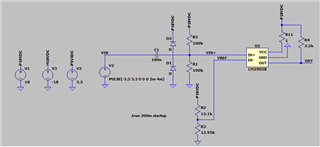
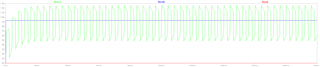
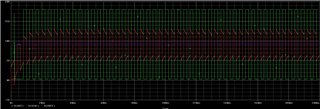
    This is my schematic and my simulation.

    You can see that the output is always 0 even if IN+ is higher than IN-.

    Thank you.

  • Hi Rami,

    Thank you for posting your schematic.

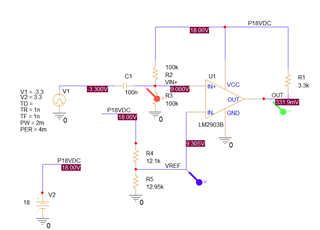
    Can you ensure that there is no low impedance connection to ground on the OUT node? If so, your circuit seems valid, and it shouldn't violate any modeled parameters for the comparator. The fact that it isn't switching may be due to the PSpice model being incompatible with being imported into LTspice. TI does not create PSpice models with LTspice compatibility in mind, since the circuit simulation software TI designs models for are TINA-TI and PSpice-for-TI. I've created a similar circuit and verified that the comparator switches using PSpice-for-TI:

    It goes mid-supply to indicate that the input goes below the allowable input range in the beginning, but the model does seem to switch properly in steady state. My suggestion would be to use TINA-TI or PSpice-for-TI for your circuit simulations if possible.

  • Hi Rami,

    LTSpice can ignore things it does not understand, then continue to run without errors.

    After running the simulation, check the error log.

    You can find the log under the VIEW menu -> "Spice Error Log".

    The log is not automatically displayed, and the window is not automatically updated...so you have to re-display the log after each run.

    Look for warnings such as "unknown" or "ignored" or other signs of confusion.

    We are not permitted to help debug LTSpice issues due to the ADI user agreement - so you are on your own as far as troubleshooting with LTSpice. As Ho said, we can only help with TI's and a limited set of non-competitive simulators.

    Also...your diodes are not connected to the input...no "dot"...