This thread has been locked.

If you have a related question, please click the "Ask a related question" button in the top right corner. The newly created question will be automatically linked to this question.

USB2ANY: USB2ANY fails to update

Part Number: USB2ANY


Tool/software:

Hello!

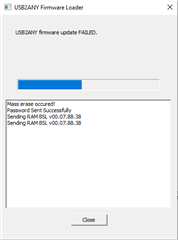
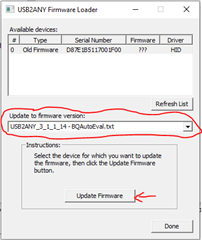
I recently purchased a USB2ANY to interface with the GUI of an Eval Board. Upon opening the GUI, the GUI prompts me to update the version of USB2ANY to 3.1.1.14. However, when trying to update the version it fails. I have performed all steps in this guide BQ79616-Q1 and BQ75614-Q1 Graphical User Interface (GUI) User's Guide (ti.com) page 3-4 including the download of the SDK and putting the file in the same folder. The SDK I have downloaded is from the TI USB2ANY webpage and shows to be API v2.8.2.0. I have also correctly pressed the BSL button and performed the subsequent steps. I have basically performed all steps in the guide perfectly. I have also shared some photographs so that it is easier for TI to evaluate the issue. I also noticed that using the SDK the firmware correctly gets updated to v2.8.2.0. 

On the GUI, it recognizes the USB2ANY with version 2.8.2.0 but shows an error connection. 

This is how my 'Firmware' folder looks like.

I would love to solve this issue as it is of high priority and urgency. 

Thank you so much!

Regards,

Samar

  • Hi Samar,

    As you have tried installing the SDK from both the GUI and the Firmware loader, I would recommend trying to install the firmware from a different computer if possible. If this does not work, I would recommend returning the USB2ANY for a replacement.

    Regards,

    David

  • Hey David,
    What SDK are you referring to? The explorer software from the TI USB2ANY website? I only downloaded it once from the website.

    One thing I wanted to confirm was that the USB2ANY explorer software I downloaded is API v2.8.2.0 and this SDK correctly updated the USB2ANY Firmware to version v2.8.2.0. So is there an SDK version API v3.1.1.14 that I need to download to correctly update to version 3.1.1.14?

    Thanks!

  • Hi Samar,

    I replied directly to your TI support field analog engineer, but also I will answer here as well.

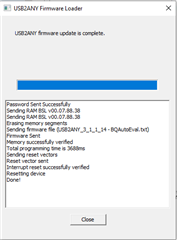
    I believe you are doing everything correctly. Sometimes on some USB2ANY's the firmware update fails on the first try, if you re-try it, it should work. For me it's always on the 3-rd try.

    1.

    2.

    3.

    If the Software app closes, you can re-launch it again. If you are working with the BQ8xx GUI we supply it in the GUI folder, or if you have the USB2ANY SDK installed, it will be at the following path:

    C:\Program Files (x86)\TI USB2ANY SDK\bin

    As far as the firmware bin files, these should all be located at the following path, otherwise the updater application will not pick them up:

    C:\Program Files (x86)\TI USB2ANY SDK\Firmware

    I hope this helps.

    Regards,

    Viktor

  • Hey Viktor,
    The files were in the wrong place. The GUI and the USB2ANY seems to work. Thanks