This thread has been locked.

If you have a related question, please click the "Ask a related question" button in the top right corner. The newly created question will be automatically linked to this question.

INA126: Amplify and shift a signal using singly supply

Part Number: INA126
Other Parts Discussed in Thread: INA826

Tool/software:

Hello

I understand that the INA126 is no longer manufactured. However, since I have a few of them lying around, I would like to ask a question about this IC and find out what I might be missing.

If I understand correctly, the INA126 can amplify a zero-centered signal and add a DC shift. Moreover, it can be powered by a single supply. I have attempted to build and simulate a circuit that accomplishes this using the INA126. However, in both cases (simulation and real world), I do not receive any output from the INA126. Conversely, the output meets expectations when I replace the INA126 with the INA826 (at least in the simulation, as I do not have the actual IC on hand). Nevertheless, it seems that both ICs are quite comparable.

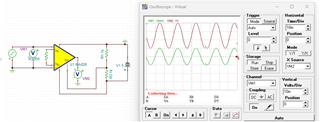
Below, I show the simulation results of the INA126 and, subsequently, the INA826 in the same circuit. In both scenarios, the input generated by VG1 has a DC of 0 and an amplitude of 10 mV.

Could you please tell me what I might be missing when using the INA126?

Thanks
  • Hi Dieter, 

    The INA126 is still active and available on ti.com, please see the product page to view the current status on the device: INA126 data sheet, product information and support | TI.com 

    Both the INA126 and INA826 cannot operate at a VCM=0V with a single supply rail. If we take a look at the INA126 for example, in the Electrical Characteristics table, the input common-mode range indicates that it can operate typically about 3.5V from the rail with the above conditions. 

    I recommend to use the Analog Engineer's Calculator to better understand the input and output capabilities of the device. You can see for both the INA126 and INA826 what the boundary plot will look like. 

    Another note - please make sure to connect a low source impedance to the REF pin. Instead of a resistor network, it is recommended to either use a buffer op amp or precision reference device. More information can be found in the INA826 datasheet, section 8.3.7, copied below for reference. 

    Please let me know if you have any questions.
    Thank you!
    Regards,
    Ashley

  • Hi Ashley

    Thank you so much for getting back to me on this. I was hoping to ask a few follow-up questions.

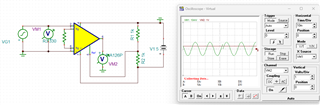
    1. If I am reading the graph you shared correctly, the INA126 should be able to swing from 0.8 to 4.25V when using a single 5V supply, and VCM=2.5 should be in the correct input range. However, when changing the source signal in the TINA simulation to have a 2.5V DC, I still don't get any output for the INA126. I've added a screenshot of my simulation below. Please note that I use AC coupling for VM1 on the virtual oscilloscope. So, the DC offset is not visible, but I've double-checked the settings of the source VG1.
    2. Can you recommend any ICs that can take a zero-centered signal, amplify it, and shift it? I want to keep the number of components low, and if an integrated solution exists, I would prefer that.
    3. Since neither can operate at VCM=0V, but I am getting the desired results for the INA826 in TINA (with VCM=0), does that mean the spice model might be incorrect?

    Thanks again for your reply.

  • Hi Dieter, 

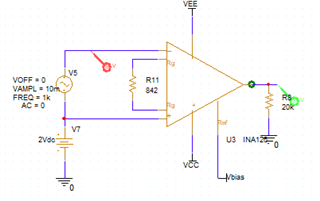
    In order to set your VCM, you need to apply a DC bias voltage outside of the sine wave signal source. See example below: 

    This will create the VCM>0V and the INA126 will properly output. However, please note that our INA models in general does not take into account the VCM vs VOUT boundary plot. If you are to exceed the boundary plot, the model may not accurately show an error. We do not have this characteristic modeled in our spice models, which is why we recommend customers to reference the Analog Engineer's Calculator to ensure you are in the linear operating space. 

    Please let me know if you have further questions.
    Thank you!

    Regards,
    Ashley