This thread has been locked.

If you have a related question, please click the "Ask a related question" button in the top right corner. The newly created question will be automatically linked to this question.

PGA309EVM-USB: How to control the Multi Cal using Tio32.dll

Part Number: PGA309EVM-USB
Other Parts Discussed in Thread: PGA309

Tool/software:

Hello,

I would like to use the Tio32.dll to control the USB DAQ platform to control the MultiCal hardware. I am using the Multi cal to calibrate PGA309s. The Calibration step is done, but I want to do some other things that involve manipulating the MultiCal Hardware via the USB DAQ platform. I need to know how to power on a unit and take a reading using the MultiCal hardware.

Two main things I need:

1. Control the multiplexer on the MultiCal in order to take readings with the DMM

So far I have Tio32_RunMnemo(....) and the command is "CMD CTRL ###" but I don't know what number to use.

2. Power on the units using MultiCal hardware

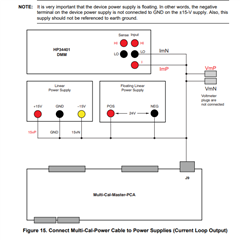
If necessary, I need the PGA309 units to be powered on. If this happens automatically then great. If not then I need to know how to get the multical hardware to do this.

Nathan

  • Hello Nathan, 

    I do not recommend this, is there a reason you would not like to use the USB-DAQ? 

    To answer your questions: 

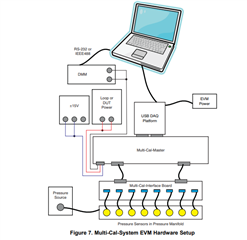
    1. Section 4 of the MULTI-CAL-PGA309 System UG has the answers: Multi-Cal-PGA309 System User Guide

    2. Power supplies are provided externally, see Figure 15 of the MULTI-CAL_System EVM UG: Multi-Cal-System Evaluation Module User's Guide (Rev. B)

    All the best,
    Carolina

  • Let me try to rephrase:

    I have a PGA309 calibration station setup and completely functional. I'm using the the Multi-Cal-PGA309 System. I would like to edit the LabVIEW program or make a different program which will control the Multi-Cal hardware and make some measurements at the end of the calibration. I'm able to talk to the USB-DAQ, but I don't know what to tell it in order to control the multiplexer on the multical board so I can take readings using my DMM.

    I've found that the MultiCal LabVIEW program uses a DLL called Tio32.dll to communicate with the USB-DAQ. I have been using this to communicate with the USB-DAQ in my experiments. It works fine. I just don't know what to send the USB-DAQ to control the MultiCal board.

    Hopefully this makes it more clear,

    Nathan

  • Hi Nathan, 

    Okay understood, thank you for the clarification. I recently took over the portfolio and did not write the LabView code, so thank you for your patience as I ramp up. 

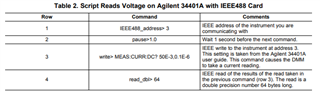
    What is the DMM you are using? Is it the Agilent 34401A?
    Section 4 of what I linked should still be relevant. 

    If not the A34401A, looks like the command file is found in the user's guide of the DMM. 

    All the best,
    Carolina 

  • Carolina,

    Thanks. I'm actually having no issues controlling the DMM. In other words, I am able to control the DMM. The DMM is not an issue anymore. Thank you.

    I'm wondering about how to use Tio32.dll to control the USB-DAQ in order to control the multiplexer on the MultiCal System board. The multical software does this automatically in the calibration process. I would like to replicate this functionality in my own program. I think that using the Tio32.dll is the best way, but I am open to suggestions. 

    Thanks,

    Nathan

  • Hello Nathan, 

    Understood, I will reach out to the original creator of the LabVIEW program and get back to you with feedback.

    All the best,
    Carolina

  • Thanks.

    At this point I've reverse-engineered some of it, enough to know that it would be a HUGE help to have a 64 bit version of this DLL. Is there a 64 bit version somewhere? It looks like the file name is Tio32.dll, which usually means it was originally Tio.dll (64 bit) but they made a special 32 bit version and appended "32" to the name. I would expect that the following two DLLs exist:

    Tio.dll or Tio64.dll: a 64 bit DLL version

    Tio32.dll: a 32 bit DLL version

    Please find the 64 bit version please.

    Nathan

  • Hi Nathan,

    Since the project was made more than 15 years ago, the resources are not available. 

    Working with the code I ran into a lot of missing files, were you able to fix this?
    I imagine this is because the original author wrote some initial vi's and ended up not using them and therefore, they aren't included in the final source code. 

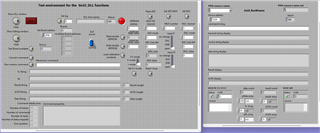
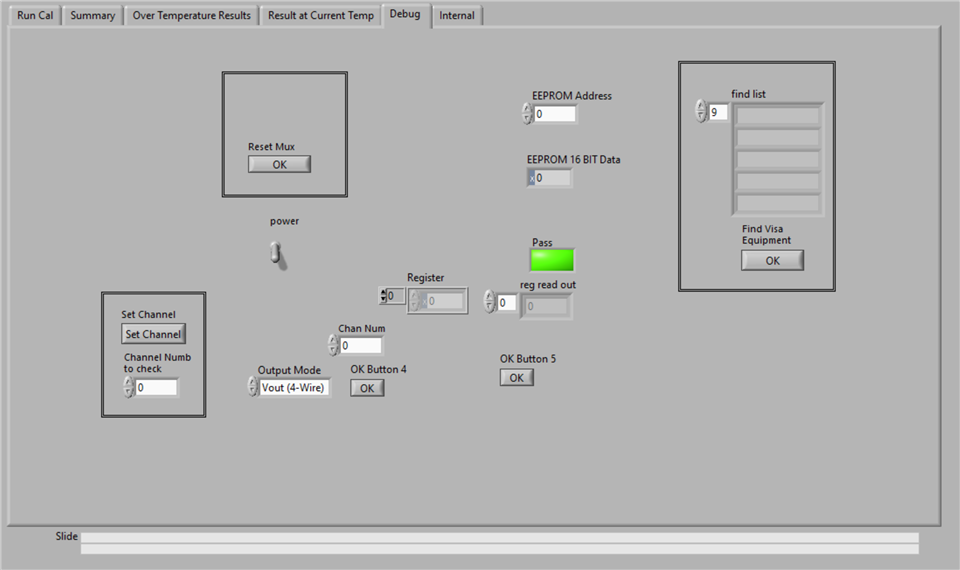
    The following vi is very similar to the debug window of the multical software: 

    Channel number equates to which mux is being read & there is a power switch. 

    The "Create model file" in the "Run Cal" tab can enumerate how many muxes your project has. 

    All the best,
    Carolina

  • I see. 

    I wasn't able to get the source code to run on my machine. The precompiled .exe works fine, and I found that the front panel looks quite a lot different as well.

    I've used the msl-loader library in python to make a 64 bit wrapper for the 32 bit DLL. I'm now going to make a set of python files and LabVIEW VIs that will allow me to develop with the Tio32.dll library in 64 bit LabVIEW.

    Nathan

  • The DLL log files state that it was made by "l-pse" for TI. Are you able to connect with l-pse? or connect me with l-pse?

    Nathan

  • Hi Nathan, 

    The only recognition I have for l-pse is for the file path of the PGA309 source code, otherwise I am unfamiliar. 

    You can also find the source code for multical located here: (1) PGA309: Multi-Cal PGA309 Software Source Code - Amplifiers forum - Amplifiers - TI E2E support forums

    All the best,
    Carolina