This thread has been locked.

If you have a related question, please click the "Ask a related question" button in the top right corner. The newly created question will be automatically linked to this question.

TAS2563: Regarding Equaliser tuning and usage of PPC3 application and tuning

Part Number: TAS2563
Other Parts Discussed in Thread: TAS2562

Hello

We are using TAS2563 amplifier in two of our products each product having 2 amplifiers for right and left configuration in audio wearables. In datasheet its mentioned that TAS2562 supports 10 band equaliser but we couldnt find any registers associated with this. We want to know how we can tune the amplifier for better equalsiet settings.

Also In puprepath console application i dont see any settings or applications to work on it i tried to connect the amplifier I2C through I2C to USB converter(CH341A) but still i couldnt find any hardware in the application. Kindly provide the application uasage guide and access to the software tools in the PPC3 application here iam attaching the screenshot of my app dashboard(i dont have access to TAS2563-SW secure resource)


Kindly provide us how we can tune this amplifier and use Equaliser which is the main reason for choosing the amplifier
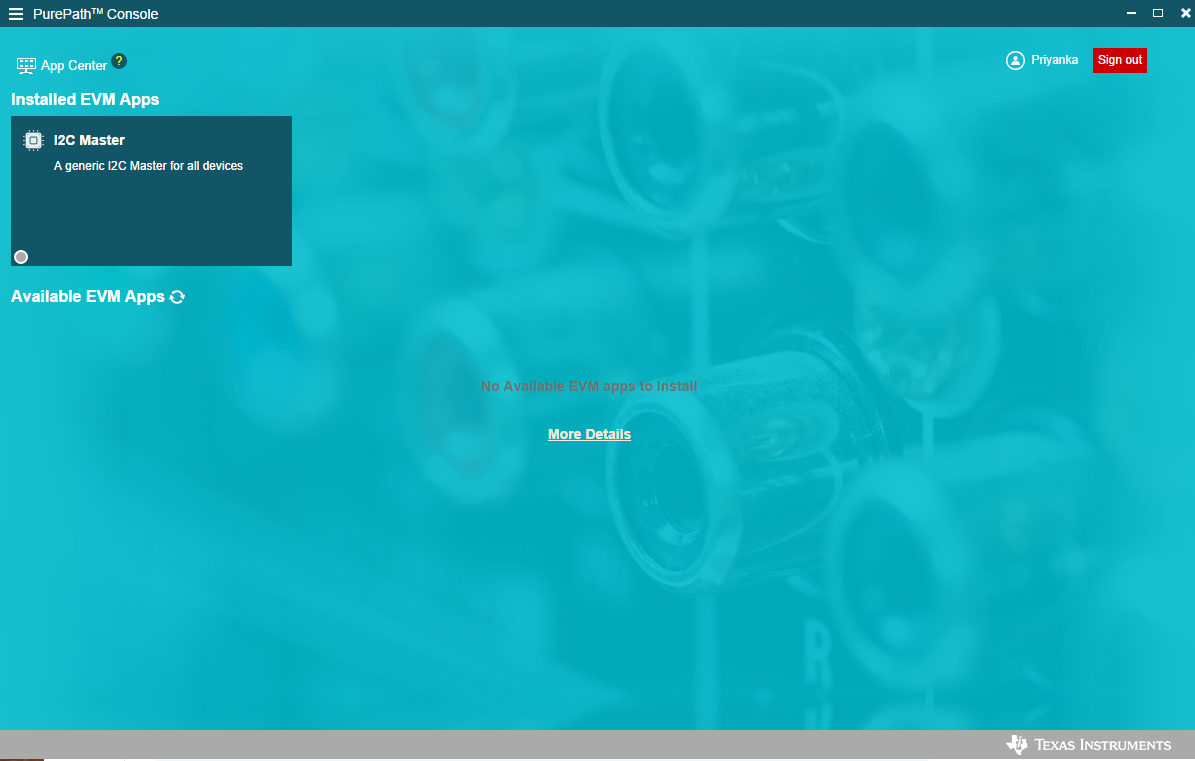
image.png

  • Hi Priyanka,

    I noticed TAS2562 in some part of your post which may be a typo, so just to clarify, it is TAS2563 that features integrated processing, including EQ bands.

    There are 2 versions of TAS2563: WCSP and QFN.

    • WCSP features 5-band EQ, 2-band DRC and 1-band DEQ
    • QFN features 2 modes of operation in itself:
      • Smart Speaker Mode: features 10-band EQ, 3-band DRC, 1-band DEQ and PBE
      • PDM Mode: features 3-band EQ and PDM microphone recording

    You can request access to each version of the PPC3 software using these links:

    Please comment which version of the device you're planning to use. Let me know if you need any further assistance on setting up the software and trying out the different modes.

    Best regards,
    -Ivan Salazar
    Applications Engineer

  • Hello Ivan

    We are using WCSP Paackage and to be precise we are using this part number in both of our products - TAS2563YBGR

    we have I2C test points on the boards to connect with this amplifier externally so can you help us over the setup and toolset guide to work with the rqualiser

  • Hello Ivan 

    I requested access but its tsill pending and i mentioned my part number below as iam using wcsp package. PLease help to do the setup and work over tuning

  • Hi Priyanka,

    I'll double check on the access request and confirm later today.
    I'll setup some guidelines on how to connect the EVM to a TAS2563 on an external board and share later this week.

    Best regards,
    -Ivan Salazar
    Applications Engineer

  • hello ivan

    KIndly check and help to provide the setup rrelated things

    we want to finalise part by checking the Equaliser thing available in TAS2563

  • Hello Ivan

    we have one more issue: IN the website its mentioned that EVen wcsp package supports 10 band equaliser but you mnetioned it supports 5 band can you clarify over this .

    Please check this link: www.ti.com/.../TAS2563YBGR

  • Hi Priyanka,

    I'll work with my team to get your approval request processed.
    Regarding the features listed, we'll also work on updating this information to clearly show the differences between the device versions.

    Best regards,
    -Ivan Salazar
    Applications Engineer

  • Hello Ivan

    We got the Tool access and connected the I2C of TAS2563 present on our board through USB to I2C converter but its showing as TAS2563 evm offline. Is it required to be tuned only on the EVM , cant we tune with respect to our custom board as its not showing device online.

    ALso once if we tune how can we program the TAS2563 with the tuned parameters of equaliser?

  • Hi Priyanka,

    PPC3 is able to communicate only with TI EVMs. You can use the software offline to generate configuration files if needed but the testing is done through the evaluation modules.

    Once the tuning is completed using PPC3, the End System Integration tool in the same software can be used to generate the configuration files. It provides 3 different formats: .cfg that can be used within PPC3, .h (header) file that can be used with bare metal or other C-based driver, and .bin (binary) that can be used with the linux-based driver.
    What is your processor platform?

    Best regards,
    -Ivan Salazar
    Applications Engineer

  • Hello Ivan

    We are using it on baremetal platform so header file would be enough for our application.

    But may i know which are the registers controlling the EQualiser tuning as in datasheet i cant find them also. EVen if we generate header file it should be programmed through registers so what are the registers used for Tuning equaliser

    Also in the generated header folder i can see multiple files and which i have to use and how can i use that array variable registers[] in my C program?

  • Hi Priyanka,

    Each of the EQ bands is controlled by a series of coefficients stored in a higher count page memory location (example: pages 7 and higher used for EQ coefficients).
    A useful tool within PPC3 is the I2C Monitor Log. This is located at the top-bottom of the PPC3 window as "I2C" button. In the pop-up you can click on "Log" tab and use the Green button to start recording, which will turn Red when logging I2C writes, then use any control and the I2C Monitor will populate with the relevant commands for each action.

    For all these processing features running in the DSP, the memory location is not included in the documentation as it is not intended to be manually manipulated. Instead, the PPC3 software should be used to take care of all the calculations which generate the proper coefficient values.

    There are 2 .h files you would need: the "program_0_..." and the "configuration_0_...COEF" files. The other file ending in "PRE" is actually not including any components, so that one is not required.

    Best regards,
    -Ivan Salazar
    Applications Engineer

  • Hello Ivan

    If we procure JUst the EVM-MB will it be sufficient to connect with our custom board I2S and I2C lines and tune it or do i need to purchase the Daughter card also. Can you explain the connection flow?

    PPC3 Software -> PPC3 EVM-MB -> Custom board(I2C and I2S Lines)

    or 

    PPC3 Software -> PPC3 EVM-MB -> Daughter card -> Custom board(I2C and I2S Lines)

    Why do i need Daughter card if i have to use and tune on my custom board having TAS2563YBGR amplifier with I2S and I2C test points?

  • Hi Priyanka,

    I'm addressing the same question over here: TAS2563: Clarification on PPC3 In-System Tuning Setup (MB vs Daughter EVM) - Amplifiers forum - Amplifiers - TI E2E support forums

    Best regards,
    -Ivan Salazar
    Applications Engineer