Part Number: TAS2562
HI, I could not able to get what register value do i need to keep to disable the Auto-mute during idle-channel mode.Can you help me with that and I also need access for PPC software access for same part TAS2562YFPT.
This thread has been locked.
If you have a related question, please click the "Ask a related question" button in the top right corner. The newly created question will be automatically linked to this question.
Part Number: TAS2562
HI, I could not able to get what register value do i need to keep to disable the Auto-mute during idle-channel mode.Can you help me with that and I also need access for PPC software access for same part TAS2562YFPT.
Hi Kashyap,
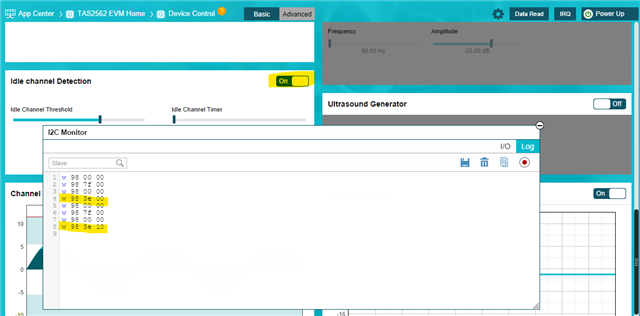
Idle Channel Detect feature is controlled by bit 4 on register 0x3e on book 0 page 0.
You should receive access to TAS2562 app soon, if you don't have access to PPC3 you can request access here: PUREPATHCONSOLE Application software & framework | TI.com
Using PPC3 you can disable or enable this feature; here is a capture of the commands used by the GUI to disable and enable Idle Channel Detect.

Best regards,
-Ivan Salazar
Applications Engineer
Thanks for your response and it actually solved my issue.But when I searched this in datasheet I couldn't find any address with 0X3E on page 0,then how can we know about this.And also I want to check with PPC software for my configurations for I2S setup.Here,to make it work do I need to connect evm board to TAS2562 to check the configurations ? With USB, I achieved playing audio in speaker but I want to work with mics data to played in speaker using i2s.Can you guide us ? We achieved data in speaker using I2S with setting some registers using I2C but I didn't get how to configure using ppc software.And I observed only page 0,1 in PPC s\W but in datasheet it has pages 0,1,2,4.
Regards,
Kashyap
Hi Kashyap,
I understand the confusion with the register documentation. We're working to improve the coherence between the different sources of information. In general, I would recommend using PPC3 to generate the configuration script, this is the best way to get a proper set of commands as it will take care of any calculations and unknown registers.
For TAS2562 PPC3 app you don't need an EVM, you can use it in Offline mode and still be able to generate the configuration files either using the End System Integration option, or the I2C Monitor Logger feature.
Best regards,
-Ivan Salazar
Applications Engineer