Part Number: TAS2573EVM-DOC-CERT
Other Parts Discussed in Thread: TAS2573
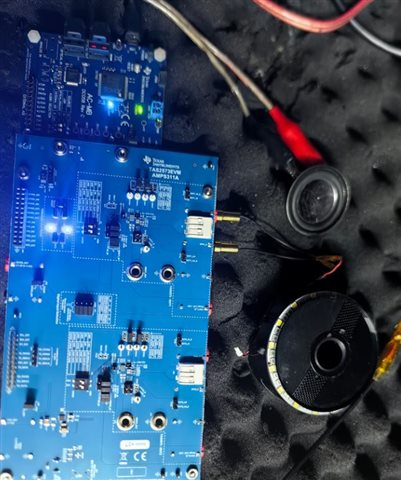
My hand's tas2573 EVM based on the TAS2573 PPC3 setup,the spk no sound.please help check it.
Our expert will feedback you shortly.
My supply the attached file include the EVM jumpers settings and PPC3 file.please check with it
Hi Zhanshi,
the jumpers of EVM seems fine. it seems you remove the 2ch to keep only one device.
but the PPC3 only show the versions.
how about the detail status?
have you measure the power supply on the EVM, the 1.8V/5V of iovdd/vdd/vbat.
did the I2C command runs correct?
if yes, please check the i2s signal on the EVM board near the chip. check it that whether it is expected.
Br,
wenbin
Hi Wenbi:
how about the detail status?
FXCN:
have you measure the power supply on the EVM, the 1.8V/5V of iovdd/vdd/vbat.
FXCN: the iovdd is 1.796v/vdd1.796v/Vbat is 4.996V
did the I2C command runs correct?
FXCN: Yes.It can input the PPC3 tool.
if yes, please check the i2s signal on the EVM board near the chip. check it that whether it is expected.
FXCN: The IIS is right.
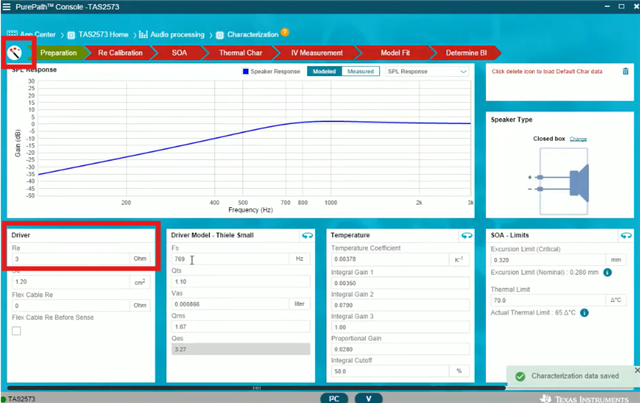
The issue is PVDD only 4.4V,and the spk out no signal.I think maybe the EVM damaged because the VBAT is no the power for the AMP, but we still input the PPC3 of TAS2573 page,and the Re calibration is 0 ohm.
Hi Zhanshi,
first, the EVM can be wrote by I2C without error, and i2S is ready. it seems the external connection should be ok. the only pending thing is the i2s format. it could be check later.
you can goto tuning page, the cfg file should be the same. i don't have updated file which is different to the PPC3 tool.
regarding the PVDD, as there is no audio output, it will keep same to the vbat, this should not be a issue.
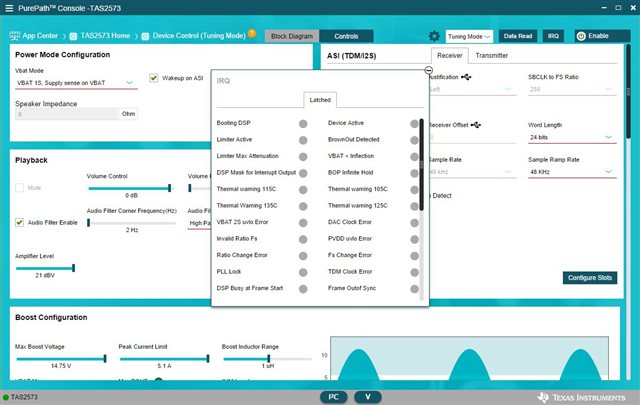
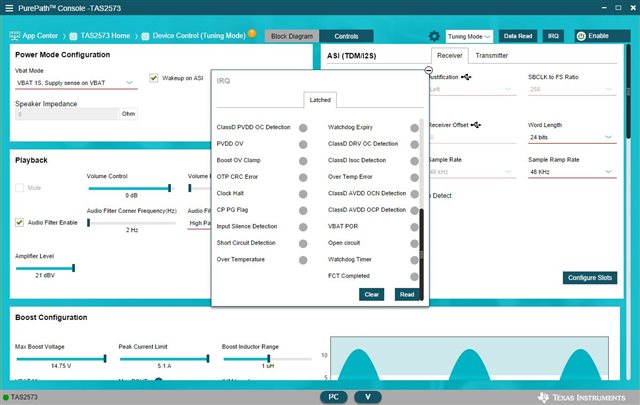
the last thing, please check the IRQ in the PPC3, it will show the INT, it may show the cause of the no sound. such as if there is OC, the chip will be in shut down.

and if possible, please run the following command in i2c log page and get the register dump

Br,
Wenbin
Hi Wenbin:
1. Based on your advice,I am check with the IRQ as the below picture,please tell me if they are ok?
2.Based on your advice,I get the register dump,as the below picture:
I check the register value and find the PPC3 is different with the SPEC,please help to check if it cause they are no sound.
page 0: 5F-- PPC3 value is 0a, the sepc value is 1a;
Page 1: A---PPC3 value is ac, the spec value is 98;
19---PPC3 value is 03, the spec value is 23;
29---PPC3 value is 04, the spec value is 64;
64---PPC3 value is 71, the spec value is 00
Hi Zhanshuai,
from the register dump, the device is power down state. so there is no sound. you can check the register 0x02 register.
in fact, in this device control page, please enable the device by click the button below:

Br,
Wenbin
and meantime, the INT status seems not valid.
please click the read button at the bottom of the IRQ page.
one more test:
after go-into processing page, you can run below command in I2C page:
w 98 00 00
w 98 7f 00
w 98 02 00
r 98 00 80
Hi Wenbin:
I am checking the EVM board and find the left tas2573 amplifer unit(u1) and 3.3V LDO(U3) both are damged.so we can't run correct the PPC3(as the red line shows in the below picture)

Hi Zhanshan,
in this case, is it possible to use U2(tas2573) to do some test? if not, maybe you need a new EVM board.
Br,
Wenbin
HiWenbin:
I have tried to use the U2 to do it,but still can't run and has the sound.The cfg file is load in the EVM maybe only support one U1 amplifier.I have ask the new EVM.wait the new EVM come on,I will keep continue to check it.
Hi Zhanshi,
get it.
in this case, we can close this thread currently. if you still meet new issue on new EVM. we an have another thread.
Br,
Wenbin
Hi Wenbi:
I have received the new TAS2573 EVM,but I find the next question:
1. the HW recailbration fail,shows the sample rate check is 44100Hz and 2 channel.but my pc only support one channel,if it can upate to 1 channel to check it ok
.
2.the Re cal fail to two spk is same re value
3. the thermal char cal fail to the tool root.
Hi Zhanshi,
regarding the system check, it's better it can be pass. you can change to other pc for check.
regarding the Re and thermal. can you change load to check whether it is working? if different load always feedback the same value. it should be an issue.
this should be checked the IV sense is working correct if there is a real issue. you can record the TX signal while playing a sine wave or during the calibration period.
Br,
Wenbin
Hi Wenbin:
regarding the system check, it's better it can be pass. you can change to other pc for check.
FXCN: now our pc all are 1 channel,no the two channel settiing.so can you do the 1 channel cfg.file?
regarding the Re and thermal. can you change load to check whether it is working? if different load always feedback the same value. it should be an issue.
this should be checked the IV sense is working correct if there is a real issue. you can record the TX signal while playing a sine wave or during the calibration period.
FXCN: We still check the re and thermal that the re is correct,but the thermal still reboot the tool when I calobrate the thermal.if we do the IV sense calibration, no the sine wave playback and the tas2573 tool reboot.
Hi Zhanshi,
regarding the 1 channel, you can remove the vbat2/iovdd2/vdd2, in this case, the channel 2 will not be detected so that the EVM board will only have one channel.
Br,
Wenbin
Hi Wenbin:
regarding the 1 channel, you can remove the vbat2/iovdd2/vdd2, in this case, the channel 2 will not be detected so that the EVM board will only have one channel.
FXCN: I have removed the vbat2/iovdd2/vdd2,the run hardware check mode still fail the 2 channel.
The thermal char and IV sense calibration both still reboot.
Hi Zhanshi,
I reviewed the history, the error should be related to the ACMB board(TI- audio) driver settings, too.
please check the TI-USB audio which is listed in the right-bottom corner panel. please change the settings and re-check. just like below:
please connect the evm and then change the audio setting for ti-usb-audio

Br,
Wenbin
Hi Wenbin:
I am check the ACMB setup same as the PC setup for the sample rate,but the PPC3 HW check still fail(as below picture),so I think it is TI EVM setup to the 2 channels cause it.please help to change it to one channel
Hi Zhanshi,
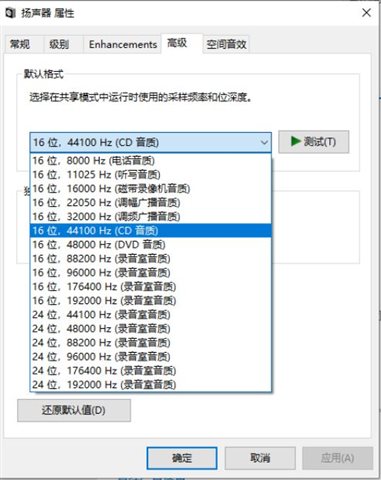
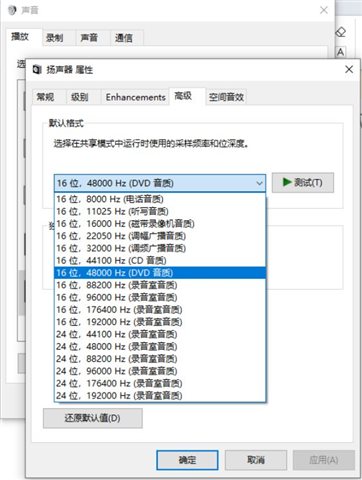
please check both 44.1k/48k, 16/32 bit in both settings in PC side and TI-usb-audio. usually it should use 32bit/8channel in ti-audio setting. and 32bit/48k(44.1k) in PC side.
Br,
Wenbin
Hi Wenbin:
please check both 44.1k/48k, 16/32 bit in both settings in PC side and TI-usb-audio. usually it should use 32bit/8channel in ti-audio setting. and 32bit/48k(44.1k) in PC side.
FXCN: Based on your request,I have check it,still fail the sample rate "2 channel 16bit 44100Hz" in PC setup.
Hi Zhanshi,
as the ti-audio is used for both TX and RX, please check the recording settings too.

Br,
Wenbin
Hi Wenbin:
as the ti-audio is used for both TX and RX, please check the recording settings too.
FXCN: Based on the Ti -audio,the recording no the sample rate select item.
Hi Wenbin:
as the ti-audio is used for both TX and RX, please check the recording settings too.
FXCN: Based on the Ti -audio,the recording sample rate is same the speaker.the hw checks still fail.
Hi Zhanshi,
it is confused that there seems no other setups for this issue.
I will loop my colleague to test it again in his side and update to you soon.
Br,
Wenbin
Hi Wenbin:
OK.thanks.
The next please help me to solve the thermal char and IV sense cal root issue.please you test it with you EVM and support the correct data to us to verify.
Hi Zhanshi,
This sampling frequency error in the system checks may just be related to USB driver issues, but if you're able to get audio playback working this can be ignored.
Regarding the characterization process issues, by any chance the speaker you're testing is 4-Ohm? If you have an 8-Ohm speaker available, could you test with that? We have recently noticed an issue with the characterization process when using 4-Ohm, so this would let us know if this is the same issue.
Best regards,
-Ivan Salazar
Applications Engineer
Hi Ivan Salazar:
Please check the bekow reply:
This sampling frequency error in the system checks may just be related to USB driver issues, but if you're able to get audio playback working this can be ignored.
FXCN: OK, Iknow it.
Regarding the characterization process issues, by any chance the speaker you're testing is 4-Ohm?If you have an 8-Ohm speaker available, could you test with that?
FXCN: Yes,I test the 4-Ohm speaker with the Smart AMP button ON,the sound is very lower after calibration the Re to 4.07ohm.But I calibration the Re to 6.2 ohm,don't find the sound becoming lower issue with the Smart AMP buttom ON.
We have recently noticed an issue with the characterization process when using 4-Ohm, so this would let us know if this is the same issue.
FXCN: I am sorry that I don;t know who supply the queston,I think that it should be the same issue.
The next, when I calibration the Thermal chars and IV-sense, the ppcs software is closed.please help to solve the issue.
Hi Zhou,
The new version of PPC3 is still not released pending some further updates.
In the meantime, there is a workaround for lower Re speakers, please try with the procedure described below and let me know if you have any questions:

Best regards,
-Ivan Salazar
Applications Engineer
Hi Ivan Salazar:
Based on your supplying steps to verify to change the Re to 3.6 ohm,the speaker sound is not becomed lower.But I have changed the Re to 3.6 ohm and save it to a PPC3 file,then I reopen the PPC3 page and download the PPC3 file with I save to update the Re to 3.6 ohm and find the sound still become lower.
1:I compared the the Re calibration data and find the Re is 3.6 ohm based your supplying steps and online changed,but the Re is 5.08ohm based on open the saving ppc3 file with changing the Re to 3.6 ohm(as the below picture).why cause the different?
A).updated online with your supply steps Re calibration value is 3.6 ohm based changed the Re from 6.04 to 3.6 ohm.

B).reopen the PPC3 file and Re calibration the Re value is 5.07 ohm based your supplying steps(the 3.6 ohm is saved in the ppc3 file and no rechanged)
2. Based on your steps to change the Re value to 3.6 ohm,the speaker sound does't become lower,but the Themical and IV calibration still root the PPC3 page.Please help to check with them.
Hi Zhou,
We're internally investigating the lower output signal with protection enabled. Can you please share the PPC3 file saved after your speaker characterization.
Regarding the software freeze/crash, have you tried re-installing the software? Please make sure you install outside of firewalls and other network limiting functions.
Best regards,
-Ivan Salazar
Applications Engineer