This thread has been locked.

If you have a related question, please click the "Ask a related question" button in the top right corner. The newly created question will be automatically linked to this question.

Converting sine to square with 68% Duty cycle

Other Parts Discussed in Thread: TINA-TI

Hi ,

May I know how to convert a sine wave int a square wave with 68% duty cycle using one opamp and a couple or resistors.

Sine wave input is provided from a function generator.

May I know how to select the resistor value to get 68% duty cycle.

Regards

Hari

  • Hello Hari,

    What is the frequency range of the sine frequency?
    What is the amplitude range of the sine frequency?

    To do this with one amplifier, I suggest a single comparator.
  • HI Ron,

    Frequency is 60Hz and amplitude is 3.3V,opamp is operating at 5V single supply.
    May I know how to set the resistor values for 68% duty cycle.

    Regards
    hari
  • Hari,

    This gives 68% if 5V is 5V and AC input is sine and 3.3Vpp

    The duty cycle is resistant to changes in AC frequency, but the duty cycle will change with sine amplitude and a little with 5V actual value.

    68 percent.TSC

  • Hi Ron,

    Thank you for your time and concern.

    Please find the attached schematic.It was a question asked me in a jog interview.They gave me an open loop circuit

    as shown and asked me to find out the value of resistors to get 68% duty cycle sine wave.I was able to implement a square wave in the

    lab via trial and error but failed to explain mathematically how to select the resistor values.Could you please help me.

    Regards

    Hari

  • Hari,

    I see , this is a thought experiment.
    68% duty cycle means output is high 68% of the time and the sine is on the non-inverting input.
    You need a fixed voltage that cuts through the sine wave horizontally if drawn on paper.
    68% of the time the sine must be above the line. The center of the over the line area occurs at the positive peak, 90 degrees.
    That means the line crossing occurs at +/-34% from 90 degrees.
    34% of 360 degrees is 122.4 deg, so you care about angles 90 + 122.4 deg or 90 - 122.4 degrees which s the same number.
    The voltage of the sine is A * sin ( angle ) + DC[voltage]. Plug in the angle to get the voltage for the comparator input.
    Then use a standard voltage divider rule to pick resistors.
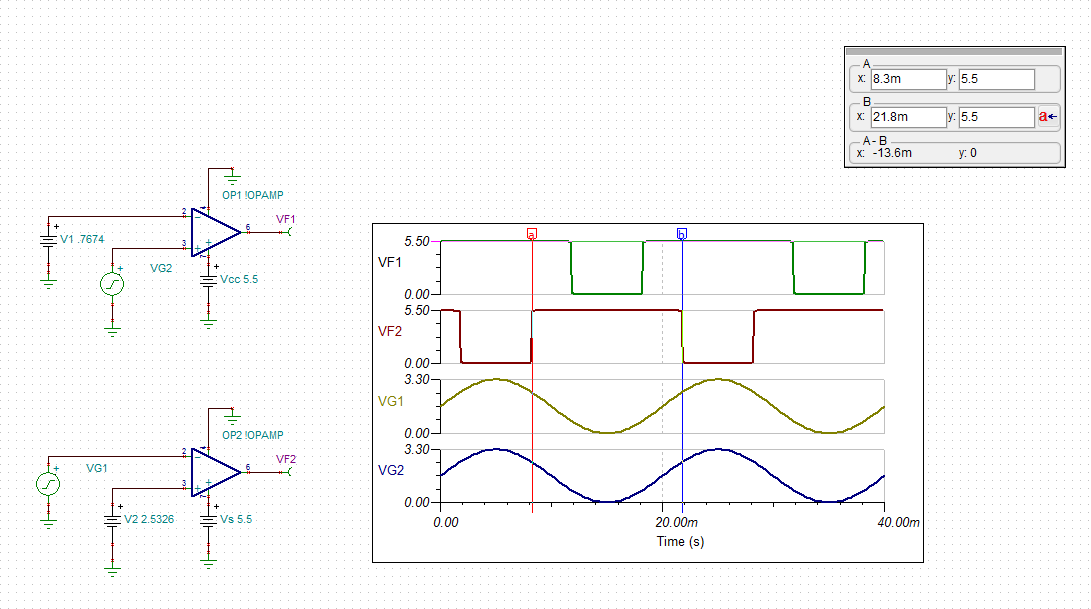
  • Following Ron's calculation, you may determine that to get 68% duty cycle on 1.65V amplitude sine wave, you must place the tripping voltage of comparator at 1.65V*cos(122.4)=0.8826V above or below center of sinusoid waveform (depending on chosen circuit polarity- see below); thus, for 0V to 3.3V peak-to-peak signal, the center is at 1.65V and the treshhold voltages must be:  1.65V+/-0.8826V = 2.5326V or 0.7674V.  Applying these voltage will give you 68% duty cycle as shown below:

     Duty cycle calculation.TSC

  • Hi Ron,

    Thank you very much.
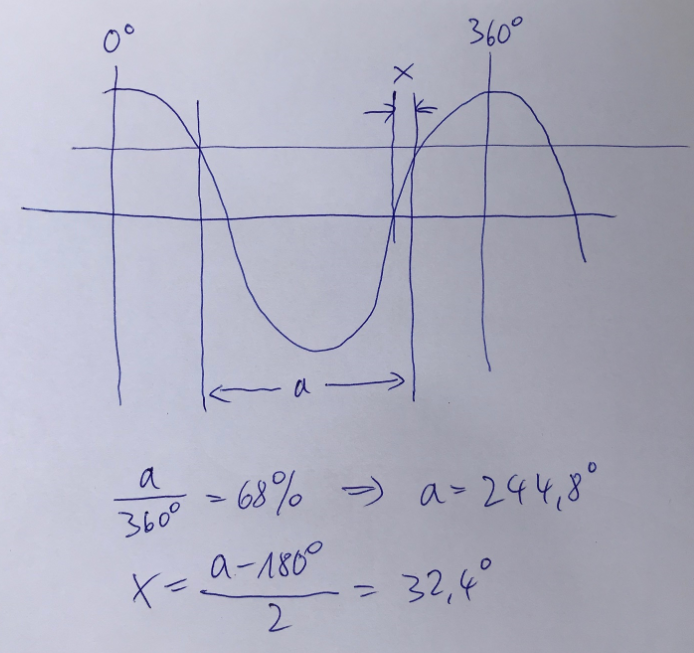
    May I know how you obtained "crossing occurs at +/-34% from 90 degrees. " ,is it 32% .If you don't mind could you please explain with a diagram,will help me to understand better.

    The way I understood your equation (A * sin ( angle ) + DC[voltage].) is given below.Please correct me if I am wrong
    A=Peak value of sine wave
    angle= Angle at transition occurs
    DC[voltage]=The offset voltage applied to sinusoidal wave here wave varies from 0 to 3.3V so here it is 1.65V.

    Regards
    Hari
  • Hi Hari,

    Kai

  • Hi Marek,

    Could you please tell me how to take the spice macro "OP2 !OPAMP" . I went to spice macros->opamps, but I was not able to see anything like OP1. I am new to TINA just started studying it. This "OP1 " is a universal opamp model available TINA TI like LtSpice.

    Regards
    Hari
  • Hi Hari,

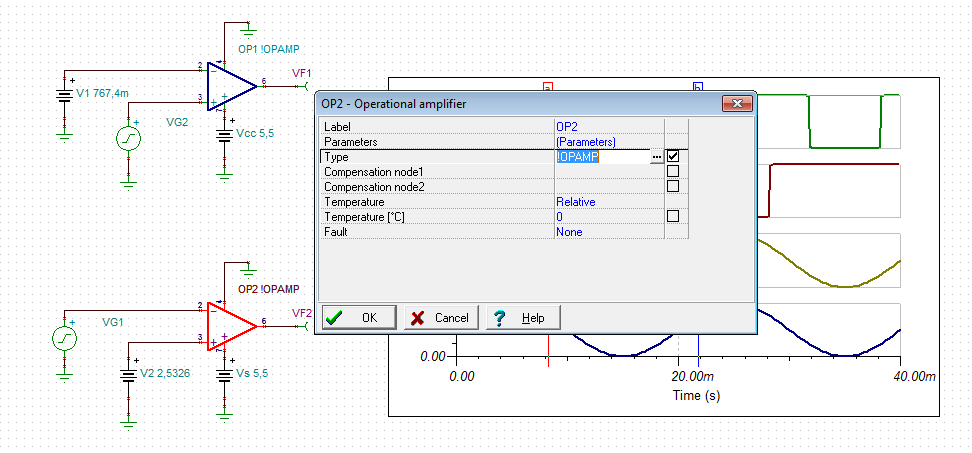
    open the TINA-TI file and double-click onto the OPamp:

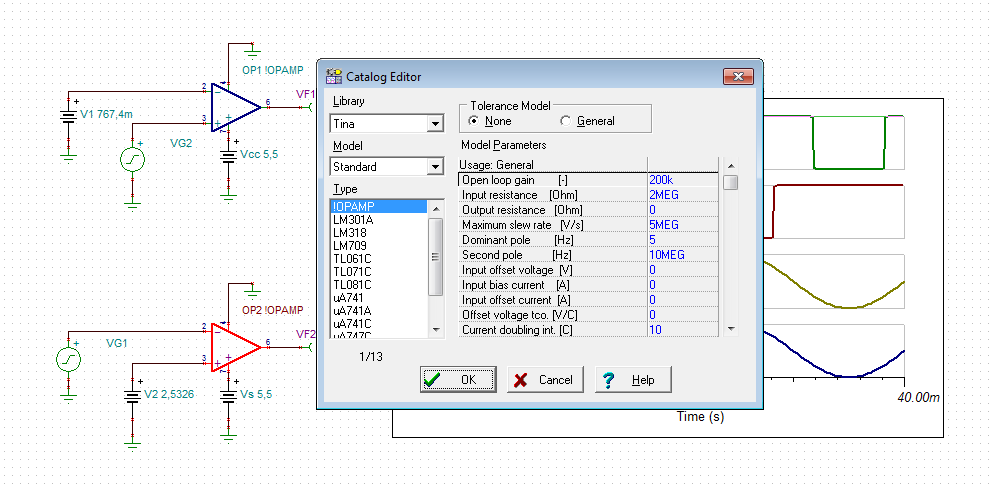
    Click on "..." and you will find the parameters of OPAmp:

    Kai

  • I have attached the schematic in my previous post with the OPA1!OPAMP.  OPA1!OPAMP generic model is under Semiconductors tab and you may freely change its parameters by clicking on the symbol - see below:

  • Hi Marek,

    Thank you very much,got it.I searched in spice macros that why i was not able to see.

    Regards
    Hari