This thread has been locked.

If you have a related question, please click the "Ask a related question" button in the top right corner. The newly created question will be automatically linked to this question.

RTOS/AM3359: CC3120 support

Part Number: AM3359
Other Parts Discussed in Thread: CC3100, CC3120, , CC3120MOD, AMIC110

Tool/software: TI-RTOS

Hello,

I have trouble how to start with the SimpleLink device only with the SYS/BIOS Kernel.

I got the TcpEcho Example of the CC3100 with the TivaC TM4C1294XL Launchpad running.

And now want to geht the same working with a custom Sitara AM3359 Board and a CC3120 Chip.

I have no Hardwaredesign problems, its all finished already.

The System there is only running the SYS/BIOS Kernel with NDK, no TIRTOS.

Are there any Drivers available or how much do I have to write them on my own?

I dont know how to start now. Maybe i have overlooked something somewhere.

Thank you,

Marvin

  • Hi Marvin,

    You need to use the SL stack and not the NDK for the CC3120. We don't have any RTOS-aware WiFi driver for the AM3359 like we have in TI-RTOS for for TivaC. You'll need to use the examples and documentation in the CC3100 SDK as a guide.

    Are you trying to run Ethernet (and NDK) at the same time?

    Todd

  • Hi Todd,

    thanks for the answer.
    The Software running on the AM3359 at the moment uses NDK and Ethernet. I can access a webserver on the device over Ethernet.
    My task is just to add the CC3120MOD device and get it working.
    The CC3120MOD is connected through SPI with the AM3359 4 Pins SPI and 1 Pin Interrupt.
    I thought for beginning i just want to configure the CC3120MOD over SPI and set up an Access Point. (Just like the TivaC Launchpad with CC3100 BoosterPack). I have worked my way through the TCP Echo Example and changed it from station to AP and got it working on the launchpad.
    I have understood how the socket is started and configured, but maybe not detailed enough.
    The next big thing after that is to make it possible to access the webserver over WiFi. I dont know if that would be even possible.
    But for now i just want to implement the simplelink device and create an AP.

    So now i try to adjust the user.h for simplelink. But i am not sure what else i have to change to get it working.
    I am not sure if i have to configure any pins for the device. SPI is initialized and should be possible to access just the read write etc. functions.

    I am a real newbie to this. I just started my internship.

    Thanks,
    Marvin
  • Hi Marvin,

    We just completed a similar project (network_terminal) which builds and runs on the AMIC110 (similar to AM335x) ICE as host to control the CC3120 BoosterPack. The connections between the AMIC110 ICE and CC3120 BP are: SPI_CLK, SPI_CS, SPI_MISO, SPI_MOSI, IRQ( via GPIO IN) and nHIB (Via GPIO OUT), 3.3V and GND.

    The files you will need to change in the host driver (in source\ti\drivers\net\wifi\porting) are cc_pal. cc_pal.h, user.h and AMIC110WIFI.h (included in AMIC110_ICE.zip) . The example project and related source files also need to change too (included in the example.zip).  Because this project depends on the Processor SDK RTOS for AM335x (for SPI, GPIO, UART drivers and SYS/BIOS), so you will need to install

    Processor SDK RTOS for AM335x release 4.3.0.5 (http://software-dl.ti.com/processor-sdk-rtos/esd/AM335X/latest/index_FDS.html),

    The SimpleLink SDK WiFi Plugin 1.55.00.42 (http://www.ti.com/tool/download/SIMPLELINK-WIFI-CC3120-SDK-PLUGIN/1.55.00.42) and

    CCS 7.x (http://processors.wiki.ti.com/index.php/Download_CCS#Code_Composer_Studio_Version_7_Downloads)

    In examples\rtos\AMIC110_ICE\demos\network_terminal\tirtos\ccs folder, there is a network_terminal_AMIC110_ICE_RTOS_ccs.projectspec. You can use CCS to import this project file directly.

    This example project will be included in the next Processor SDK RTOS for AM335x (release 5.0.0).

    If you have any questions please let us know.

    Best regards,AMIC110_ICE.zipexamples.zip

    Ming

    In examples\rtos\AMIC110_ICE\demos\network_terminal\tirtos\ccs folder, there is a network_terminal_AMIC110_ICE_RTOS_ccs.projectspec. You can use CCS to import this project file directly.

  • Hi Ming,

    i am currently trying my best to take profit out of this example. Thank you.

    I have noticed that in the Hardware design the nHib Pin is constantly pulled on High with a Pull-Up Resistor on the Board i am working on.

    I first have to modify this.

    Thank you for now

    If i need any more help i will reply here again

  • Hi,

    i am not sure what to change in the example. I am using a phyCORE AM335x R2 Board with a platform underneath.
    The CC3120MOD is connected to SPI0 with CS1. Interrupt and nHIB are on free GPIO ports.
    For the first try i just want to get the interface running and then setup an AccesPoint with sl_netcfg and sl_start and so on.

    Thanks
  • Marvin,

    Were you able to get the CC3120 to work with the AM335X board?

    Todd
  • Hi Todd,

    not yet. I have problems getting the SPI Port configured correctly. I am a bit confused with "instance" and "index" some start counting at zero some at one.

    The CC3120 is connected at

    SPI0_SCLK

    SPI0_D0

    SPI0_D1

    SPI0_CS1 (not CS0)

    nHIB (some GPIO the DeviceEnable and Disable working correctly)

    IRQ Pin

    I got it to create sl_Task and it keeps running. Then I run sl_Start but the return value is never the correct configuration (It runs in a while circle only exiting if  sl_start returns ROLE_AP). I can not see any activity on the SCLK with an Oscilloscope.

    So i think the Problem musst be the configuration of the SPI Port.

    In the Network Terminal example there is

    #define ASSERT_CS() (GPIO_write(curDeviceConfiguration->csPin, 0))

    but ASSERT_CS is never used or i havent found it. And the Question is do i configure the CS Pin as GPIO or SPI0_CS1 (pinmux mode 0 or mode 7)

    Is it important to configure the Interrupt? Because the Callback Function is just empty so nothing happens anyway.

    const WIFIAM335x_HWAttrsV1 wifiAM335xHWAttrs =
    {
       0,          /* Index of the SPI driver to use */
       2*32+12,    /* Host IRQ Pin */
       3*32+17,    /* nHIBPint */
       0*32+6,     /* Chip Select Pin */
       1024,       /* Maximum DMA size (default 1024) */
       3000000     /* Bitrate of SPI */
    };

    is this calculation correct ? If I am right its PORT_NO * 32 + PIN_Number

    Marvin

  • Hi,

    so at the moment i can see the SPI CLK and MOSI doing something. But die CS is not configured correctly. I cant find the correct position in the code to change CS0 to CS1. While not sending CS0 is still High and turns low if a message transaction starts, this should not interfere with my configuration? At CS0 there is another device not used in this application.

    Greetings
  • Hi Marvin,

    It is in the cc.pal.c:

        // Set up SPI1 channel 0
        SPI_initConfig(1, 0);

    Ming

  • HI Marvin,

    In your case, you will need to change to :

    // Set up SPI0 channel 1
    SPI_initConfig(0, 1);

    BR,

    Ming
  • Hi Marvin,

    const WIFIAM335x_HWAttrsV1 wifiAM335xHWAttrs =
    {
    1, /* Index of the SPI driver to use */
    1, /* Host IRQ Pin */
    2, /* nHIBPint */
    0, /* Chip Select Pin */
    1024, /* Maximum DMA size (default 1024) */
    3000000 /* Bitrate of SPI */
    };

    Is to tell the drivers the SPI index, GPIO indices used for interfacing with the CC3120. For example, the "1 for SPI index" means the SPI1 is used, the "1 for Host IRQ Pin" means the GPIO index 1 is used for Host IRQ Pin, and the "2 for nHIB Pin" means the nHID Pin is on GPIO index 2. To see the GPIO Indices, you will need to go to refer the following table:

    #define GPIO_USER0_LED_PIN_NUM (0x15)
    #define GPIO_USER0_LED_PORT_NUM (0x02)
    #define GPIO_USER1_LED_PIN_NUM (0x01)
    #define GPIO_USER1_LED_PORT_NUM (0x01)
    #define GPIO_USER2_LED_PIN_NUM (0x1B)
    #define GPIO_USER2_LED_PORT_NUM (0x02)

    /* GPIO Driver board specific pin configuration structure */
    GPIO_PinConfig gpioPinConfigs[] = {
    /* Output pin: Bus_switch_enable, M16, GPIO1_21 */
    GPIO_DEVICE_CONFIG((GPIO_USER0_LED_PORT_NUM + 1), GPIO_USER0_LED_PIN_NUM) |
    GPIO_CFG_OUT_STD,

    /* Input pin : IRQ pin, V7, GPIO1_1 */
    GPIO_DEVICE_CONFIG((GPIO_USER1_LED_PORT_NUM + 1), GPIO_USER1_LED_PIN_NUM) |
    GPIO_CFG_IN_INT_RISING|GPIO_CFG_IN_PD,

    /* Output pin: nHIB pin, GPIO1_27, F18, GPIO2_27 */
    GPIO_DEVICE_CONFIG((GPIO_USER2_LED_PORT_NUM + 1), GPIO_USER2_LED_PIN_NUM) |
    GPIO_CFG_OUT_STD
    };

    As you can see the Index 0 is the use to set the GPIO2_21 to high in order to enable the AMIC110 ICE board interface connector (you may not need it in your case). Index 1 configures the GPIO1_1 as input pin for Host IRQ Pin, Index2 configures GPIO2_27 as output pin for nHIB Pin. Those settings are for the AMIC110 ICE. They may not be correct for your board. You will need to adjust the above to meet your own requirement.

    The callback setting for GPIO is very important. Using the following call:
    sl_IfRegIntHdlr-->NwpRegisterInterruptHandler

    HostIrqGPIO_callback has been set as the callback function for GPIO1_1 and
    g_Host_irq_Hndlr <--_SlDrvRxIrqHandler

    When the Host IRQ Pin is triggered (when there is data ready in the CC3120 side), the g_Host_irq_Hndlr get called. It will wake up the corresponding task to handle the input/out data for SPI.

    Best regards,

    Ming
  • AMIC110ICE_CC3120BP_Connection.pdf

    Hi Marvin,

    Attached please find the connections between the AMIC110 ICE and CC3120BP.

    BR,

    Ming

  • Hi,

    the Configuration works. If i manually pull the Interrupt pin up it jumps into the interrupt.

    I now can see the CS pin is inverse.

    In the Picture you can see the SPI Interface

    D0 - SCLK

    D1 - MOSI

    D2 - MISO

    D3 - CS1

    CS0 is at the moment now always low. but the device at CS0 has an nCS pin. I think the DATA on MISO must be coming from the other Device. I now search the Location to change the CS Levels.

    Marvin

  • Hi,

    it is working for now the SPI communication works and sl_Start(0,0,0) returns "ROLE_AP" what i want to establish.
    But the Problem is I can not see the SSID with my mobile phone.
    Or maybe its another problem?

    Marvin
  • Can we mark this thread as resolved and you open a new one regarding the SSID with the mobile phone?

    Todd
  • Yes its resolved. I created a new one in the CC31xx Forum here:
    e2e.ti.com/.../698177
  • Hi Ming,

    i got the example from you and was able to get everything running thank you very much for that.
    But the function sl_Send now is a problem.
    If the packetsize is greater than 32 bytes, sl_send never returns. Packets smaller or equal 32 bytes are no problem.
    I figured out the problem is somewhere in the spi configuration. At some point the driver locks itself out.
    I think i have to make some changes to the spi config.
    Are there any other examples with AMIC110 and the simplelink CC3xxx devices?
    I will now start searching what configuration i need to change in the SPI configuration.

    Thanks
    Marvin
  • Hi Marvin,

    You can find SPi examples in Processor SDJ RTOS for AM335x:

    software-dl.ti.com/.../index_FDS.html

    You can find more C3120 examples in

    http://www.ti.com/tool/SIMPLELINK-WIFI-CC3120-SDK-PLUGIN

    Best regards,

    Ming

  • Hi Ming,

    i now have figured out that if i change the Maximum DMA size here to 32.
    const WIFIAM335x_HWAttrsV1 wifiAM335xHWAttrs =
    {
    0, /* Index of the SPI driver to use */
    76, /* Host IRQ Pin */
    3*32+17, /* nHIBPint */
    0*32+6, /* Chip Select Pin */
    32, /* Maximum DMA size (default 1024) */
    20000000 /* Bitrate of SPI */
    };
    Everything "works". At least there is no freezing of the SPI interface.
    Then the SPI Transactions are no bigger then 32 bytes and is splitted on more transactions. Like in the cc_pal.c spi_write and spi_read seen.
    But i have the Problem that the packets i receive with sl_Recv() are cut off. The Buffer and packetsize while receiving are definitly big enough. sl_Send works without problems with bigger packetsizes.


    I have looked with wireshark what my PC is sending and check the received package with system_Printf(). Its cutted of after 64 characters.
    Are there any known problems with your example?
    When will it official be released in the next sdk?
    Are there more examples with the AMIC110 and CC3120 planned or released?

    I just wanted to ask these questions because i am unsure if the problem is maybe in the terminal example because its for AMIC110 and not the AM335x Sitara directly.

    Marvin
  • Hi

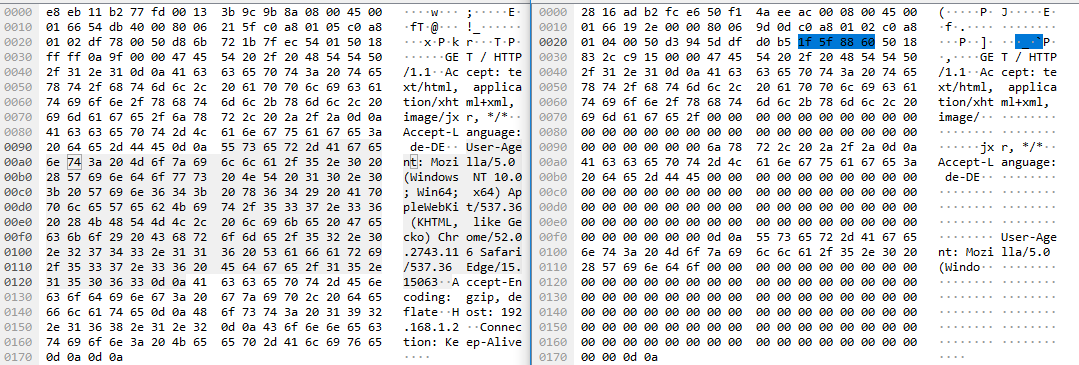
    now i have to add. I implemented the tcpechoexample again and i see many zeros between the words coming back. Left is what i send and the right side what i receive.

  • I found the problem in the cc_pal.c in the spi_read function.
    read_size += transact_details.count;
    len = len - transact_details.count;
    transact_details.rxBuf = ((unsigned char *) transact_details.rxBuf + read_size);
    The third line is just wrong. The incrementation will grow too big and we have empty characters in the buffer given to spi_read.
    rxBuf will already be incremented and we overwrite it. If we would add the read_size to the pointer given to the function it would be correct.

    In spi_write its correctly implemented
    transact_details.txBuf = ((unsigned char *) (transact_details.txBuf) + transact_details.count);

    So i had to change the third line posted above to:
    transact_details.rxBuf = ((unsigned char *) transact_details.rxBuf + transact_details.count);

    I really wonder that nobody had a problem with that before.
    I hope you get what i mean and i do not describe it weird. But i think you will see what i mean