This thread has been locked.

If you have a related question, please click the "Ask a related question" button in the top right corner. The newly created question will be automatically linked to this question.

LMK05318BEVM: LMK05318EVM software/interfacing

Part Number: LMK05318BEVM
Other Parts Discussed in Thread: LMK05318B, USB2ANY, LMK05318

Hi I have the TICs pro software installed on my laptop and the Matlab runtime v9.0 as described in the instructions. I have the unit powered up and connected to my laptop via a USB cable. Two questions 1) should this work or do I need any additional hardware like your "USBANY" interface ? It doesn't list USBANY among list of items needed so wanted clarification 2) I can't get the TICSPRO to open windows just asks me what program I want to use to open, do I need an executable or to remame the TICPRO to .exe ? Either way couldn't see this in the instructions. Thanks Steve

  • Hi I just tried renaming the TICS PRO download (which shows up as a file in windows 10) to be an executable. I then get the error message that this program won't work with Windows 10 please contact software vendor to provide the correct version. So that's what I'm doing now Best Steve

  • Hi Steve,

    Please follow these steps for TICSPRO setup and let me know if any fail for you:

    1. Download TICSPRO on ti.com.
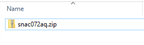
    2. Extract the contents from the downloaded snac072aq.zip.
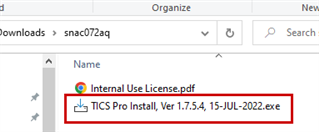
    3. The extracted contents should have a .PDF and .exe files. 
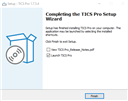
    4. Follow the installation setup from the .exe file. TICS PRO should launch at the end.
      1.   
    5. For LMK05318B TICSPRO walkthrough, please refer to the PDF attachment.
      1. 0537.LMK05318B TICS Pro GUI Overview.pdf

    Please also review the EVM quick start instructions listed in the User Guide. Key steps are summarized below:

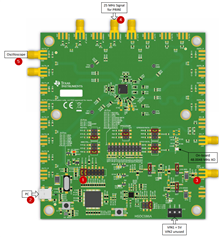
    1. Ensure all jumper settings match the picture.
    2. Connect LMK05318B to the computer through the USB cable.
    3. Apply 5 V, 1 A to VIN (J35 or U13).
    4. Apply 25 MHz input to PRIREF_P (J17)
    5. Connect OUT0 (J22) to an oscilloscope to confirm you see an output.

    Regards,

    Jennifer

  • Thanks Jennifer, solved the first part the file I'd downloaded didn't have any extension so windows treated it as a file. I added the .exe extension and was then able to unzip/install.

    Looking at the TICSPRO user guid it appears that I need the TI USBANY to establish a connection. Is this correct ? I ask because it isn't listed as a requirement in the LMK eval board set up guide hence the confusion.

    Best, Steve

  • Hi I have Ticspro installed and configured for the LMK but I cannot communicate with the evaluation board. If I connect directly via USB to board in the USB menu it gives me ticspro or evaluation board. If I select evaluation boar I cant test to see if I have a connection and if I select USBANY it gives error "no device found". If I connect a USBANY then I see no easy way to connect this to the evaluation board with the cables supplied. Can you please clarify Thanks

  • Hi Steve,

    I apologize for the delay in response—it seems my original reply never went through:

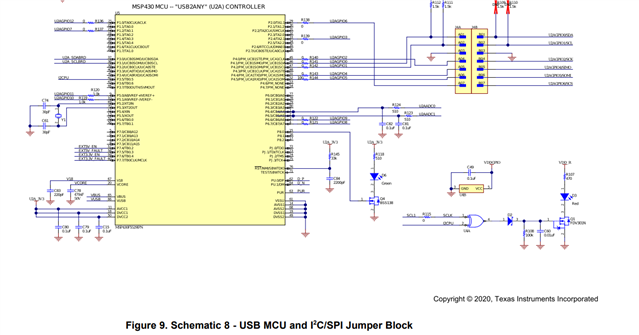
    1. With these newer board, no external USB2ANY component or software is required because the USB2ANY is included in the EVM. All that you need to do is connect the USB to the computer. See page 14 of the User Guide for the USB2ANY schematic
      1.   
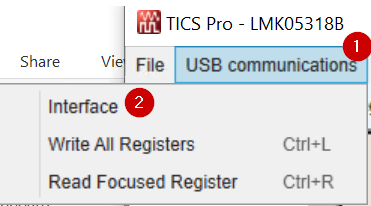
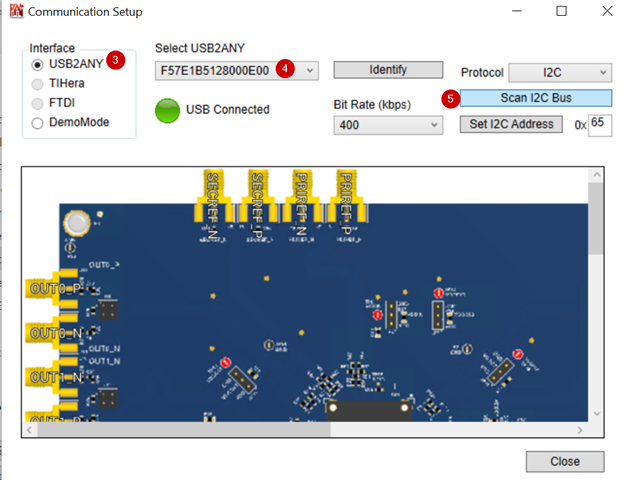
    2. Please confirm these steps and let me know which stage you get stuck:
      1. Step 1: Go to USB communications  
      2. Step 2: Go to Interface  
      3. Step 3: Select USB2ANY
      4. Step 4: Ensure the USB2ANY device (on-board the EVM) is detected. You should see a unique serial number show up.
      5. Step 5: Once a USB2ANY device is selected, scan the I2C bus.
        1. If you get "no device found" at this stage, make sure the EVM is receiving power. Probe the VDD and VDDO pins.

    Regards,

    Jennifer

  • Thanks Jennifer,

    I have connected directly as you suggest and selected USBANY. The interface shows USB connected (green), and an address is visible in the "select USBANY" window. the VDD and VDD0 are both 3.3V supply current 0.71A, also with a 25MHz input I get an output clock per manual. However IF I di IIC scan it still says "no device found" and red not connected bar below. Id the EVM bad, or am I doing something wrong ? (Module was sent to me by someone who had already used it but was supposed to work). Best Steve

  • Steve, as a sanity check, can you please make sure the device on the EVM is LMK05318B?

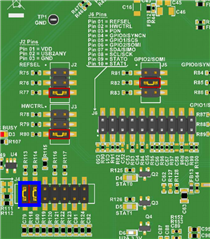
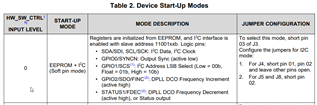
    Also, since outputs are shown the device is working. There seems to be an issue with the I2C. Please confirm the jumper settings are correct for I2C setting and HW_SW_CTRL mode:

    Regards,

    Jennifer

  • Hi Jennifer, it is the LMK05318EVM not B version. However found jumpers were in USB rather than IIC position (presumably previous user was using SPI control not TI app.). So can now change output frequency ETC. One last issue with 100MHz as primary reference I cannot get an output much above the default 165MHz. I need to evaluate at 400MHz ad 500MHz. When I try the output disappears what are the correct settings to get the cleanest output at these frequencies ?

  • Hi Jennifer, so I have the output set to APLL2 which enables me to achieve 400MHz and have turned dither mode off to get rid of the jitter. (my application requires a jitter-free clock). Final issue is that output isn't synchronized to the Pri ref. Pri ref = 100MHz 0dBm, but it appears that GUI only allows me to sync APLL1/APLL2 to crystal but not pri ref. this is evident on 500MHz scope where I can trigger on either the 100MHz incoming or the 400MHz output and see the other as a blur. Can you please tell me how to fix this ? Thanks, Steve

  • Hi Steve,

    Please provide your .tcs file and I can review it on my end.

    Regards,

    Jennifer

  • Hi Jennifer, Now locks to 100MHz 0dB signal generator input but slowly drifts approx 2.5nS every few seconds. Website won't let me attach files but below is text version:

    [SETUP]
    ADDRESS=888
    CLOCK=8
    DATA=4
    LE=2
    PART=LMK05318
    IFACE=I2C
    ADDRESS_I2C=0x64
    INTERFACE_SPEED=400

    [PINS]
    PINNAME00=REFSEL
    LOCATION00=9
    PINVALUE00=False
    PINNAME01=HW_CTRL
    LOCATION01=7
    PINVALUE01=False
    PINNAME02=PDN
    LOCATION02=3
    PINVALUE02=True
    PINNAME03=GPIO0
    LOCATION03=8
    PINVALUE03=False
    PINNAME04=GPIO1
    LOCATION04=6
    PINVALUE04=False
    PINNAME05=GPIO2
    LOCATION05=5
    PINVALUE05=False
    PINNAME06=Status0
    LOCATION06=10
    PINVALUE06=False
    PINNAME07=Status1
    LOCATION07=11
    PINVALUE07=False

    [MODES]
    NAME00=R0
    VALUE00=16
    NAME01=R1
    VALUE01=267
    NAME02=R2
    VALUE02=565
    NAME03=R3
    VALUE03=768
    NAME04=R4
    VALUE04=1024
    NAME05=R5
    VALUE05=1280
    NAME06=R6
    VALUE06=1536
    NAME07=R7
    VALUE07=1792
    NAME08=R8
    VALUE08=2050
    NAME09=R10
    VALUE09=2760
    NAME10=R11
    VALUE10=2816
    NAME11=R12
    VALUE11=3131
    NAME12=R13
    VALUE12=3336
    NAME13=R14
    VALUE13=3584
    NAME14=R15
    VALUE14=3840
    NAME15=R16
    VALUE15=4096
    NAME16=R17
    VALUE16=4381
    NAME17=R18
    VALUE17=4863
    NAME18=R19
    VALUE18=4864
    NAME19=R20
    VALUE19=5120
    NAME20=R21
    VALUE20=5376
    NAME21=R22
    VALUE21=5632
    NAME22=R23
    VALUE22=5973
    NAME23=R24
    VALUE23=6229
    NAME24=R25
    VALUE24=6400
    NAME25=R26
    VALUE25=6656
    NAME26=R27
    VALUE26=6912
    NAME27=R28
    VALUE27=7169
    NAME28=R29
    VALUE28=7441
    NAME29=R30
    VALUE29=7744
    NAME30=R32
    VALUE30=8260
    NAME31=R35
    VALUE31=8960
    NAME32=R36
    VALUE32=9219
    NAME33=R37
    VALUE33=9472
    NAME34=R38
    VALUE34=9728
    NAME35=R39
    VALUE35=9986
    NAME36=R40
    VALUE36=10240
    NAME37=R41
    VALUE37=10496
    NAME38=R42
    VALUE38=10753
    NAME39=R43
    VALUE39=11146
    NAME40=R44
    VALUE40=11265
    NAME41=R45
    VALUE41=11520
    NAME42=R46
    VALUE42=11980
    NAME43=R47
    VALUE43=12039
    NAME44=R48
    VALUE44=12368
    NAME45=R49
    VALUE45=12618
    NAME46=R50
    VALUE46=12800
    NAME47=R51
    VALUE47=13208
    NAME48=R52
    VALUE48=13336
    NAME49=R53
    VALUE49=13574
    NAME50=R54
    VALUE50=13976
    NAME51=R55
    VALUE51=14104
    NAME52=R56
    VALUE52=14342
    NAME53=R57
    VALUE53=14744
    NAME54=R58
    VALUE54=14854
    NAME55=R59
    VALUE55=15256
    NAME56=R60
    VALUE56=15366
    NAME57=R61
    VALUE57=15768
    NAME58=R62
    VALUE58=15878
    NAME59=R63
    VALUE59=16300
    NAME60=R64
    VALUE60=16384
    NAME61=R65
    VALUE61=16640
    NAME62=R66
    VALUE62=16896
    NAME63=R67
    VALUE63=17158
    NAME64=R68
    VALUE64=17416
    NAME65=R69
    VALUE65=17664
    NAME66=R70
    VALUE66=17920
    NAME67=R71
    VALUE67=18176
    NAME68=R72
    VALUE68=18495
    NAME69=R73
    VALUE69=18688
    NAME70=R74
    VALUE70=18944
    NAME71=R75
    VALUE71=19200
    NAME72=R76
    VALUE72=19456
    NAME73=R77
    VALUE73=19727
    NAME74=R78
    VALUE74=19968
    NAME75=R79
    VALUE75=20240
    NAME76=R80
    VALUE76=20608
    NAME77=R81
    VALUE77=20746
    NAME78=R82
    VALUE78=20992
    NAME79=R83
    VALUE79=21262
    NAME80=R84
    VALUE80=21520
    NAME81=R85
    VALUE81=21853
    NAME82=R86
    VALUE82=22016
    NAME83=R87
    VALUE83=22302
    NAME84=R88
    VALUE84=22660
    NAME85=R89
    VALUE85=22914
    NAME86=R90
    VALUE86=23040
    NAME87=R91
    VALUE87=23316
    NAME88=R92
    VALUE88=23552
    NAME89=R93
    VALUE89=23822
    NAME90=R94
    VALUE90=24080
    NAME91=R95
    VALUE91=24413
    NAME92=R96
    VALUE92=24576
    NAME93=R97
    VALUE93=24862
    NAME94=R98
    VALUE94=25220
    NAME95=R99
    VALUE95=25474
    NAME96=R100
    VALUE96=25640
    NAME97=R101
    VALUE97=25858
    NAME98=R102
    VALUE98=26129
    NAME99=R103
    VALUE99=26383
    NAME100=R104
    VALUE100=26648
    NAME101=R105
    VALUE101=26885
    NAME102=R106
    VALUE102=27136
    NAME103=R107
    VALUE103=27492
    NAME104=R108
    VALUE104=27648
    NAME105=R109
    VALUE105=28008
    NAME106=R110
    VALUE106=28200
    NAME107=R111
    VALUE107=28416
    NAME108=R112
    VALUE108=28689
    NAME109=R113
    VALUE109=29049
    NAME110=R114
    VALUE110=29306
    NAME111=R115
    VALUE111=29467
    NAME112=R116
    VALUE112=29697
    NAME113=R117
    VALUE113=29952
    NAME114=R118
    VALUE114=30208
    NAME115=R119
    VALUE115=30464
    NAME116=R120
    VALUE116=30720
    NAME117=R121
    VALUE117=30976
    NAME118=R122
    VALUE118=31232
    NAME119=R123
    VALUE119=31528
    NAME120=R124
    VALUE120=31753
    NAME121=R125
    VALUE121=32229
    NAME122=R126
    VALUE122=32309
    NAME123=R127
    VALUE123=32558
    NAME124=R128
    VALUE124=32768
    NAME125=R129
    VALUE125=33029
    NAME126=R130
    VALUE126=33280
    NAME127=R131
    VALUE127=33537
    NAME128=R132
    VALUE128=33793
    NAME129=R133
    VALUE129=34167
    NAME130=R134
    VALUE130=34304
    NAME131=R135
    VALUE131=34600
    NAME132=R136
    VALUE132=34897
    NAME133=R137
    VALUE133=35307
    NAME134=R138
    VALUE134=35461
    NAME135=R139
    VALUE135=35611
    NAME136=R140
    VALUE136=35842
    NAME137=R141
    VALUE137=36096
    NAME138=R142
    VALUE138=36353
    NAME139=R143
    VALUE139=36609
    NAME140=R144
    VALUE140=36983
    NAME141=R145
    VALUE141=37121
    NAME142=R146
    VALUE142=37505
    NAME143=R147
    VALUE143=37664
    NAME144=R149
    VALUE144=38157
    NAME145=R150
    VALUE145=38400
    NAME146=R151
    VALUE146=38657
    NAME147=R152
    VALUE147=38925
    NAME148=R153
    VALUE148=39209
    NAME149=R154
    VALUE149=39460
    NAME150=R155
    VALUE150=39819
    NAME151=R156
    VALUE151=39937
    NAME152=R157
    VALUE152=40192
    NAME153=R158
    VALUE153=40448
    NAME154=R159
    VALUE154=40704
    NAME155=R160
    VALUE155=40960
    NAME156=R161
    VALUE156=41216
    NAME157=R162
    VALUE157=41472
    NAME158=R164
    VALUE158=41984
    NAME159=R165
    VALUE159=42240
    NAME160=R167
    VALUE160=42753
    NAME161=R178
    VALUE161=45568
    NAME162=R180
    VALUE162=46080
    NAME163=R181
    VALUE163=46336
    NAME164=R182
    VALUE164=46592
    NAME165=R183
    VALUE165=46848
    NAME166=R184
    VALUE166=47104
    NAME167=R185
    VALUE167=47365
    NAME168=R186
    VALUE168=47617
    NAME169=R187
    VALUE169=47872
    NAME170=R188
    VALUE170=48128
    NAME171=R189
    VALUE171=48384
    NAME172=R190
    VALUE172=48641
    NAME173=R191
    VALUE173=48896
    NAME174=R192
    VALUE174=49232
    NAME175=R193
    VALUE175=49451
    NAME176=R194
    VALUE176=49707
    NAME177=R195
    VALUE177=49920
    NAME178=R196
    VALUE178=50176
    NAME179=R197
    VALUE179=50441
    NAME180=R198
    VALUE180=50688
    NAME181=R199
    VALUE181=50944
    NAME182=R200
    VALUE182=51209
    NAME183=R201
    VALUE183=51456
    NAME184=R202
    VALUE184=51712
    NAME185=R203
    VALUE185=51968
    NAME186=R204
    VALUE186=52227
    NAME187=R205
    VALUE187=52480
    NAME188=R206
    VALUE188=52736
    NAME189=R207
    VALUE189=52995
    NAME190=R208
    VALUE190=53248
    NAME191=R209
    VALUE191=53512
    NAME192=R210
    VALUE192=53760
    NAME193=R211
    VALUE193=54026
    NAME194=R212
    VALUE194=54272
    NAME195=R213
    VALUE195=54536
    NAME196=R214
    VALUE196=54784
    NAME197=R215
    VALUE197=55050
    NAME198=R216
    VALUE198=55296
    NAME199=R217
    VALUE199=55552
    NAME200=R218
    VALUE200=55811
    NAME201=R219
    VALUE201=56109
    NAME202=R220
    VALUE202=56505
    NAME203=R221
    VALUE203=56576
    NAME204=R222
    VALUE204=56838
    NAME205=R223
    VALUE205=57114
    NAME206=R224
    VALUE206=57473
    NAME207=R225
    VALUE207=57600
    NAME208=R226
    VALUE208=57859
    NAME209=R227
    VALUE209=58157
    NAME210=R228
    VALUE210=58553
    NAME211=R229
    VALUE211=58624
    NAME212=R230
    VALUE212=58886
    NAME213=R231
    VALUE213=59162
    NAME214=R232
    VALUE214=59521
    NAME215=R233
    VALUE215=59658
    NAME216=R234
    VALUE216=59914
    NAME217=R235
    VALUE217=60160
    NAME218=R236
    VALUE218=60416
    NAME219=R237
    VALUE219=60672
    NAME220=R238
    VALUE220=60928
    NAME221=R239
    VALUE221=61184
    NAME222=R240
    VALUE222=61440
    NAME223=R241
    VALUE223=61696
    NAME224=R242
    VALUE224=61952
    NAME225=R243
    VALUE225=62208
    NAME226=R244
    VALUE226=62464
    NAME227=R249
    VALUE227=63777
    NAME228=R250
    VALUE228=64000
    NAME229=R251
    VALUE229=64290
    NAME230=R252
    VALUE230=64557
    NAME231=R253
    VALUE231=64768
    NAME232=R254
    VALUE232=65024
    NAME233=R255
    VALUE233=65280
    NAME234=R256
    VALUE234=65536
    NAME235=R257
    VALUE235=65793
    NAME236=R258
    VALUE236=66048
    NAME237=R259
    VALUE237=66305
    NAME238=R260
    VALUE238=66562
    NAME239=R261
    VALUE239=66944
    NAME240=R262
    VALUE240=67072
    NAME241=R263
    VALUE241=67328
    NAME242=R264
    VALUE242=67584
    NAME243=R265
    VALUE243=67840
    NAME244=R266
    VALUE244=68296
    NAME245=R267
    VALUE245=68512
    NAME246=R268
    VALUE246=68620
    NAME247=R269
    VALUE247=68874
    NAME248=R270
    VALUE248=69122
    NAME249=R271
    VALUE249=69396
    NAME250=R272
    VALUE250=69632
    NAME251=R273
    VALUE251=69888
    NAME252=R274
    VALUE252=70144
    NAME253=R275
    VALUE253=70414
    NAME254=R276
    VALUE254=70668
    NAME255=R277
    VALUE255=70926
    NAME256=R278
    VALUE256=71177
    NAME257=R279
    VALUE257=71432
    NAME258=R280
    VALUE258=71689
    NAME259=R281
    VALUE259=71943
    NAME260=R282
    VALUE260=72205
    NAME261=R283
    VALUE261=72455
    NAME262=R284
    VALUE262=72712
    NAME263=R285
    VALUE263=72968
    NAME264=R286
    VALUE264=73218
    NAME265=R287
    VALUE265=73520
    NAME266=R288
    VALUE266=73728
    NAME267=R289
    VALUE267=74222
    NAME268=R290
    VALUE268=74242
    NAME269=R291
    VALUE269=74698
    NAME270=R292
    VALUE270=74761
    NAME271=R293
    VALUE271=75009
    NAME272=R294
    VALUE272=75264
    NAME273=R295
    VALUE273=75564
    NAME274=R296
    VALUE274=75784
    NAME275=R297
    VALUE275=76044
    NAME276=R298
    VALUE276=76296
    NAME277=R299
    VALUE277=76545
    NAME278=R300
    VALUE278=76800
    NAME279=R301
    VALUE279=77084
    NAME280=R302
    VALUE280=77344
    NAME281=R303
    VALUE281=77568
    NAME282=R304
    VALUE282=77825
    NAME283=R305
    VALUE283=78080
    NAME284=R306
    VALUE284=78336
    NAME285=R307
    VALUE285=78592
    NAME286=R308
    VALUE286=78864
    NAME287=R309
    VALUE287=79274
    NAME288=R310
    VALUE288=79530
    NAME289=R311
    VALUE289=79786
    NAME290=R312
    VALUE290=80042
    NAME291=R313
    VALUE291=80298
    NAME292=R314
    VALUE292=80639
    NAME293=R315
    VALUE293=80895
    NAME294=R316
    VALUE294=81151
    NAME295=R317
    VALUE295=81407
    NAME296=R318
    VALUE296=81663
    NAME297=R319
    VALUE297=81667
    NAME298=R320
    VALUE298=81920
    NAME299=R321
    VALUE299=82186
    NAME300=R322
    VALUE300=82432
    NAME301=R323
    VALUE301=82724
    NAME302=R324
    VALUE302=83103
    NAME303=R325
    VALUE303=83200
    NAME304=R326
    VALUE304=83456
    NAME305=R327
    VALUE305=83864
    NAME306=R328
    VALUE306=84118
    NAME307=R329
    VALUE307=84352
    NAME308=R330
    VALUE308=84480
    NAME309=R331
    VALUE309=84836
    NAME310=R332
    VALUE310=84992
    NAME311=R333
    VALUE311=85284
    NAME312=R334
    VALUE312=85663
    NAME313=R335
    VALUE313=85760
    NAME314=R336
    VALUE314=86016
    NAME315=R337
    VALUE315=86424
    NAME316=R338
    VALUE316=86678
    NAME317=R339
    VALUE317=86912
    NAME318=R340
    VALUE318=87040
    NAME319=R341
    VALUE319=87296
    NAME320=R342
    VALUE320=87552
    NAME321=R343
    VALUE321=87808
    NAME322=R344
    VALUE322=88064
    NAME323=R345
    VALUE323=88320
    NAME324=R346
    VALUE324=88576
    NAME325=R347
    VALUE325=88832
    NAME326=R348
    VALUE326=89088
    NAME327=R349
    VALUE327=89344
    NAME328=R350
    VALUE328=89600
    NAME329=R351
    VALUE329=90039
    NAME330=R352
    VALUE330=90112
    NAME331=R357
    VALUE331=91432
    NAME332=R367
    VALUE332=93952
    NAME333=R411
    VALUE333=105220

    [FLEX]
    CH0_PREDRIVER=0
    CH1_PREDRIVER=0
    CH2_PREDRIVER=0
    CH3_PREDRIVER=0
    CH4_PREDRIVER=0
    CH5_PREDRIVER=0
    CH6_PREDRIVER=0
    CH7_PREDRIVER=0
    DPLL_REF_LOOPCTL_CHG_QUANT_INTG=0
    PLL1_BAW_CAPDAC=0
    PLL1_CP_TRIM=0
    bFindAddressBtn=Find I2C Addr
    i2cAddr=0
    MATLAB_RUNTIME_DOWNLOAD_URL=www.mathworks.com/.../matlab-runtime.html
    bGotoStartupPage=Goto Start Page
    stScriptsVersion=Scripts Version = 1eddaf0447
    AbsDCO_ppb_error=0
    BAW_LOCK_PPM_THRESH=5
    BAW_UNLK_PPM_THRESH=10
    DPLL_PL_LOCK_calc=384.96 ps
    DPLL_PL_UNLK_calc=6.16 ns
    DPLL_REF_NUM_calculated=Not calculated
    OUT0_ACT_freq=400
    OUT1_ACT_freq=400
    OUT2_ACT_freq=400
    OUT3_ACT_freq=400
    OUT4_ACT_freq=400
    OUT5_ACT_freq=400
    OUT6_ACT_freq=400
    OUT7_ACT_freq=400
    PLL1_PFD_freq_units=24.002400 MHz
    VCO1_freq=2500
    VCO1_start_freq=2499875000
    VCO1_stop_freq=2500125000
    VCO2_freq=5600
    VCO2_start_freq=5500000000
    VCO2_stop_freq=6200000000
    bCALC_FREQPLAN=Calculate Frequency Plan
    bCalcDPLL_PLD=Recommended
    bDPLL_FDECR=Decrement
    bDPLL_FINCR=Increment
    bLoadCurrentVCOfreqRanges=Load current VCO freq ranges
    bRUN_SCRIPT=Run Script
    bResetNumerator0ppb=Reload Original DPLL Numerator
    bTest=Test
    bUpdateDetectorsBelow=Update Detectors Below
    bypass_run_script_warning=0
    cbDCO_MODE=2
    cb_allow_PLL2_prescaler_of_2=1
    fDPLL_Fastlock_Time=Not calculated
    hdr_act_freq=Actual Freq. (MHz)
    old_matlab=0
    sBAW_LOCK_ACCURACY_PPM=1
    sBAW_LOCK_AVG=2
    sBAW_TMEAS_LOCK_calc=19.20 ms
    sBAW_TMEAS_UNLK_calc=19.20 ms
    sBAW_UNLK_ACCURACY_PPM=1
    sBAW_UNLK_AVG=2
    sCH0_1_IN_freq=400000000
    sCH0_1_MUX=2
    sCH2_3_IN_freq=400000000
    sCH2_3_MUX=2
    sCH4_IN_freq=400000000
    sCH4_MUX=2
    sCH5_IN_freq=400000000
    sCH5_MUX=2
    sCH6_IN_freq=400000000
    sCH6_MUX=2
    sCH7_IN_freq=400000000
    sCH7_MUX=2
    sCalcFreqPlanWarning=0
    sDPLL_DCO_FREQPPB_ACT=Not calculated
    sDPLL_DCO_STEP=0.01
    sDPLL_DCO_STEP_ACT=0.166437530425
    sDPLL_HISTCNT_calc=901.12 us
    sDPLL_HISTDLY_calc=450.56 us
    sDPLL_LBW=100
    sDPLL_LBW_ACCURACY=5
    sDPLL_LBW_ACT=101.3
    sDPLL_LOCK_ACCURACY_PPM=1
    sDPLL_LOCK_AVG=10
    sDPLL_LOCK_PPM=1
    sDPLL_PEAK=0.1
    sDPLL_PEAK_ERROR=1
    sDPLL_REF_COMMON_DIV=1000000000
    sDPLL_TDC_freq=25.000000 MHz
    sDPLL_TMEAS_LOCK_calc=96.00 ms
    sDPLL_TMEAS_UNLK_calc=96.00 ms
    sDPLL_UNLK_ACCURACY_PPM=1
    sDPLL_UNLK_AVG=10
    sDPLL_UNLK_PPM=10
    sDPLL_er_fn_offset=1
    sDPLL_er_fn_value=-42.99
    sDPLL_tr_fn_offset=100
    sDPLL_tr_fn_value=-3.03
    sMAX_TDC_freq=26000000
    sMAX_TDC_simple=1
    sPRIREF_ACCURACY_PPM=5
    sPRIREF_AVG_COUNT=2
    sPRIREF_EARLY_MARGIN=0
    sPRIREF_EARLY_calc=4.80 ns
    sPRIREF_LATE=0
    sPRIREF_LATE_MARGIN=0
    sPRIREF_LATE_calc=14.40 ns
    sPRIREF_PH_VALID_calc=n/a; PRIREF > 2 kHz
    sPRIREF_PPM_INVALID=26
    sPRIREF_PPM_TIMER=8.33 ms
    sPRIREF_PPM_VALID=20
    sPRIREF_freq=8e+08
    sSECREF_ACCURACY_PPM=5
    sSECREF_AVG_COUNT=2
    sSECREF_EARLY_MARGIN=0
    sSECREF_EARLY_calc=4.80 ns
    sSECREF_LATE=0
    sSECREF_LATE_MARGIN=0
    sSECREF_LATE_calc=14.40 ns
    sSECREF_PH_VALID_calc=n/a; SECREF > 2 kHz
    sSECREF_PPM_INVALID=26
    sSECREF_PPM_TIMER=8.33 ms
    sSECREF_PPM_VALID=20
    sSECREF_freq=8e+08
    sSYNC_PHASE_OFFSET=0
    sVCO1_freq=156.25e6*16*1
    sVCO2_freq=400000000*7*2
    sXO_freq=48004800
    stDPLL_PL_LPF_COEFF=DPLL_PL_LPF_COEFF\ncan be 0
    ADDR_10=0
    ADDR_11=0
    ADDR_249=0
    ADDR_250=0
    ADDR_251=0
    ADDR_252=0
    NVM_ERASE_PROG=0
    REGCOMMIT_PG=0
    bEXPORTEEPROMFILE=Export GUI Map --> EEPROM File
    bIMPORTEEPROMFILE=(1b) Import EEPROM File --> GUI Map
    bLoadDefaultEEPROMImageToGUIMap=(1c) Load Default EEPROM Image --> GUI Map
    bLoadPage_from_GUIMap_to_GUI_Registers=Load GUI Map PAGE --> Register
    bPROGRAMEEPROM=(3) Program EEPROM <-- SRAM
    bREADBACKEEPROM=Read All EEPROM --> GUI Map
    bREADBACKROM=Read All ROM --> GUI Map
    bREADBACKSRAM=Read All SRAM --> GUI Map
    bREG2EE=(1a) Commit Registers --> SRAM PAGE/GUI Map
    bUpdate_ExtraEEPROM_Bytes=Read Extra\nEEPROM Bytes
    cbEESLAVEADR=0
    cbWrite_ADR10=0
    cbWrite_ADR11=0
    mtc_EEPROMdump=0
    mtc_USERNOTES=Enter User Notes
    tc_DESIGNNAME=Enter Design Name
    PLL1_DEN=1099511627776
    PLL1_PFD_freq=24.0024
    VCO1_freq=2500
    XO_freq=48.0048
    PLL2_DEN=16777216
    PLL2_PFD_freq=138.888888888889
    VCO1_freq=2500
    VCO2_freq=5600
    XO_freq=48.0048
    bClearAllFlagStickyStatus=Clear All Flags
    bReadStatus=Read Status
    OUT0_freq=400
    OUT1_freq=400
    OUT2_freq=400
    OUT3_freq=400
    OUT4_freq=400
    OUT5_freq=400
    OUT6_freq=400
    OUT7_freq=400
    PLL2PDIV1_freq=2800
    PLL2PDIV2_freq=2800
    VCO1_freq=2500
    VCO2_freq=5600
    sOUT7_DIV=7
    CH0_PREDRIVER=0
    CH1_PREDRIVER=0
    CH2_PREDRIVER=0
    CH3_PREDRIVER=0
    CH4_PREDRIVER=0
    CH5_PREDRIVER=0
    CH6_PREDRIVER=0
    CH7_PREDRIVER=0
    DPLL_REF_LOOPCTL_CHG_QUANT_INTG=0
    PLL1_BAW_CAPDAC=0
    PLL1_CP_TRIM=0
    bFindAddressBtn=Find I2C Addr
    i2cAddr=0

  • Hi Steve,

    Thanks for sharing your config. 

    Some comments:

    • Are you testing with 100 MHz reference input or 800 MHz input? The config states 800 MHz. Try testing with the reference frequency used in the TICS PRO setting.
    • Make sure to click on "Run script" once your config has been set. I get a different config than yours after performing a Run Script on my end.

    Regards,

    Jennifer

  • Hi Jennifer, it should have been 100MHz, not sure where 800MHz came from. Also current level is "0dBm" is this correct or too low ? I tried your file I get an error message unknown DPLL value loading original DPLL value so output frequency no longer 400MHz and not locked. Best, Steve

  • Hi Steve,

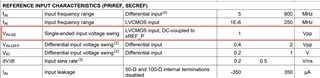
    The reference input spec must be met which is a minimum of 1 Vpp.

    Is the 0 dBm measurement at the pins or the signal generator setting? Please probe the voltage swing to confirm the level instead. I'm not sure about the actual power level at the pins considering there are losses from the wires.

    I've updated the tics profile to 100 MHz reference instead of 800 MHz. Please try again with this config which I've confirmed locks: e2e_LMK05318EVM software interfacing_sept 20 2022.tcs

    Regards,
    Jennifer

  • Hi Jennifer, I just tried your file. Still and increased signal to 1.5V pk-pk 100MHz but still not locking. When I look at the start page it does indeed say 400MHz output and 100MHz reference. However when I go to the  output tab it says the the frequency of each output is is 396.83MHz When I measure the output on my scope the period is 6.36nS which is only 157,232, 704 Hz. Can you possibly take another look at your settings file and if you have access to an eval board verify you see the same issue and hopefully come up with updates that enable this to work correctly. Thanks Steve

  • Steve,

    Please try with this config. I have tested it and achieve lock with 100 MHz input for 400 MHz outputs.

    e2e_LMK05318EVM software interfacing_REF=100 MHz, OUT=400 MHz_sept 28 2022.tcs


    Regards,

    Jennifer

  • Hi Jennifer, I just tried but still the same. it says the code was loaded etc. Output is still around 167MHz and while start page shows 100MHz input clock and 400MHz outputs if I go to the output tab it tells me the frequency is 396.83MHz not 400MHz as I would expect. I did try to read status registers but they all come back with "read error". First question is what frequency does your "output" tab show ? 400MHz or 396.83MHz ? Assuming you have both reference and output on the scope and reference is 100MHz and output is 400MHz.  I used file_>load and got "file loaded" once complete with no error messages.and am using a Rhode and Schwartz SMIQ with output set to +8dbm and get >1V pk-pk on my scope. I did try going down to +6dB m and up to +10dbm but to no avail. I do get read errors when I try to do a register read.So two things why is the Output window showing the wrong frequency (396.83MHz Vs 400MHz) if I loaded file correctly ? Also why is actual output wrong and not locked jumper settings, bad board ? Best Steve

  • Hi Jennifer, I just tried but still the same. it says the code was loaded etc. Output is still around 167MHz and while start page shows 100MHz input clock and 400MHz outputs if I go to the output tab it tells me the frequency is 396.83MHz not 400MHz as I would expect. I did try to read status registers but they all come back with "read error". First question is what frequency does your "output" tab show ? 400MHz or 396.83MHz ? Assuming you have both reference and output on the scope and reference is 100MHz and output is 400MHz.  I used file_>load and got "file loaded" once complete with no error messages.and am using a Rhode and Schwartz SMIQ with output set to +8dbm and get >1V pk-pk on my scope. I did try going down to +6dB m and up to +10dbm but to no avail. I do get read errors when I try to do a register read.So two things why is the Output window showing the wrong frequency (396.83MHz Vs 400MHz) if I loaded file correctly ? Also why is actual output wrong and not locked jumper settings, bad board ? Best Steve

  • Hi Jennifer, So I've purchased a brand new evaluation board from Digikey, set the jumpers exactly how the TI eval board manual says and I loaded your code. First the GUI still says 396.83MHz on the output tab (as opposed to 400MHz). However although I can connect with the board via your software there is no output either on output 0 or output 7. This is a brand new board the previous one was much larger and had all of the SMA connectors loaded). The other big difference is supply current, the older board draws about 700mA from my 5V supply, where the new board is closer to 200mA. Can you please help ? I've spent a lot of time on this and am doing the same thing with both boards and getting very different results plus neither work. Thanks

  • Turns out the earlier board wasn't a B version - just a straight EVM, the new board is definitely a B version. Steve

  • Closing this thread as we have taken this offline.