This thread has been locked.

If you have a related question, please click the "Ask a related question" button in the top right corner. The newly created question will be automatically linked to this question.

LMK03318EVM: How to generate the clocks using my configuration.

Part Number: LMK03318EVM
Other Parts Discussed in Thread: LMK03318

Hi,

I first run the LMK03318EVM and can see some clock outputs. Then i tried to download my configuration into the EEPROM. I may made some mistake. now the board cannot output any signals. i tried to use "default configuration" button and download it into EEPROM to recover the board. but it didn't work. i still cannot see any signals now. i fixed the reference input to the XTAL, and select the RSEL pin to low. it didn't work.

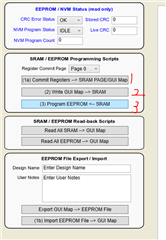
i followed the guide to download the GUI map to the EEPROM. I repeated the commit step for all six pages. Did i use wrong way?
lmk03318.tcs

Regards,

Shu

  • Shu,

    Set the EVM back up exactly the way that it was when you first used it (use the EVM User's Guide as a reference for all of the default jumper states). Once this is complete, power cycle, and reload the default configuration.

    Once the board is in a working state, commit the registers to the GUI map for the EEPROM pages that you are using (so, if using page 0 only, leave the "Page 0" dropdown as is, otherwise change this and press the button for the pages used).

    Then, click the (2) button to write the GUI map to the device SRAM, then the (3) button to program the SRAM contents into the EEPROM of the device.

    Following the above steps gets you back to the default state.

    Now, write your device configuration to the device. If it does not work, do NOT write it to EEPROM, and debug your configuration using the STATUS LEDs and register contents.

    If the configuration is good, then follow the above steps, starting with the GUI map commit (1), in order to program the device EEPROM.

    Thanks,
    Kadeem

  • Hi Kadeem,

    My configuration can be wrote to EEPROM now. I did the same steps as before, and it worked. Cann't explain it.

    Any way, Thanks for the help.

    Regards,

    Shu