This thread has been locked.

If you have a related question, please click the "Ask a related question" button in the top right corner. The newly created question will be automatically linked to this question.

LMK5B33216EVM: The LMK5B33216 chip does not respond to the programmer input

Part Number: LMK5B33216EVM
Other Parts Discussed in Thread: LMK5B33216, USB2ANY

Hello,

We are using the evm to generate a 60 Hz clock signal. Although the module has always worked well, in the last few days we are no longer able to program it. We can reach the board from the PC (the USB led blinks after click Identify on the TICS Pro GUI) but the LMK5B33216 chip seems to not respond to the pogramming input as it does not give any ouput signal from any of the SMA ports. Trying with I2C interface or SPI one does not change anything. Another strange behavior is that pushing the PDN pin does not change the device current consumption.

Could you suggest anything to solve the problem? Thank you in advance.

Ennio


  • Hi Ennio, 

    Is the "PD#" pin enabled under the "User Controls" page on TICS Pro? If not, the PDN pin will be pulled down and the device won't be active. 

    Assuming that's not the issue, can you provide the following:

    1. Picture of board setup/jumper configurations

    2. Device current consumption 

    3. Console log or screenshot from TICS Pro when you scan I2C bus and try programming the device 

    Regards, 

    Connor 

  • Hi Connor,

    Thank you for the reply.

    The PD# is enabled under User Controls and its test point reading is 2.70V.

    1. Picture of the board:

    2. The current consumption is 50 mA and it doesn't change when #PDN is tied low:

    3. Screenshot from TICS Pro:

  • Hi Ennio, 

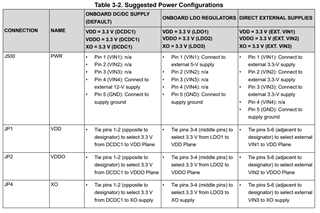
    Just to confirm, are the VDD test points close to the device measuring ~3.3V? The current consumption of 50 mA at 12V seems low. It may also be worth trying a different power supply config, such as supplying 5V to VIN1 and configuring the jumpers to use the LDO, or directly supplying 3.3V with an external supply. I can also compare your setup to a working EVM in the lab early next week. 

    Regards, 

    Connor 

  • Hi Connor,

    We have tried all of the three power supply configurations, unfortunately with the same results. The VDD test points measure 3.27V. Scanning I2C bus from TICS Pro returns no device found.

    Regards,

    Ennio

  • Hi Ennio,

    The current is very low so TICS Pro could not recognize the device when scanning bus.

    When you probed 3.27 V at VDD, what was the power setup you used? If you used onboard LDO method, please set the current limit at 2A on your power supply.

    -Riley

  • Hi Riley,

    I was using the onboard LDO regulators when probed the 3.27 V at VDD. We think this is not a problem of power supply configuration, changing it does not impact significantly on the power consumption of the board. With the 2A current limit, the current level read on the power supply does not change.

    Thanks,

    Ennio

  • Hi Ennio,

    I assume you connect to the correct serial # of the USB: "D7D7...500". VDD is reading at 3.27 V. What about VDDO reading?

    Does your board has J42 on the bottom of the EVM? If yes, can you try an external USB2ANY adapter connect to J42 and scan the bus again?

             EVM -> external USB2ANY adapter -> USB -> PC

    When you press "Identify" button, do you see USB LED on the EVM flashing?

    -Riley

  • Hi Riley,

    We have tried with an external microcontroller but the chip cannot be reached, both on SPI and I2C interface.

    Ennio

  • Hi Ennio,

    Did you try toggling the PDN physical pin on EVM? (please don't use TICS Pro PD# as the device is not connecting to TICS Pro).

    -Riley

  • Can you also try holding PDN physical pin low, probe VDDO and VDD, then release PDN pin after:

    - VDDO ramps up above 3.135 V, and

    - VDD ramps up above 2.72 V

    Let me know if you see the current draws up.

    -Riley