This thread has been locked.

If you have a related question, please click the "Ask a related question" button in the top right corner. The newly created question will be automatically linked to this question.

LMK04208: Wrong configuration when importing register HEX values

Part Number: LMK04208
Other Parts Discussed in Thread: LMX2594, CODELOADER

Hello,

I am currently using TICS Pro v1.7.6.2 to configure the LMK04208 part. The application performs exceptionally well in generating the required output clock frequency.

However, I am facing a challenge when attempting to import Hex register values. The application seems to generate random values, resulting in incorrect configurations. Interestingly, when loading the TCS file, everything works flawlessly.

My objective is to inspect existing register values, make modifications, and apply them to the configuration. Unfortunately, the current bug hinders this process, making it impossible to achieve the desired outcome.

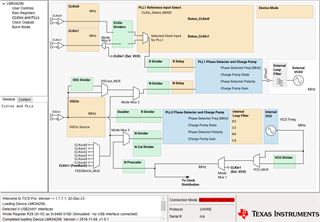
Here is the output of the TICS Pro when I import the register values:

CLKout4 must be 110 MHz but instead, it is a random value. Attached are the Register Hex Values to replicate the issue on your side.

R0 (INIT)	0x00160040
R0	0x00143400
R1	0x00143401
R2	0x00140342
R3	0x80140343
R4	0x00140344
R5	0x80141BE5
R6	0x01100006
R7	0x01100007
R8	0x06010008
R9	0x55555549
R10	0x9102410A
R11	0x0401900B
R12	0x1B8C006C
R13	0x2302886D
R14	0x0200000E
R15	0x8000800F
R16	0xC1550410
R24	0x00000058
R25	0x02C9C419
R26	0x8FA8001A
R27	0x10001E1B
R28	0x6001201C
R29	0x0188BA7D
R30	0x0208BA7E
R31	0x003F001F

Could you kindly guide me in resolving this issue? I have attempted to upgrade to the latest TICS Pro version (v1.7.7.1), but the GUI does not function correctly.

Regards,

  • Hany, 

    I will look into this and get back to you by the end of the week.  

    Regards,

    Will

  • Thanks, .FYI the issue also persists with the LMX2594 part.
    The import Hex register seems to be a generic bug in the software as it has not worked for two parts.

  • Hany, 

    Sorry for the delay and thank you for the information.  I will consult with our Software team and get back to you early next week.

    Regards,
    Will

  • Hany,

    I have been unable to reproduce the bug on my end.  Can you please send me the working ticspro config file so I can look at that as well?

    I have attempted to upgrade to the latest TICS Pro version (v1.7.7.1), but the GUI does not function correctly

    What part of the GUI does not function correctly?

    Regards,

    Will

  • Hey
    Thanks for your reply. Do you mean that you can get the correct clock frequency in the LMK part when you load the Hex register file?
    Here is what TICS Pro looks like when I load the TICS Pro config files:

    All the outputs and configurations are correct. For example, ClkOut4 is 110 MHz and the external VCXO is 122.88 MHz.

    Now, when the we import the HexRegisterValues corresponding to the previous configuration, I get the following:

    You can see the configurations are already wrong and not identical to the previous screenshots. To replicate this behavior, you need to reset the LMK to the default configuration, otherwise, TICS Pro won't update the current GUI with the Hex Register Values. Here are the configuration files for your reference. Again, I am using TICS Pro v1.7.6.2.

    R0 (INIT)	0x00160040
    R0	0x00143400
    R1	0x00143401
    R2	0x00140342
    R3	0x80140343
    R4	0x00140344
    R5	0x001411E5
    R6	0x01100006
    R7	0x01100007
    R8	0x06010008
    R9	0x55555549
    R10	0x9102410A
    R11	0x0401900B
    R12	0x1B8C006C
    R13	0x2302824D
    R14	0x0200000E
    R15	0x8000800F
    R16	0xC1550410
    R24	0x00000058
    R25	0x02C9C419
    R26	0x8FA8001A
    R27	0x10001F5B
    R28	0x6000601C
    R29	0x0188BA7D
    R30	0x0208BA7E
    R31	0x003F001F
    
    LMK_IM_clkin1_40MHz_clkout5_20MHz.tcs

    Regarding the second question, here is what the GUI looks like on my PC. FYI, we have already tried it on 3 different machines and all are the same. We are using Windows 10. As you can see, I cannot enter any value and also I do not see what are the current values.

    Let me know if you need additional information.

    Regards,
    Hany

  • Hany,

    Thank you for the information.  I will do more research and get back to you tomorrow.

    Will

  • Hany,

    It seems that this is a known bug and that our software team is working to fix this problem in a future software release this year, thank you for reporting the problem.  It doesn't seem like there is a straightforward fix at the moment, but I can let you know when the problem is fixed.  let me know if you have any further questions.

    Regards,

    Will


  • Could you please specify which bug you are referring to in your answer? I have reported the following 3 bugs in this thread:

    1. Wrong configurations when importing LMK04208 HEx Registers Values in TICS Pro v1.7.6.2.
    2. Wrong configurations when importing LMX2594 Ex Registers Values in TICS Pro v1.7.6.2.
    3. V1.7.7.1 GUI does not work.

    Also, could you please give a rough estimate of when to expect a software release with all the bugs mentioned above being solved? We are using Xilinx/AMD RFSoC and doing multiple experiments that involve manipulating both LMK and LMX parts.

    Thanks.

  • Hany,

    The Hex Register import bug is known and I do not have a timeline on when it will be fixed.  

    The 1.7.7.1 GUI not working is not a known bug and I have reported it to the software team.  

    For the time being we recommend saving everything as a .tcs file.  

    Regards,
    Will

  • Hany, I work on software development for TICS Pro. I want to give you some more detailed updates.

    1. Regarding wrong configurations when importing LMK04208 hex register values - LMK04208 profile was built during a transition period from legacy software (CodeLoader) to new software (TICS Pro). To facilitate the transition, TICS Pro includes a partial reconstruction of the built-in PLL calculation logic for CodeLoader; however, sometimes the legacy CodeLoader logic and the newer TICS Pro logic are at odds, and this is one such case. Long-term there's a push to fully deprecate the CodeLoader logic and migrate all devices onto the newer TICS Pro logic, which will eventually resolve issues with the frequencies being recalculated on some devices. Fully migrating the LMK04208 profile will take time, and I'm not sure if it's something we'll get to any time soon... but for what it's worth, the groundwork for the migration is being implemented later this month.

      For now I can recommend two options:
      1. In the Options menu, you can click "AutoUpdate" to disabled before register import. This will import the register values, but no side effects should occur. Re-enable "AutoUpdate" after the import is complete.
      2. As an alternative that doesn't involve adjusting the "AutoUpdate" option, just re-enter the correct frequencies in CLKin0 and CLKin1 after hex register import, and it should not affect register programming. In fact the GUI suggests this whenever registers are imported:
      3. As Will suggested, TCS file should work as well, since it preserves all frequencies.
    2. LMX2594 is in the same situation, and some of the same solutions should work:
      1. Disabling "AutoUpdate" in the Options menu should allow hex register imports without modifying frequencies. Re-enable "AutoUpdate" after the import is complete.
      2. The issues with LMX2594 mean that re-entering correct frequencies isn't always an option, as some registers are modified. This issue is also observed with TCS files. I've found that with TCS files, I can load the TCS file twice and it correctly sets the registers.
    3. I determined the issue with v1.7.7.1 is incorrect locale-based parsing of values used to determine the positions and sizing of the controls on the page. I can reliably reproduce the issue if I set the Windows number format to use commas as decimal separators. I had thought we tracked down and resolved all of these issues a long time ago, but it appears that in a recent change with v1.7.7.x and unicode handling, we overlooked some locale inheritance in text parsing. I've determined a solution that resolves the issue, and I have implemented and tested the solution internally. I'll roll out the fix in v1.7.7.2 next week.

      For now, if you urgently need to get things done on v1.7.7.1, a temporary workaround could be to set the Windows number formatting options to use period instead of comma for decimal separator.

    Regards,

    Derek Payne

  • Hany, I just pushed v1.7.7.2 to the web which should resolve the issue you encountered where controls were off the page. It should be available for download within the next hour.

  • Thanks a lot for your support! I can confirm that the GUI problem with the latest SW v.1.7.7.2 has been resolved. Your temporary suggestion to change the decimal symbol also worked on v1.7.7.1.

    Regards,
    Hany