This thread has been locked.

If you have a related question, please click the "Ask a related question" button in the top right corner. The newly created question will be automatically linked to this question.

LMK04616EVM: Write Register with TICS Pro v1.7.10.1 not working

Part Number: LMK04616EVM
Other Parts Discussed in Thread: USB2ANY, LMK04616

I can change Output settings for Divider 0&1 on the Outputs page between values of 1 and 2 successfully. Each time it says it's writing the expected value to R68.  But when I try to do the same thing from the Raw Registers page, it doesn't work.  If the value is 0x004401 and I attempt to change it to 0x004402 it displays in red and when I click on "Write Register" it writes 0x00 4401.  This seems to be the case for every register.  Connecting the same cable to another computer using TICSPro v1.7.7.2 and it works as expected; we can change the value from the Raw Registers page as expected.

Ultimately I was trying to do this from Python using the Python interface, and when I was having issues I tried from the GUI.  Same problem.  Is this a known issue?  Or could I have something configured incorrectly?Screenshot4TI.png
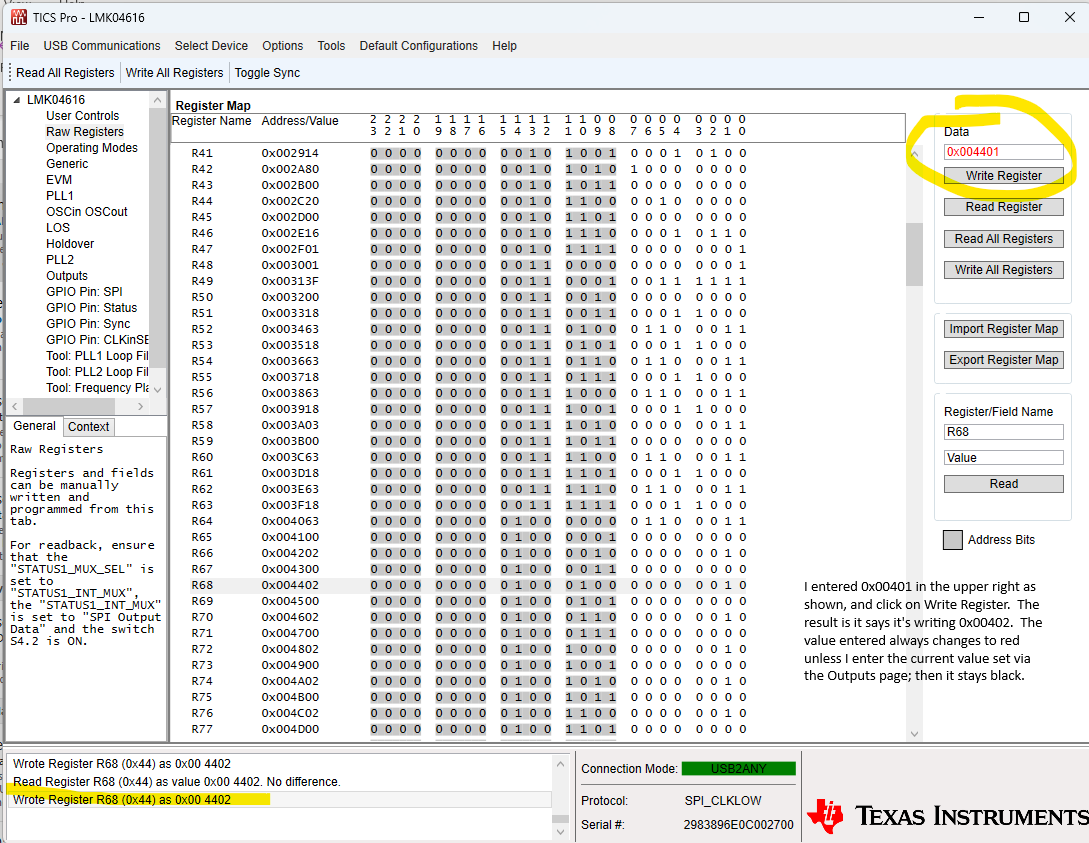
  • Further experimentation shows I can change the address portion of the register!  That is, for R2, if the current value is 0x00 0200 I can change it to 0x00 0300! Something is very broken. I should not be able to change the register's address, right?

  • Hi Serge,

    Right, the newer version TICS Pro has this issue. In the older version, we can change the data field value but not the address. 

    A workaround, instead of writing to the Data box, we can change the bit value directly. 

    Click on the bit that we want to change, type the value.

  • Okay... I'll try that. Then how best to accomplish this through the Python interface, which is what I really need to do.  Thanks!

  • What I'm really trying to do is establish connectivity to the board using TI's Python interface (ticspro.py). One way to do that, I thought, is to see if I can change the value of a register, write the register, and read it back, to ensure it changed.  If there is a way to do that (from Python in this latest version)?  Is there something else I can do to ensure I have hardware connectivity?

    I just verified I can use GetAllUSB2ANY() to verify the cable is connected to the USB2ANY, but that still is connected even if the board is not powered.  So I really need something that shows the board itself is communicating.

  • Hi Serge,

    We don't have support on software development. Since you have installed TICS Pro, you should be able to find the scripts that we built for the GUI. 

    C:\ProgramData\Texas Instruments\TICS Pro\Configurations\Devices\Clock Generator-Jitter Cleaner (Dual Loop)\LMK0461x\LMK04616

    Hope these files help.