This thread has been locked.

If you have a related question, please click the "Ask a related question" button in the top right corner. The newly created question will be automatically linked to this question.

LMX2572: Pin-triggered automatic ramping configuration

Part Number: LMX2572

Request: We are evaluating the LMX2572 for an application requiring externally triggered frequency ramps.

Desired behavior: Device idle at start frequency (no ramping). Rising edge on RampClk pin triggers one complete frequency ramp. After ramp completes, frequency resets to start and waits for next RampClk rising edge

Questions: Is this behavior achievable with the LMX2572? If so, what is the recommended configuration?

  • Hi There,

    This is doable. For example:

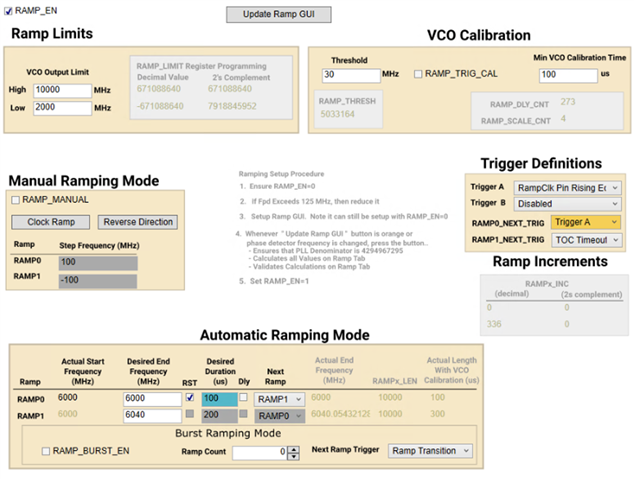
    After checking the RAMP_EN bit, the ramp will start ramping from 6GHz to 6GHz for 100µs, then it will wait for the trigger signal. The edge at the RampClk pin triggers the ramping from 6GHz to 6.04GHz, and then the device will ramp back to 6GHz automatically, and wait for the next trigger signal.

  • Hi Noel,

    Thank you for your response and the example configuration.
    We have a few follow-up questions regarding your setup:

    1. Which version of TICS Pro did you use for this test?
    2. Which hardware/platform did you use to verify this behavior (EVM, custom board, etc.)?

    We have configured our LMX2572EVM using TICS Pro v1.7.10.0 according to your recommendation (see screenshots above). However, when toggling the RampClk pin, no ramping behavior is observed.
    The device remains at the start frequency and does not respond to the trigger as expected. We are verifying this behavior by probing the VTune pin with an oscilloscope.
    Could you please advise if there are any additional settings, firmware requirements, or known issues with this TICS Pro version that we should be aware of?

    Thank you for your support

  • Hi There,

    I used TICS Pro v1.7.10.2 (internal version) and EVM. 

    You can probe the RampCLK test point on the EVM to verify the trigger signal. Check the RampCLK box will bring the test point HIGH.

    In this example, the VCO frequency change is 40MHz, I set the Threshold to 50MHz to avoid VCO calibration.

    Test procedure:

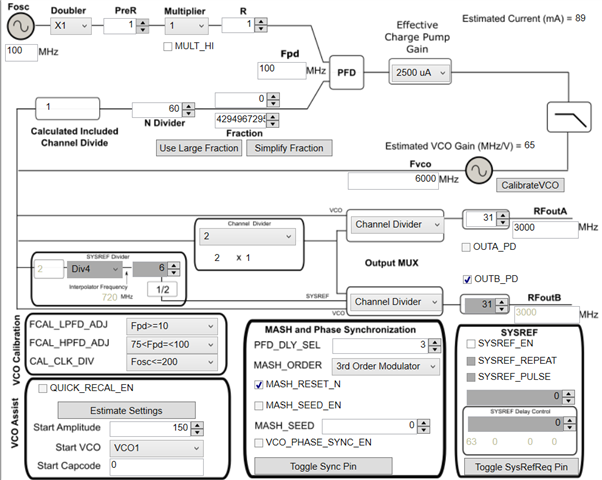
    Program the device to lock to 6GHz without enabling ramp (RAMP_EN = 0).

    Then write RAMP_EN = 1 to start ramping.

    Here is the PLL configuration.

  • Hi Noel,

    Thank you — the configuration is working correctly now.

    I have one more question:

    Is it possible to generate a triangular ramp (up and then down) using the RampClk trigger, instead of only a sawtooth ramp?

    If yes, could you please advise how to configure this?

    Thank you

  • Hi There,

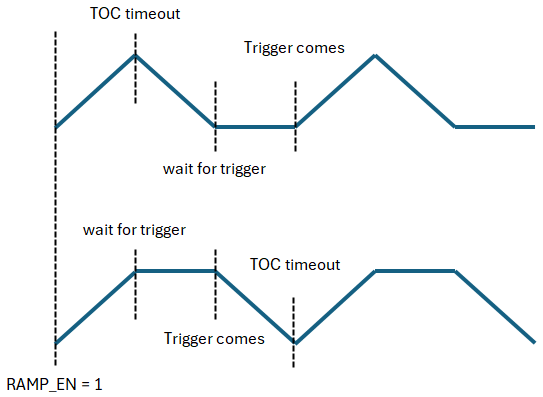
    because the trigger signal is not synchronous with the ramp timing, you will get below waveform. is this something you are trying to implement?

  • Thank you, this is exactly what we are looking for. Could you please provide a TICS Pro configuration example for generating this triangular ramp waveform with external trigger?

  • Hi There,

    Here is the configuration, because we cannot use TOC counter, we need to use the High/Low Limits to cap the frequencies. 

    Pink trace is Vtune, Green trace is the trigger signal.