This thread has been locked.

If you have a related question, please click the "Ask a related question" button in the top right corner. The newly created question will be automatically linked to this question.

CDCE6214-Q1: CDCE6214-Q1 EEPROM Programming with Serial Interface Mode, Default Settings Persist after Register Commit method is followed

Part Number: CDCE6214-Q1
Other Parts Discussed in Thread: USB2ANY,

Hello,

I am trying to program the CDCE6214-Q1 EEPROM using TICSPRO GUI and USB2ANY, with my application specific settings of CDCE6214-Q1 while in Serial Interface Mode. I am using a .tcs file with the mentioned settings, and load this prior to any EEPROM write attempt. However, when I follow steps 1-8 in CDCE6214-Q1 datasheet section 10.5.2.3.1, using Register Commit Flow method and confirming register write/read statuses in the prompt with each step, the read back register values after completing all steps are the default values still, and not my settings/values.

I have also considered that the steps include the hex values, and the values to be written in the GUI are in decimal, and that the some steps are most easily and confidently done in the 'User Control' page and the EEPROM reg commit operation is done on the 'EEPROM' page. I have also tried the steps using the 'User Control' page with no success.

Schematically, REF_SEL is grounded through 4.7 k ohm, and HW_SW_CTRL is pulled high to 1.8V (VDD for CDC is 1.8V) through 4.7k ohm res. The CDCE6214-Q1 is at 0x68.

What might I be missing here?

  • Hi Luis,

    Please check two things:

    1. The device has to be power cycled, or PDN pin needs to be toggled, before the new EEPROM is loaded.

    2. Make sure that you wrote the EEPROM into page 1, not page 0, because by pulling HW_SW_CTRL high, you're reading the page 1 EEPROM.

    Regards,
    Hao

  • Hello Hao,

    Thank you for your support on this. I have tried doing both power cycle, and writing to Page 1. The default values are still being read out, not my desired settings.

  • Hi Luis,

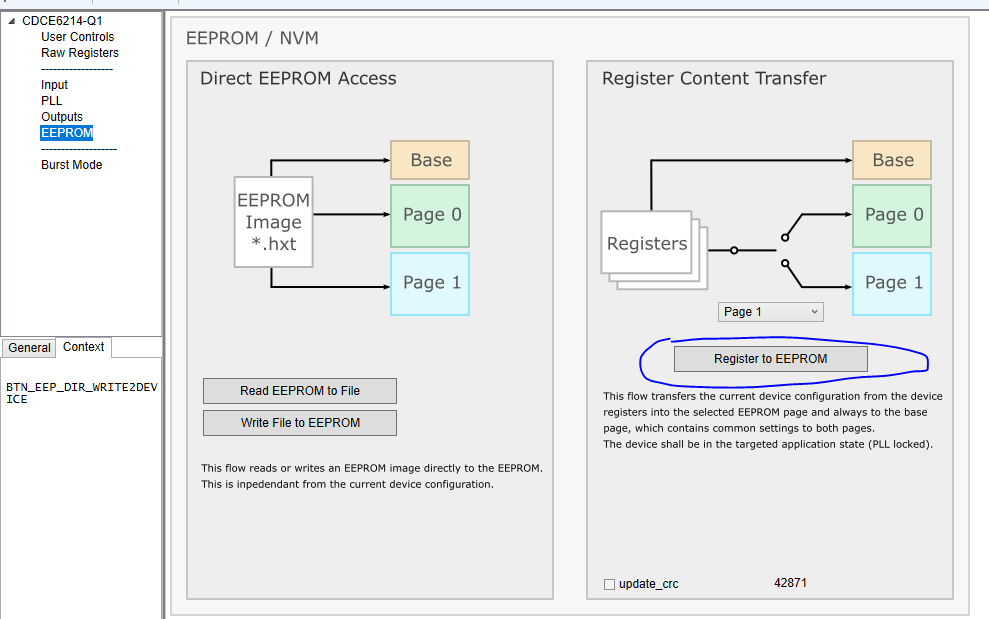
    I missed how you followed the datasheet procedures. Actually, can you start with using the EEPROM tab in Ticspro? Just click this button and EEPROM will be written.

    Regards,
    Hao

  • Hi Hao,

    I did: power up board, open TI CS Pro, power cycle device, read all registers, load .tcs file, Register to EEPROM Page 1 commit. The result was the same.

    I have also tried: power up board open TI CS pro, power cycle device, load .tcs file (which Writes to registers), a second write to all registers, Register to EEPROM page 1, and finally Read All Registers, as another sanity check. Same result again, default values were read out.

    I also tried without power cycle, just load .tcs file and Register to EEPROM page 1 with same result.

  • Hi Luis,

    Can you do the following:

    1. Power up the board, open Ticspro, go to EEPROM page, click Read EEPROM to File and save the file. This is the default (or last time's) EEPROM image.

    2. Write your own register values, then click "register to EEPROM". This writes the register content to EEPROM.

    3. Power cycle the board.

    4. Click Read EEPROM to File again and this is the new EEPROM image.

    5. Compare the two EEPROM images. If they're the same, change some registers (must not be read-only) and repeat the procedures for sanity check.

    Regards,
    Hao

  • Hi Hao,

    Yes, this works. Looks like the tcs profile I was trying was not sticking for one reason or another. I then tried a different tcs profile and this worked as well.

    Greatly appreciate the fast responses here.